
This page is not an official page of the app or its developer, but an independent editorial publication created for informational and commentary purposes. Unless expressly stated otherwise, neither the app nor its developer is affiliated with, endorsed by, sponsored by, authorized by, or otherwise officially connected with MWM, Apple, Google Play, the app publisher, or the app's developer, and nothing on this page implies that the app was developed using MWM's services. Any trademarks, logos, screenshots, and other content remain the property of their respective owners.

Speedometer Simple
Dashboards often obscure vital data. This application grants users unfiltered access to their travel metrics, empowering them to precisely understand every journey.
Downloads
12.5M+User Rating
Total Ratings
151.0KPublisher
Category
NavigationLocales
17Latest Version
2026.2.2Size
49.7 MBFirst Released
Nov 18, 2014Speedometer Simple: Core Features Analysis
An evaluation of key functionalities designed for practical, convenience-seeking users.
Accurate GPS Speed
The app provides highly accurate speed readings by leveraging the phone's GPS, essential for reliable tracking across various modes of transport.
High Visibility Display
This tool features large, easy-to-read fonts, ensuring vital speed information is immediately visible at a glance, enhancing safety and convenience for drivers and other users.
Customizable Speed Units
It allows users to view their speed in preferred units (miles per hour, kilometers per hour, or knots), catering to diverse regional and specialized needs (e.g., boating).
Comprehensive Trip Statistics
The app provides comprehensive trip recording capabilities, allowing users to track total distance, maximum speed, and average speed for post-trip analysis and record-keeping.
Navigation & Location Aids
It allows users to optionally display a compass for directional orientation and the current city name, adding supplementary navigation and location context.
Personalized Interface Colors
Users can personalize the app's interface by choosing from a variety of pre-selected colors, enhancing visual comfort and personal preference.
Frequently Asked Questions
Everything you need to know about Speedometer Simple
What is Speedometer Simple?
Speedometer Simple is an easy-to-use application that accurately determines and displays your speed using your phone's GPS.
What speed units does Speedometer Simple support?
Speedometer Simple supports mph, km/h, and knots for speed display. Users can choose their preferred unit.
Can I customize the display in Speedometer Simple?
Yes, Speedometer Simple offers display customization. It can optionally show the city name and a compass. Interface color is also customizable.
Does Speedometer Simple record trip data?
Yes, Speedometer Simple records speed during trips. It provides post-trip statistics such as maximum speed, average speed, and traveled distance.
How accurate is Speedometer Simple?
Speedometer Simple determines your speed accurately by utilizing your phone's GPS. This ensures reliable speed measurements.
Does Speedometer Simple have a HUD display mode?
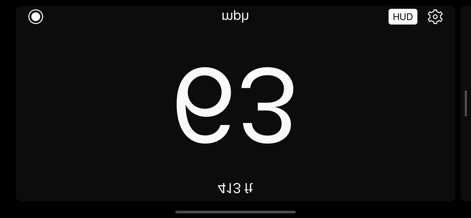
Yes, Speedometer Simple includes a Head-Up Display (HUD) mode. This feature mirrors the speed display for projection onto a windshield.
Where can I find the privacy policy for Speedometer Simple?
The privacy policy for Speedometer Simple is available at https://bit.ly/speedometer_privacy. This link is provided in the app description.
Where are the Terms of Service for Speedometer Simple?
The Terms of Service for Speedometer Simple are accessible at https://www.apple.com/legal/internet-services/itunes/dev/stdeula/. This link is found in the app description.
Does Speedometer Simple use large fonts?
Yes, Speedometer Simple features large fonts for enhanced readability. This design choice makes speed display clear and easy to see.
Can users adjust the maximum gauge speed in Speedometer Simple?
Yes, users can adjust the maximum gauge speed displayed in Speedometer Simple settings. The default maximum is 200 mph.
The following screenshots and description are sourced directly from the app's official store listing and are the property of the app developer.
App Store
Screenshots

Real-time Metrics
The app presents current speed via a clear circular speedometer display and a prominent large digital readout for immediate visibility.

Comprehensive Trip Data
Users can review essential trip statistics, including 'Start Time' and 'Avg Speed', all presented within a customizable interface with vibrant color options like this blue theme.

Focused Digital Readout
This tool prioritizes readability with an extra-large digital speed display, perfect for quick glances, and offers a dedicated HUD mode for projection onto a windshield.

Navigation & Speed
The app seamlessly integrates a dynamic map view alongside the precise speedometer, offering both current speed and contextual geographical awareness.

Personalized Experience
Users gain full control over their display, from toggling 'Show Compass' and 'Show City Name' to selecting preferred 'Color Scheme' and maximum gauge speed.
Innovative HUD Display
The app features an innovative Head-Up Display (HUD) mode, presenting reversed digits like 'E9' for windshield projection, ensuring essential information is always in the driver's line of sight.
Description
Download
More Like This
Apps with similar features and user experience

Speedometer»
Tim O's Studios, LLC

Speedometer: Speed Control.
Sandy Masey

GPS Speedometer HUD - SpeedAce
Changsha Liangchao Technology Co., Ltd.
GPS Speedometer: MPH Tracker
APPASPECT TECHNOLOGIES PRIVATE LIMITED
Speedometer 55 GPS Speed & HUD
Stanislav Dvoychenko

GPS Speedometer MPH Tracker
BITHAUS.TECH, UNIPESSOAL LDA

Speedometer∞
Roman Baulin

Speedometer GPS: Speed Monitor
Changsha Duyou Network Technology Co., Ltd
Digital Speed GPS Speedometer
BITHAUS.TECH, UNIPESSOAL LDA
This page is not an official page of the app or its developer, but an independent editorial publication created for informational and commentary purposes. Unless expressly stated otherwise, neither the app nor its developer is affiliated with, endorsed by, sponsored by, authorized by, or otherwise officially connected with MWM, Apple, Google Play, the app publisher, or the app's developer, and nothing on this page implies that the app was developed using MWM's services. Any trademarks, logos, screenshots, and other content remain the property of their respective owners.