
This page is not an official page of the app or its developer, but an independent editorial publication created for informational and commentary purposes. Unless expressly stated otherwise, neither the app nor its developer is affiliated with, endorsed by, sponsored by, authorized by, or otherwise officially connected with MWM, Apple, Google Play, the app publisher, or the app's developer, and nothing on this page implies that the app was developed using MWM's services. Any trademarks, logos, screenshots, and other content remain the property of their respective owners.


Spoon: Live Audio & Podcasts
Audio-first, this app hands users the microphone, dissolving the pressure of 'on-camera' performance.
Downloads
7.5M+User Rating
Total Ratings
28.5KPublisher
Category
Social NetworkingLocales
5Latest Version
9.11.0Size
141.2 MBFirst Released
Mar 18, 2016An evaluation of key functionalities driving user engagement and platform differentiation for Gen Z and young Millennial audiences.
Spoon: Live Audio & Podcasts - Core Feature Analysis
Proactive Content Moderation
The app maintains a dedicated moderation team that actively monitors content 24/7, ensuring a safe and non-toxic environment crucial for its young audience.
Audio-First Platform
The app provides an audio-only environment for live streams and podcasts, removing the pressure of video and fostering authentic, spontaneous interactions.
Intuitive Content Creation
This tool features straightforward mobile-first controls, allowing users to easily go live or record and upload podcasts with just a phone, eliminating complex equipment needs.
Direct Audience Engagement
It allows users to directly interact with streamers and podcasters, fostering a strong sense of community and connection.
Varied Exclusive Content
The app offers a wide array of exclusive live streams and podcasts covering diverse topics from music and news to gaming, catering to varied interests.
Creator Support Mechanisms
This tool enables listeners to show appreciation and support for their favorite streamers through exclusive digital stickers, enhancing engagement and community loyalty.
Frequently Asked Questions
Everything you need to know about Spoon: Live Audio & Podcasts
What is Spoon: Live Audio & Podcasts?
Spoon: Live Audio & Podcasts is an audio-only platform for live streams and podcasts, connecting over 30 million people worldwide. Users can go live, host podcasts, listen to exclusive content, and interact with creators directly.
How do streamers use Spoon to go live?
Streamers use Spoon to go live or record podcasts directly from their phone with one button. The platform supports audio-only content, meaning no camera or complex equipment like OBS is required.
Does Spoon offer camera-free streaming for content creators?
Yes, Spoon: Live Audio & Podcasts offers camera-free streaming. Streamers can leave their camera off when creating live broadcasts or podcasts, focusing solely on audio content.
How does Spoon ensure user safety on its platform?
Spoon prioritizes user safety by actively monitoring content 24/7 with a dedicated moderation team. The platform is committed to creating a non-toxic environment, and violating content is subject to moderation policies.
Can listeners interact with live streamers on Spoon?
Yes, listeners can interact directly with live streamers and podcast creators on Spoon. They can also show support by sending exclusive stickers and engaging through the live chat feature.
What optional app permissions does Spoon require from users?
Spoon: Live Audio & Podcasts requests optional permissions for Microphone (for live streams/voice content), Storage space (to save content), and Phone (for live calls during a stream). No permissions are strictly required for basic app usage.
Where can users find help or support for the Spoon app?
Users can find help for Spoon: Live Audio & Podcasts directly within the app. Navigate to Profile, then Menu, select Contact Us, and finally Help for support.
The following screenshots and description are sourced directly from the app's official store listing and are the property of the app developer.
App Store
Screenshots

The app showcases a vibrant orange aesthetic and a confident live performer with a microphone, emphasizing the platform's focus on dynamic audio creation.
Discover Audio Content

Users can navigate an organized feed featuring "Top Lives" stream cards and utilize the intuitive bottom navigation bar for quick access to various sections.
Explore Live Audio

This tool offers an interactive live chat interface for real-time communication and dynamic heart-shaped graphics, enhancing user engagement with streamers.
Engage & Interact
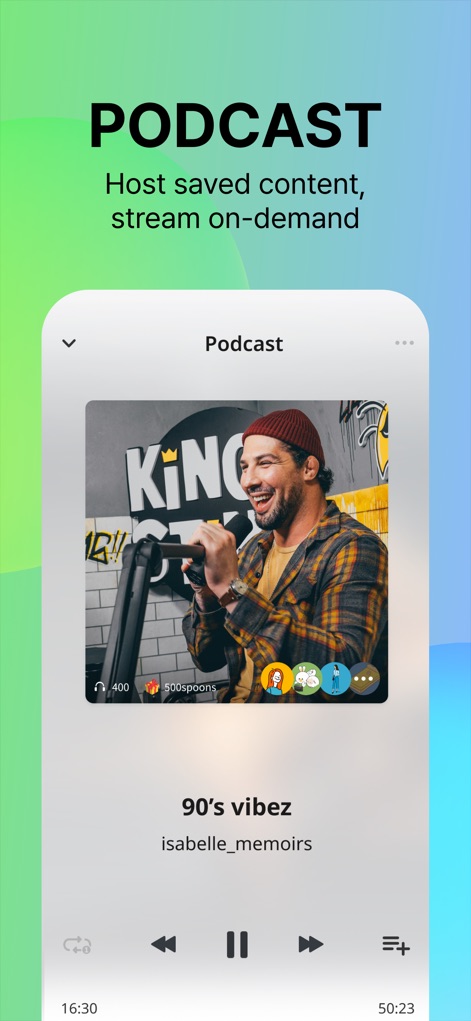
The app provides a dedicated podcast player with essential playback controls and a clear progress bar, allowing users to enjoy on-demand audio content seamlessly.
Curated Podcasts

The platform displays multiple participant avatars within live sessions and includes a crucial moderation notice, underscoring its commitment to a secure environment.
Safe Community
The final screen prominently features the iconic Spoon logo and a compelling call to action, inviting users to "START Your online radio station today!".
Begin Your Broadcast
Description
Download
More Like This
Apps with similar features and user experience
Stationhead
Stationhead Inc

戏鲸-Pia戏配音秀,连麦交朋友
Beijing JiuYaoYao Tech CO.,LTD

BoloUp-Live&Chat
JIULI TECHNOLOGY CO., LIMITED.

Chatter Social
Chatter Social Inc

OyeTalk
OYE TECHNOLOGY PTE LIMITED

Hala Voice Chat Community
Hangzhou Yuyan Network Technology Co., Ltd.

Boomlive-Audio&Live Stream
TRANSSNET MUSIC LIMITED

달보이스
Dalpaengi Voice Co.,Ltd.

TaloVoice
Zhejiang Hongfeng Technology Co., Ltd
This page is not an official page of the app or its developer, but an independent editorial publication created for informational and commentary purposes. Unless expressly stated otherwise, neither the app nor its developer is affiliated with, endorsed by, sponsored by, authorized by, or otherwise officially connected with MWM, Apple, Google Play, the app publisher, or the app's developer, and nothing on this page implies that the app was developed using MWM's services. Any trademarks, logos, screenshots, and other content remain the property of their respective owners.