Stagehand: PRO DJ LINK Manager
Download on App Store

This page is not an official page of the app or its developer, but an independent editorial publication created for informational and commentary purposes. Unless expressly stated otherwise, neither the app nor its developer is affiliated with, endorsed by, sponsored by, authorized by, or otherwise officially connected with MWM, Apple, Google Play, the app publisher, or the app's developer, and nothing on this page implies that the app was developed using MWM's services. Any trademarks, logos, screenshots, and other content remain the property of their respective owners.

Logo of Stagehand: PRO DJ LINK Manager
Download on App Store

Stagehand: PRO DJ LINK Manager

Streamline your production workflow with remote hardware control, real-time status monitoring, and precise lighting synchronization for CDJ-3000 and DJM-A9 setups.

Key Figures

Downloads

1K+

User Rating

1.0/5

Total Ratings

0

Publisher

AlphaTheta Corporation

Category

Entertainment

Locales

12

Latest Version

1.0.4

Size

8.9 MB

First Released

Apr 17, 2023
Features

Total Control of the Booth, Anywhere in the Venue

The industry-first iPad solution for FOH engineers and production teams to remotely manage, monitor, and sync Pioneer DJ hardware via PRO DJ LINK.

Remote Soundcheck Efficiency

Trigger tracks, manage utility settings, and test acoustics from the dancefloor. Eliminate the two-man rule and cut setup time in half.

Real-Time Health Monitoring

Keep a professional distance from the booth while monitoring master levels and device status. Spot red-lining and technical issues before they ruin the set.

The following screenshots and description are sourced directly from the app's official store listing and are the property of the app developer.

App Store

Screenshots
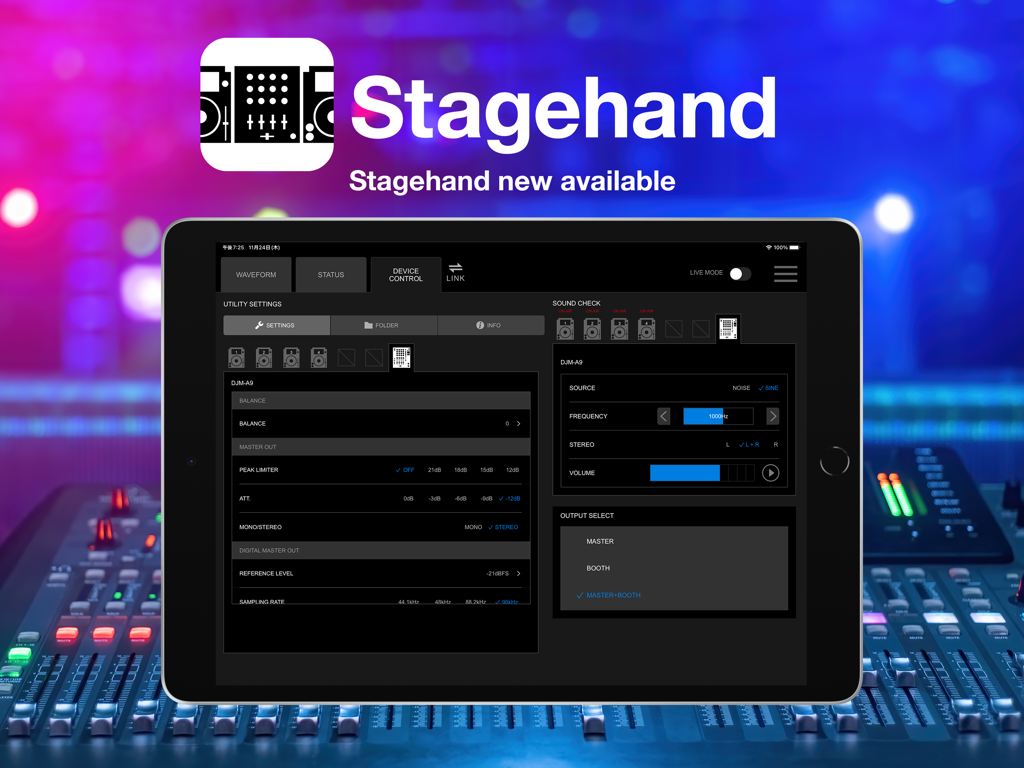
Stagehand: PRO DJ LINK Manager - iPad displaying the Stagehand PRO DJ LINK Manager interface for remote DJ equipment control
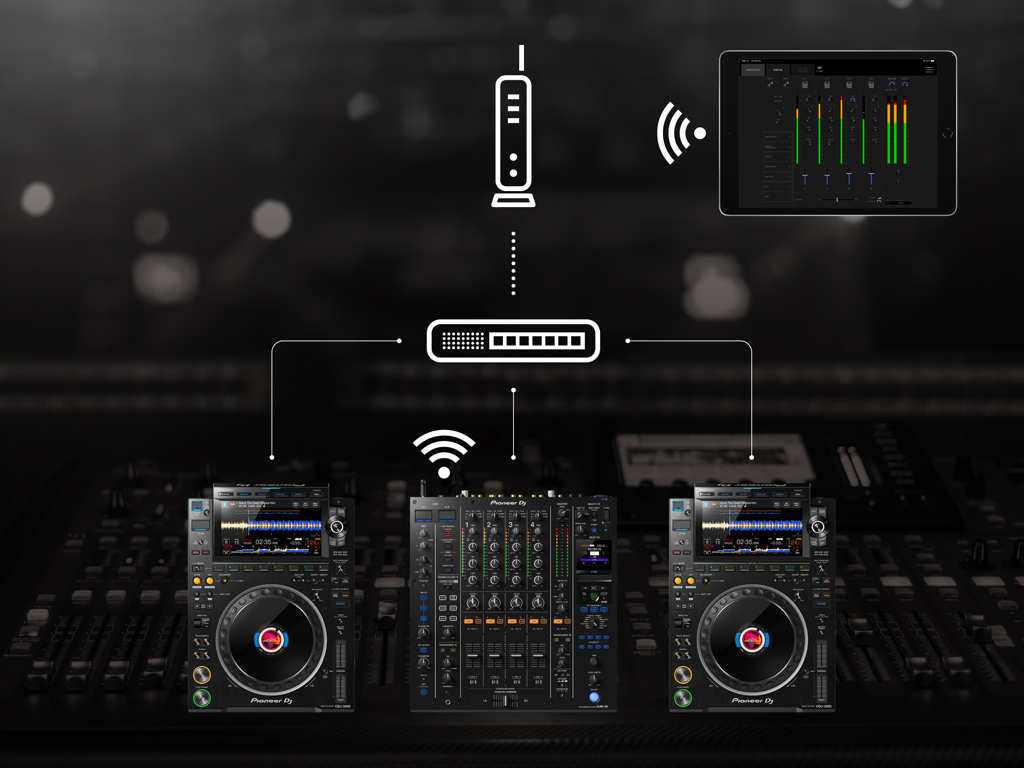
iPad displaying the Stagehand PRO DJ LINK Manager interface for remote DJ equipment control

Stagehand: PRO DJ LINK Manager - An iPad using the Stagehand app to wirelessly monitor and control a Pioneer DJ mixer and multi players over a network
An iPad using the Stagehand app to wirelessly monitor and control a Pioneer DJ mixer and multi players over a network

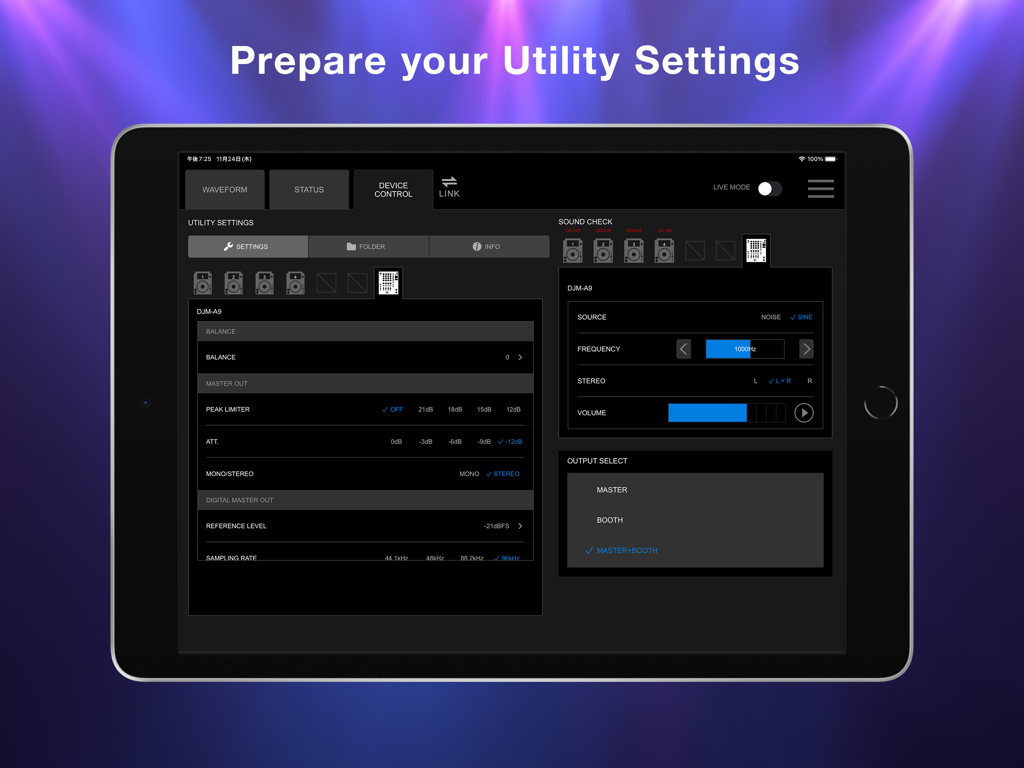
Stagehand: PRO DJ LINK Manager - iPad screen showing Stagehand app with DJM-A9 mixer utility settings and sound check controls
iPad screen showing Stagehand app with DJM-A9 mixer utility settings and sound check controls

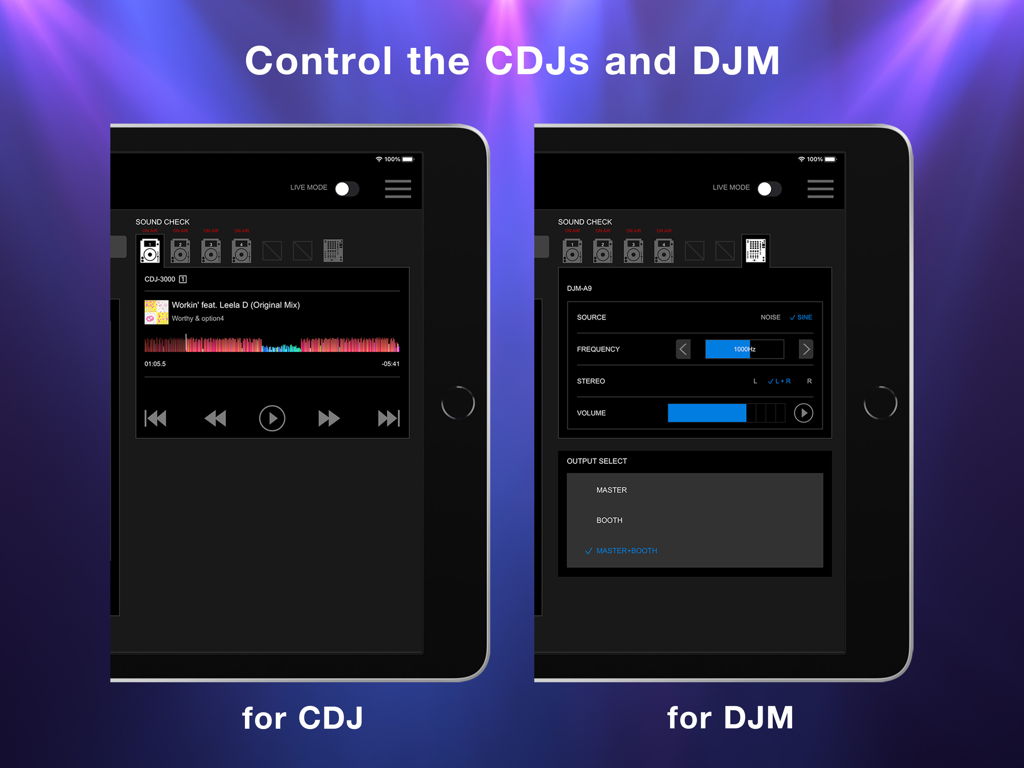
Stagehand: PRO DJ LINK Manager - iPad screen displaying the Stagehand app interface for remote control of CDJ players and DJM mixers
iPad screen displaying the Stagehand app interface for remote control of CDJ players and DJM mixers

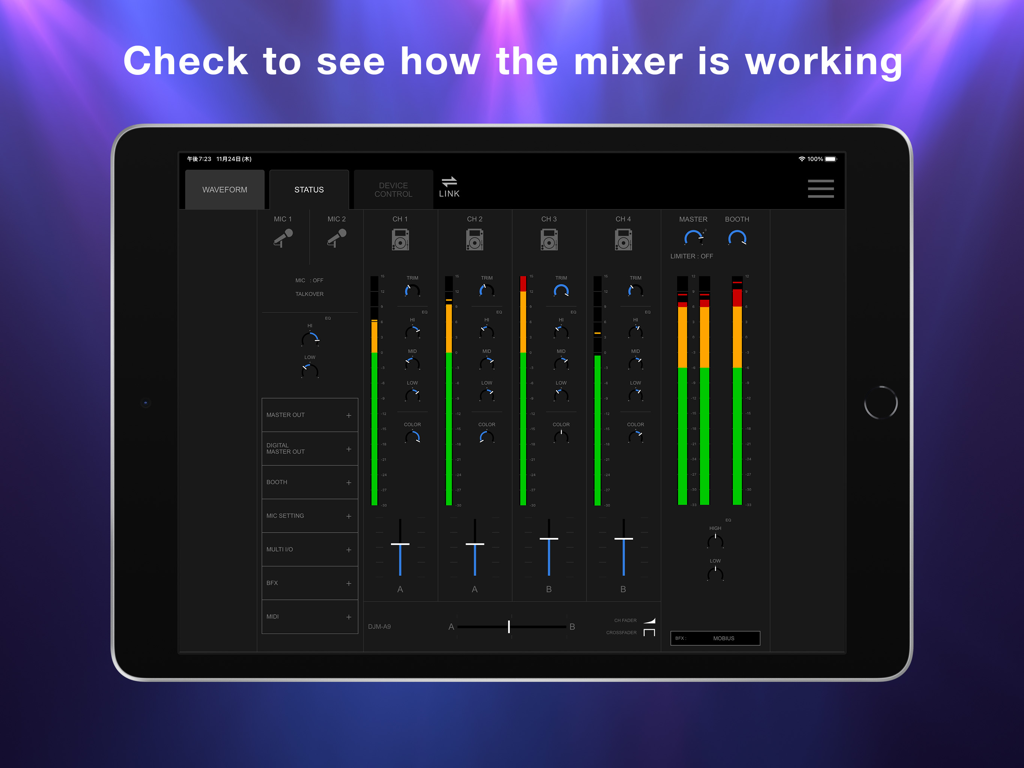
Stagehand: PRO DJ LINK Manager - iPad showing the Stagehand app status screen with real-time DJ mixer channel levels and fader positions
iPad showing the Stagehand app status screen with real-time DJ mixer channel levels and fader positions

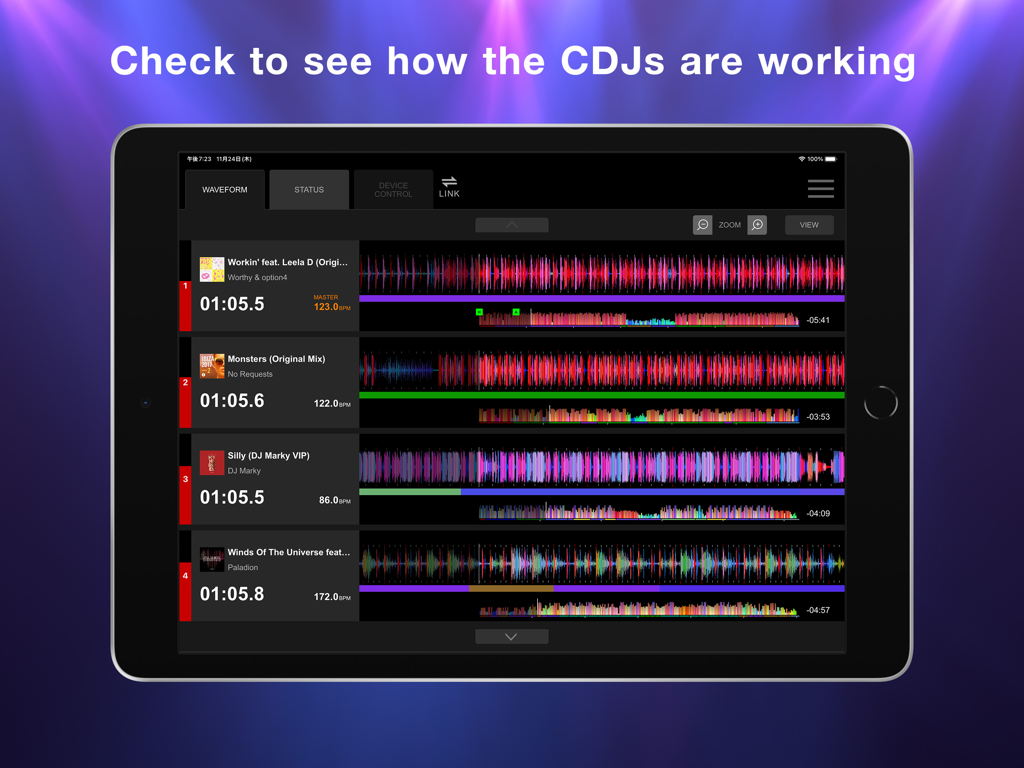
Stagehand: PRO DJ LINK Manager - iPad screen showing the Stagehand app waveform display for monitoring multiple CDJ units.

iPad screen showing the Stagehand app waveform display for monitoring multiple CDJ units.

Description

This indispensable new app, the first of its kind, enables you to keep an eye on a host of information and remotely adjust settings on DJM-A9 and CDJ-3000, CDJ-3000X units in a PRO DJ LINK network, all from your iPad. By managing the mixer and multi players via Stagehand, you can run smoother shows and produce more exciting lighting in sync with sound. Before your event begins, you can use Stagehand to remotely check and change the Utility settings of the DJM-A9 and CDJ-3000, CDJ-3000X units for quicker setup. Stagehand is also useful once a gig is underway as you can monitor the DJ’s use of the mixer and players without needing to enter the booth. The app enables you to keep an eye on volume levels and settings, and use beatgrid, BPM, and time information to help create effective lighting displays. There’s a Live mode too, which disables many of the app’s features so you can’t accidentally stop the music during the show. You can try Stagehand free for 60 days. Download the app from App Store to use it with an iPad. To use Stagehand, update the mixer and player's firmware to the latest version via our support page [https://www.pioneerdj.com/support/software/]. A device with the A12 Bionic chip or later is recommended. [Key Features] - Device Control If you’re the designated Admin user of the system, you can easily check and change the Utility settings of the DJM-A9 and CDJ-3000, CDJ-3000X units in the PRO DJ LINK network via the Device Control screen. You can create multiple settings files in advance, giving you the option to apply multiple changes in one go if you need to, and you can share them in numerous ways, including via AirDrop or email to make event preparations run smoother. Speed up sound checks with remote control of the CDJ-3000, CDJ-3000X. There’s no need to go back and forth between the booth and the dancefloor; simply use Sound Check in Stagehand to play, stop, fast-forward, and rewind tracks. You can also control sine waves and noise from the DJM-A9 to make sure the sound system is set up correctly for the room’s acoustics. When the gig starts, turn on Live mode to disable Device Control functions so you can’t accidentally interrupt the music in the middle of a DJ’s set. - Status Keep an eye on a host of information without needing to look over the DJ’s shoulder – or even enter the booth. The Status screen gives you a remote view of almost everything happening on the DJM-A9, including the status of Utility settings, enabling you to quickly spot problems such as excessive volume from the trim and master levels so you can troubleshoot effectively. You can also check the playing information on the CDJ-3000, CDJ-3000X units from here. - Waveform Remotely view various elements of track information from your iPad to help you create exciting lighting sequences in sync with sound. From the Waveform screen, you can view not only the waveforms of tracks playing on CDJ-3000, CDJ-3000X units in real time but also the beatgrid, BPM, and time information. DJs have a choice of public and private settings in their own rekordbox account for sharing most of the music information, and settings made in advance will be reflected in Stagehand.

Download

Download on App Store

This page is not an official page of the app or its developer, but an independent editorial publication created for informational and commentary purposes. Unless expressly stated otherwise, neither the app nor its developer is affiliated with, endorsed by, sponsored by, authorized by, or otherwise officially connected with MWM, Apple, Google Play, the app publisher, or the app's developer, and nothing on this page implies that the app was developed using MWM's services. Any trademarks, logos, screenshots, and other content remain the property of their respective owners.








