
This page is not an official page of the app or its developer, but an independent editorial publication created for informational and commentary purposes. Unless expressly stated otherwise, neither the app nor its developer is affiliated with, endorsed by, sponsored by, authorized by, or otherwise officially connected with MWM, Apple, Google Play, the app publisher, or the app's developer, and nothing on this page implies that the app was developed using MWM's services. Any trademarks, logos, screenshots, and other content remain the property of their respective owners.


SUZURIアルバム
Forget the photo-sharing headache. This app makes sharing memories a non-issue, putting total control in users' hands.
Downloads
1M+User Rating
Total Ratings
1.4KPublisher
Category
Photo & VideoLocales
1Latest Version
6.9.0Size
23.5 MBFirst Released
Aug 22, 2011An Analytical Overview of Key Features for Personal and Professional Photo Management
SUZURIアルバム: A Comprehensive Review
Flexible & Secure Photo Sharing
The app provides versatile options for sharing photos, allowing users to choose between private, password-protected albums or public albums for broader reach, catering to diverse needs from family memories to business presentations.
Collaborative Album Creation
It allows friends and family members to collectively add photos to shared albums, fostering a comprehensive collection of memories from group events.
Intuitive Operation & Rapid Uploads
The app features straightforward controls for swift album creation and photo uploads, ensuring a seamless and hassle-free user experience without confusion.
Automatic Photo Organization
This tool automatically arranges uploaded photos by their shooting date, simplifying the process of keeping albums neatly organized without manual effort.
Effortless URL-Based Sharing
It enables quick and easy sharing of albums by simply sending a URL through messaging apps or email, with the added convenience that viewers do not require a separate account registration.
Versatility for Professional Use
The platform has a proven track record for professional applications, including sharing photos with clients for studios, photographers, kindergartens, and event participants.
PRO Plan: Extended Storage & High Quality
Subscribers to the PRO plan benefit from unlimited album creation, increased photo capacity per album (up to 2000 images), and the ability to store high-resolution photos up to 15MB each.
PRO Plan: Ad-Free Experience
The PRO plan enhances the user experience by removing all advertisements, providing an uninterrupted and clean interface for photo sharing and viewing.
Frequently Asked Questions
Everything you need to know about SUZURIアルバム
What is SUZURIアルバム?
SUZURIアルバム is an online album app for sharing photos. It allows private sharing with passwords or public sharing via SNS, supports collaborative albums, and automatically organizes photos, accessible on PC and smartphones.
How much does SUZURIアルバム's PRO plan cost?
The SUZURIアルバム PRO plan costs 360 yen (tax included) per month. This subscription offers benefits like unlimited monthly album creation, an increased photo limit to 2000 per album, and ad removal.
Can I share photos privately with SUZURIアルバム?
Yes, SUZURIアルバム enables private sharing. Users can secure albums with a password ("合い言葉") or set a time limit for public access. This ensures sensitive content is shared safely, for example, with family.
Is SUZURIアルバム the same as 30days Album?
Yes, SUZURIアルバム is the rebranded name for the application formerly known as 30days Album. The operating company and core service features remain identical, ensuring a seamless experience for all users.
What are the benefits of the SUZURIアルバム PRO plan?
The SUZURIアルバム PRO plan includes unlimited monthly album creation, an increased capacity of 2000 photos per album, storage for high-quality photos up to 15MB, and an ad-free experience. The first month is free.
How do I cancel my SUZURIアルバム PRO plan subscription?
To cancel the SUZURIアルバム PRO plan, access the App Store app, tap your profile icon, navigate to "Subscriptions," select "SUZURIアルバム," and manage your subscription. Direct cancellation from the app or website is not supported.
Can multiple people add photos to a SUZURIアルバム album?
Yes, SUZURIアルバム supports collaborative albums. Friends and family members can contribute their own photos to an album, allowing everyone to collectively gather and share memories within a single, unified collection.
Does SUZURIアルバム automatically organize photos?
Yes, SUZURIアルバム automatically organizes uploaded photos. The app arranges pictures sequentially based on their shooting date, providing effortless sorting and management for all your photographic collections.
Do viewers need to register to see SUZURIアルバム albums?
No, viewers do not need to register to access SUZURIアルバム albums. Albums are viewable on both PC and smartphone devices without requiring any membership or account creation.
The following screenshots and description are sourced directly from the app's official store listing and are the property of the app developer.
App Store
Screenshots
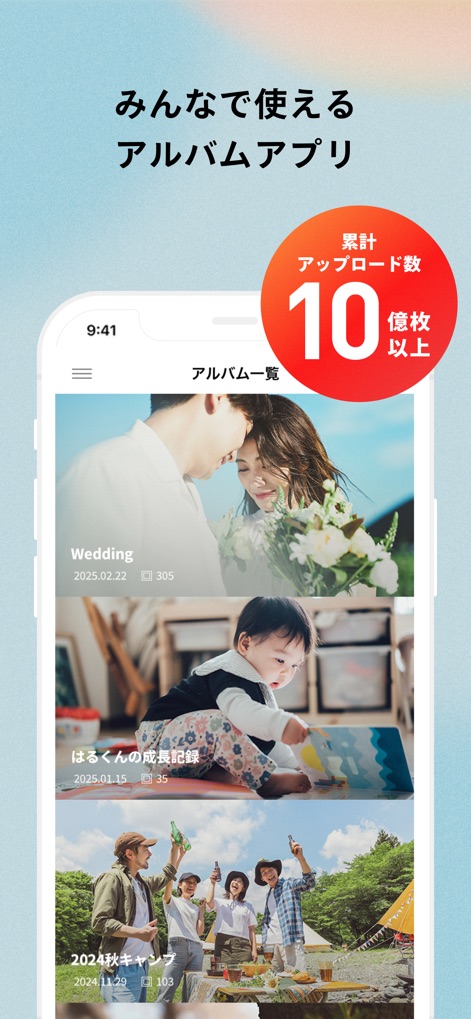
Explore the intuitive album interface and discover the app's impressive milestone of over one billion photos uploaded.
Collaborative Photo Hub
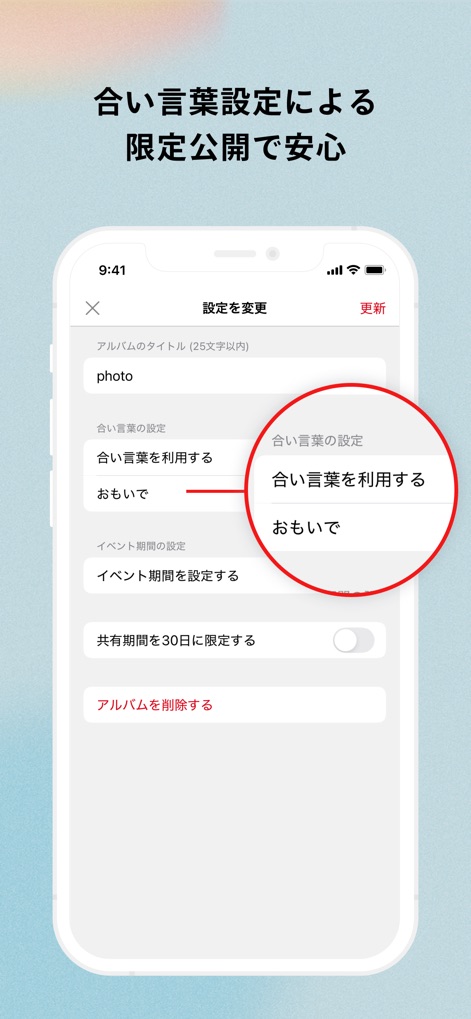
Users can activate robust password protection and set limited sharing periods for enhanced privacy and control over their memories.
Secure Sharing Controls
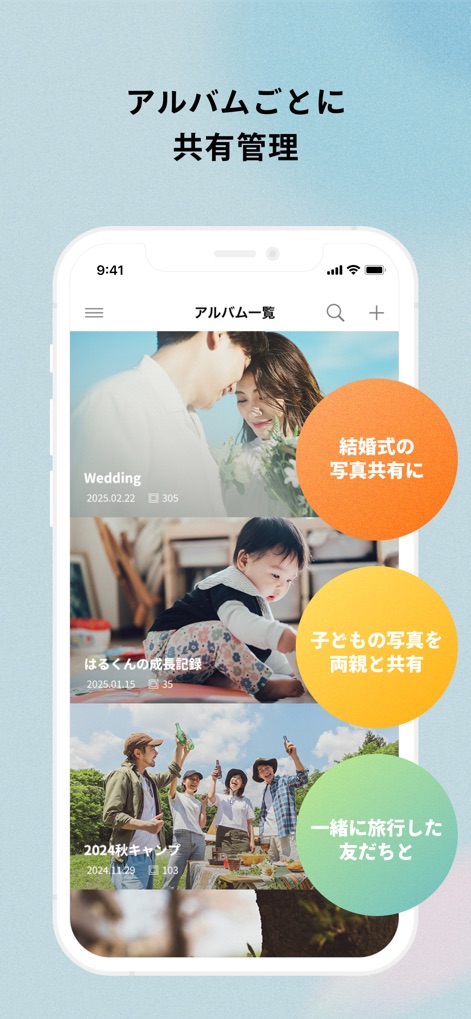
This tool streamlines sharing management for each album, showcasing diverse use cases like sharing wedding photos and childhood memories with family.
Flexible Album Management
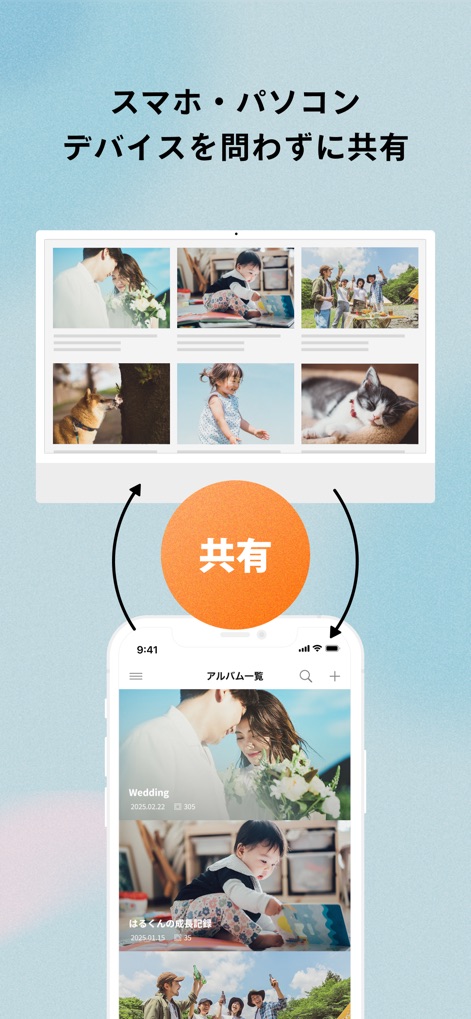
The app facilitates effortless cross-device sharing, allowing users to access and manage their photos seamlessly across both smartphone and PC platforms.
Seamless Cross-Device Sharing

This visual emphasizes the app's core purpose, allowing users to effortlessly share diverse personal memories and create lasting connections.
Cherished Memories Shared
Description
Download
More Like This
Apps with similar features and user experience






This page is not an official page of the app or its developer, but an independent editorial publication created for informational and commentary purposes. Unless expressly stated otherwise, neither the app nor its developer is affiliated with, endorsed by, sponsored by, authorized by, or otherwise officially connected with MWM, Apple, Google Play, the app publisher, or the app's developer, and nothing on this page implies that the app was developed using MWM's services. Any trademarks, logos, screenshots, and other content remain the property of their respective owners.