
This page is not an official page of the app or its developer, but an independent editorial publication created for informational and commentary purposes. Unless expressly stated otherwise, neither the app nor its developer is affiliated with, endorsed by, sponsored by, authorized by, or otherwise officially connected with MWM, Apple, Google Play, the app publisher, or the app's developer, and nothing on this page implies that the app was developed using MWM's services. Any trademarks, logos, screenshots, and other content remain the property of their respective owners.


タイムズカー
Find, reserve, and unlock the perfect vehicle in seconds. Experience the freedom of the road without the overhead of ownership, all through a seamless, tech-forward car-sharing experience.
Downloads
2M+User Rating
Total Ratings
1K+Publisher
Category
NavigationLocales
1Latest Version
2.13.16Size
17.2 MBFirst Released
Feb 27, 2014Your Personal Fleet, Just a Tap Away
Experience the ultimate freedom of urban mobility with a seamless car-sharing platform designed to eliminate the costs and headaches of traditional ownership.
Instant Map Availability
Locate and reserve cars in your neighborhood in real-time. Use smart filters to find the exact model, size, or capacity you need for your next errand or getaway.
Zero-Friction Technology
Skip the paperwork with biometric login and sync your destination directly to the vehicle's navigation system from your phone before you even arrive.
Frequently Asked Questions
Everything you need to know about タイムズカー
How do I book a car using the タイムズカー app?
Yes, the タイムズカー app allows users to quickly reserve and pay for Times Car Share vehicles. You can set usage dates and times, filter by car type, and complete the reservation directly within the app.
Can I extend my car reservation with the タイムズカー app?
Yes, you can extend your car reservation directly within the タイムズカー app. The app provides options to extend your booking by 15, 30, or 60 minutes with a simple button tap.
Does the タイムズカー app show car availability on a map?
Yes, the タイムズカー app displays vehicle locations and their current availability on a map. This feature helps users easily check which cars are free at a glance.
How do I unlock a Times Car Share vehicle using the タイムズカー app?
Yes, the タイムズカー app allows users to unlock and lock car share vehicles. To start your usage, confirm the car number and press the "利用開始 (unlock)" button in the app.
Can I get notified when a specific Times Car Share vehicle becomes available?
Yes, the タイムズカー app offers an "Availability Waitlist" feature. If your desired car is unavailable, you receive an email notification if it becomes free due to cancellation or early return.
What iOS version does the タイムズカー app require?
The タイムズカー app requires a device running iOS 16.0 or later for proper operation. Users should always use the latest iOS version for optimal performance and compatibility.
Does the タイムズカー app use push notifications?
Yes, the タイムズカー app utilizes push notifications. These notifications inform users about new services, campaigns, and car share e-tickets, delivering the latest information directly to their device.
Can I filter car search results in the タイムズカー app?
Yes, the タイムズカー app allows users to refine their car search. You can filter available vehicles by criteria such as class, seating capacity, and specific car models to find a suitable option.
Does the タイムズカー app support biometric login?
Yes, the タイムズカー app supports biometric login. Users can log in securely using registered biometric information, such as face or fingerprints, stored on their smartphone device.
Where can I find the privacy policy for the タイムズカー app?
The privacy policy for the タイムズカー app is available at https://share.timescar.jp/sp_app-policy.html. Installing the app signifies agreement to this policy regarding user information handling.
The following screenshots and description are sourced directly from the app's official store listing and are the property of the app developer.
App Store
Screenshots
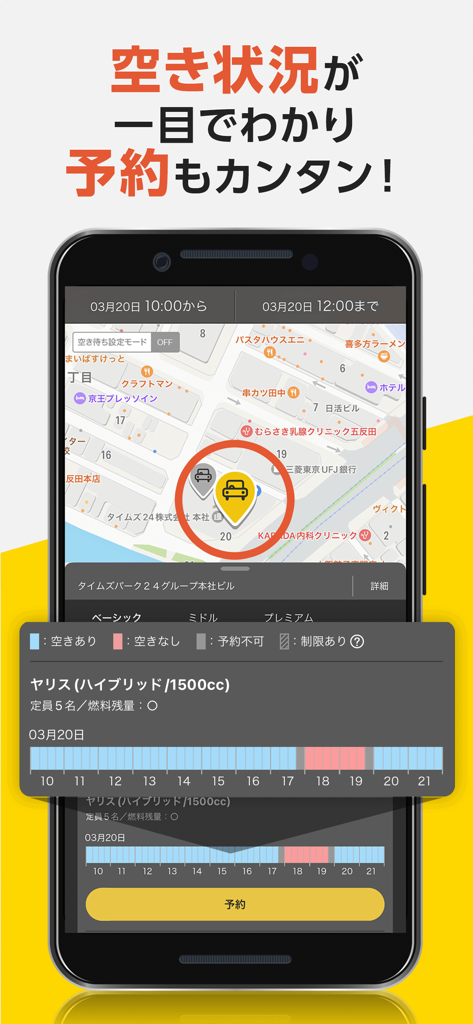
Times Car app interface showing a car share location on a map and a detailed reservation schedule for a Yaris Hybrid.
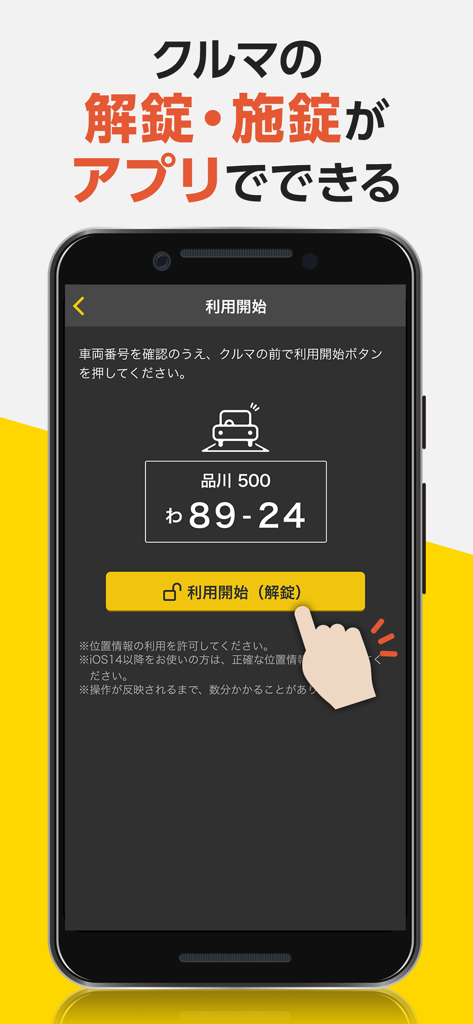
Smartphone screen showing the Times Car app interface with a hand tapping a button to unlock a shared car
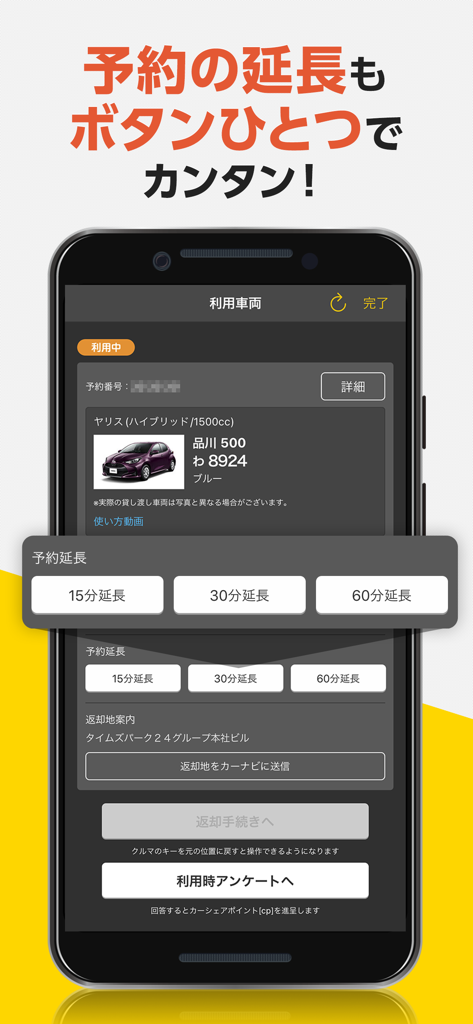
Smartphone screen showing options to extend a car rental reservation in the Times Car app
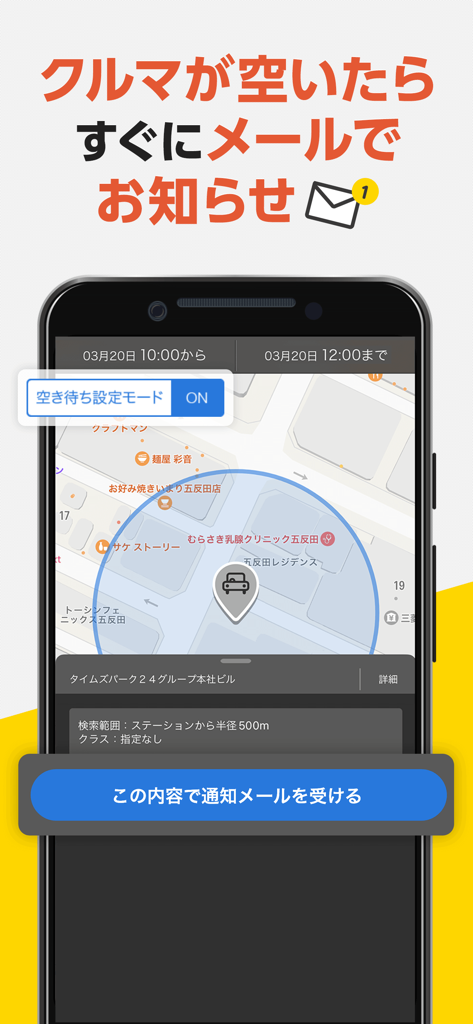
Smartphone screen displaying the Times Car app waitlist and availability notification feature
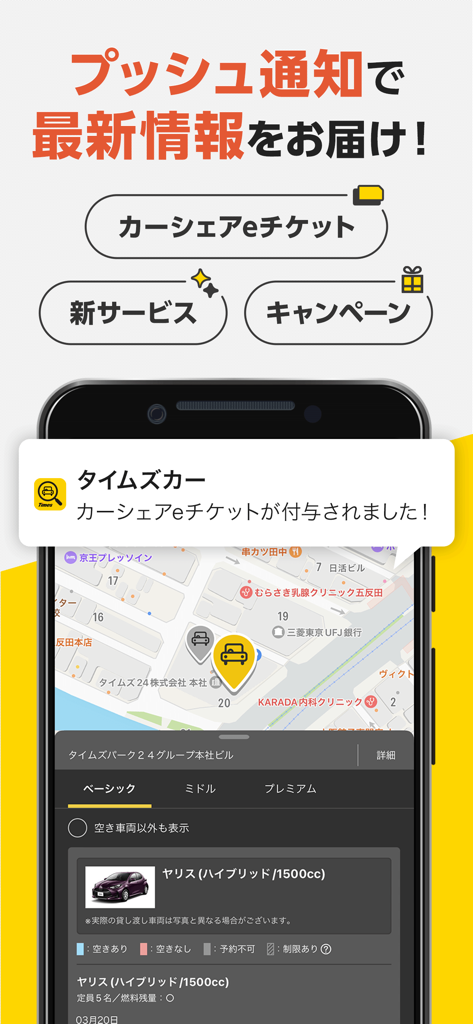
Times Car app interface showing a push notification for an e-ticket and a car location map
Description
Download
More Like This
Apps with similar features and user experience

Turo — Car rental marketplace
Turo Inc.

MILES Car & Van Sharing
MILES Mobility GmbH

Turbi - Aluguel de Carros 24h
Turbi Compartilhamento de Veiculos S A

Hyre
Hyre AS

GoMore | Car rental
GOMORE ApS

Virtuo: hassle-free car rental
MobiTech SAS

Getaround - car rental
Getaround

TikTak
TIKTAK YENI NESIL ULASIM COZUMLERI VE ARAC KIRALAMA ANONIM SIRKETI

Delimobil: Carsharing and Rent
Karshering Russiya OOO
This page is not an official page of the app or its developer, but an independent editorial publication created for informational and commentary purposes. Unless expressly stated otherwise, neither the app nor its developer is affiliated with, endorsed by, sponsored by, authorized by, or otherwise officially connected with MWM, Apple, Google Play, the app publisher, or the app's developer, and nothing on this page implies that the app was developed using MWM's services. Any trademarks, logos, screenshots, and other content remain the property of their respective owners.