Tally AI: Expense & Budget Log

This page is not an official page of the app or its developer, but an independent editorial publication created for informational and commentary purposes. Unless expressly stated otherwise, neither the app nor its developer is affiliated with, endorsed by, sponsored by, authorized by, or otherwise officially connected with MWM, Apple, Google Play, the app publisher, or the app's developer, and nothing on this page implies that the app was developed using MWM's services. Any trademarks, logos, screenshots, and other content remain the property of their respective owners.

Logo of Tally AI: Expense & Budget Log

Tally AI: Expense & Budget Log

Stop typing and start speaking. Log expenses in seconds, scan receipts, and master your cash flow with the smartest AI financial assistant built for your busy life.

Key Figures

Downloads

5K+

User Rating

4.7/5

Total Ratings

200

Publisher

Beijing Huishuo Mobile Technology Co.,Ltd.

Category

Finance

Locales

3

Latest Version

1.2.16

Size

33.0 MB

First Released

Dec 18, 2025
Features

Expense Tracking, Reimagined by AI

Stop manual typing and start living. Tally AI turns your voice and photos into organized financial insights in seconds, built for your fast-paced lifestyle.

Just Speak, Don’t Type

Record complex expenses like "Spent $15 on lunch and $40 on gas" naturally. Our AI understands, splits, and categorizes everything for you.

Snap & Sync Receipts

Turn paper clutter into digital data instantly. Advanced OCR extracts consumption details from grocery bills to handwritten notes with one photo.

The following screenshots and description are sourced directly from the app's official store listing and are the property of the app developer.

App Store

Screenshots

Tally AI: Expense & Budget Log - A mobile phone screen using Tally AI to scan a coffee receipt for instant expense logging.
A mobile phone screen using Tally AI to scan a coffee receipt for instant expense logging.

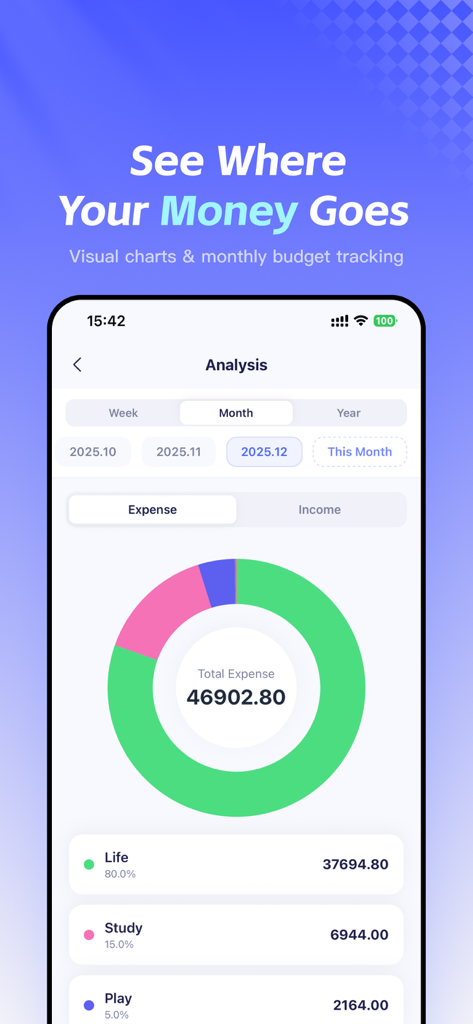
Tally AI: Expense & Budget Log - A doughnut chart in the Tally AI app showing a breakdown of monthly expenses by category like life study and play
A doughnut chart in the Tally AI app showing a breakdown of monthly expenses by category like life study and play

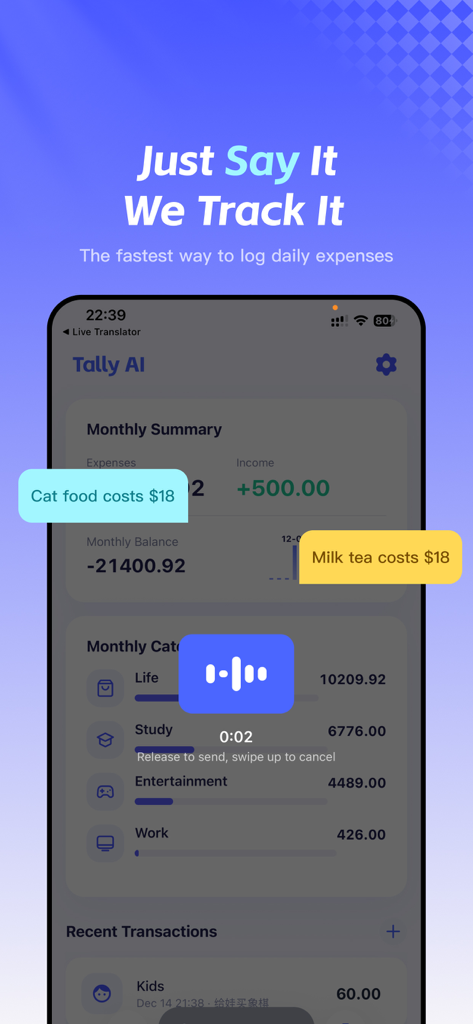
Tally AI: Expense & Budget Log - Tally AI mobile app interface demonstrating voice command expense logging and a monthly financial summary dashboard
Tally AI mobile app interface demonstrating voice command expense logging and a monthly financial summary dashboard

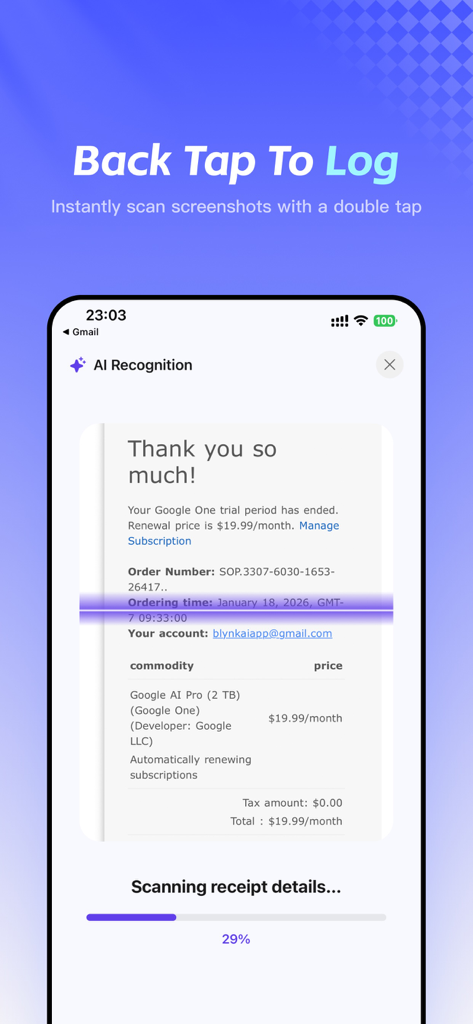
Tally AI: Expense & Budget Log - Tally AI app screen demonstrating AI recognition scanning a digital receipt through the back tap feature.
Tally AI app screen demonstrating AI recognition scanning a digital receipt through the back tap feature.

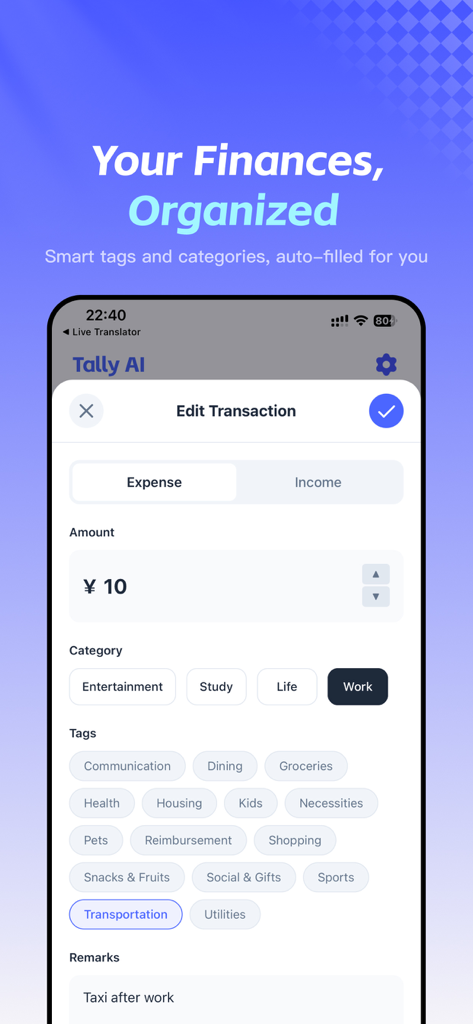
Tally AI: Expense & Budget Log - A mobile app screen showing a transaction edit interface for Tally AI with smart tags and categories auto filled for an expense
A mobile app screen showing a transaction edit interface for Tally AI with smart tags and categories auto filled for an expense

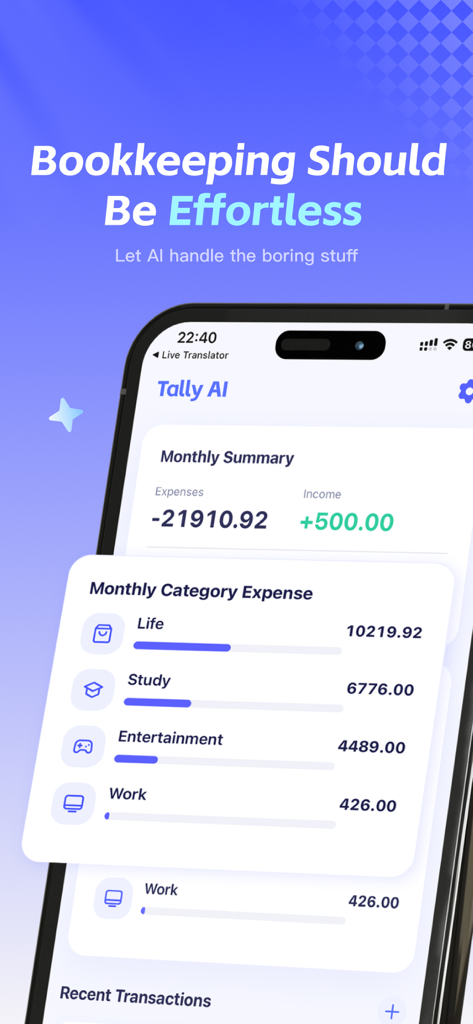
Tally AI: Expense & Budget Log - Tally AI app showing a monthly summary of expenses and categorized spending bars for life study and entertainment

Tally AI app showing a monthly summary of expenses and categorized spending bars for life study and entertainment

Description

[THE PAIN POINT] Have you tried keeping a budget but quit because manual entry was too tedious? Does facing complex categories and endless numbers make bookkeeping feel like a burden? [THE SOLUTION] Meet Tally AI, your intelligent financial assistant. We utilize advanced AI to simplify the bookkeeping process to the absolute limit. No typing, no manual sorting—just let AI handle it. [CORE FEATURES] ● Lightning Voice Entry (Multi-item Support) Just speak naturally: "Spent $15 on breakfast and $35 on gas." AI instantly understands, splits the transaction into two separate records, and automatically fills in the amount, category, and time. Speak, don't type. ● Smart Receipt Scanning Grocery receipts, restaurant bills, handwritten notes... just snap a photo. Our OCR technology intelligently extracts consumption details. ● Visual Charts & Financial Insights See where your money goes. Our new Analysis module visualizes spending trends with pie charts and line graphs. Track cash flow by week, month, or year effortlessly. ● Monthly Budgets & Saving Set monthly spending limits to keep your finances on track. Real-time balance monitoring helps you stop overspending and build a saving habit. ● Multi-Currency Auto-Conversion Perfect for travel and shopping abroad. Simply say "Spent 2000 JPY on a souvenir," and AI automatically identifies the currency and converts it based on current exchange rates. Global spending, one ledger. ● Widgets & Shortcuts Track expenses right from your Home Screen, Control Center, or via iOS Shortcuts. No need to open the app to check your balance or add a record. Fast, smooth, and seamless. ● Share Your Spending Easily generate and share transaction images with friends or family. Perfect for splitting bills or tracking shared household expenses. ● Minimalist & Secure No ads. No distractions. Fast startup. Your data is encrypted and synced via the cloud, keeping your financial privacy secure. [WHO IS IT FOR?] Efficiency lovers who hate manual data entry. Travelers and students abroad managing multiple currencies. Gig workers needing to log expenses quickly. Anyone wanting to visualize cash flow and build wealth. Bookkeeping should be this simple. Download Tally AI now and start your smart financial life! [VIP Subscription] - Subscription Service: Unlock all premium features for unlimited access. - Pricing: Please refer to the in-app purchase page for specific pricing details. - Payment: Payment will be charged to your iTunes Account at confirmation of purchase. - Auto-Renewal: Subscription automatically renews unless auto-renew is turned off at least 24-hours before the end of the current period. - Renewal Charge: Account will be charged for renewal within 24-hours prior to the end of the current period. - Cancellation: You can manage or turn off auto-renewal in your Apple ID Account Settings at any time after purchase. - Terms of Use: https://blynkai.app/dingdong/terms - Privacy Policy: https://blynkai.app/dingdong/privacy

Download

This page is not an official page of the app or its developer, but an independent editorial publication created for informational and commentary purposes. Unless expressly stated otherwise, neither the app nor its developer is affiliated with, endorsed by, sponsored by, authorized by, or otherwise officially connected with MWM, Apple, Google Play, the app publisher, or the app's developer, and nothing on this page implies that the app was developed using MWM's services. Any trademarks, logos, screenshots, and other content remain the property of their respective owners.