
This page is not an official page of the app or its developer, but an independent editorial publication created for informational and commentary purposes. Unless expressly stated otherwise, neither the app nor its developer is affiliated with, endorsed by, sponsored by, authorized by, or otherwise officially connected with MWM, Apple, Google Play, the app publisher, or the app's developer, and nothing on this page implies that the app was developed using MWM's services. Any trademarks, logos, screenshots, and other content remain the property of their respective owners.


The North Face
It weaponizes loyalty: the app transforms every outdoor pursuit into a currency, empowering users to dominate their next adventure.
Downloads
1M+User Rating
Total Ratings
35.2KPublisher
Category
ShoppingLocales
3Latest Version
12.14.0Size
155.9 MBFirst Released
May 31, 2012An in-depth look into the features that empower outdoor enthusiasts.
The North Face App: Key Features Analysis
Exclusive Gear Access
It notifies users about early and exclusive access to limited-edition collections and collaborations.
Cash-Back Reward Redemption
Users can convert earned points into cash-back rewards towards future gear purchases, with cards issued periodically.
XPLR Pass Account Management
The app provides quick access to rewards, point balance, activity history, and account details for XPLR Pass members.
Personalized Gear Recommendations
The app provides personalized recommendations for gear and products, tailoring suggestions to individual user preferences.
Diverse Point Earning Opportunities
Users can earn points for every dollar spent and discover additional methods to accumulate points while exploring.
Location-Based Rewards
This tool enables users to earn points by checking in at National Parks, Monuments, and The North Face stores and outlets via the mobile app.
XPLR Pass Enrollment
It allows non-members to join the free XPLR Pass loyalty program, granting access to exclusive gear, member-only product testing, and points on purchases.
In-Store Product Scanner
This feature allows users to scan product barcodes in stores to quickly access detailed product information, reviews, and availability of other colors or sizes.
Friend Referral Rewards
It facilitates earning points by referring friends through a personal link available within the app.
Eco-Friendly Shopping Incentive
The app encourages sustainable practices by awarding points to users who bring their own reusable bags when shopping in stores.
Frequently Asked Questions
Everything you need to know about The North Face
What is The North Face app?
The North Face app provides XPLR Pass members with access to rewards, point tracking, and exclusive gear shopping. It also allows in-store product scanning for detailed information.
How do XPLR Pass members earn points in The North Face app?
XPLR Pass members earn 1 point per $1 spent. Additional points come from downloading the app, checking in at locations, referring friends, and using reusable bags in-store.
How do I get rewards with The North Face XPLR Pass?
XPLR Pass members receive a $10 reward for every 100 points earned. Cash-back reward cards are issued quarterly in March, June, and October for qualifying members.
Can I scan products with The North Face app in-store?
Yes, The North Face app features a barcode scanner. Users can scan products in-store to access details, reviews, available colors, and sizes directly within the app.
Is the XPLR Pass loyalty program free to join through The North Face app?
Yes, the XPLR Pass is a free loyalty program available through The North Face app. Members gain access to exclusive gear and earn points on purchases.
Does The North Face app offer personalized product recommendations?
Yes, The North Face app provides personalized gear and product recommendations. This feature helps users discover items tailored to their past interactions and preferences.
Do XPLR Pass members receive free shipping in The North Face app?
Yes, XPLR Pass members enjoy free shipping on purchases made through The North Face app. This benefit is automatically applied in the shopping cart.
The following screenshots and description are sourced directly from the app's official store listing and are the property of the app developer.
App Store
Screenshots

This screenshot showcases the app's iconic The North Face logo and its inspiring tagline, setting an adventurous tone for users.
App's Welcome View
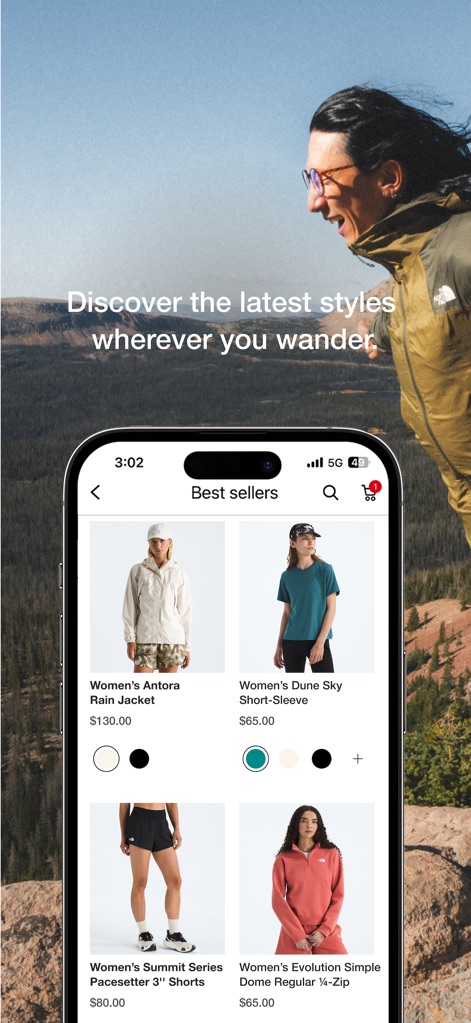
Users can effortlessly browse new arrivals and best-selling gear, viewing detailed product images and available color variations.
Gear Discovery

The app provides a clear overview of the user's XPLR Pass point balance and illustrates progress toward their next reward through an intuitive progress bar.
Loyalty Tracker

Members can easily view their accumulated rewards, including specific values like $10 and $40, alongside their respective expiration dates.
Redeem Rewards
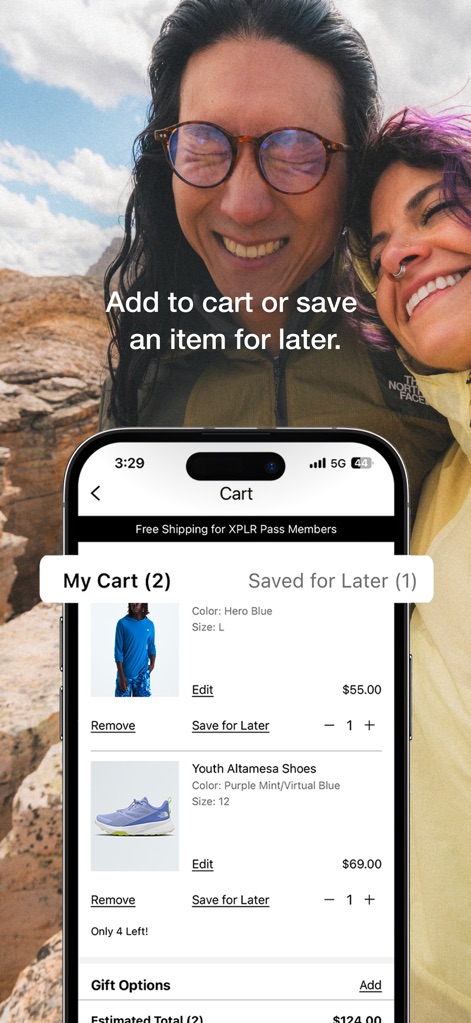
This tool allows users to manage their selections, providing clear views of items in 'My Cart' and products designated for 'Saved for Later'.
Shopping Management

The app empowers users to instantly access product information and reviews by scanning any item's barcode in-store, facilitating informed purchasing decisions.
In-Store Scanner
Description
Download
More Like This
Apps with similar features and user experience

Walmart: Shopping & Savings
Walmart

Target: Shop Deals & Trends
Target
The Home Depot
The Home Depot, Inc.

Hollister Co.
Abercrombie & Fitch
Circle K
Circle K Stores, Inc

苏宁易购
Suning Commerce Group Co.,Ltd.

Lojas Renner - Comprar Roupas
Lojas Renner S/A

Liverpool: Compra en línea
Distribuidora Liverpool S.A. de C.V,
7-Eleven: Rewards & Shopping
7-Eleven, Inc.
This page is not an official page of the app or its developer, but an independent editorial publication created for informational and commentary purposes. Unless expressly stated otherwise, neither the app nor its developer is affiliated with, endorsed by, sponsored by, authorized by, or otherwise officially connected with MWM, Apple, Google Play, the app publisher, or the app's developer, and nothing on this page implies that the app was developed using MWM's services. Any trademarks, logos, screenshots, and other content remain the property of their respective owners.