
This page is not an official page of the app or its developer, but an independent editorial publication created for informational and commentary purposes. Unless expressly stated otherwise, neither the app nor its developer is affiliated with, endorsed by, sponsored by, authorized by, or otherwise officially connected with MWM, Apple, Google Play, the app publisher, or the app's developer, and nothing on this page implies that the app was developed using MWM's services. Any trademarks, logos, screenshots, and other content remain the property of their respective owners.


Timestamp Camera Time & GPS
Stop guessing. It proves your visual evidence is ironclad, stamping out doubt with verifiable data.
Downloads
100k+User Rating
Total Ratings
2.4KPublisher
Category
Photo & VideoLocales
18Latest Version
1.4.2Size
167.2 MBFirst Released
Mar 14, 2025An evaluation of core functionalities designed for verifiable, tamper-proof documentation in professional field-based operations.
Key Features Analysis: Timestamp Camera Time & GPS
Real-time Time & GPS Stamping
The app provides real-time, verifiable time and GPS location stamps directly onto photos and videos, ensuring tamper-proof evidence for professional documentation and dispute resolution.
Batch Processing & Workflow Management
This tool features comprehensive batch processing capabilities, allowing users to efficiently save, export, and manage multiple verified photos and videos, including PDF report generation and ZIP archiving.
AI-Powered PhotoProof Templates & Watermarks
It offers AI-suggested and customizable PhotoProof templates with anti-counterfeit watermarks and branding options, enhancing the authenticity, professionalism, and security of visual evidence.
Advanced Geo-Visualization & Data Export
The app provides 3D globe visualization of PhotoProof records, interactive location pins, and one-tap export of PhotoProof and Time & GPS data for detailed professional reporting.
Frequently Asked Questions
Everything you need to know about Timestamp Camera Time & GPS
What is the primary function of the Timestamp Camera app?
The Timestamp Camera app adds and stamps GPS maps, latitude, longitude, anniversary, time, and date to your camera photos. It serves as a multi-functional photography tool.
Does Timestamp Camera allow users to add GPS location information to photos?
Yes, Timestamp Camera automatically records GPS photo location information when photos are taken. It supports stamping GPS maps, longitude, and latitude onto images.
Can I customize the watermarks in the Timestamp Camera app?
Yes, Timestamp Camera allows custom watermarks. Users can select content like address, longitude, and latitude, choose from diverse templates, and place watermarks anywhere on the photo.
How many watermark templates are available in Timestamp Camera?
The Timestamp Camera app offers 25 templates specifically for the GPS map camera. These templates allow users to tailor photos with various items like date and time.
Does Timestamp Camera provide photo editing features like filters?
Yes, Timestamp Camera provides filter effects. Users can select different filters via the watermark camera and apply them to photos from the album before saving or sharing.
What photo ratios does Timestamp Camera support?
Timestamp Camera supports common photo ratios including 4:3, 1:1, and 16:9. This feature enables users to choose the optimal aspect ratio for their scene.
Can Timestamp Camera manage and share photos?
Yes, Timestamp Camera provides management and sharing functions. Users can save both original and timestamped photos to the album and share them with friends or other apps.
Does the Timestamp Camera app allow zooming?
Yes, the Timestamp Camera app offers HD camera magnification, providing 0.5x, 1x, and 2x zoom options for users to capture details effectively.
How can I manage my subscription for Timestamp Camera?
Subscriptions and auto-renewal for Timestamp Camera are managed within your App Store Account Settings after purchase. Payment is charged directly to your App Store Account.
Where can I find the Privacy Policy for Timestamp Camera?
The Privacy Policy for Timestamp Camera is located at the URL: https://camera.aifontkeyboard.xyz/privacy.html. This provides information on data handling practices.
The following screenshots and description are sourced directly from the app's official store listing and are the property of the app developer.
App Store
Screenshots
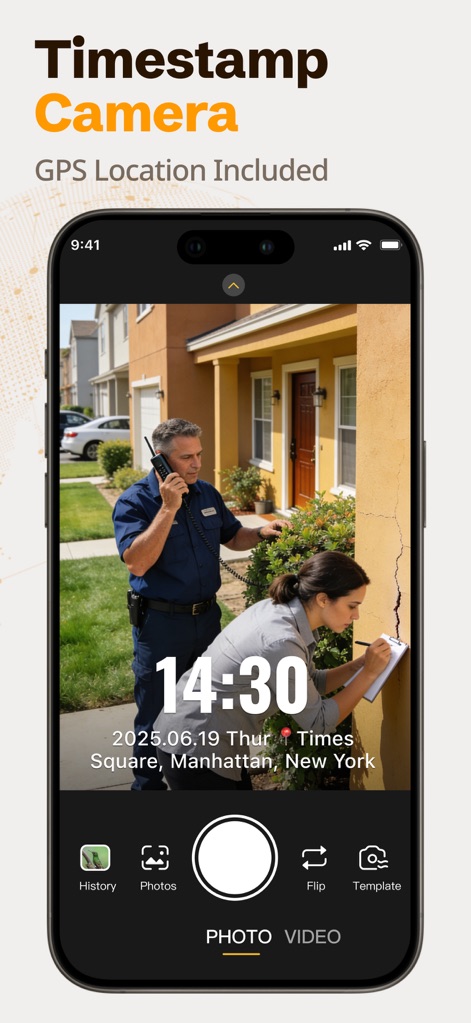
See how the app instantly embeds precise time and date stamps and accurate GPS location directly onto every photo for undeniable documentation.
Capture Verified Moments
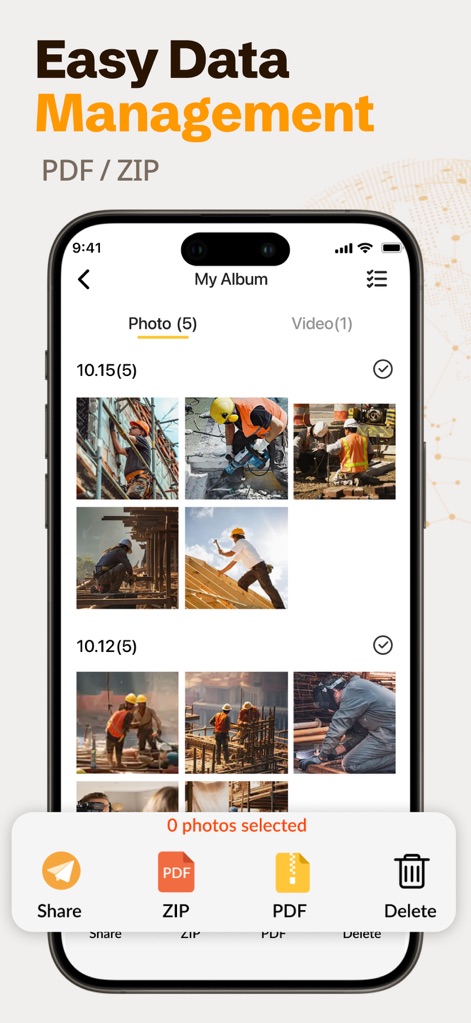
Users can efficiently organize recorded media within a clear album view and seamlessly export PhotoProof records as professional PDF or ZIP archives.
Streamlined Data Management
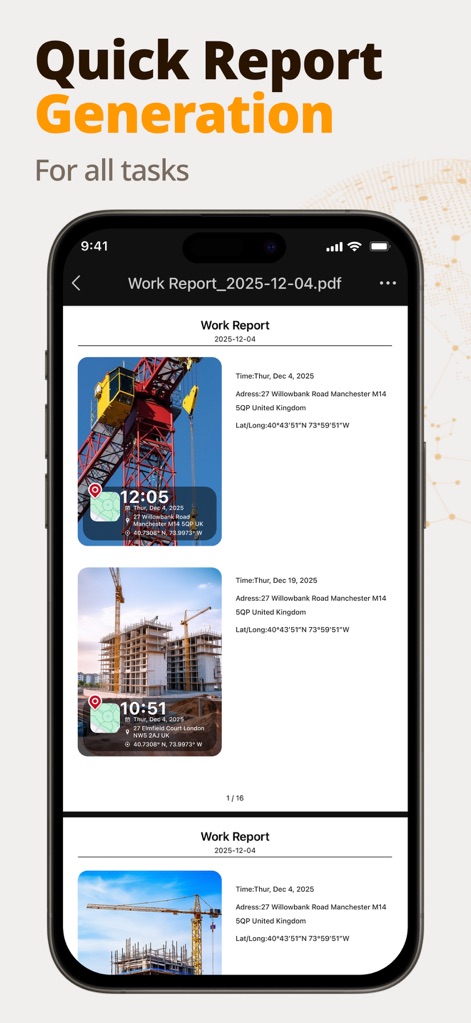
This tool empowers professionals to create detailed PDF reports, consolidating multiple timestamped images and precise location data for comprehensive project tracking.
Instant Report Generation

Explore the variety of professional templates available, showcasing how the app applies diverse data overlays and custom branding for tailored documentation across industries.
Adaptable Field Templates
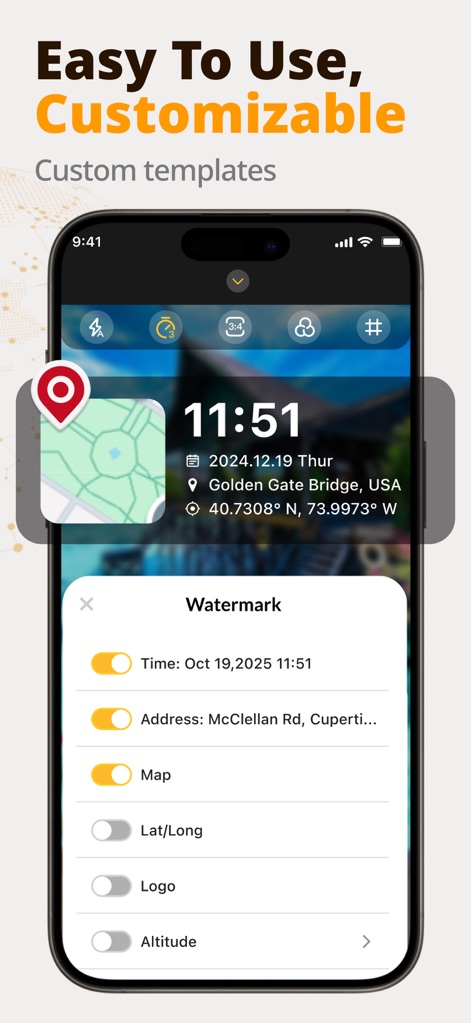
The app offers robust customization options for photomarks, allowing users to easily toggle essential data like time, address, and map views directly onto their images.
Fully Customizable Proof
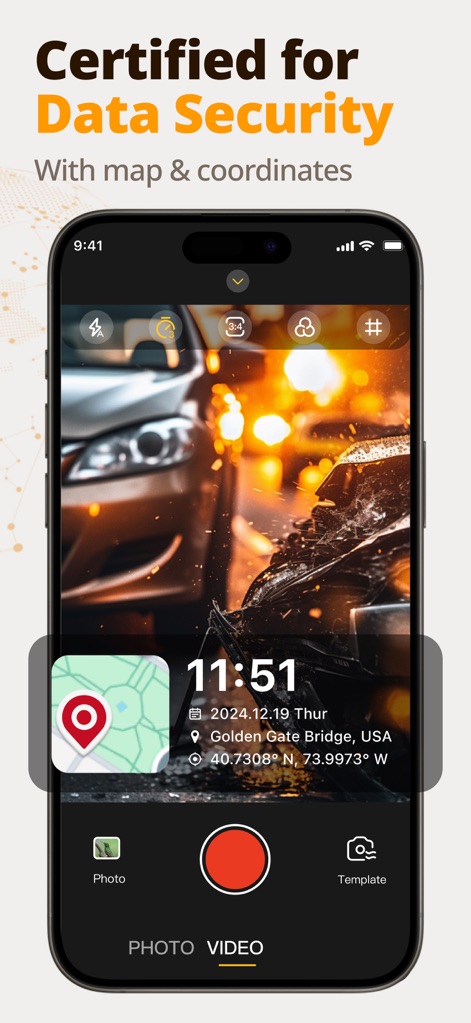
Validate critical visual evidence with integrated GPS coordinates and an on-image map overlay, ensuring every photo is certified for data security and precise location.
Secure Geographic Evidence
Description
Download
More Like This
Apps with similar features and user experience

今日水印相机-时间地点经纬度打卡拍照
Keep Curiosity, Inc.

Timemark: Photo Proof
OCEAN GALAXY PTE. LTD.

自定义水印相机
Beidou Hanglu Technology Co.,Ltd.

CompanyCam
CompanyCam, Inc

今日水印专业版-官方无广告版,真实时间今日水印相机拍照
Keep Curiosity, Inc.

经纬度相机&水印相机-记录时间地点天气
Shuzhuo Network Technology Guangzhou Co., Ltd.

水印相机-时间地点工作打卡拍照视频
Chengdu Chongbianli Science and Technology Ltd.

经纬相机:水印相机拍照水印记录时间地点
佳铭 游

TimeStamp Camera+MAP
源泽 高
This page is not an official page of the app or its developer, but an independent editorial publication created for informational and commentary purposes. Unless expressly stated otherwise, neither the app nor its developer is affiliated with, endorsed by, sponsored by, authorized by, or otherwise officially connected with MWM, Apple, Google Play, the app publisher, or the app's developer, and nothing on this page implies that the app was developed using MWM's services. Any trademarks, logos, screenshots, and other content remain the property of their respective owners.