
This page is not an official page of the app or its developer, but an independent editorial publication created for informational and commentary purposes. Unless expressly stated otherwise, neither the app nor its developer is affiliated with, endorsed by, sponsored by, authorized by, or otherwise officially connected with MWM, Apple, Google Play, the app publisher, or the app's developer, and nothing on this page implies that the app was developed using MWM's services. Any trademarks, logos, screenshots, and other content remain the property of their respective owners.


Vimeo
Professionals demand control. This app grants precise command over every video detail, from creation to secure distribution.
Downloads
12.5M+User Rating
Total Ratings
26.8KPublisher
Category
Photo & VideoLocales
7Latest Version
11.24.1Size
143.7 MBFirst Released
Mar 29, 2011Vimeo: A Professional Video Platform Analysis
Evaluating key features for businesses, creators, and discerning consumers.
Ad-Free 4K UHD Video Hosting & Playback
The app provides ad-free playback and allows for uploading videos in 4K Ultra HD with Dolby Vision HDR, ensuring a premium viewing experience without interruptions.
Secure & Private Video Management
This tool offers robust privacy and security features, including password protection, private links, and team permission management for sensitive content.
Comprehensive Video Creation & Editing Suite
It allows users to easily upload, record (with teleprompter and screen recording), and edit videos, including AI-powered script generation and text-based editing for efficient production.
Live Streaming & Engagement Tools
The app facilitates live streaming events directly from mobile devices and offers tools for engaging remote workforces through microlearning and team collaboration.
Centralized Content Management & Collaboration
This tool provides centralized management of all video content with features for team collaboration, permissions, privacy, and security for organizational use.
Offline Viewing & Multi-device Accessibility
It allows users to download videos for offline viewing and utilize AirPlay for casting to larger screens, enhancing content accessibility across various environments.
Frequently Asked Questions
Everything you need to know about Vimeo
Does Vimeo support 4K video playback?
Yes, Vimeo supports watching videos in 4K Ultra HD with Dolby Vision HDR, offering high-quality, ad-free playback for users.
Can I watch Vimeo videos offline?
Yes, Vimeo allows users to save videos for offline viewing. This feature is available directly within the app.
What AI-powered tools are available in the Vimeo app?
The Vimeo app includes AI-powered tools for creating videos, such as AI script generation and text-like editing to remove pauses and 'ums'.
Does Vimeo have a built-in teleprompter for recording?
Yes, the Vimeo app features a built-in teleprompter. This allows users to capture content directly from their iOS device, enabling one-take video creation.
How does Vimeo help engage a deskless workforce?
Vimeo helps engage a deskless workforce by enabling the creation of high-quality micro-learning content, facilitating team collaboration, and managing company video content from iOS devices.
How do Vimeo subscriptions renew?
Vimeo subscriptions like Vimeo Plus renew monthly or annually. Pricing varies by subscription type and country. Users must disable auto-renew at least 24 hours before the subscription ends to avoid renewal.
How do I cancel my Vimeo subscription?
Users can turn off auto-renew for their Vimeo subscription at any time directly from their App Store subscription settings. This prevents future charges.
Can I share videos privately using Vimeo?
Yes, Vimeo allows users to privately share videos. This can be done by using passwords or private links, ensuring controlled access to content.
Does Vimeo provide analytics for uploaded videos?
Yes, Vimeo provides analytics to measure the impact of videos. This includes metrics such as views, impressions, and view rate, displayed visually.
Can I collaborate on videos within the Vimeo app?
Yes, users can collaborate on videos using the Vimeo app. The app facilitates team collaboration and features a comments section for interaction.
The following screenshots and description are sourced directly from the app's official store listing and are the property of the app developer.
App Store
Screenshots
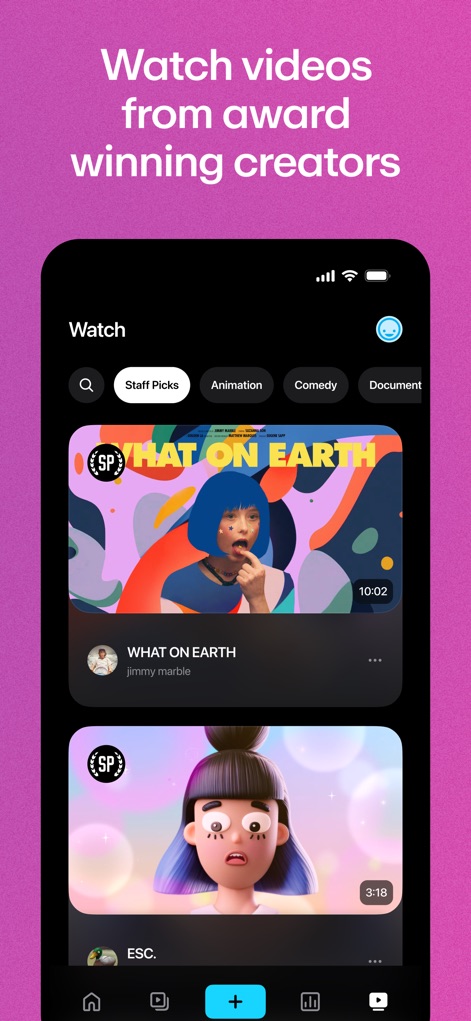
Curated Content Hub
This section reveals the app's diverse video library, showcasing expertly curated "Staff Picks" and intuitive category navigation for seamless content discovery.

Seamless Sharing Options
Users can efficiently distribute their content, with prominent share and save options alongside clear creator details and engagement metrics.
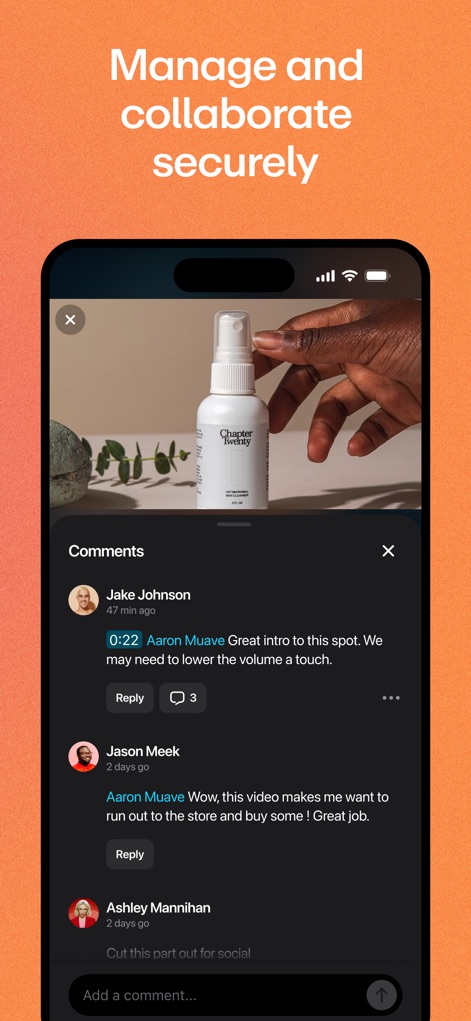
Collaborative Feedback Tools
The app facilitates secure teamwork through its robust comments section, displaying threaded discussions with user profiles and precise timestamped feedback.
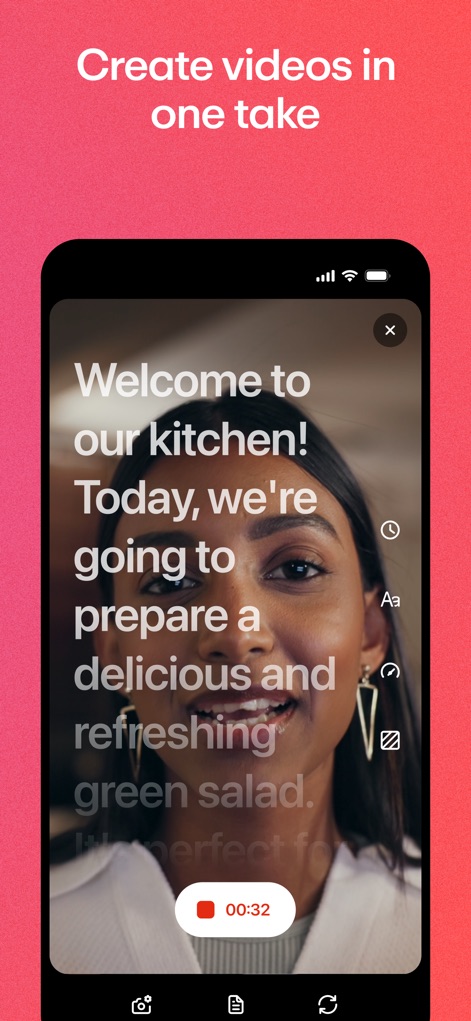
Efficient Video Creation
This tool streamlines content production with its integrated teleprompter text overlay and accessible on-screen recording timer and editing tools for single-take capture.

Performance Insights Dashboard
The app provides deep insights into video performance through its comprehensive analytics dashboard, showcasing detailed view and impression graphs alongside flexible filtering options.
Description
Download
More Like This
Apps with similar features and user experience

This page is not an official page of the app or its developer, but an independent editorial publication created for informational and commentary purposes. Unless expressly stated otherwise, neither the app nor its developer is affiliated with, endorsed by, sponsored by, authorized by, or otherwise officially connected with MWM, Apple, Google Play, the app publisher, or the app's developer, and nothing on this page implies that the app was developed using MWM's services. Any trademarks, logos, screenshots, and other content remain the property of their respective owners.