
This page is not an official page of the app or its developer, but an independent editorial publication created for informational and commentary purposes. Unless expressly stated otherwise, neither the app nor its developer is affiliated with, endorsed by, sponsored by, authorized by, or otherwise officially connected with MWM, Apple, Google Play, the app publisher, or the app's developer, and nothing on this page implies that the app was developed using MWM's services. Any trademarks, logos, screenshots, and other content remain the property of their respective owners.


VoCat - My Own Vocabulary
Vocabulary building is often a chore. This app gives you total command over your word arsenal, making rote learning obsolete.
Downloads
250k+User Rating
Total Ratings
5.3KPublisher
Category
EducationLocales
72Latest Version
4.5.8Size
159.4 MBFirst Released
Nov 10, 2020An evaluation of core functionalities designed for dedicated language learners and exam preparation.
VoCat - My Own Vocabulary: Key Analytical Features
Adaptive Quizzing & Mastery
The app offers diverse quizzing modes, including Flashcards, Multiple Choice, Dictation, and a 'Blinker' method, allowing users to practice words in varied ways. It intelligently supports mastery by enabling retesting specifically on previously incorrect answers.
Structured Study Planning
This tool allows users to create a personalized study schedule, defining the number of words to learn daily from their custom vocabulary lists. It facilitates structured, goal-oriented learning, crucial for exam preparation.
Exam-Ready Vocabulary Packs
The app provides access to ready-made vocabulary lists tailored for standardized exams such as SAT, JLPT, and HSK, alongside specialized fields like Medicine. This feature significantly streamlines preparation for specific academic or professional goals.
Intelligent Custom Vocabulary Builder
It allows users to easily create their own vocabulary lists. Upon entering a word, the app automatically fetches and completes its meaning, part of speech, and synonyms via integration with Google Translator and other dictionaries, saving significant time and ensuring comprehensive data.
Flexible Vocabulary Import/Export
The app supports importing vocabulary lists created in external tools like Excel or Google Sheets via CSV format, and also allows exporting existing lists. This flexibility is highly beneficial for users with structured data or those who prefer managing words outside the app initially.
Pronunciation Practice via TTS
This tool features a built-in Text-to-Speech engine that reads words aloud. It supports auditory learning and helps users improve their pronunciation across a wide range of supported languages.
Calendar-Based Progress Monitoring
The app offers a calendar view to track daily study activities, including newly added words and quiz history. This visual representation helps users monitor their consistency, review past performance, and stay motivated.
Visual Word Association
It allows users to associate words with images, either by selecting photos from their album or taking new pictures. This visual aid is a powerful memorization technique, enhancing recall and making learning more engaging.
Scheduled Word Alerts
The app provides customizable word notifications at user-defined times. This feature ensures consistent exposure to vocabulary throughout the day, reinforcing learning through passive engagement.
Uninterrupted Offline Access
The app enables users to access and study their vocabulary lists even without an internet connection. This ensures learning can occur anywhere, anytime, providing flexibility for dedicated learners.
Frequently Asked Questions
Everything you need to know about VoCat - My Own Vocabulary
What is VoCat - My Own Vocabulary app?
VoCat - My Own Vocabulary is an application for creating personal vocabulary lists with unlimited words, offering offline access, and various study tools like quizzes, a calendar, and word alerts.
Can I use VoCat - My Own Vocabulary without an internet connection?
Yes, VoCat - My Own Vocabulary supports offline use. Users can access their vocabulary and study without an internet connection.
How does VoCat - My Own Vocabulary help me create a vocabulary?
VoCat assists by automatically completing the meaning, part of speech, and synonyms of a word using Google Translator. It also integrates Naver Dictionary and Google Translate for easy reference.
Does VoCat - My Own Vocabulary support importing existing word lists?
Yes, VoCat - My Own Vocabulary allows users to import vocabulary lists in CSV format, enabling easy addition of words created in Excel or Google Sheets.
Can I share my vocabulary lists with others using VoCat - My Own Vocabulary?
Yes, VoCat - My Own Vocabulary allows users to share their created vocabulary as a CSV file. Users can share lists with friends for collaborative study.
What types of quizzes does VoCat - My Own Vocabulary offer?
VoCat - My Own Vocabulary provides various quiz types including Swipe Cards (FlashCard), Multiple Choice, Dictation, and Blinker. It also allows retesting of incorrect words.
Does VoCat - My Own Vocabulary offer pre-made vocabulary sets?
Yes, VoCat - My Own Vocabulary includes a bookstore with prepared vocabulary sets. These include English (SAT words), Japanese (JLPT), Chinese (HSK), and Medicine.
Can VoCat - My Own Vocabulary remind me to study words?
Yes, VoCat - My Own Vocabulary features word alerts. Users can receive notifications for words at any desired time to ensure frequent review.
Does VoCat - My Own Vocabulary support dark mode?
Yes, VoCat - My Own Vocabulary supports dark mode. This feature allows for comfortable viewing and study during nighttime.
Can I backup my data in VoCat - My Own Vocabulary?
Yes, VoCat - My Own Vocabulary provides backup options. Users can back up their entire data as a file or safely back it up to Google Drive with a single click.
What languages does VoCat - My Own Vocabulary support for learning?
VoCat - My Own Vocabulary supports an extensive list of languages for learning, including major ones like English, Japanese, Chinese, Korean, Spanish, French, and German.
How can I track my study progress in VoCat - My Own Vocabulary?
VoCat - My Own Vocabulary allows users to track study progress via a calendar. The calendar displays words added daily and quiz history, facilitating review.
Does VoCat - My Own Vocabulary offer text-to-speech for words?
Yes, VoCat - My Own Vocabulary reads words aloud using its built-in speech engine (TTS). Users can listen to words, similar to listening to music.
The following screenshots and description are sourced directly from the app's official store listing and are the property of the app developer.
App Store
Screenshots
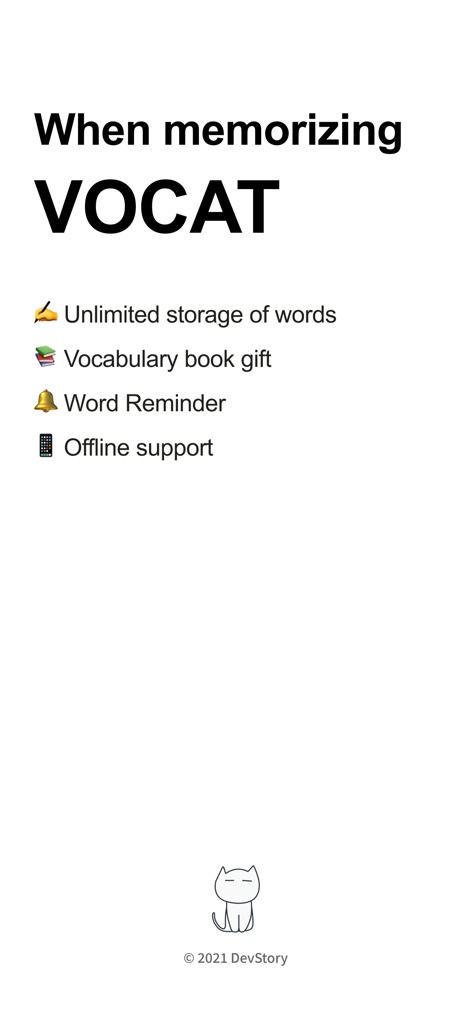
Discover the core advantages of VoCat, including its unlimited word storage and robust offline support for uninterrupted learning.
Essential App Features
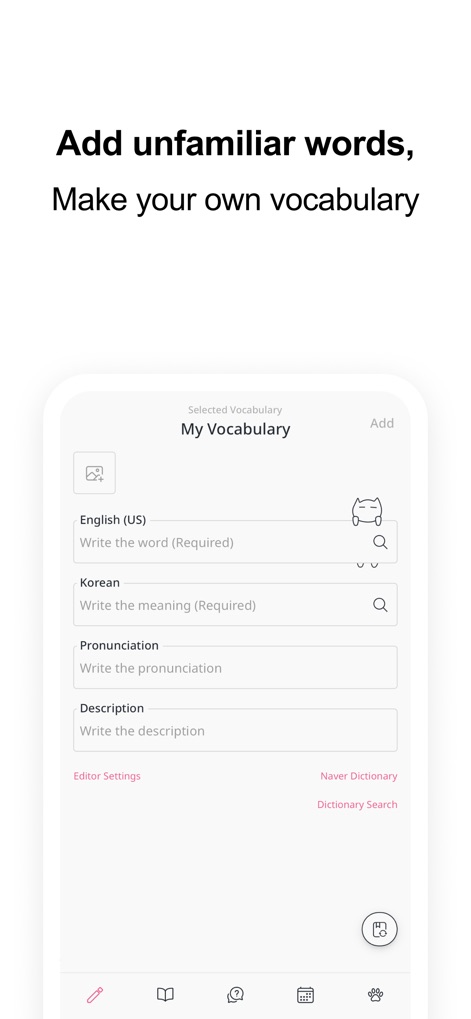
See how users can easily add new words with customizable entry fields and instantly access integrated dictionary search results.
Effortless Word Creation
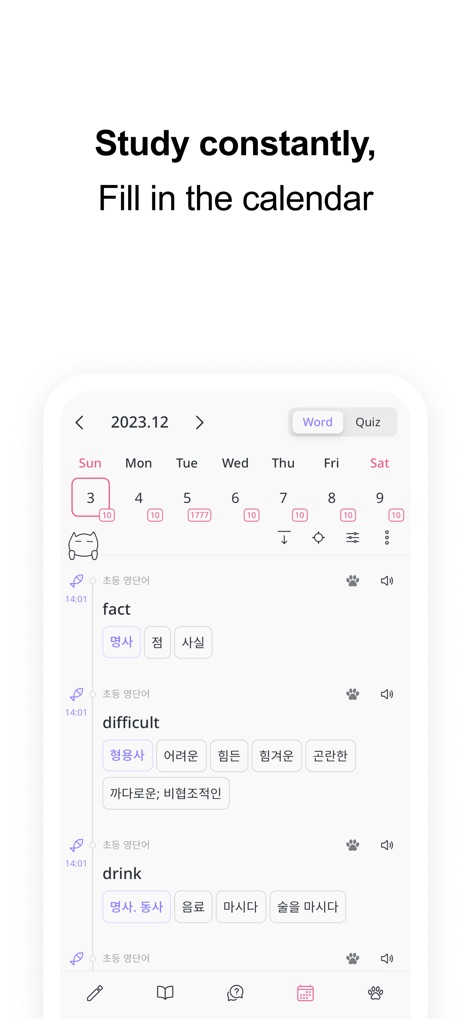
The app visualizes learning activity through an intuitive calendar view, highlighting daily word additions and study history.
Track Study Progress
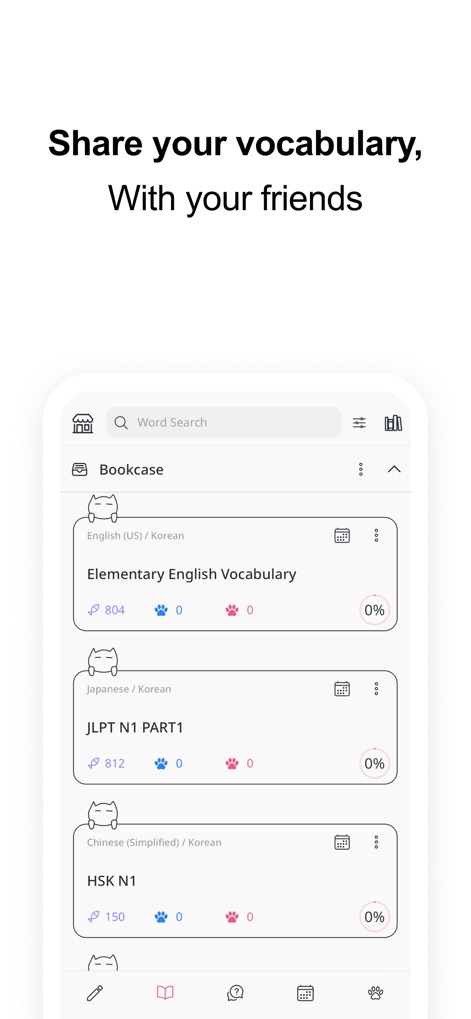
VoCat organizes vocabulary into distinct sets within the "Bookcase" and offers straightforward sharing functionality for group study.
Collaborative Learning
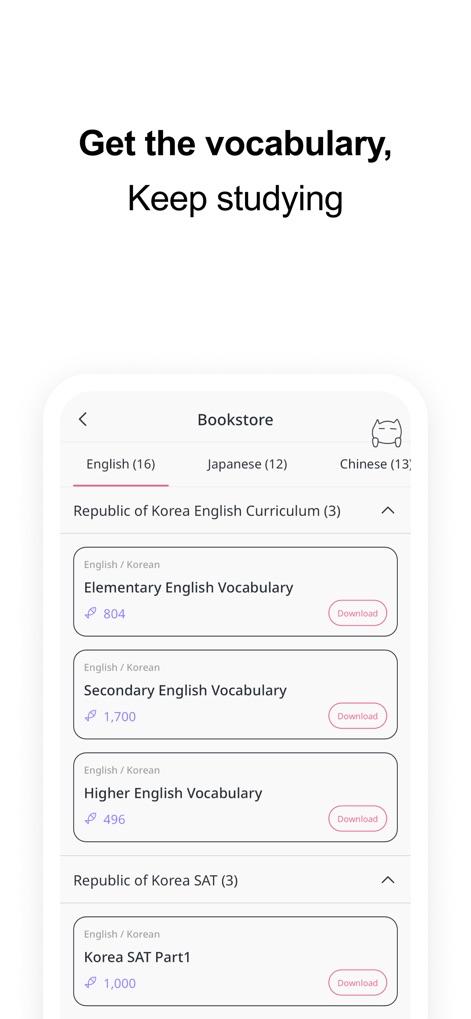
Explore the extensive "Bookstore" feature, providing access to specialized vocabulary lists for exams like SAT and JLPT.
Curated Vocabulary Library
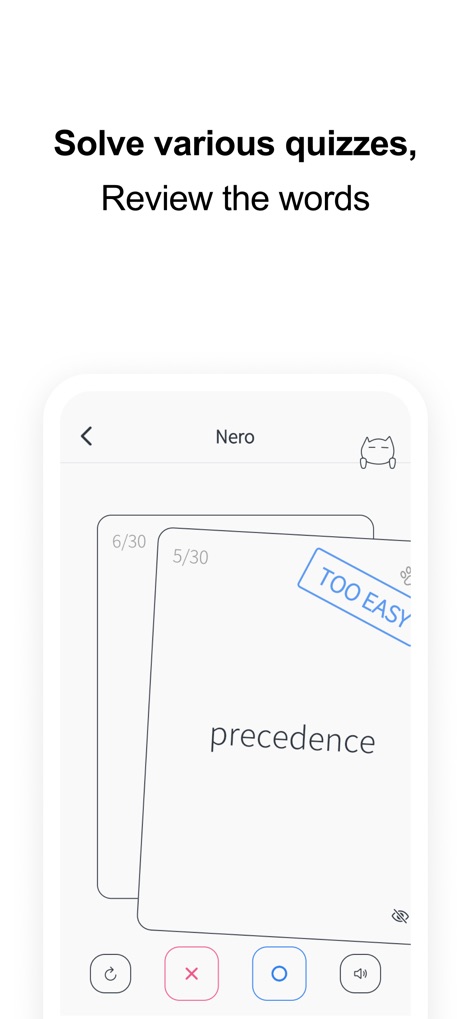
Engage with dynamic learning methods such as interactive flashcard quizzes, complete with options to mark words as "too easy".
Diverse Quiz Modes
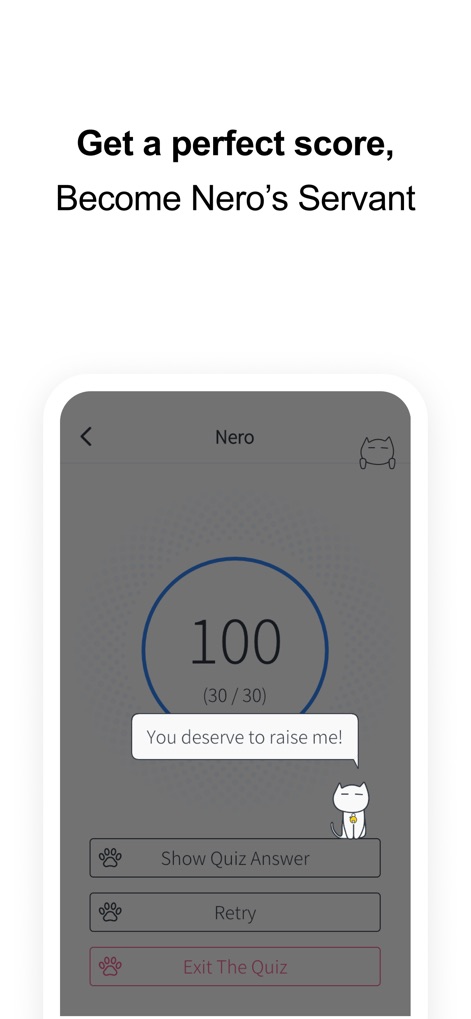
Experience the satisfaction of achieving a perfect quiz score, with visual feedback and encouragement from the app's mascot, Nero.
Gamified Achievements
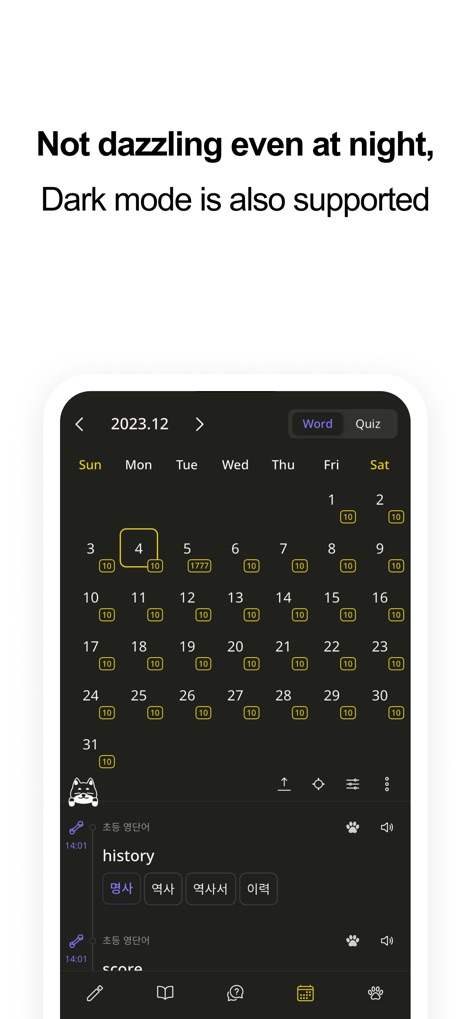
The app ensures comfortable use in any environment, featuring a comprehensive calendar interface and full dark mode support.
Adaptive User Experience
Description
Download
More Like This
Apps with similar features and user experience
Periodic Table Quiz
Atlas Educational Software

The Bible Memory App
Millennial Apps, LLC

Cogni: Flashcards Learning
COGNIFLY LTD

墨墨记忆卡|考研考公考证外语学习闪卡
Guangzhou Quanliang Technology Co., Ltd.
RemNote - Notes & Flashcards
RemNote, LLC

GreenNote-Flashcards for memo
利颜 王

Flashcards maker - Easy to use
Yoshinobu Ikeda
MemoWord: My FlashCards Maker
Elena Tikhonova

Flashcard Hero
Rico Gundermann
This page is not an official page of the app or its developer, but an independent editorial publication created for informational and commentary purposes. Unless expressly stated otherwise, neither the app nor its developer is affiliated with, endorsed by, sponsored by, authorized by, or otherwise officially connected with MWM, Apple, Google Play, the app publisher, or the app's developer, and nothing on this page implies that the app was developed using MWM's services. Any trademarks, logos, screenshots, and other content remain the property of their respective owners.