
This page is not an official page of the app or its developer, but an independent editorial publication created for informational and commentary purposes. Unless expressly stated otherwise, neither the app nor its developer is affiliated with, endorsed by, sponsored by, authorized by, or otherwise officially connected with MWM, Apple, Google Play, the app publisher, or the app's developer, and nothing on this page implies that the app was developed using MWM's services. Any trademarks, logos, screenshots, and other content remain the property of their respective owners.


WASH-Connect
No more laundry room limbo. This app delivers ultimate control over your wash.
Downloads
1M+User Rating
Total Ratings
165.7KPublisher
Category
UtilitiesLocales
2Latest Version
6.7.1Size
58.1 MBFirst Released
Sep 27, 2019An analytical overview of key features for modern urban living.
WASH-Connect: A Smart Laundry Solution
Mobile Payment for Laundry
It allows users to conveniently pay for laundry services directly from their mobile device, eliminating the need for coins or physical cards. This feature significantly enhances convenience and aligns with modern digital payment preferences.
Real-time Machine Availability
The app provides real-time updates on which washing and drying machines are currently available or in use. This enables users to efficiently plan their laundry trips, avoiding queues and wasted time.
Laundry Completion Notifications
This tool features automated notifications that alert users as soon as their laundry cycle is complete. This prevents forgotten loads, reduces machine hogging, and allows users to manage their time more effectively.
Direct In-App Support
The app offers direct access to support resources and assistance within the application itself. This ensures that users can quickly resolve issues or get answers to their questions, improving the overall user experience.
In-App Service Request
It allows users to easily report issues with a specific machine or request service directly through the app. This streamlines the problem-solving process and ensures that maintenance concerns are addressed promptly.
Laundry Tips and Hacks
The app provides a collection of helpful tips, tricks, and laundry hacks. This content assists users in optimizing their washing routines, caring for garments, and making the most out of their laundry experience.
Frequently Asked Questions
Everything you need to know about WASH-Connect
What is the WASH-Connect app?
Yes, WASH-Connect is a mobile payment app designed for smart laundry rooms. It enables users to pay for laundry, check machine availability, and receive notifications when laundry cycles are complete.
How do I pay for laundry using WASH-Connect?
Yes, you pay using the WASH-Connect app. Set up an account, add funds with your credit/debit card, then find the desired machine and tap pay. You can enter the machine number or scan a QR code.
Can I check machine availability and get notifications with the WASH-Connect app?
Yes, the WASH-Connect app allows users to check machine availability and see which machines are in use. It also provides real-time notifications when your laundry completes.
Is mobile payment available for all laundry machines with WASH-Connect?
No, mobile payment through the WASH-Connect app is only available for WASH-Connect enabled machines. The app specifically states this limitation.
What kind of support does WASH-Connect offer?
WASH-Connect offers in-app support for machine service requests, app not working, and refund requests. Users can also email mobilesupport@washlaundry.com for assistance.
Does the WASH-Connect app provide laundry tips and tricks?
Yes, the WASH-Connect app includes a "Tips, Tricks and Laundry Hacks" section. This resource provides information on best practices, stain removal, machine troubleshooting, and laundry symbols.
Do I need to be in the laundry room to start a machine with WASH-Connect?
Yes, you must be physically present in the laundry room to start a machine using the WASH-Connect app. You can start a machine by entering its number or scanning its QR code.
How do I add funds to my WASH-Connect account?
Yes, you add funds within the WASH-Connect app. After setting up your account, use your credit or debit card to load money into your balance for laundry payments.
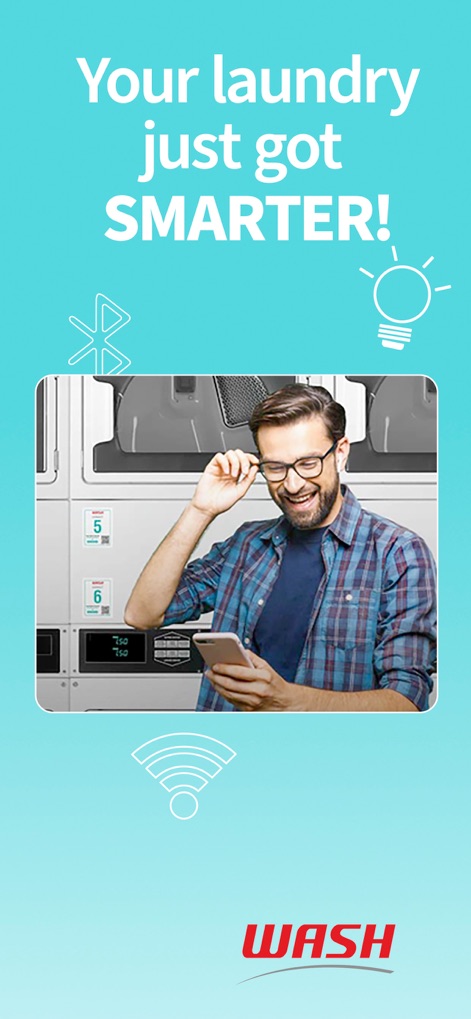
The following screenshots and description are sourced directly from the app's official store listing and are the property of the app developer.
App Store
Screenshots


Description
Download
More Like This
Apps with similar features and user experience

Speed Queen
Alliance Laundry Systems, LLC

toreluna - トレルナで生理用ナプキンが無料
NEXT INNOVATION INC.

WashXpress
LAUNDRY YOU PUBLIC COMPANY LIMITED
VMmarket
VM TECNOLOGIA LTDA

Foodles
La Boite a Encas

PayRange
PayRange Inc.

CSC GO
CSC ServiceWorks Holdings, INC.
MatiPay
Matipay S.r.l.
24U
Michael Grinman
This page is not an official page of the app or its developer, but an independent editorial publication created for informational and commentary purposes. Unless expressly stated otherwise, neither the app nor its developer is affiliated with, endorsed by, sponsored by, authorized by, or otherwise officially connected with MWM, Apple, Google Play, the app publisher, or the app's developer, and nothing on this page implies that the app was developed using MWM's services. Any trademarks, logos, screenshots, and other content remain the property of their respective owners.