
This page is not an official page of the app or its developer, but an independent editorial publication created for informational and commentary purposes. Unless expressly stated otherwise, neither the app nor its developer is affiliated with, endorsed by, sponsored by, authorized by, or otherwise officially connected with MWM, Apple, Google Play, the app publisher, or the app's developer, and nothing on this page implies that the app was developed using MWM's services. Any trademarks, logos, screenshots, and other content remain the property of their respective owners.


Water Tracker by WaterMinder®
Dehydration is a silent drain on performance; this app hands you the reins to consistent hydration.
Downloads
2.5M+User Rating
Total Ratings
75.9KPublisher
Category
Health & FitnessLocales
24Latest Version
7.2.12Size
296.2 MBFirst Released
Jul 19, 2013An analytical overview of key features for health-conscious Apple users.
Comprehensive Evaluation: Water Tracker by WaterMinder®
Seamless Apple Ecosystem Integration
This tool features comprehensive integration with the Apple ecosystem, including a standalone Apple Watch app for wrist-based logging, customizable Home Screen widgets for quick progress views, and Apple Health sync for consolidated health data.
Personalized Hydration Goals & Smart Reminders
The app provides personalized daily water intake goals based on user body weight and delivers customizable smart reminders to ensure consistent hydration throughout the day.
Detailed Hydration Analytics & Progress Visualization
The app provides users with a beautiful hydration progress ring, percentage views, and detailed weekly statistics to monitor their intake trends and understand their hydration habits over time.
Intuitive Interface & Visual Customization
The app features a clean, simple interface that is easy to use daily, along with options for Dark Mode, multiple app icons, and unit switching (US oz, UK oz, mL, L) to personalize the user experience.
Diverse Beverage Tracking & Customization
It allows users to track a wide range of beverages beyond just water, such as coffee, tea, and juice. Users can also create custom cup sizes with personalized icons and colors for accurate logging.
Gamified Motivation & Community Sharing
It includes challenges, achievements for reaching intake goals, and the option to share progress with friends, fostering motivation and encouraging consistent hydration habits.
Frequently Asked Questions
Everything you need to know about Water Tracker by WaterMinder®
What is WaterMinder®?
WaterMinder® is an award-winning water tracker app. It helps users track their water intake and reminds them to drink to reach daily hydration goals, based on body weight or personal targets.
Does WaterMinder® send hydration reminders?
Yes, WaterMinder® sends advanced water tracker reminders. It prompts users to drink water to achieve daily goals, with notifications appearing on both Apple Watch and iPhone.
Can I log other drink types besides water in WaterMinder®?
Yes, WaterMinder® allows users to log and create other drink types in addition to water. You can also customize cups with specific sizes, icons, and colors for various beverages.
Is WaterMinder® available on Apple Watch?
Yes, WaterMinder® includes a standalone Apple Watch app. Users receive reminders and track water intake directly from their Apple Watch for convenient hydration management.
Does WaterMinder® offer Home Screen or Lock Screen widgets?
Yes, WaterMinder® provides multiple Home Screen and Lock Screen widgets. These interactive widgets enable users to track and view their hydration progress instantly from their device's screen.
What measurement units does WaterMinder® support for water intake?
WaterMinder® supports US oz, UK oz, L (liters), and ML (milliliters) units for tracking water intake. Users select their preferred measurement system within the app.
Is WaterMinder® a free application?
WaterMinder® offers an auto-renewing subscription that includes a 7-day free trial. Payments are charged to your iTunes Account, requiring auto-renew to be turned off for cancellation.
Does WaterMinder® integrate with Apple Health?
Yes, WaterMinder® features Apple Health Sync. This integration reads and writes user data including weight, gender, and date of birth, enhancing health tracking capabilities.
Can I customize the appearance of the WaterMinder® app?
Yes, WaterMinder® offers customization options. Users can change their app icon, choose an alternative hydration progress ring layout, and utilize a dark mode for personalized aesthetics.
Does the WaterMinder® app offer hydration challenges?
Yes, WaterMinder® includes various challenges. Users can participate in activities like the '21-Day Hydration Habit' to encourage and maintain consistent water intake goals.
The following screenshots and description are sourced directly from the app's official store listing and are the property of the app developer.
App Store
Screenshots
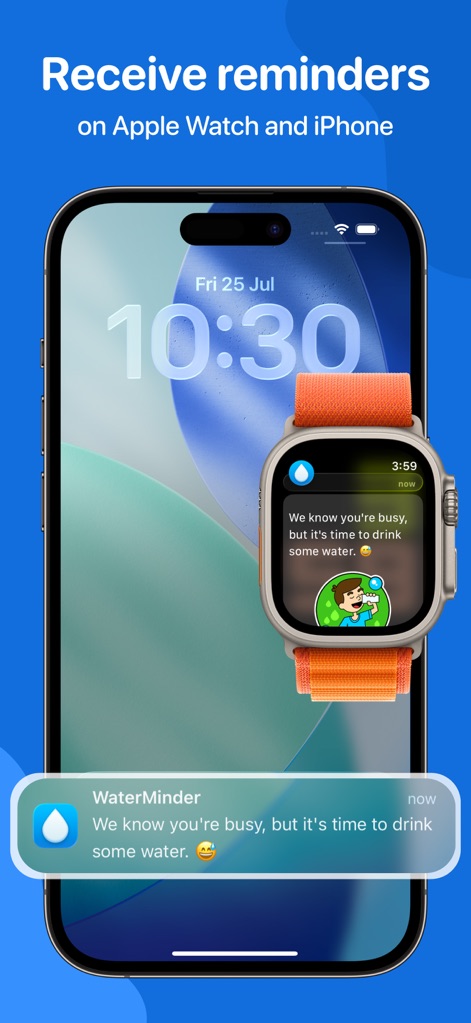
Users receive timely hydration reminders on both their Apple Watch and iPhone, ensuring consistent hydration tracking throughout the day.
Smart Reminders Across Devices

This tool simplifies water intake logging with a simple tap, visually representing progress as a character fills up and offering quick Apple Watch entry.
Effortless Hydration Tracking
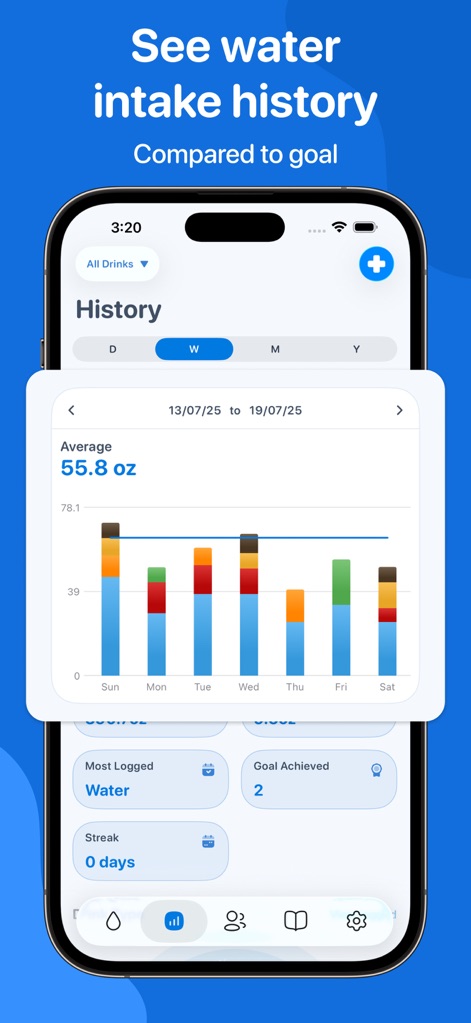
The app provides a clear overview of hydration progress, showcasing a weekly bar chart of intake and detailed daily averages for insightful analysis.
Hydration History Insights
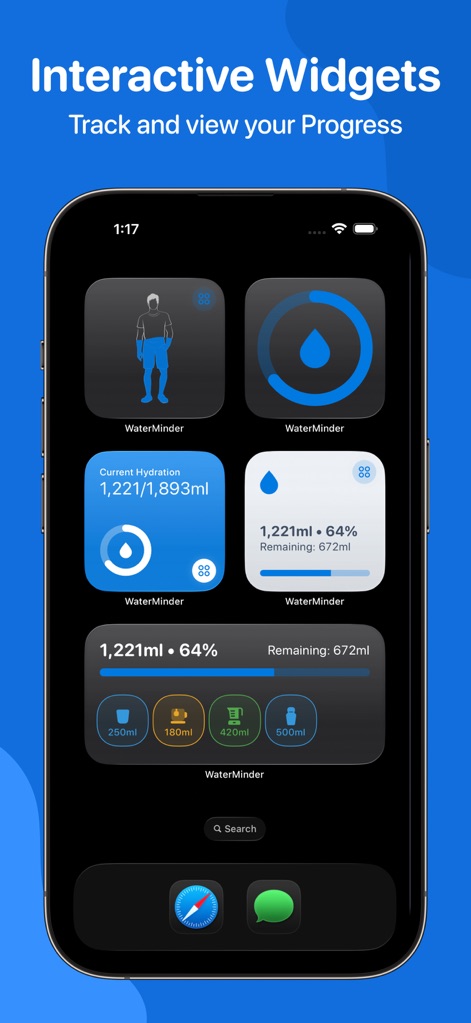
Users can monitor their daily water tracker progress at a glance with multiple Home Screen and Lock Screen widgets, displaying current hydration percentage and remaining intake.
Dynamic Hydration Widgets
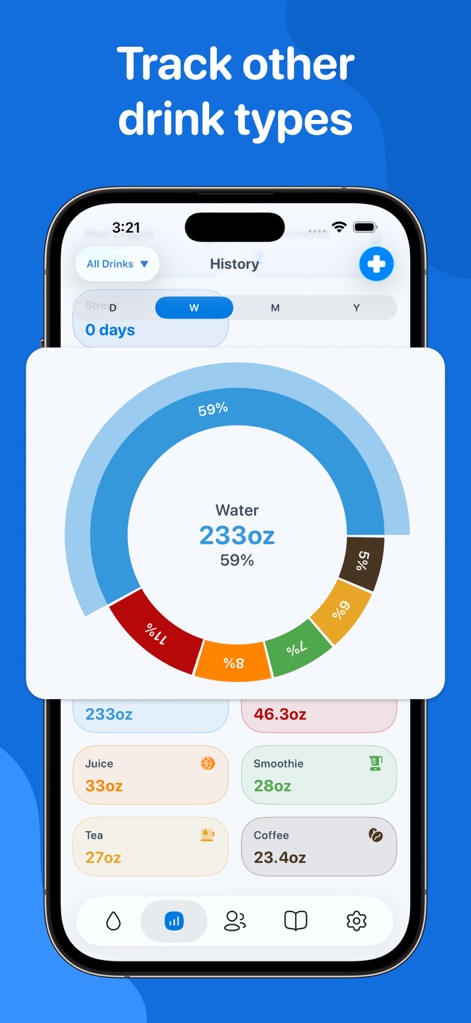
Beyond water, the app allows logging of various drink types, presenting a clear circular graph to visualize the proportional intake of each beverage.
Diverse Drink Tracking
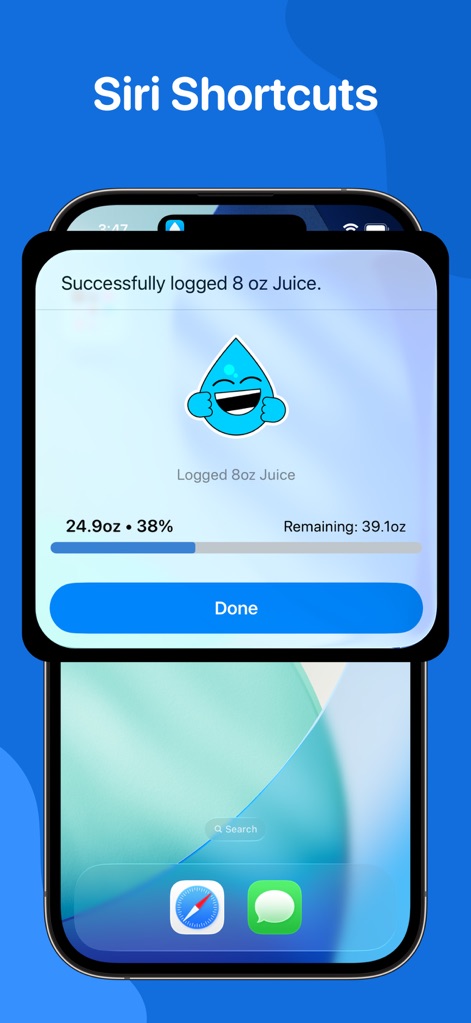
The app integrates seamlessly with Siri Shortcuts, enabling users to log drinks like juice effortlessly with voice commands and view immediate confirmation.
Hands-Free Logging
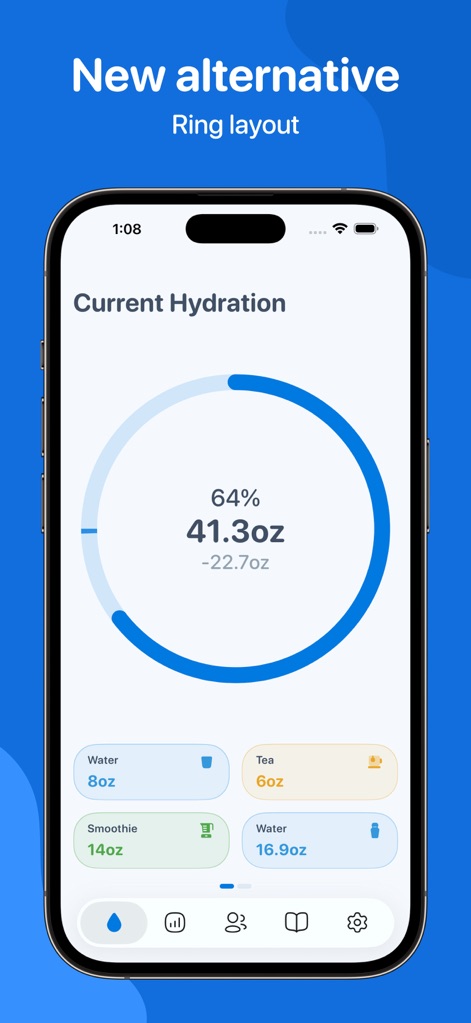
This tool offers an alternative ring layout to display current hydration, providing a percentage and remaining intake alongside quick-tap custom drink buttons.
Visual Progress Rings
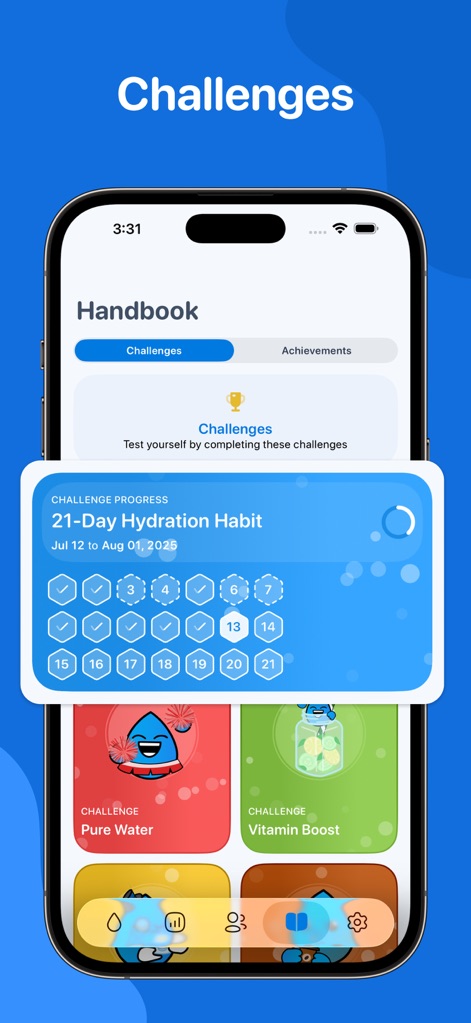
Users can boost motivation through structured challenges, tracking their progress on a calendar grid and selecting from various themed activities.
Engaging Hydration Challenges
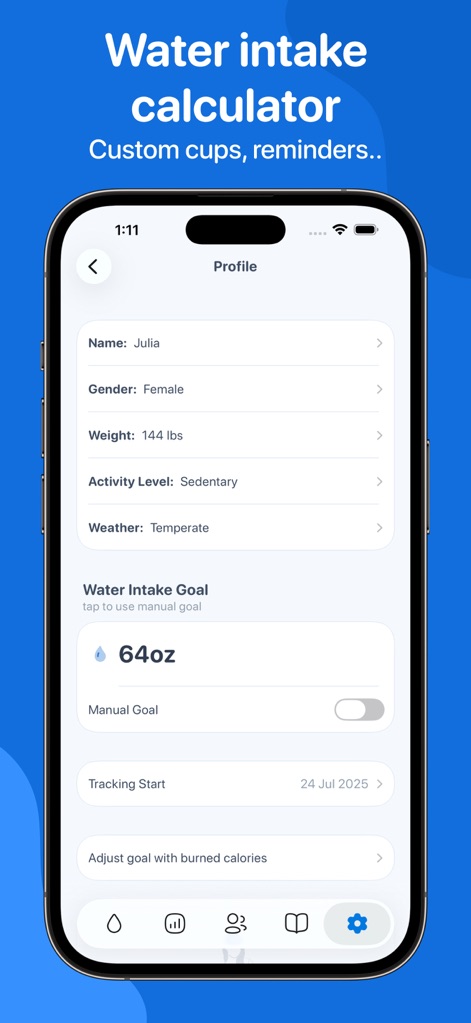
The app calculates a personalized water intake goal based on user profile details like weight and activity level, with options for manual goal adjustment.
Personalized Hydration Goals
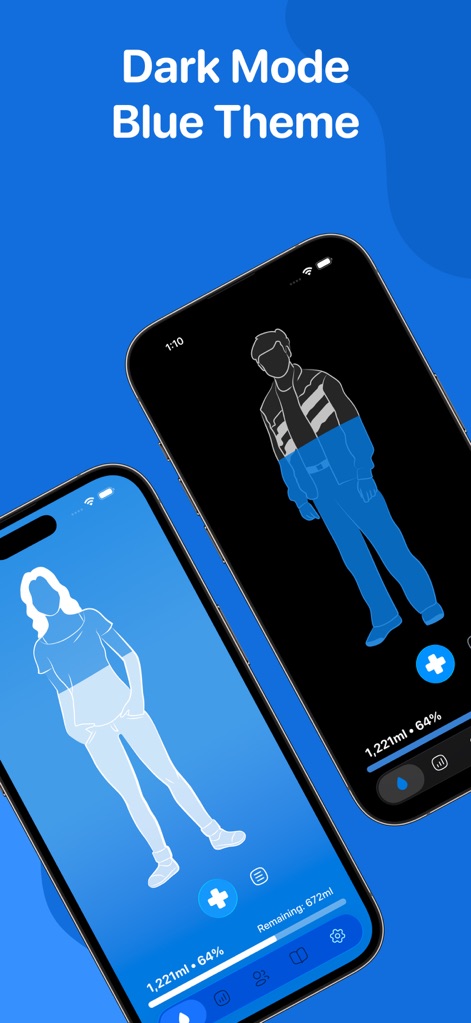
The app supports Dark Mode, offering a sleek blue theme that visually highlights the hydration level on the character for an enhanced user experience.
Aesthetic Dark Mode
Description
Download
More Like This
Apps with similar features and user experience

Water tracker Waterllama
Llama Luna Apps Inc
Water Time - My Drink Reminder
Roman Nikolaev
Water Tracker. Drink Reminder
CREATIVE TECHNOLOGIES LLC
Water Tracker - Drink Reminder
Shenzhen Xinchuang Information Technology Co., Ltd.

Watercat: drink reminder
Orange dog d.o.o.
Water Reminder - Daily Tracker
VGFIT LLC
Drink water reminder
Hieu Nguyen
Drink water: Drinking reminder
TOWER OF HANOI SOFTWARE COMPANY LIMITED
My Water: Daily Drink Tracker
My Water Drink Tracker Oy
This page is not an official page of the app or its developer, but an independent editorial publication created for informational and commentary purposes. Unless expressly stated otherwise, neither the app nor its developer is affiliated with, endorsed by, sponsored by, authorized by, or otherwise officially connected with MWM, Apple, Google Play, the app publisher, or the app's developer, and nothing on this page implies that the app was developed using MWM's services. Any trademarks, logos, screenshots, and other content remain the property of their respective owners.