
This page is not an official page of the app or its developer, but an independent editorial publication created for informational and commentary purposes. Unless expressly stated otherwise, neither the app nor its developer is affiliated with, endorsed by, sponsored by, authorized by, or otherwise officially connected with MWM, Apple, Google Play, the app publisher, or the app's developer, and nothing on this page implies that the app was developed using MWM's services. Any trademarks, logos, screenshots, and other content remain the property of their respective owners.


Wave: Small Business Software
Small business finance, untangled. This app gives users absolute clarity on their cash flow, from invoice to payout.
Downloads
1M+User Rating
Total Ratings
9.6KPublisher
Category
BusinessLocales
1Latest Version
4.14.0Size
104.9 MBFirst Released
Jun 19, 2014An Analytical Overview for Self-Employed and Small Business Owners
Key Features of Wave: Small Business Software
Online Payment Processing
It allows users to accept credit card and bank payments directly through invoices, accelerating payment collection and improving cash flow.
Professional Mobile Invoicing
The app provides tools to create and send customized, professional invoices, track their status, and receive payment notifications on the go.
Automated Expense Tracking & Receipts
This tool features automated receipt capture using OCR technology for easy expense tracking and synchronization with accounting reports, simplifying tax preparation.
Automated Payment Reminders
It enables users to automate sending reminders for late payments, which helps improve cash flow and reduces the manual effort of chasing overdue invoices.
Bank Transaction Automation
The app automatically imports, merges, and categorizes bank transactions, streamlining bookkeeping and ensuring accurate financial records.
Comprehensive Business Dashboard
The app offers an intuitive dashboard providing at-a-glance business insights, including profit/loss statements and key invoicing metrics for informed decision-making.
Frequently Asked Questions
Everything you need to know about Wave: Small Business Software
What is the Wave mobile app designed for?
The Wave mobile app is an integrated solution for small business owners, creators, freelancers, and contractors. It manages invoicing, estimates, and expense tracking on-the-go.
Who can use the Wave: Small Business Software app?
The Wave app is for small business owners, creators, freelancers, consultants, and contractors in the US and Canada. It serves as a mobile companion to the desktop experience.
What core features does the Wave app offer for small businesses?
The Wave app offers professional invoicing, customizable estimates, expense tracking, and optional online credit card and bank payment processing. It helps manage business finances.
How does receipt scanning work in the Wave app?
The Wave app uses optical character recognition (OCR) technology to capture receipt details instantly. Users can track business expenses by scanning receipts from mobile or uploading from desktop/email.
Is receipt scanning free with the Wave app?
No, receipt scanning is included for free with the Pro Plan. For the Starter Plan, it is available as an easy add-on, allowing unlimited receipt capture.
What are the benefits of the Wave Pro Plan for small businesses?
The Pro Plan provides unlimited receipt capture, discounted online payment rates, auto-import/categorize bank transactions, additional users, automated late payment reminders, and live support.
Can the Wave app accept online payments from clients?
Yes, the Wave app integrates with online payments to accept major credit cards (Visa, MasterCard, Amex, Discover) and bank payments for a per-transaction fee.
How quickly do payments process through the Wave app?
Most Wave invoices paid by credit card and bank payment process in 2 days or less. This feature helps businesses get paid faster.
Is financial data secure when using the Wave app?
Yes, Wave states that user data is safe with bank-grade security and encryption. This protects sensitive financial information for small businesses.
Does the Wave mobile app synchronize with the desktop version?
Yes, the Wave mobile app synchronizes instantly with the user's Wave account on desktop. It acts as a companion to the desktop experience.
What invoicing features does the Wave app provide?
The Wave app allows creating professional, customized invoices with logos. Users receive payment notifications, check invoice status (sent, viewed, overdue, paid), and send reminders and receipts.
How do I create estimates with the Wave app?
Users create and send estimates instantly from the Wave app, customizing them with brand colors and logos. Estimates convert into invoices in seconds.
How does the Wave app help manage business expenses?
The Wave app tracks business expenses by capturing unlimited receipts via OCR technology. It allows categorizing transactions on-the-go or on desktop, keeping everything synced.
The following screenshots and description are sourced directly from the app's official store listing and are the property of the app developer.
App Store
Screenshots

The app's intuitive dashboard offers quick financial overviews, highlighting key metrics like overdue invoices and upcoming payments.
Instant Business Insights

This tool provides essential functionality for small business owners, featuring integrated income & expense tracking and comprehensive estimates & invoicing.
Core Business Tools
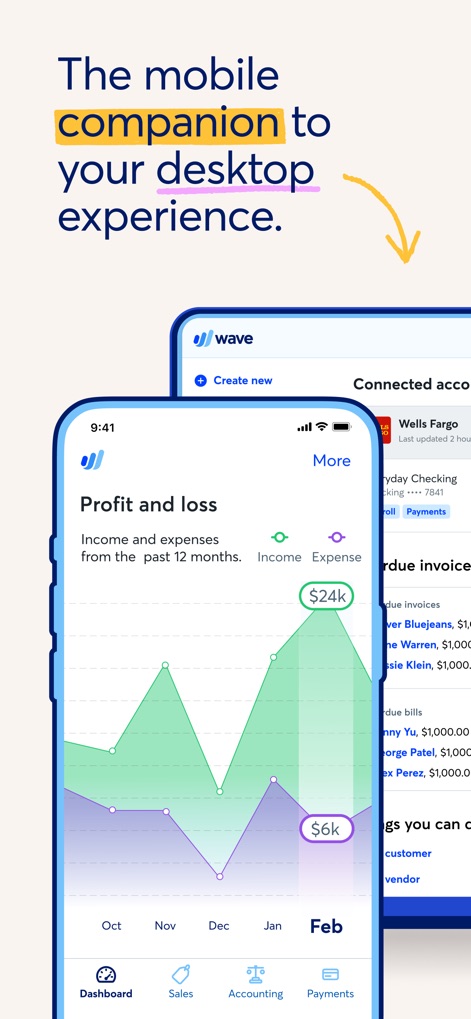
Users can monitor their business's financial health through interactive profit and loss graphs, with seamless synchronization between the mobile and desktop experiences.
Seamless Cross-Platform

The desktop interface offers dynamic cash flow visualizations and instant notifications, keeping users informed about viewed invoices and received payments.
Real-time Financials
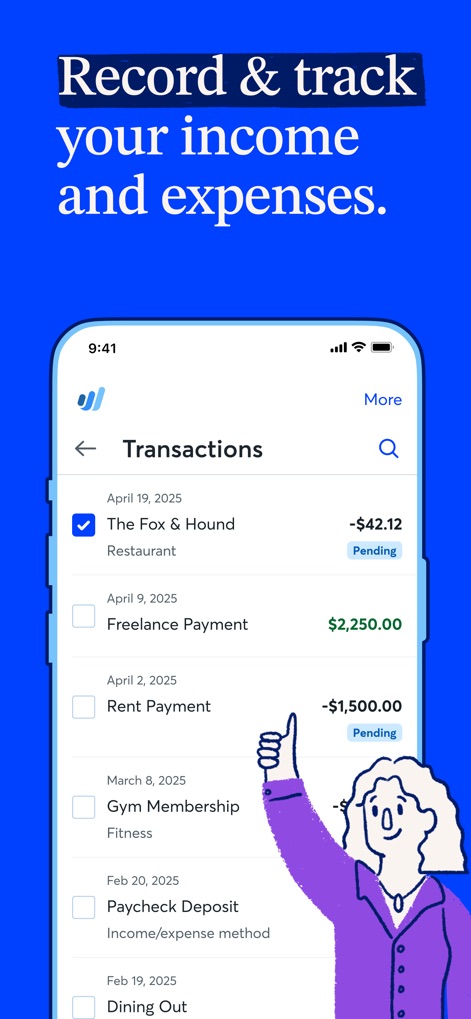
Effortlessly manage all income and expense transactions, allowing users to categorize entries and view their current payment status directly from the app.
Track All Transactions
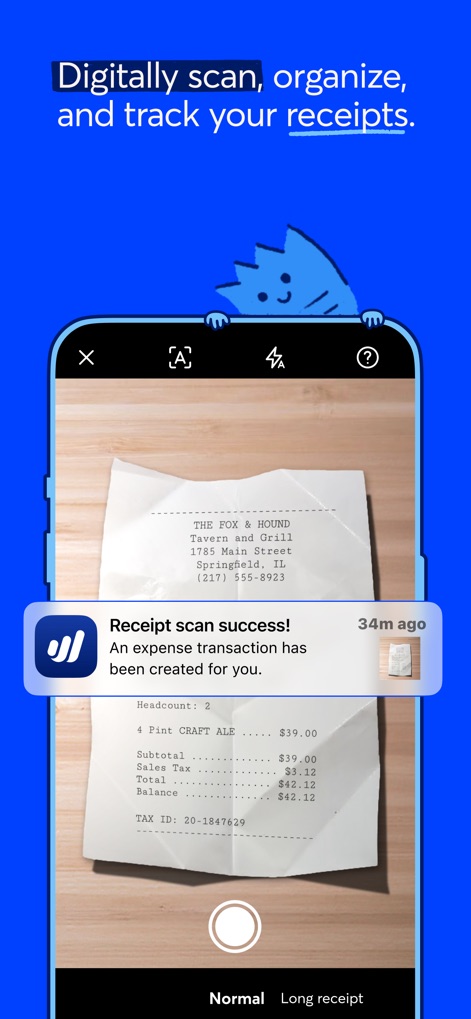
This app simplifies expense management with advanced receipt scanning using OCR technology, which automatically creates and tracks expense transactions.
Effortless Receipt Scan
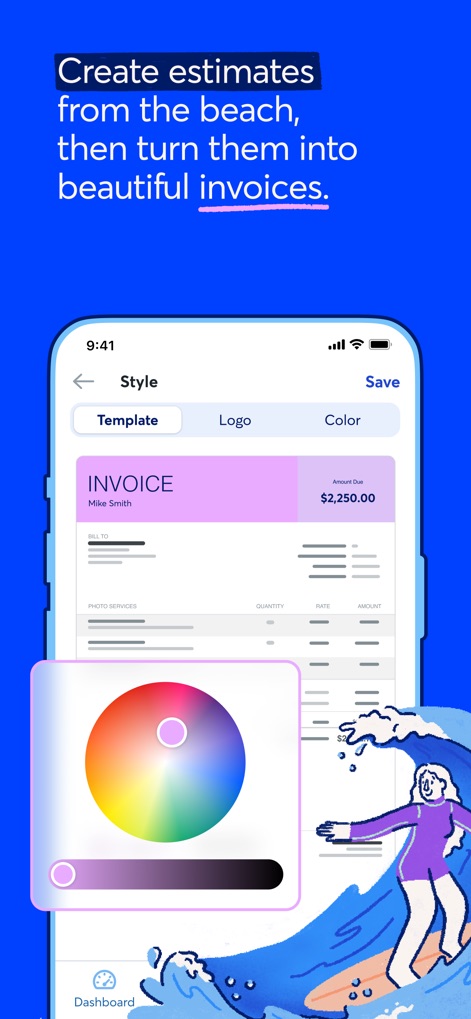
Create polished, personalized invoices using various customizable templates and integrate unique branding elements like company logos and custom color schemes.
Customized Professionalism
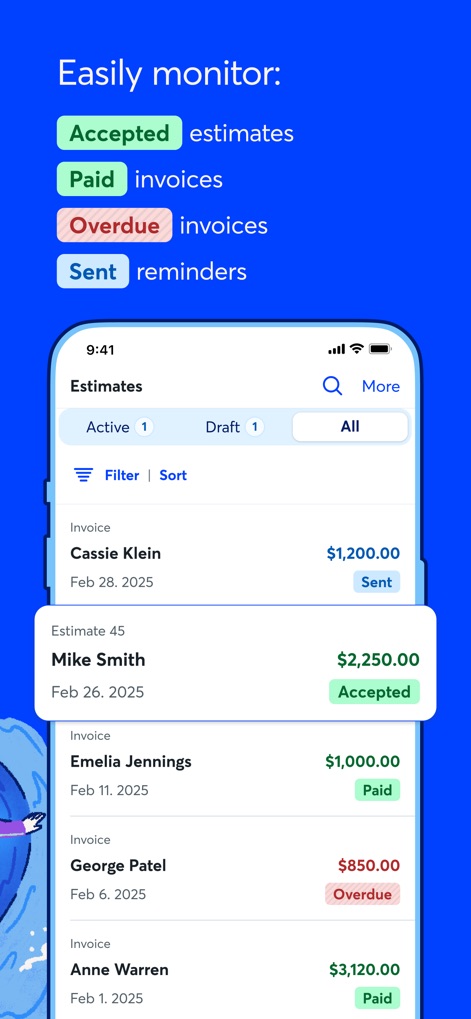
Effortlessly manage client payment cycles by monitoring the status of all estimates and invoices, clearly displaying accepted estimates and overdue payments.
Oversee Payments Easily
Description
Download
More Like This
Apps with similar features and user experience

Invoice Maker - PDF Creator
Decodation LLC
Invoice Maker + Estimate App
Daniel Bitton

Invoice Maker - Invoice Fly
Labhouse Mobile SL
Invoice Maker ▸ Estimate App
GetPaid Inc.

Invoice Simple: Invoice Maker
Zenvoice Inc.
Zoho Invoice Maker App
Zoho Corporation

Accounting App - Zoho Books
Zoho Corporation

Invoice2go: Easy Invoice Maker
Invoice2go.com

Invoice Maker & Estimate App
Bookipi Pty Ltd
This page is not an official page of the app or its developer, but an independent editorial publication created for informational and commentary purposes. Unless expressly stated otherwise, neither the app nor its developer is affiliated with, endorsed by, sponsored by, authorized by, or otherwise officially connected with MWM, Apple, Google Play, the app publisher, or the app's developer, and nothing on this page implies that the app was developed using MWM's services. Any trademarks, logos, screenshots, and other content remain the property of their respective owners.