
This page is not an official page of the app or its developer, but an independent editorial publication created for informational and commentary purposes. Unless expressly stated otherwise, neither the app nor its developer is affiliated with, endorsed by, sponsored by, authorized by, or otherwise officially connected with MWM, Apple, Google Play, the app publisher, or the app's developer, and nothing on this page implies that the app was developed using MWM's services. Any trademarks, logos, screenshots, and other content remain the property of their respective owners.


WeDJ for iPhone
Pioneer DJ's latest offering grants instant command over digital decks. It hands users the power to craft mixes, anywhere, anytime.
Downloads
2.5M+User Rating
Total Ratings
82.8KPublisher
Category
MusicLocales
2Latest Version
2.0.9Size
74.8 MBFirst Released
Nov 24, 2016An evaluation of essential functionalities tailored for mobile-first music enthusiasts and beginners seeking an accessible entry into digital DJing.
WeDJ for iPhone: Core Features Analysis for Aspiring DJs
Intuitive Dual-Deck Mixing
This tool features a 2-channel layout, Beat Sync for effortless tempo matching, and a crossfader, complemented by Transition FX for professional-sounding blends, making core DJing accessible.
Streaming Service Integration
The app provides seamless access to popular music streaming services like Beatport Streaming and SoundCloud Go+/DJ, alongside local iPhone tracks, offering an extensive and diverse music library for mixing.
Comprehensive Performance Effects
It allows users to creatively manipulate sound with a variety of FX such as Echo and Reverb, trigger built-in sounds with the Sampler, fine-tune audio with a 3-band EQ, and precisely control track speed using the tempo slider and Master Tempo.
Precise Track Control
This tool features advanced playback control with Loop functionality to repeat track sections and Hot Cue points for instant jumps to specific moments, empowering dynamic and precise mixing.
Dynamic Visual Interface
The app offers an intuitive visual experience with responsive jog wheels for scratching and enlarged waveforms that provide clear visual feedback for beat matching and playback positioning.
External Hardware Integration
It allows users to elevate their DJ experience by connecting to compatible Pioneer DJ gear like the DDJ-200, DDJ-WeGO4, and DDJ-WeGO3 for a more tactile and professional control setup.
Frequently Asked Questions
Everything you need to know about WeDJ for iPhone
What is WeDJ for iPhone?
WeDJ for iPhone is a DJ application developed by Pioneer DJ. It provides a flexible and seamless DJ experience, allowing users to play and mix music from streaming services and tracks stored on their iPhone.
What music sources does WeDJ for iPhone support?
WeDJ for iPhone supports music from iTunes, Beatport Streaming, SoundCloud Go+/DJ, and other iPhone locations such as Dropbox. Streaming services require separate subscriptions.
Can I connect external DJ hardware to WeDJ for iPhone?
Yes, WeDJ for iPhone connects to compatible Pioneer DJ hardware. Supported units include the DDJ-200, DDJ-WeGO4, and DDJ-WeGO3, allowing for hands-on control during performances.
What effects are available in WeDJ for iPhone?
WeDJ for iPhone offers various effects (FX) to modify sound texture. These include Echo, Reverb, Roll, Sweep, Flanger, V.Brake, and R.Echo, enabling users to create unique sounds.
Does WeDJ for iPhone include a sampler?
Yes, WeDJ for iPhone includes a sampler feature. Users can trigger built-in sounds such as Horn, Siren, Clapsnare, Drop FX, Kick, Hat, and Razer to enhance their mixes creatively.
How do I record my DJ mix in WeDJ for iPhone?
WeDJ for iPhone allows users to record their mixes. This feature captures the audio output, but recording is disabled when playing music from supported streaming services like Beatport or SoundCloud.
Can WeDJ for iPhone automatically mix tracks?
Yes, WeDJ for iPhone features an Automix function. This allows the application to automatically perform the mixing between tracks, enabling users to enjoy their playlists without manual intervention.
What is Phrase Sync in WeDJ for iPhone?
Phrase Sync in WeDJ for iPhone helps achieve smooth transitions by matching the starting points of musical phrases between tracks on different decks. It provides visual cues and a countdown.
How can I use loops in WeDJ for iPhone?
WeDJ for iPhone allows users to loop specific sections of a track, playing them repeatedly. The app provides various beat loop options, including 1/16, 1/8, 1/4, 1/2, 1, 2, 4, and 8 beats.
What is the purpose of the 3-band EQ in WeDJ for iPhone?
The 3-band EQ in WeDJ for iPhone enables users to adjust the volume of high, medium, and low sound ranges. This allows for smooth mixing and balanced audio transitions between tracks.
The following screenshots and description are sourced directly from the app's official store listing and are the property of the app developer.
App Store
Screenshots
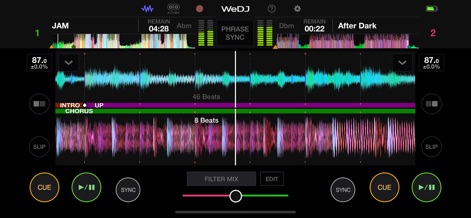
The app displays enlarged waveforms for precise visual beat-matching and features prominent CUE/PLAY/SYNC controls for real-time track manipulation.
Core Mixing Interface
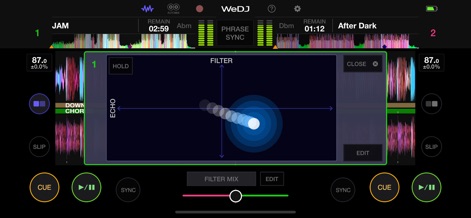
Users can sculpt their sound with the dynamic Filter Mix interface, seamlessly blending powerful Echo FX with precise filter adjustments for unique transitions.
Dynamic FX Control
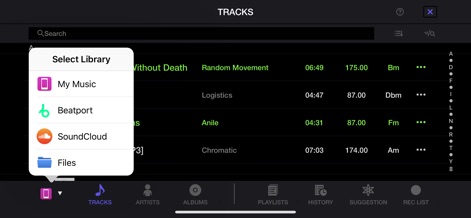
This tool seamlessly integrates diverse music sources, allowing users to access tracks from popular streaming services like Beatport and SoundCloud alongside their local music library.
Diverse Music Sources
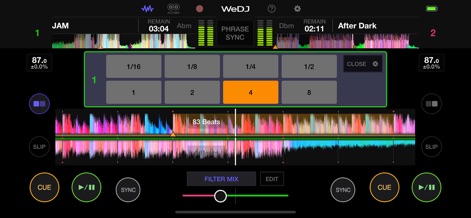
The app provides precision looping controls for rhythmic creativity, clearly displayed over the enlarged waveforms for accurate, on-the-fly adjustments.
Precision Beat Looping
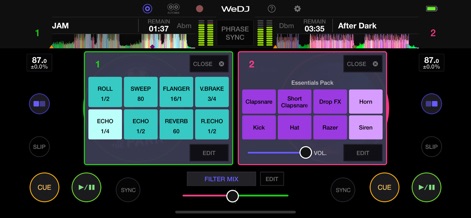
Users can elevate their mixes with a rich array of performance FX like Echo and Flanger, complemented by an expressive sampler for triggering iconic sounds such as Horns and Kicks.
Advanced FX & Sampler
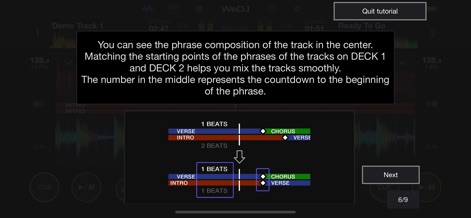
The app provides built-in tutorial guidance to master advanced techniques, visually illustrating phrase composition and effective mixing strategies for beginners.
Intuitive Learning Tools
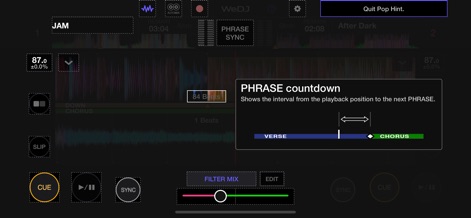
This tool features an intelligent PHRASE countdown, offering clear visual cues to identify upcoming song sections such as Verse and Chorus for seamless mixing.
Intelligent Phrase Sync
Description
Download
More Like This
Apps with similar features and user experience
YouDJ Mixer - Easy DJ app
Wurth Adrien
Jammable - Mashups
Jammable Limited
Edjing Mix - DJ Music Mixer
MWM
djay - DJ App & AI Mixer
Algoriddim GmbH

DJ Mixer Studio:Remix Music
MVTrail Tech Co., Ltd.

DJDJ Mixing App
Rodrigo Yanez

rekordbox - DJ App & DJ Mixer
AlphaTheta Corporation
DJ it! Virtual Music Mixer app
Gismart Ltd

Mixy - Make Mashups
Mixy, Inc.
This page is not an official page of the app or its developer, but an independent editorial publication created for informational and commentary purposes. Unless expressly stated otherwise, neither the app nor its developer is affiliated with, endorsed by, sponsored by, authorized by, or otherwise officially connected with MWM, Apple, Google Play, the app publisher, or the app's developer, and nothing on this page implies that the app was developed using MWM's services. Any trademarks, logos, screenshots, and other content remain the property of their respective owners.