
This page is not an official page of the app or its developer, but an independent editorial publication created for informational and commentary purposes. Unless expressly stated otherwise, neither the app nor its developer is affiliated with, endorsed by, sponsored by, authorized by, or otherwise officially connected with MWM, Apple, Google Play, the app publisher, or the app's developer, and nothing on this page implies that the app was developed using MWM's services. Any trademarks, logos, screenshots, and other content remain the property of their respective owners.


微脉输入法-私域必备,人人销冠
Conversion is king. This app proves to be the definitive toolkit for private domain sales, turning every user into a top performer.
Downloads
2.5M+User Rating
Total Ratings
61.3KPublisher
Category
ProductivityLocales
1Latest Version
2.5.83Size
306.1 MBFirst Released
Oct 7, 2017Optimizing Private Domain Traffic for Sales Professionals
Key Features Analysis: 微脉输入法
Copy Anti-folding
The app provides a 'Copy Anti-folding' mechanism, ensuring that long sales messages and marketing content are displayed in their entirety on social platforms like WeChat, preventing truncation and loss of information.
AI Writing Assistant & Local Knowledge Base Search
This tool features an AI writing assistant for generating compelling sales copy and an AI search function integrated with a local knowledge base, significantly streamlining content creation and information retrieval.
Team Shared Scripts & Image Library
It allows users to create and share common sales scripts (话术) and marketing image libraries with their team, ensuring consistent branding, messaging, and efficient collaboration across the sales force.
Automated Multi-line Message Sending with Images
The app enables automated sending of multi-line common phrases as individual messages, with support for attaching images, which significantly enhances the efficiency of targeted outreach and structured communication.
Text to Card Sending
This tool converts plain text messages into visually appealing 'card' formats for sharing, elevating the professionalism and attractiveness of product promotions or information sharing on social platforms.
Copywriting Library
It provides a comprehensive library of pre-written sales copy and marketing texts, allowing users to quickly access and deploy effective messaging for various scenarios without starting from scratch.
Voice-to-Text Input
The app supports efficient voice-to-text input, allowing users to quickly dictate messages and content, which is particularly useful for busy sales professionals on the go.
Fancy Font & Character Templates
It offers a variety of fancy font styles and character templates, enabling users to create eye-catching messages that stand out in crowded social feeds and grab customer attention.
Keyboard Calculator
This tool integrates a calculator directly into the keyboard, allowing for quick and seamless calculations during sales negotiations or customer interactions without switching apps.
Common Phrases & Clipboard Backup
The app ensures the backup and restoration of frequently used phrases and clipboard content, providing data security and immediate access to essential text snippets across devices.
Frequently Asked Questions
Everything you need to know about 微脉输入法-私域必备,人人销冠
What was the previous name of the 微脉输入法 (Weimai Input Method) app?
微脉输入法 (Weimai Input Method) was formerly known as 微商输入法 (Weishang Input Method). It underwent a name change in 2019.
What input methods does the 微脉输入法 (Weimai Input Method) app support?
微脉输入法 offers various input methods including 9-key, 26-key, stroke, handwriting, and Wubi. It provides a comprehensive typing experience for users.
Does 微脉输入法 (Weimai Input Method) have a keyboard calculator?
Yes, 微脉输入法 includes a keyboard calculator feature. It supports automatic calculations directly within the keyboard interface for convenience.
How does 微脉输入法 (Weimai Input Method) prevent text folding?
The 微脉输入法 app offers an anti-folding feature to prevent text messages from being folded. Users can choose between 'Pure Anti-folding' and 'Signature Anti-folding' modes.
Can I share common phrases with my team using 微脉输入法 (Weimai Input Method)?
微脉输入法 allows users to share common phrases and text snippets with team members. This feature is called 'Shared Phrases' (共享话术) or 'Team Shared Phrases'.
How do I install the 微脉输入法 (Weimai Input Method) app?
To install 微脉输入法, open the app, then go to phone settings, General, Keyboard, Keyboards, Add New Keyboard, select 微脉输入法, and allow full access.
Is full access required for the 微脉输入法 (Weimai Input Method) app?
Yes, allowing full access for 微脉输入法 is necessary to utilize its clipboard functionality. Without it, features relying on the clipboard will not work.
What is the price of the VIP subscription for 微脉输入法 (Weimai Input Method)?
微脉输入法 offers an annual VIP renewal subscription priced at 78 CNY per year. This subscription provides VIP features and is valid for one year.
Does the 微脉输入法 (Weimai Input Method) VIP subscription auto-renew?
Yes, the VIP subscription for 微脉输入法 automatically renews. Users must turn off automatic renewal 24 hours before the end of the current subscription period to cancel.
How do I cancel my 微脉输入法 (Weimai Input Method) VIP subscription?
To cancel the 微脉输入法 VIP subscription, go to your AppStore account, navigate to Purchase History or Subscription Management, and manage your subscriptions there.
Does 微脉输入法 (Weimai Input Method) include a library of pre-written content?
微脉输入法 provides a 'Copy Library' (文案库) feature. This allows users to access a vast collection of pre-written text snippets for quick sharing and use.
Can 微脉输入法 (Weimai Input Method) send messages line by line?
Yes, 微脉输入法 supports line-by-line sending of common phrases. This feature reduces reading pressure and enhances the perceived presence during conversations, and it supports adding images.
How can 微脉输入法 (Weimai Input Method) help make text more appealing?
微脉输入法 offers fancy character templates and eye-catching fonts to help users beautify their posts and capture attention, particularly for social media content.
Does 微脉输入法 (Weimai Input Method) support voice-to-text functionality?
Yes, 微脉输入法 supports voice-to-text input. This feature allows users to convert spoken words into written text directly within the keyboard interface.
Can I customize the keyboard appearance in 微脉输入法 (Weimai Input Method)?
微脉输入法 allows users to customize their keyboard appearance. It supports changing keyboard skins, using photos as wallpaper, and adjusting brightness and color.
The following screenshots and description are sourced directly from the app's official store listing and are the property of the app developer.
App Store
Screenshots
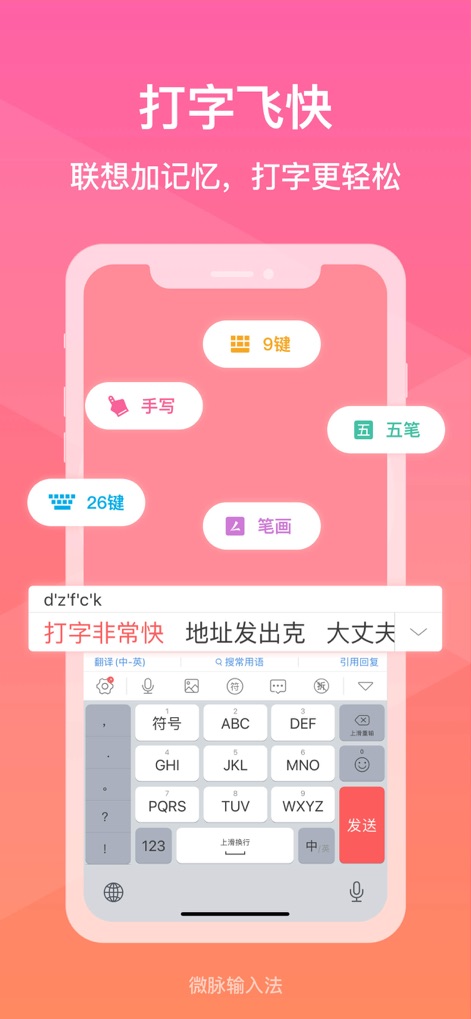
This tool revolutionizes text entry by offering diverse input methods like 26-key QWERTY and handwriting recognition, enhancing speed and flexibility for users.
Rapid Typing Modes
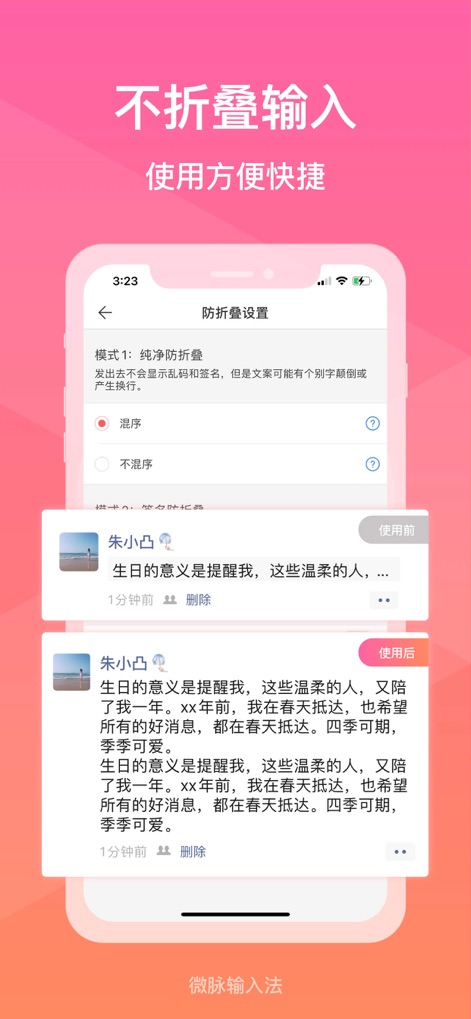
Users can ensure their important messages remain fully visible with the anti-folding feature, preventing truncation and maintaining message integrity in chats.
Uninterrupted Messaging

The app integrates a convenient keyboard calculator, allowing users to perform real-time calculations directly within the input interface and display results instantly.
Instant Keyboard Math

Teams can boost productivity with the shared talk script feature, allowing instant access to a collaborative library of common phrases and predefined responses.
Collaborative Messaging Scripts

This feature allows users to send long messages line by line, improving readability and creating a dynamic, engaging 'sense of presence' for recipients.
Sequential Message Delivery

Users can elevate their social media presence with pattern character templates, transforming plain text into visually appealing designs and creative emoji arrangements.
Creative Text Artistry

The app offers a selection of eye-catching fonts, enabling users to personalize their messages and capture attention with unique typographic styles.
Distinctive Font Styles

Access a massive copywriting library for instant inspiration, empowering users to quickly post compelling content to their Moments and engage their audience.
Extensive Content Library
Description
Download
More Like This
Apps with similar features and user experience







This page is not an official page of the app or its developer, but an independent editorial publication created for informational and commentary purposes. Unless expressly stated otherwise, neither the app nor its developer is affiliated with, endorsed by, sponsored by, authorized by, or otherwise officially connected with MWM, Apple, Google Play, the app publisher, or the app's developer, and nothing on this page implies that the app was developed using MWM's services. Any trademarks, logos, screenshots, and other content remain the property of their respective owners.