
This page is not an official page of the app or its developer, but an independent editorial publication created for informational and commentary purposes. Unless expressly stated otherwise, neither the app nor its developer is affiliated with, endorsed by, sponsored by, authorized by, or otherwise officially connected with MWM, Apple, Google Play, the app publisher, or the app's developer, and nothing on this page implies that the app was developed using MWM's services. Any trademarks, logos, screenshots, and other content remain the property of their respective owners.


YouTube Kids
Untamed digital content floods young audiences; this app grants parents the power to dictate their children's viewing environment.
Downloads
100M+User Rating
Total Ratings
6.5MPublisher
Category
EntertainmentLocales
73Latest Version
11.13Size
188.3 MBFirst Released
Feb 23, 2015An Analytical Overview of Core Functionalities for Child Safety and Engagement
YouTube Kids: Key Feature Analysis
Comprehensive Parental Controls
The app provides robust parental control features, allowing caregivers to manage and limit their children's viewing experience to ensure a safe and guided environment.
Curated Age-Appropriate Content
This tool offers a meticulously curated selection of video content, ensuring that children are exposed only to age-appropriate and family-friendly material tailored to their developmental stage.
Customizable Content Modes & Profiles
It allows users to personalize individual profiles with custom content filters, including Preschool, Younger, Older, and Approved Content Only modes, enabling adaptation as children grow and their interests evolve.
Screen Time Management
The app includes a built-in Timer feature, empowering parents to set screen time limits and automatically pause the app, encouraging children to engage in offline activities.
Child-Friendly Navigation
This tool features an intuitive and easy-to-use navigation interface, designed specifically for children to explore content independently and safely.
Favorite Content Replay
It provides a 'Watch it Again' tab, simplifying the process for children and parents to quickly revisit favorite videos and shared content.
Frequently Asked Questions
Everything you need to know about YouTube Kids
What is the YouTube Kids app?
YouTube Kids is an application designed for children to explore video content they love in a safe, curated environment. It features easy navigation tools and parental controls to help kids discover new interests.
How does YouTube Kids provide age-appropriate content?
YouTube Kids ensures age-appropriate content through personalized filters and modes: Preschool (ages 4 and under), Younger (ages 5-7), and Older (ages 8-12). Parents can also hand-pick content with the "Approved Content Only" mode.
Can parents set screen time limits in the YouTube Kids app?
Yes, YouTube Kids includes a Timer feature. Parents can set screen-time limits, and the app freezes once the set time expires, encouraging children to take a break from viewing.
How can parents control content in YouTube Kids?
YouTube Kids offers Parental Control features. Parents can limit content, guide viewing experiences, block unwanted videos or channels, and flag inappropriate content for review by the YouTube Kids team.
Does YouTube Kids allow users to rewatch videos?
Yes, the YouTube Kids app features a "Watch it Again" tab. This allows parents and children to quickly find favorite videos and previously shared content for rewatching.
Does YouTube Kids display advertisements?
Yes, children using YouTube Kids may see commercial content from YouTube creators. This content is not considered paid advertising, as it originates directly from the creators themselves.
What age-specific content modes are available in YouTube Kids?
YouTube Kids offers content modes including Preschool (ages 4 and under), Younger (ages 5-7), Older (ages 8-12), and an "Approved Content Only" mode for parent-selected videos.
Is parental setup necessary for YouTube Kids?
Parental setup is required for YouTube Kids to ensure the best experience for the family. This process allows parents to configure essential settings and content filters for their children.
How can I hand-pick videos for my child on YouTube Kids?
Parents can hand-pick specific videos, channels, and collections for their children using the "Approved Content Only" mode. This feature gives complete control over accessible content.
The following screenshots and description are sourced directly from the app's official store listing and are the property of the app developer.
App Store
Screenshots
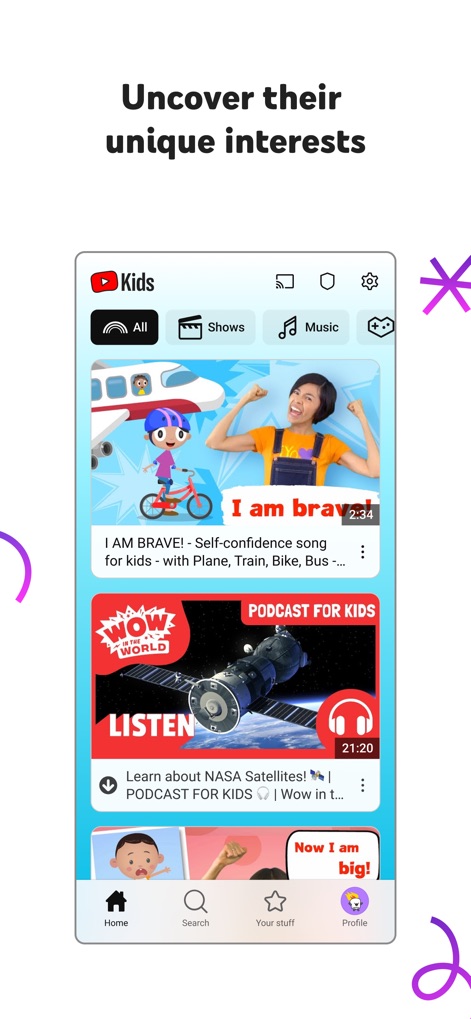
This tool presents a vibrant home feed, allowing children to browse through clear categories such as 'Shows' and 'Music', and explore a variety of engaging video thumbnails that spark curiosity.
Explore Engaging Content
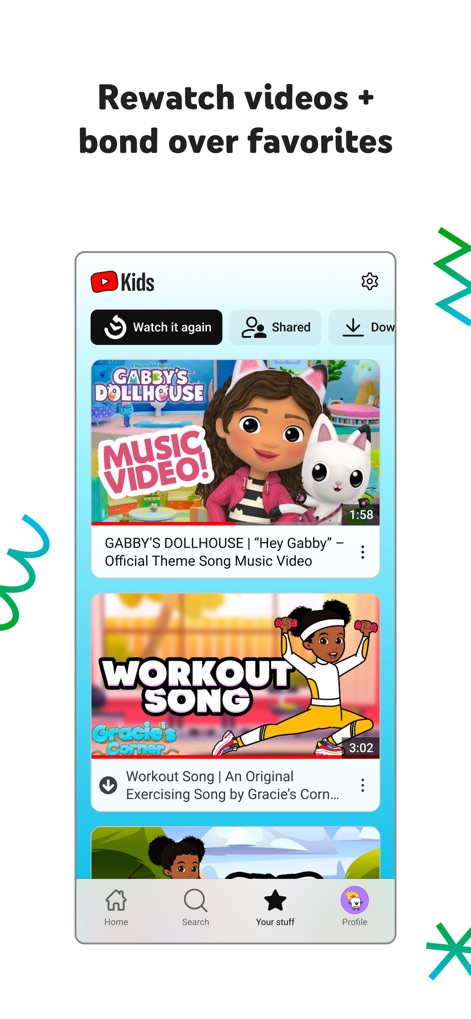
Users can easily revisit beloved content using the dedicated 'Watch it again' tab and rediscover curated video thumbnails, like 'Gabby's Dollhouse' and 'Workout Song', for repeated enjoyment.
Revisit Favorites
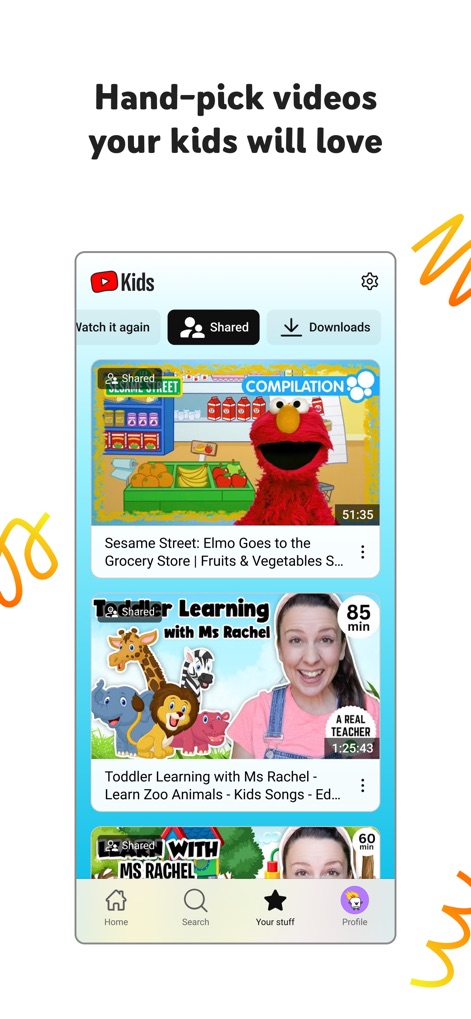
The app facilitates tailored viewing experiences, showcasing previously 'Shared' videos and presenting enriching educational content through engaging thumbnails featuring popular educators like Ms Rachel.
Curated Learning
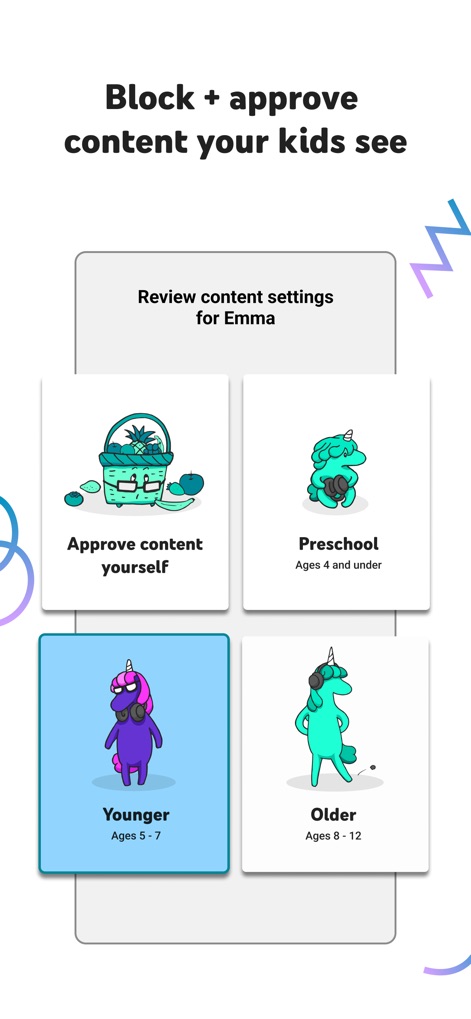
This tool empowers parents with robust content control, offering age-specific viewing modes like 'Preschool' and 'Younger' while also providing an 'Approve content yourself' option for personalized content selection.
Custom Content Control
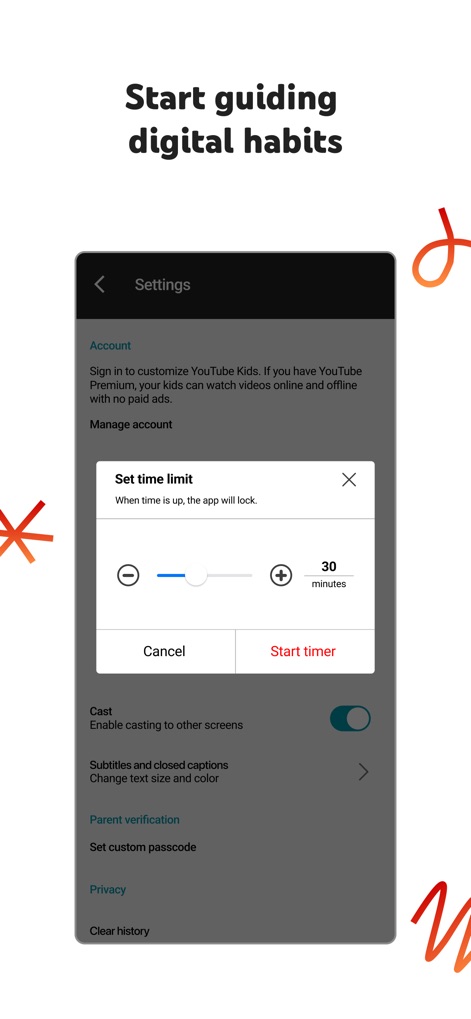
The app supports healthy digital habits through its 'Set time limit' feature, allowing parents to easily manage viewing duration using intuitive plus and minus buttons to adjust screen time.
Manage Screen Time
Description
Download
More Like This
Apps with similar features and user experience

Bounce Patrol Nursery Rhymes!
BOUNCE PATROL PTY. LTD.
贝乐虎儿歌-宝贝儿歌故事童话寓言多多听听
Leqing Network Technology Co., Ltd
儿歌点点-儿歌故事动画片益智启蒙
Beijing Mampod Technology Co. Ltd.

Safe Vision Kids for YouTube
Safe Vision Parental Software Pty Ltd

Kidjo TV: Kids Videos to Learn
Kidjo, INC

Tankee Gaming Videos & More
Tankee Inc.
Cuquin - Baby Songs & Cartoons
COLORCITY LIMITED
One4Kids TV
One 4 Kids Pty Ltd

Video Touch: Wild Animals
SoundTouch Interactive
This page is not an official page of the app or its developer, but an independent editorial publication created for informational and commentary purposes. Unless expressly stated otherwise, neither the app nor its developer is affiliated with, endorsed by, sponsored by, authorized by, or otherwise officially connected with MWM, Apple, Google Play, the app publisher, or the app's developer, and nothing on this page implies that the app was developed using MWM's services. Any trademarks, logos, screenshots, and other content remain the property of their respective owners.