
This page is not an official page of the app or its developer, but an independent editorial publication created for informational and commentary purposes. Unless expressly stated otherwise, neither the app nor its developer is affiliated with, endorsed by, sponsored by, authorized by, or otherwise officially connected with MWM, Apple, Google Play, the app publisher, or the app's developer, and nothing on this page implies that the app was developed using MWM's services. Any trademarks, logos, screenshots, and other content remain the property of their respective owners.


云宠智能
Take full control of your pet's smart environment from anywhere, monitor their well-being in real-time, and unlock your creativity with integrated AI pet art tools.
Downloads
110K+User Rating
Total Ratings
200Publisher
Category
LifestyleLocales
13Latest Version
2.5.4Size
193.2 MBFirst Released
Nov 3, 2021Seamless Smart Care for Your Furry Family
From remote feeding to AI-generated art, manage every aspect of your pet's life through one intuitive high-tech hub designed for the modern pet parent.
Remote Control & Monitoring
Stay connected to your pet’s routine from anywhere. Adjust smart devices and get real-time status updates to eliminate 'pet guilt' while you're at work.
AI-Powered Pet Creativity
Turn your fur baby into a masterpiece. Use built-in AI tools to transform simple pet photos into stunning digital art ready for your social feed.
Frequently Asked Questions
Everything you need to know about 云宠智能
What is 云宠智能 (Yun Chong Zhi Neng)?
云宠智能 is a smart pet device management platform. It enables users to control various smart pet devices via a mobile app, providing convenient services and humanized interaction for a smart pet care experience.
What devices can I control with the 云宠智能 app?
The 云宠智能 app allows control of smart pet devices such as feeders, water dispensers, cat litter boxes, snack rewarders, and smart pet toys. It enables remote management of all connected smart products.
Does 云宠智能 support remote control of pet devices?
Yes, 云宠智能 supports remote control. Users can easily bind devices with one click via their phone and operate smart products from anywhere, ensuring seamless management of pet care devices.
Can I share device access with family members using 云宠智能?
Yes, 云宠智能 allows device sharing. Users can share connected smart pet devices with family and friends, enabling everyone to collaboratively enjoy the convenience and fun of smart pet technology.
What AI features does the 云宠智能 app offer?
The 云宠智能 app includes AI creative tools. These tools allow users to generate creative images from text descriptions ("文生图") and perform intelligent extended creation by uploading photos ("图生图").
Can I view the operating status of my pet devices in the 云宠智能 app?
Yes, the 云宠智能 app provides real-time updates on device status. Users can view whether each device is on or off and monitor their pet's situation directly through the application.
Does 云宠智能 have a built-in store to purchase pet products?
Yes, the 云宠智能 app features a multi-category mall. Users can purchase various pet products, including cat food, snacks, daily necessities, and smart pet supplies directly within the application.
What happens if a 云宠智能 feeder loses power?
The 云宠智能 feeder maintains functionality even when offline. It supports continuous power, allowing the device to dispense food normally, ensuring pets are fed without interruption.
Can I contact customer service through the 云宠智能 app?
Yes, users can contact customer service directly through the 云宠智能 app. The personal center includes options for "帮助与反馈" (Help & Feedback) and "联系客服" (Contact Customer Service).
The following screenshots and description are sourced directly from the app's official store listing and are the property of the app developer.
App Store
Screenshots
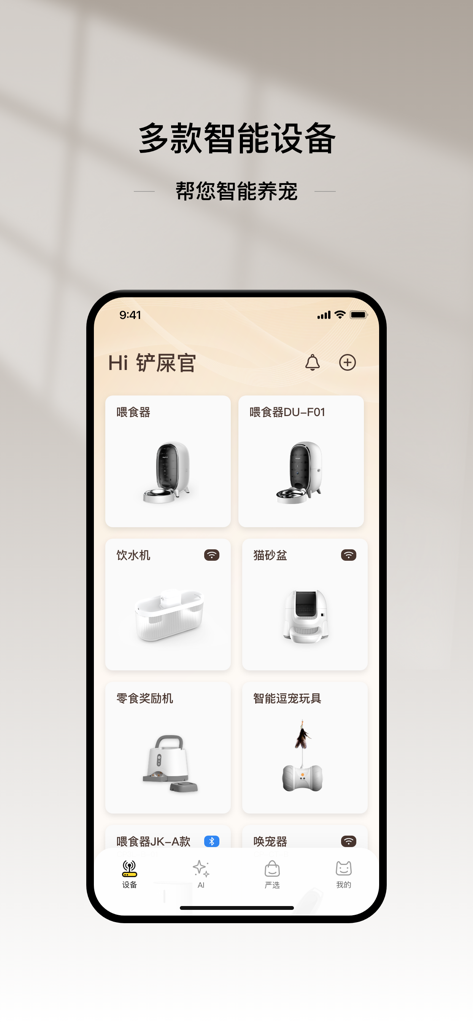
Dashboard of the Cloud Pet Intelligence app showing multiple connected smart pet devices like feeders and water dispensers
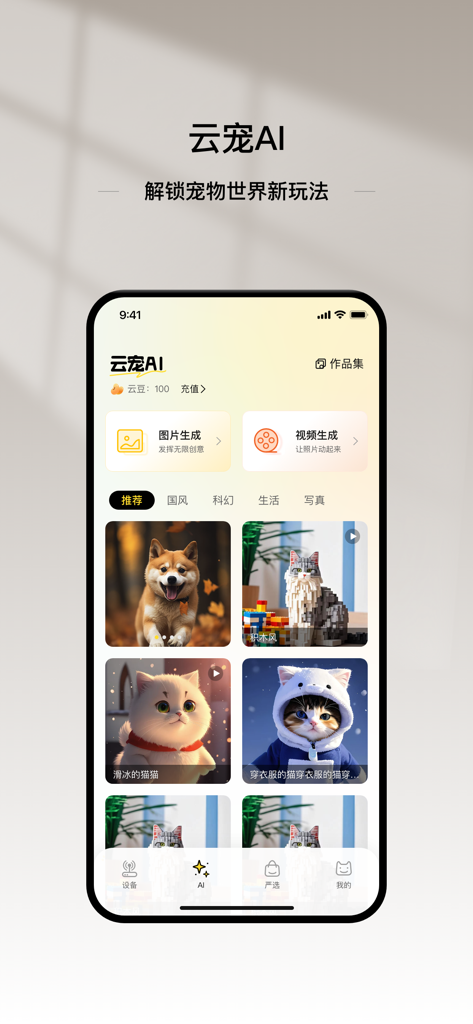
Cloud Pet Intelligence app interface showing AI pet image and video generation tools with a gallery of stylized cat and dog portraits
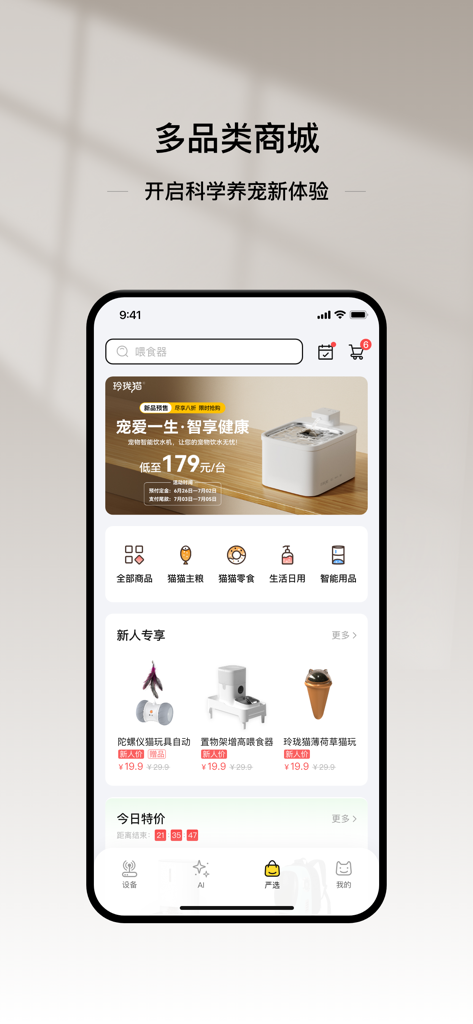
A mobile app interface showing a multi category mall for smart pet supplies and food
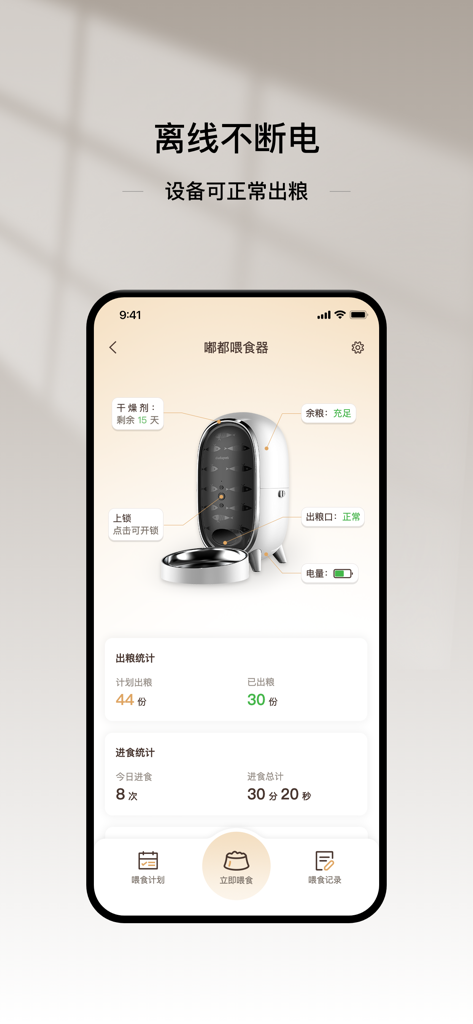
A mobile app dashboard for a smart pet feeder displaying food levels and feeding schedules.
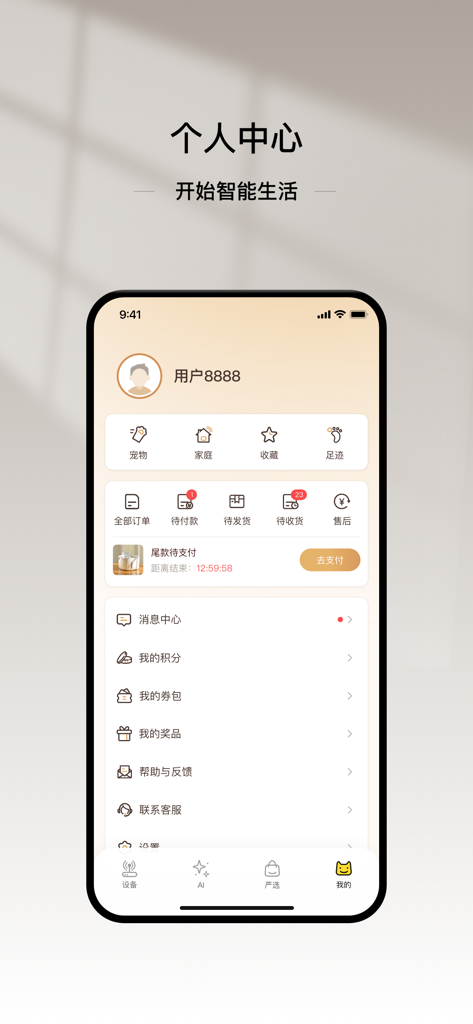
User profile dashboard in the Cloud Pet Intelligence app featuring account management and pet device order status.
Description
Download
More Like This
Apps with similar features and user experience






This page is not an official page of the app or its developer, but an independent editorial publication created for informational and commentary purposes. Unless expressly stated otherwise, neither the app nor its developer is affiliated with, endorsed by, sponsored by, authorized by, or otherwise officially connected with MWM, Apple, Google Play, the app publisher, or the app's developer, and nothing on this page implies that the app was developed using MWM's services. Any trademarks, logos, screenshots, and other content remain the property of their respective owners.