
Diese Seite ist keine offizielle Seite der App oder ihres Entwicklers, sondern eine unabhängige redaktionelle Veröffentlichung, die zu Informations- und Kommentarzwecken erstellt wurde. Sofern nicht ausdrücklich anders angegeben, sind weder die App noch ihr Entwickler mit MWM, Apple, Google Play, dem App-Herausgeber oder dem Entwickler der App verbunden, von ihnen unterstützt, gesponsert, autorisiert oder anderweitig offiziell verbunden, und nichts auf dieser Seite impliziert, dass die App unter Verwendung der Dienste von MWM entwickelt wurde. Alle Marken, Logos, Screenshots und andere Inhalte bleiben Eigentum ihrer jeweiligen Inhaber.

Brother iPrint&Scan
Das Smartphone regiert den Papierberg. Direkte Kontrolle über den Drucker, ohne PC-Zwänge – eine Befreiung.
Downloads
12.5M+Bewertung
Bewertungen gesamt
17.2KHerausgeber
Kategorie
UtilitiesSprachen
21Neueste Version
6.15.4Größe
37.4 MBErstveröffentlichung
29. Juli 2010Analyse der Brother iPrint&Scan App: Kernfunktionen für mobile Produktivität
Eine Bewertung der Schlüsselmerkmale, die Effizienz und Flexibilität für Berufstätige, Kleinunternehmer und Heimanwender steigern.
PC- und Treiberlose Bedienung
Die App eliminiert die Notwendigkeit eines Computers und spezifischer Treiber für den Betrieb, was die mobile Nutzung und Einrichtung erheblich vereinfacht und den "Mobile Office"-Ansatz unterstützt.
Mobiles Drucken
Dieses Tool ermöglicht das direkte Drucken von verschiedenen Dokumenttypen (PDF, Word, Excel, PowerPoint, Text, Webseiten) und Bildern von einem mobilen Gerät, was die Effizienz und Flexibilität für mobile Nutzer stark erhöht.
Direkter Scan auf Mobilgeräte
Es ermöglicht Nutzern, Dokumente und Fotos direkt auf iOS-Geräte zu scannen, was den Digitalisierungsprozess vereinfacht und den Zugriff auf wichtige Unterlagen unterwegs ermöglicht.
Cloud-Druckintegration
Die App bietet direkten Zugriff und Druck von Dokumenten und Fotos aus wichtigen Cloud-Diensten wie Dropbox, OneDrive und Evernote, was die Produktivität erhöht und den physischen Standort des Nutzers irrelevant macht.
Druckerstatus-Überwachung
Dieses Tool ermöglicht die Überwachung des Druckerstatus, wie z.B. Tinten-/Tonerstand und Fehlermeldungen, direkt auf dem Mobilgerät, was eine proaktive Wartung ermöglicht und Ausfallzeiten minimiert.
Flexible Scan-Speicheroptionen
Es bietet flexible Speicher- und Freigabeoptionen für gescannte Dokumente und Fotos, einschliesslich des Speicherns in der Fotoalben, iCloud oder dem Versand per E-Mail sowie auf soziale Medien wie Facebook und X.
Vorschau & Bearbeitung
Die App erlaubt das Bearbeiten von Bildern und Dokumenten (Skalieren, Begradigen, Zuschneiden) vor dem Drucken, Scannen oder Kopieren, wodurch Fehler reduziert und die Qualität der Ergebnisse verbessert wird.
Mobile Fax-Funktionen
Es bietet die Möglichkeit, Faxe direkt vom Mobilgerät zu senden und empfangene Faxe auf dem Gerät anzuzeigen, was besonders für Kleinunternehmer oder Büros, die noch auf Fax angewiesen sind, relevant ist.
Automatische Gerätesuche
Die App vereinfacht die Einrichtung und Verbindung mit Brother-Geräten durch eine automatische Erkennung im lokalen Netzwerk, was die Benutzerfreundlichkeit und den schnellen Start erhöht.
Offline-Druckvorbereitung via Dateiaustausch
Dieses Tool ermöglicht das einfache Übertragen von kompatiblen Dateien (PDF, Office-Dokumente, Bilder) über iTunes File Sharing an iPrint&Scan zur späteren, komfortablen Druckausgabe, was die Planung und Flexibilität verbessert.
Häufig gestellte Fragen
Alles, was Sie über wissen müssen Brother iPrint&Scan
What is Brother iPrint&Scan?
Brother iPrint&Scan is a free application that enables users to print from and scan to their iOS devices. It connects to compatible Brother printers and all-in-one machines via a local wireless network.
How do I print documents using Brother iPrint&Scan?
Yes, Brother iPrint&Scan allows printing of photos, web pages, and documents such as PDF, Word, Excel, PowerPoint, and Text files. Users can also print from cloud services like Dropbox.
Can Brother iPrint&Scan scan images to my iOS device?
Yes, Brother iPrint&Scan allows direct scanning to iPhone, iPod touch, or iPad. Scanned images can be saved to the photo album, iCloud, or shared via email, Facebook, X, or Flickr accounts.
Does Brother iPrint&Scan support cloud printing?
Yes, Brother iPrint&Scan supports printing documents and photos directly from cloud services. Compatible services include Dropbox, OneDrive, and Evernote.
What file formats are compatible with Brother iPrint&Scan for printing via iTunes File Sharing?
Brother iPrint&Scan supports compatible files such as PDF, Word, Excel, PowerPoint, Text, JPEG, PNG, and TIFF for printing via iTunes File Sharing.
Can I check my Brother printer's status with iPrint&Scan?
Yes, Brother iPrint&Scan allows users to view the machine's status, including ink or toner volume levels and error messages, directly on their mobile device.
Is the Brother iPrint&Scan app free to download and use?
Yes, Brother iPrint&Scan is a free application. It enables printing from and scanning to iOS devices without any cost.
Does Brother iPrint&Scan require a computer or driver for operation?
No, Brother iPrint&Scan does not require a computer or any drivers for its operation. It connects directly to compatible Brother devices via a local wireless network.
Can I send faxes using the Brother iPrint&Scan mobile app?
Yes, users can send faxes directly from their mobile device using Brother iPrint&Scan. This feature is available on new models and requires access to the device's address book.
What advanced editing features are available in Brother iPrint&Scan?
Brother iPrint&Scan offers advanced editing tools for previewed images. Users can scale, straighten, and crop images as needed, ensuring optimal output before printing or copying.
What access permissions does Brother iPrint&Scan request?
Brother iPrint&Scan requires essential contact information access for fax functions and optional location information for device search features like Wi-Fi Direct or Bluetooth.
How does Brother iPrint&Scan connect to a Brother printer?
Brother iPrint&Scan connects to a Brother printer or all-in-one device using the local wireless network. The app automatically searches for supported devices on the network.
Die folgenden Screenshots und die Beschreibung stammen direkt aus dem offiziellen Store-Eintrag der App und sind Eigentum des Entwicklers.
App Store
Screenshots

Startseite und Funktionen
Die App präsentiert ein übersichtliches Hauptmenü mit prominenten runden Schaltflächen für zentrale Funktionen wie Drucken und Scannen, ergänzt durch das hervorgehobene Druckermenü im unteren Bereich für eine schnelle Auswahl.
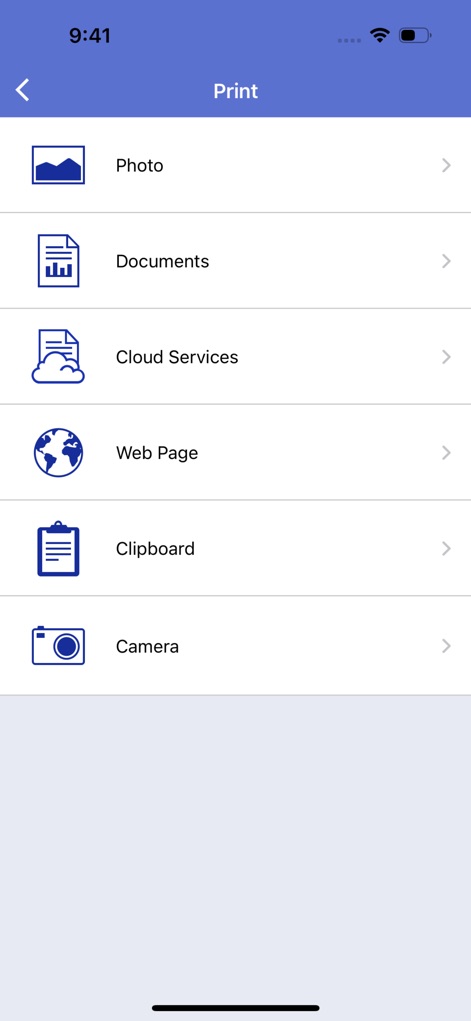
Druckquellen Vielfalt
Nutzer finden eine Vielfalt an Druckoptionen, übersichtlich dargestellt mit Symbolen und Text, die eine klare Kategorisierung wie 'Photo' und 'Cloud Services' für verschiedene Inhalte bieten.
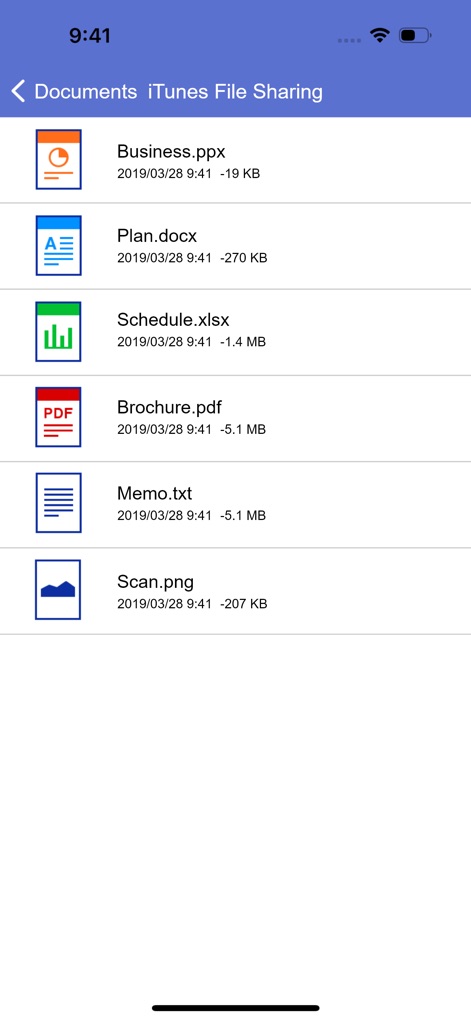
Dokumente verwalten
Dieses Tool ermöglicht eine einfache Dokumentenverwaltung durch eine detaillierte Dateiliste, die wichtige Informationen wie Dateinamen und -größen anzeigt, und unterstützt diverse Dateitypen von PDF bis DOCX.

Bearbeitung vorab
Die App bietet vor dem Drucken oder Scannen flexible Bearbeitung, ersichtlich am großzügigen Vorschaubild des Dokuments, kombiniert mit intuitiven Bearbeitungswerkzeugen wie Zuschneiden und Skalieren am unteren Bildschirmrand.
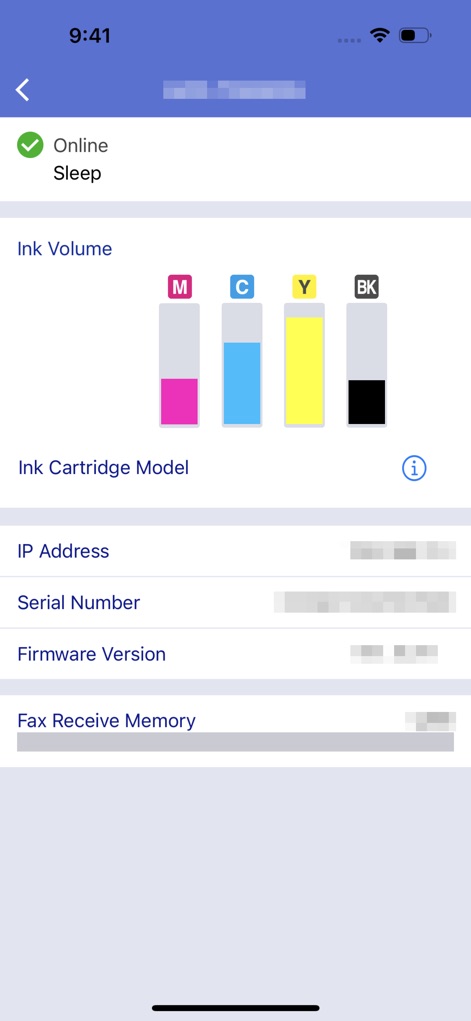
Gerätestatus prüfen
Nutzer erhalten umfassende Gerätestatus-Einblicke durch die farbcodierte Tintenstandanzeige für CMYK und detaillierte Geräteinformationen wie die IP-Adresse und die Firmware-Version.
Beschreibung
Download
Ähnliche Apps
Apps mit ähnlichen Funktionen und Nutzererfahrung

Docuslice - Poster Printing
Jeremiah Lachica

Printer Pro: Smart Printer App
Ivan Spyrydonov

HP
HP Inc.

Canon PRINT
Canon Inc.

Epson Smart Panel
Seiko Epson Corporation

Brother Mobile Connect
Brother Industries, LTD.

Epson iPrint
Seiko Epson Corporation

Printer App: Smart Print
Netpeak EOOD

Smart Printer App: iPrint
AppFusion OU
Diese Seite ist keine offizielle Seite der App oder ihres Entwicklers, sondern eine unabhängige redaktionelle Veröffentlichung, die zu Informations- und Kommentarzwecken erstellt wurde. Sofern nicht ausdrücklich anders angegeben, sind weder die App noch ihr Entwickler mit MWM, Apple, Google Play, dem App-Herausgeber oder dem Entwickler der App verbunden, von ihnen unterstützt, gesponsert, autorisiert oder anderweitig offiziell verbunden, und nichts auf dieser Seite impliziert, dass die App unter Verwendung der Dienste von MWM entwickelt wurde. Alle Marken, Logos, Screenshots und andere Inhalte bleiben Eigentum ihrer jeweiligen Inhaber.