
Diese Seite ist keine offizielle Seite der App oder ihres Entwicklers, sondern eine unabhängige redaktionelle Veröffentlichung, die zu Informations- und Kommentarzwecken erstellt wurde. Sofern nicht ausdrücklich anders angegeben, sind weder die App noch ihr Entwickler mit MWM, Apple, Google Play, dem App-Herausgeber oder dem Entwickler der App verbunden, von ihnen unterstützt, gesponsert, autorisiert oder anderweitig offiziell verbunden, und nichts auf dieser Seite impliziert, dass die App unter Verwendung der Dienste von MWM entwickelt wurde. Alle Marken, Logos, Screenshots und andere Inhalte bleiben Eigentum ihrer jeweiligen Inhaber.


Duet Display
Dein iPad ist kein Spielzeug mehr. Es wird zum verlängerten Arm deines Rechners, ohne Verzögerung. MWMs Kreation liefert eine rohe, direkte Arbeitserweiterung.
Downloads
2.5M+Bewertung
Bewertungen gesamt
139.6KHerausgeber
Kategorie
ProductivitySprachen
15Neueste Version
3.1.4Größe
67.3 MBErstveröffentlichung
18. Dez. 2014Bewertung der Kernfunktionen für produktivitätsorientierte Fachkräfte und Kreative
Analyse der Duet Display App
Professionelles Grafiktablett mit Apple Pencil (Duet Pro)
Die App verwandelt das iPad und den Apple Pencil in ein leistungsstarkes Grafiktablett mit optimierter Zeichenwiedergabe, Druck- und Neigungsempfindlichkeit sowie Handballenauflage für präzise Arbeit in professionellen Kreativprogrammen.
Hochleistungsfähiger Zweitbildschirm mit Null Latenz
Es ermöglicht die Erweiterung des Desktop-Arbeitsbereichs auf iPad oder iPhone mit unübertroffener Leistung, Anzeigequalität und absolut keiner Verzögerung, was die Multitasking-Fähigkeiten erheblich steigert.
Kabelgebundene und zuverlässige Verbindung
Dieses Tool stellt eine stabile und verzögerungsfreie Verbindung zum Desktop-Computer über ein Ladekabel sicher, wodurch WLAN-Probleme, Leistungseinbrüche und Netzwerkverwaltung vermieden werden.
Intuitive Touch-Steuerung und Gesten
Die App bietet eine innovative Interaktion mit Mac- und PC-Anwendungen über Touch-Gesten wie Zwei-Finger-Scrollen, Zoomen und Schwenken direkt auf dem iPad oder iPhone.
Steigerung der Produktivität und Mobilität
Es ermöglicht eine Verdopplung der Produktivität durch erweiterten Bildschirmplatz und bietet eine portable Lösung für effizientes Arbeiten unterwegs, auf Reisen oder in flexiblen Arbeitsumgebungen.
Touch Bar-Integration für Mac-Nutzer
Die App ermöglicht Mac-Benutzern die Hinzufügung einer Touch Bar-Funktionalität auf jedem iPad, was die Interaktion mit Mac-Anwendungen auf eine neue Weise erweitert.
Häufig gestellte Fragen
Alles, was Sie über wissen müssen Duet Display
What is Duet Display?
Duet Display transforms your iPad or iPhone into an advanced extra display for your Mac or PC, providing unparalleled performance and zero lag with touch capabilities.
How do you connect devices with Duet Display?
Yes, Duet Display works by plugging your iPad or iPhone into your desktop with a charging cable. The free Duet desktop app automatically detects the device and converts it into a high-performance display.
Does Duet Display experience lag?
No, Duet Display offers zero lag performance and high display quality. It eliminates concerns about unreliable Wi-Fi or laggy performance, as affirmed by press reviews like The Guardian and Business Insider.
Does Duet Display support touch interaction?
Yes, Duet Display supports touchscreen interaction with both Mac and PC. It includes gestures like two-finger scrolling, pan, and zoom, and can add a touch bar to any iPad with any Mac.
What features are included with Duet Pro?
Duet Pro is an optional upgrade that turns your iPad and Apple Pencil into a professional graphics tablet. It offers ultra-responsive drawing, pressure and tilt sensitivity, hover, and palm rejection for creative software.
What devices are compatible with Duet Display and Duet Pro?
Duet Display is compatible with all iPhones and iPads running iOS 7.0+, all Macs with OS 10.9+, and all PCs with Windows 7+. Duet Pro requires iPad Pros with Apple Pencil and Windows 8.1+ (64 bit) for PCs.
Die folgenden Screenshots und die Beschreibung stammen direkt aus dem offiziellen Store-Eintrag der App und sind Eigentum des Entwicklers.
App Store
Screenshots
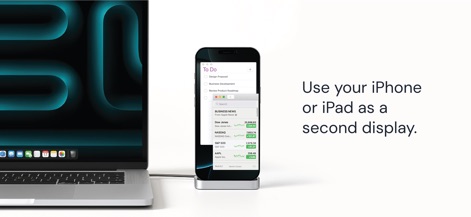
Dieses Bild veranschaulicht, wie ein iPhone über ein Kabel mit einem MacBook Pro verbunden ist und als erweiterter Bildschirm fungiert, um produktive Apps wie eine 'To Do'-Liste und Börsennachrichten darzustellen.
Mobiles Zweitdisplay
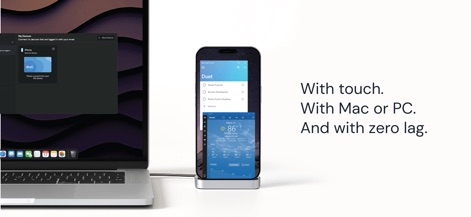
Dieser Screenshot zeigt die 'My Devices'-Oberfläche der Duet-App auf dem MacBook und die Anzeige einer Wetter-App auf dem verbundenen iPhone, was die einfache Geräteerkennung und die Nutzung verschiedener Inhalte demonstriert.
Nahtlose Verbindung

Dieses Bild präsentiert eine Sammlung anerkennender Zitate von führenden Tech-Publikationen wie TechCrunch und The Verge, die die magische Leistung und flüssige Bedienung der App hervorheben.
Renommierte Pressestimmen
Beschreibung
Download
Ähnliche Apps
Apps mit ähnlichen Funktionen und Nutzererfahrung

Mouse · Keyboard
Remote Sunrise LTD

Camo Camera
Reincubate Ltd

DroidCam Webcam & OBS Camera
DEV47 APPS LTD.

spacedesk - USB Display for PC
datronicsoft Technology GmbH

iVCam Webcam
俊红 柴

Remote Mouse
耀 阮

CamX - USB Camera
Touchbits Inc.

Genki Studio
Human Things, Inc

Astropad Studio Drawing Tablet
Astro HQ LLC
Diese Seite ist keine offizielle Seite der App oder ihres Entwicklers, sondern eine unabhängige redaktionelle Veröffentlichung, die zu Informations- und Kommentarzwecken erstellt wurde. Sofern nicht ausdrücklich anders angegeben, sind weder die App noch ihr Entwickler mit MWM, Apple, Google Play, dem App-Herausgeber oder dem Entwickler der App verbunden, von ihnen unterstützt, gesponsert, autorisiert oder anderweitig offiziell verbunden, und nichts auf dieser Seite impliziert, dass die App unter Verwendung der Dienste von MWM entwickelt wurde. Alle Marken, Logos, Screenshots und andere Inhalte bleiben Eigentum ihrer jeweiligen Inhaber.