
このページはアプリまたはその開発者の公式ページではなく、情報提供および論評を目的として作成された独立した編集出版物です。明示的に別段の記載がない限り、アプリおよびその開発者は、MWM、Apple、Google Play、アプリのパブリッシャー、またはアプリの開発者と提携、承認、後援、認可、またはその他の公式的な関係はなく、このページのいかなる内容も、アプリがMWMのサービスを使用して開発されたことを意味するものではありません。すべての商標、ロゴ、スクリーンショット、その他のコンテンツはそれぞれの所有者の財産です。


Affinity Publisher 2 for iPad
iPadを、妥協なき出版スタジオに変貌させる。場所を選ばず、プロレベルのレイアウト作業を現実のものにする。
ダウンロード
1M+ユーザー評価
評価数
807開発元
カテゴリ
Graphics & Design対応言語
8最新バージョン
2.6.4サイズ
1.7 GBリリース日
2022年11月9日クリエイティブプロフェッショナル向けモバイルデスクトップパブリッシングソリューション
Affinity Publisher 2 for iPad: 主要機能分析
高度なページレイアウト機能
見開きページ、ライブマスターページ、高度なガイド、グリッド、スナップ、カスタム表形式、任意のオブジェクトや画像の周囲へのテキスト回り込み、脚注、サイドノート、エンドノートなど、複雑なドキュメント作成に必要な包括的なレイアウトツールが提供されます。
プロフェッショナルな出力品質
エンドツーエンドのCMYK、PANTONE©、特色サポート、ライブプリフライトチェック、PDF/X-1a、PDF/X-3、PDF/X-4出力により、印刷業界標準に準拠した高品質な成果物を確実に生成できます。
柔軟なコンテンツ配置と多様な入出力形式
IDML、XLSX、Adobe InDesignファイル形式のインポート/エクスポート、PSD、AI、PDF、JPGなどの広範なファイルタイプの配置、Dropbox統合、AutoCAD DWG/DXFのインポートと編集が可能で、業界標準ツールとの高い互換性を提供します。
iPad向け最適化とパフォーマンス
iPadジェスチャーコントロール、Apple Pencilの筆圧感知、傾き、角度への対応、Metalアクセラレーションによる高速パフォーマンス、iCloud連携、外部ディスプレイサポートなど、iPadデバイス上でのスムーズで効率的な作業体験が提供されます。
AffinityスイートとのStudioLink統合
StudioLink機能により、Affinity Publisherを離れることなく、Affinity Photoの高度な写真編集機能やAffinity Designerの正確なベクターツールへ瞬時に切り替えることができ、創造的なスイート内での流動的なワークフローを実現します。
効率的な生産性ツール
セクションマネージャー、保存可能なアンドゥ履歴、スマートマスターページ、インデックスと目次の自動生成、テンプレートファイル保存、パッケージ機能など、作業の効率化とプロジェクト管理を支援する多様な機能が備わっています。
画像とグラフィックの高度な処理
ドキュメント内での画像のリンクまたは埋め込み、非破壊的な調整レイヤーによる画像補正と強化、精密なペンツールとノードツールによるベクター曲線と形状の作成、ブール演算など、プロフェッショナルな画像およびグラフィック編集機能が利用可能です。
高機能なタイポグラフィ
文字スタイルと段落スタイルに対する完全な制御、包括的なOpenTypeサポート、任意のパスに沿ったテキスト配置、高度なテキストフローオプションとハイフネーション機能により、精緻でプロフェッショナルなタイポグラフィデザインが可能です。
よくある質問
について知っておくべきこと Affinity Publisher 2 for iPad
What is Affinity Publisher 2 for iPad?
Affinity Publisher 2 for iPad is an on-the-go page layout and design app. It enables users to create books, brochures, posters, reports, and more, offering the power of its desktop publishing software.
Is Affinity Publisher 2 for iPad optimized for iPad features?
Yes, Affinity Publisher 2 for iPad is optimized for iPad. It features gesture controls, a Quick Menu, Apple Pencil support, Metal acceleration for performance, and iCloud Drive integration for file management.
Does Affinity Publisher 2 for iPad support Apple Pencil?
Yes, Affinity Publisher 2 for iPad supports Apple Pencil. The app is sensitive to pressure, tilt, and angle, harnessing the full power and precision of the Apple Pencil for design tasks.
Does Affinity Publisher 2 for iPad integrate with iCloud Drive?
Yes, Affinity Publisher 2 for iPad includes full iCloud Drive integration. This feature allows for seamless file management, storage, and sharing of documents directly within the app.
Can Affinity Publisher 2 for iPad handle professional page layouts?
Yes, Affinity Publisher 2 for iPad provides professional layout tools. These include facing page spreads, live master pages, advanced guides, tables, text wrapping, and the ability to link multiple text frames.
Does Affinity Publisher 2 for iPad support footnotes and endnotes?
Yes, Affinity Publisher 2 for iPad supports footnotes, sidenotes, and endnotes. Users can incorporate these elements into their documents for academic or reference purposes.
What typography features does Affinity Publisher 2 for iPad offer?
Affinity Publisher 2 for iPad offers advanced typography features. These include full control over character and paragraph styles, comprehensive OpenType support, text along any path, and advanced flow options.
Does Affinity Publisher 2 for iPad support OpenType fonts?
Yes, Affinity Publisher 2 for iPad provides comprehensive OpenType support. This allows users to access advanced typographic features for detailed text formatting in their designs.
What image and graphic formats can Affinity Publisher 2 for iPad import?
Affinity Publisher 2 for iPad can import PSD, AI, PDF, JPG, TIFF, PNG, DWG, or Affinity files. Users can link or embed these images and graphics into their documents.
Does Affinity Publisher 2 for iPad support non-destructive image editing?
Yes, Affinity Publisher 2 for iPad supports non-destructive image editing. Users can correct and enhance images using adjustment layers, preserving original image data.
How does Affinity Publisher 2 for iPad enhance productivity?
Affinity Publisher 2 for iPad enhances productivity with features like a section manager, savable undo history, smart master pages, automatic index/TOC generation, and the Package feature for collating document resources.
Can Affinity Publisher 2 for iPad package documents for sharing?
Yes, Affinity Publisher 2 for iPad can package documents. The Package feature collates the document with all used image and font resources into a folder, facilitating collaboration and sharing.
Does Affinity Publisher 2 for iPad have PDF passthrough?
Yes, Affinity Publisher 2 for iPad features PDF passthrough. This allows users to flag imported PDFs, ensuring professional output and integration within their layouts.
Does Affinity Publisher 2 for iPad support auto-flow for content?
Yes, Affinity Publisher 2 for iPad supports auto-flow. It offers autoflow for multiple images and multi-page PDFs, which helps save time during document creation and layout.
Can Affinity Publisher 2 for iPad create multi-page spreads?
Yes, Affinity Publisher 2 for iPad allows users to easily create multi-page spreads. This feature is part of its professional layout tools for designing publications effectively.
Can Affinity Publisher 2 for iPad import InDesign files?
Yes, Affinity Publisher 2 for iPad supports importing from Adobe InDesign® and other programs via IDML. This facilitates transferring existing projects into the application.
Does Affinity Publisher 2 for iPad integrate with Dropbox?
Yes, Affinity Publisher 2 for iPad includes Dropbox API integration. This feature helps retain placed resource linkage across multiple devices for seamless workflow and collaboration.
What professional output options are available in Affinity Publisher 2 for iPad?
Affinity Publisher 2 for iPad offers professional output options. These include end-to-end CMYK, PANTONE©, spot color, live preflight checking, and PDF/X-1a, PDF/X-3, PDF/X-4 output.
Does Affinity Publisher 2 for iPad support PANTONE colors?
Yes, Affinity Publisher 2 for iPad supports PANTONE© and spot colors. It provides end-to-end CMYK and color management for professional print output.
Does Affinity Publisher 2 for iPad integrate with other Affinity apps?
Yes, Affinity Publisher 2 for iPad integrates fully with other Affinity apps via StudioLink. Users can instantly switch to Affinity Photo's photo editing or Affinity Designer's vector tools without leaving Publisher.
What is StudioLink in Affinity Publisher 2 for iPad?
StudioLink is a feature in Affinity Publisher 2 for iPad that enables seamless integration with other Affinity apps. It allows users to access Affinity Photo's and Designer's tools directly within Publisher.
Does Affinity Publisher 2 for iPad offer extensive color control?
Yes, Affinity Publisher 2 for iPad provides full color control. It supports end-to-end CMYK, PANTONE©, spot color, and includes vast swatch libraries for precise color management.
Can users create and format tables in Affinity Publisher 2 for iPad?
Yes, Affinity Publisher 2 for iPad allows users to create and format tables. The app provides tools for custom table formats, enhancing document organization and presentation.
以下のスクリーンショットと説明は、アプリの公式ストアリスティングから直接取得されたものであり、アプリ開発者の所有物です。
アプリストア
スクリーンショット

複雑なテキストフローと、カスタム可能な文字スタイルで、デザインの可能性を広げ、視覚的な魅力を高めます。
テキストを自在に配置

ライブマスターページ機能により、複数のページにわたる一貫したレイアウトと効率的なデザイン管理を実現します。
ライブマスターページ

脚注、サイドノート、およびエンドノート機能で、文書に正確な参照と補足情報を提供し、読者の理解を深めます。
注釈で詳細を

高度なOpenTypeサポートにより、合字や文体セットを適用し、タイポグラフィの表現力を最大限に引き出します。
豊かなタイポグラフィ

PDFパススルー機能は、取り込んだPDFファイルの視認性を保持し、レイヤーパネルでその管理と操作を可能にします。
PDFパススルー

ドキュメントのパッケージ化により、使用された画像やフォントリソースをひとつのフォルダにまとめ、共同作業とアーカイブを容易にします。
ドキュメントをパッケージ化

複数画像のオートフロー機能により、多くの画像を瞬時に配置し、コレクションのページ作成プロセスを大幅に効率化します。
オートフローで効率化
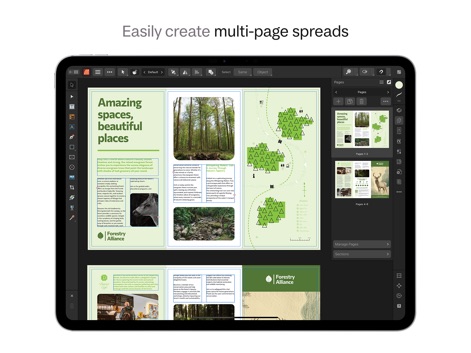
複数ページの見開きレイアウトを容易に作成でき、ページパネルで構成要素を直感的に管理しながら、魅力的で広範なデザインを実現します。
見開きページを自在に

PANTONE©やCMYKなどの広範なスウォッチライブラリにより、正確な色選択とプロフェッショナルな出力品質を保証します。
色彩を完全に制御

テーブル作成ツールにより、カスタム可能な表形式でデータを整理し、行やセルの詳細な設定で表現豊かなレイアウトを実現します。
表作成とフォーマット
説明
Download
類似アプリ
似た機能とユーザー体験を持つアプリ

Brochure Maker, Pamphlet Maker
Bhavesh Gabani

Zine - Enjoy Writing
Aura Marker Studio Co., Ltd.

Pages: Create Documents
Apple Inc.

Price List & Menu Maker
Desygner Pty Ltd

Story Creator - Easy Story Book Maker for Kids
Innovative Mobile Apps Ltd

Book Creator for iPad
Tools for Schools Limited

Book Creator One
Tools for Schools Limited
このページはアプリまたはその開発者の公式ページではなく、情報提供および論評を目的として作成された独立した編集出版物です。明示的に別段の記載がない限り、アプリおよびその開発者は、MWM、Apple、Google Play、アプリのパブリッシャー、またはアプリの開発者と提携、承認、後援、認可、またはその他の公式的な関係はなく、このページのいかなる内容も、アプリがMWMのサービスを使用して開発されたことを意味するものではありません。すべての商標、ロゴ、スクリーンショット、その他のコンテンツはそれぞれの所有者の財産です。