
このページはアプリまたはその開発者の公式ページではなく、情報提供および論評を目的として作成された独立した編集出版物です。明示的に別段の記載がない限り、アプリおよびその開発者は、MWM、Apple、Google Play、アプリのパブリッシャー、またはアプリの開発者と提携、承認、後援、認可、またはその他の公式的な関係はなく、このページのいかなる内容も、アプリがMWMのサービスを使用して開発されたことを意味するものではありません。すべての商標、ロゴ、スクリーンショット、その他のコンテンツはそれぞれの所有者の財産です。

Alarm & Timer
時間という流動体を自在に操り、その秩序を捻じ曲げる。このアプリは、ユーザーをただの時間の消費者から、その設計者へと変貌させる。
ダウンロード
2.5M+ユーザー評価
評価数
35.4K開発元
カテゴリ
Lifestyle対応言語
16最新バージョン
13.9.0サイズ
44.5 MBリリース日
2016年1月5日カスタマイズ性と高度なスケジュール管理に焦点を当てた包括的レビュー
「Alarm & Timer」アプリの機能分析
広範な視覚的カスタマイズ
このアプリは、色、フォント、時刻表示スタイル、時計盤デザイン、秒針の動き、背景画像などをユーザーの好みに合わせて詳細に調整する機能を提供します。
高度なアラームスケジュール設定
本ツールは、特定の日付指定、日ごと、週ごと(曜日)、月ごと、年ごと、または隔日などの間隔やパターンによる柔軟な繰り返し設定が可能です。
サイレントモード時のアラーム鳴動
特定のiOSバージョン以降、本アプリケーションはデバイスがサイレントモードに設定されている場合でもアラーム音を再生する機能を提供します。
高機能なアラーム管理
ユーザーは、無制限のアラームを設定でき、フォルダによる整理や一時停止機能など、アラームリストが増えても容易に管理できる機能を利用できます。
複数タイマーの同時実行
このアプリケーションは、複数のタイマーを同時に起動し、それぞれを独立して管理する機能を提供します。
ヘッドホン接続時の個別アラーム
ヘッドホンが接続されている場合、本アプリのアラーム音はデバイスのスピーカーからは再生されず、ユーザーは周囲を気にすることなくアラームを受け取ることが可能です。
柔軟な時計表示オプション
アプリケーションはアナログ表示とデジタル表示の両方をサポートしており、ランドスケープモードではデジタル表示のみの選択肢も提供されます。
ミニマルなUI表示モード
ユーザーは、ステータスバーやタブバーを非表示にすることで、より洗練されたミニマルな外観で時計を表示させることが可能です。
よくある質問
について知っておくべきこと Alarm & Timer
What is the main functionality of the Alarm & Timer app?
The Alarm & Timer app provides an Alarm, Timer, and Stopwatch to help users manage their time effectively. It is designed for simplicity and includes various customizable features.
Does the Alarm & Timer app support alarms and timers even when the screen is off?
Yes, the Alarm & Timer app notifies users with a notification even if the screen is off for both alarms and timers. This ensures timely alerts.
Can I customize alarm sounds in the Alarm & Timer app?
Yes, the Alarm & Timer app allows users to record their own alarm sounds. This feature provides personalized alert options for any created alarm.
What repeat options are available for alarms in the Alarm & Timer app?
The Alarm & Timer app offers flexible repeat options for alarms, including every week, month, year, custom intervals, and patterns. Users can also specify a date for their alarms.
Can I run multiple timers simultaneously with the Alarm & Timer app?
Yes, the Alarm & Timer app allows users to run any number of timers concurrently, ranging from 1 second to 99 hours. Presets and history are also available for quick use.
Does the Alarm & Timer app record lap times?
Yes, the Alarm & Timer app's Stopwatch feature accurately records lap times. Users can also conveniently send a text file of their recorded lap times via email.
How can I customize the clock's appearance in the Alarm & Timer app?
The Alarm & Timer app offers extensive clock customization, including color themes, font styles, 12/24 hour display, various clock face designs, background images, and second hand movement options.
Is the Alarm & Timer app compatible with iOS silent or focus modes for alarms?
Yes, starting with iOS 26.1, the Alarm & Timer app supports AlarmKit, allowing users to hear alarm sounds even when the device is in silent mode or focus mode.
Can I play music from Apple Music or iCloud through the Alarm & Timer app?
No, the Alarm & Timer app allows music playback only from your iPhone/iPad. Music from iCloud and Apple Music is not available for direct playback within the app.
Does the Alarm & Timer app include a skip function for alarms?
Yes, the Alarm & Timer app includes a skip function for alarms. This feature enables users to temporarily disable an upcoming alarm without needing to delete it.
以下のスクリーンショットと説明は、アプリの公式ストアリスティングから直接取得されたものであり、アプリ開発者の所有物です。
アプリストア
スクリーンショット

このアプリでは、カスタマイズ可能な色と複数のクロックフェイスデザインを組み合わせて、自分だけの時計画面を作成できます。
多様な時計表示
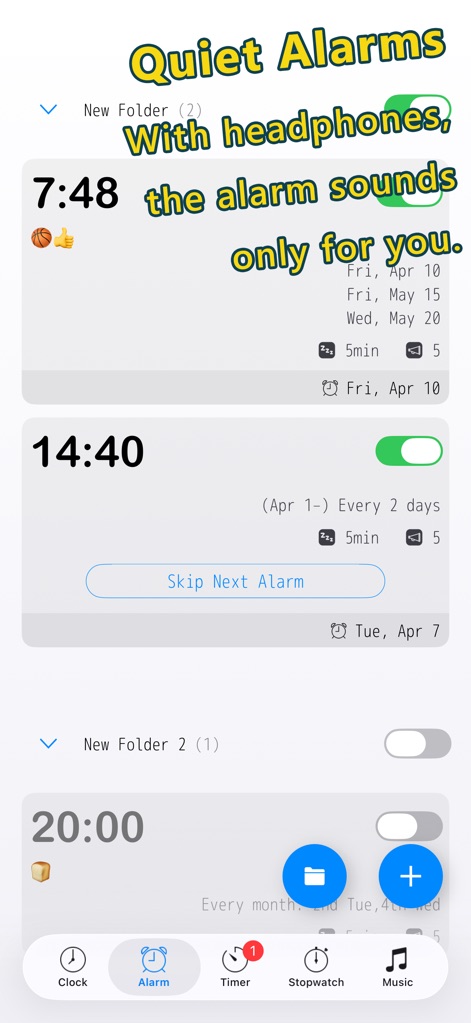
ヘッドホン接続時にアラームがデバイススピーカーから鳴らない個別アラーム機能と、詳細な繰り返し設定により、周囲を気にせず利用できます。
個別アラーム機能
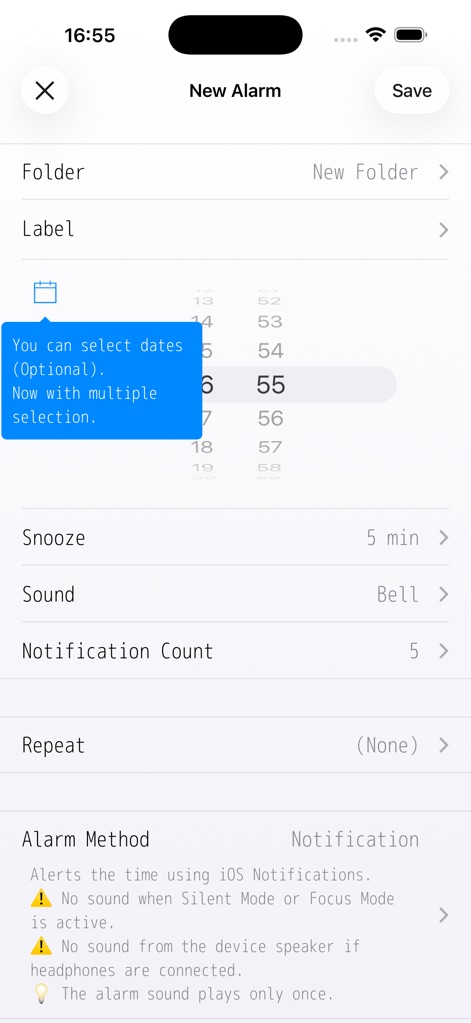
ユーザーは、特定の日付選択機能と細やかなスヌーズ設定を組み合わせることで、ニーズに合わせたアラームを詳細に設定できます。
詳細なアラーム設定
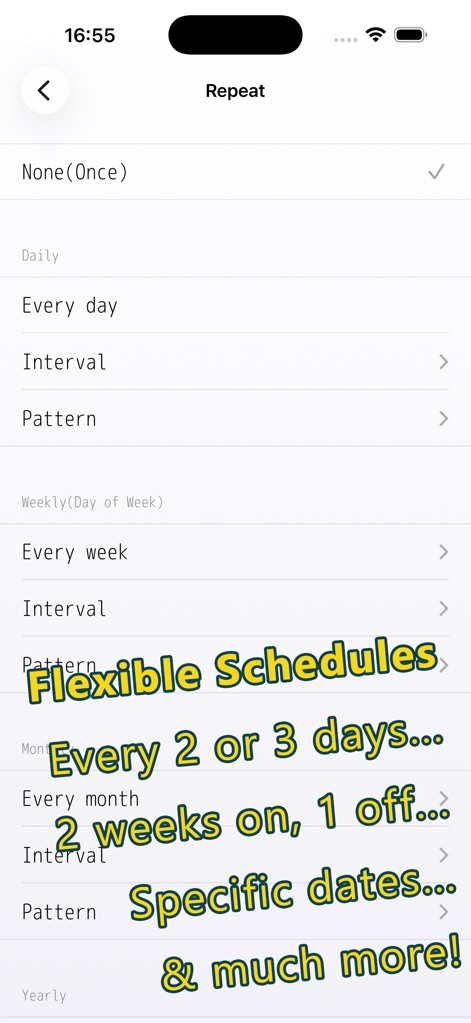
このアプリは、日、週、月、年ごとの高度な繰り返しパターンと特定の日付設定により、あらゆるスケジュールに対応するアラームを実現します。
高度な繰り返し設定
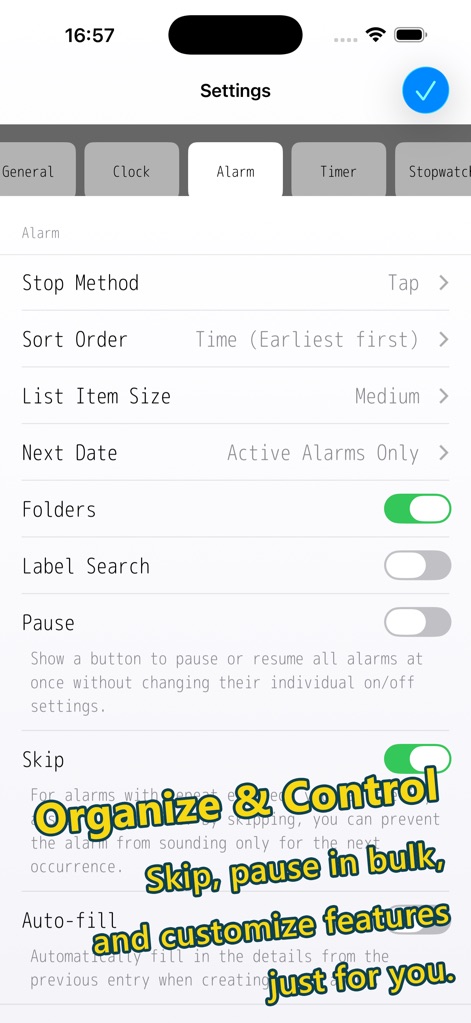
ユーザーは、アラームのフォルダ管理機能と一括スキップ/一時停止機能によって、多数のアラームも効率的に整理し、状況に応じて制御できます。
アラームを管理
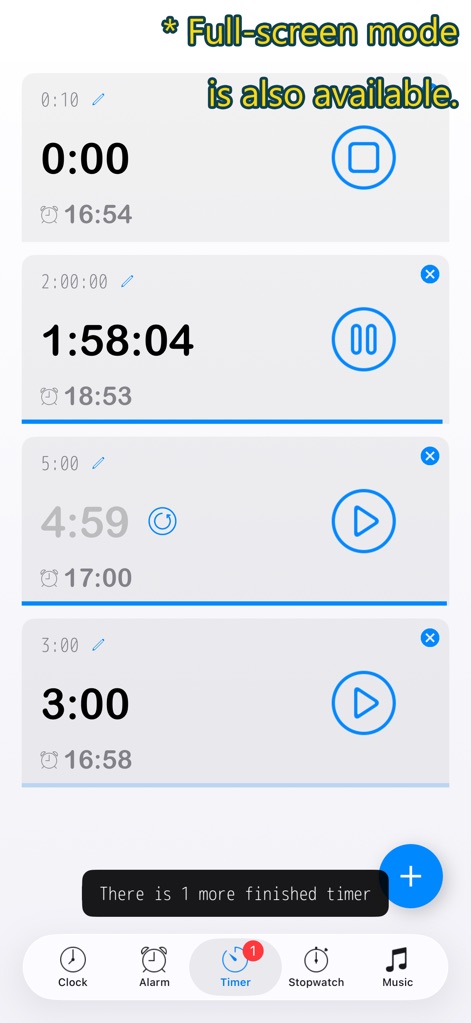
このアプリは、複数のタイマーを同時に実行する機能と、集中を促す全画面表示モードを搭載しており、様々な作業を効率化します。
複数タイマー
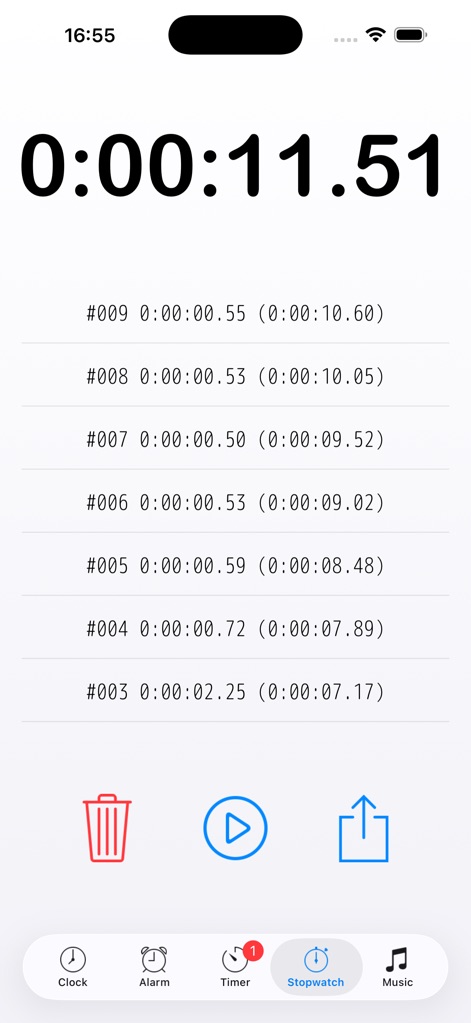
本ツールは、高精度なタイム計測と詳細なラップタイム表示により、スポーツや作業時間の記録に最適です。
高精度ストップウォッチ
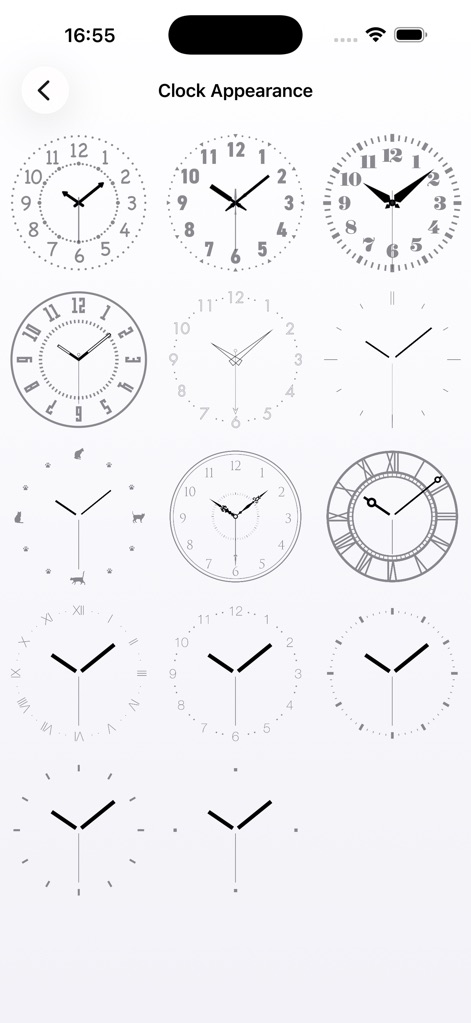
このアプリでは、アナログ表示の多様なスタイルと豊富な時計デザインから選択することで、ユーザーは時計の外観を自由にカスタマイズできます。
豊富な時計デザイン

このアプリは、横向き表示に対応し、時刻表示に加え、ユニークな時計フェイスデザインで個性的なデスクトップ時計としても利用可能です。
個性的な横向き表示
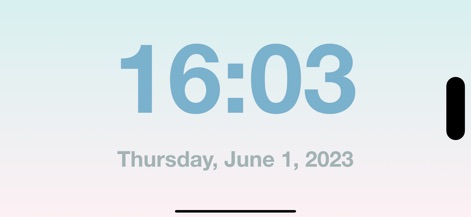
このアプリは、横向き表示でのデジタルのみの表示と、他の要素を隠すミニマルなデザインにより、シンプルで洗練された時計画面を提供します。
ミニマルなデジタル時計
説明
Download
類似アプリ
似た機能とユーザー体験を持つアプリ
Nowmusi - Alarm Music & Sounds
"INPEK-ZE" d.o.o. Zenica
Zen Flip Clock - Minimal Timer
Chaoyang Minimal Software Studio
Alarm Clock App: myAlarm Clock
APPMIND - SOFTWARE TECHNOLOGIES LDA
ClockPhone big digital clocks
EVGENII KOSTIN
Smart Alarm Clock-Focus&Sleep
VISONXY LIMITED
Stopwatch & Countdown Timer
Appenvision Ltd
このページはアプリまたはその開発者の公式ページではなく、情報提供および論評を目的として作成された独立した編集出版物です。明示的に別段の記載がない限り、アプリおよびその開発者は、MWM、Apple、Google Play、アプリのパブリッシャー、またはアプリの開発者と提携、承認、後援、認可、またはその他の公式的な関係はなく、このページのいかなる内容も、アプリがMWMのサービスを使用して開発されたことを意味するものではありません。すべての商標、ロゴ、スクリーンショット、その他のコンテンツはそれぞれの所有者の財産です。