ClockPhone big digital clocks
ダウンロード: App Store

このページはアプリまたはその開発者の公式ページではなく、情報提供および論評を目的として作成された独立した編集出版物です。明示的に別段の記載がない限り、アプリおよびその開発者は、MWM、Apple、Google Play、アプリのパブリッシャー、またはアプリの開発者と提携、承認、後援、認可、またはその他の公式的な関係はなく、このページのいかなる内容も、アプリがMWMのサービスを使用して開発されたことを意味するものではありません。すべての商標、ロゴ、スクリーンショット、その他のコンテンツはそれぞれの所有者の財産です。

ロゴ: ClockPhone big digital clocks
ダウンロード: App Store

ClockPhone big digital clocks

デスク環境をグレードアップし、ルーチンをマスターしましょう。ヘビー スリーパー向けの解除不能なNFCアラームからプロレベルの生産性タイマーまで、iPhoneやiPadにスタイリッシュで機能的なセカンドライフを。

主要数値

ダウンロード

1M+

ユーザー評価

4.6/5

評価数

40K+

開発元

EVGENII KOSTIN

カテゴリ

Lifestyle

対応言語

10

最新バージョン

2.4.5

サイズ

201.3 MB

リリース日

2019年11月4日
機能

一日を記録する、よりスマートな方法

ClockPhoneは、デバイスを強力な生産性ハブに変え、大胆な美学と、日々のルーチンのあらゆる部分に対応する失敗しないツールを組み合わせています。

失敗しない起床方法

数学の問題を解いたり、バスルームのバーコードをスキャンしたりして、実際にベッドから出ていることを確認し、睡眠慣性(スリープイナーシャ)を克服しましょう。

最適化された集中&フィットネス

ディープワークとワークアウトのニーズに合わせて調整された、組み込みのポモドーロ、タバタ、カスタムインターバルタイマーで効率を高めましょう。

洗練された機能的なディスプレイ

大きな読みやすい数字、ランドスケープサポート、統合された画面焼き付き防止機能で、デバイスをデザイナーズデスククロックに変えましょう。

以下のスクリーンショットと説明は、アプリの公式ストアリスティングから直接取得されたものであり、アプリ開発者の所有物です。

アプリストア

スクリーンショット
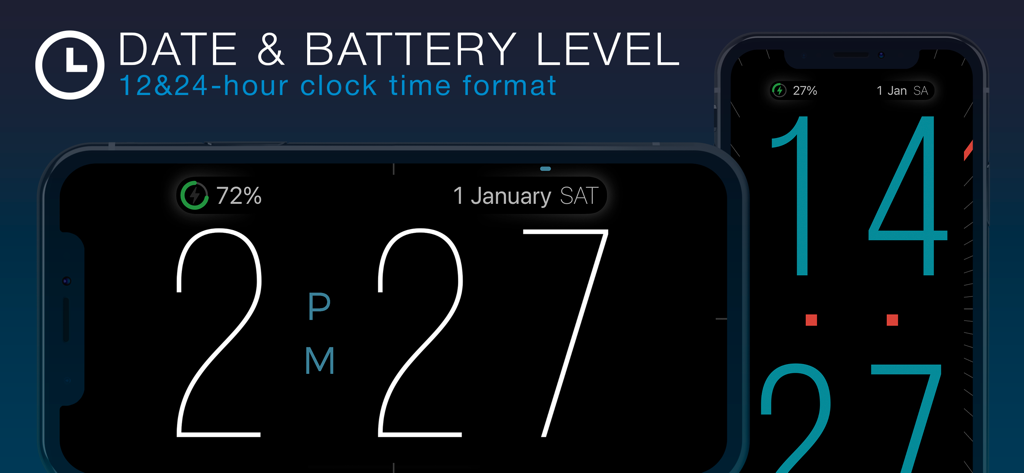
ClockPhone big digital clocks - iPhone上のデジタル時計インターフェース。大きな数字、日付、バッテリーレベルがランドスケープモードとポートレートモードの両方で表示されています。
iPhone上のデジタル時計インターフェース。大きな数字、日付、バッテリーレベルがランドスケープモードとポートレートモードの両方で表示されています。

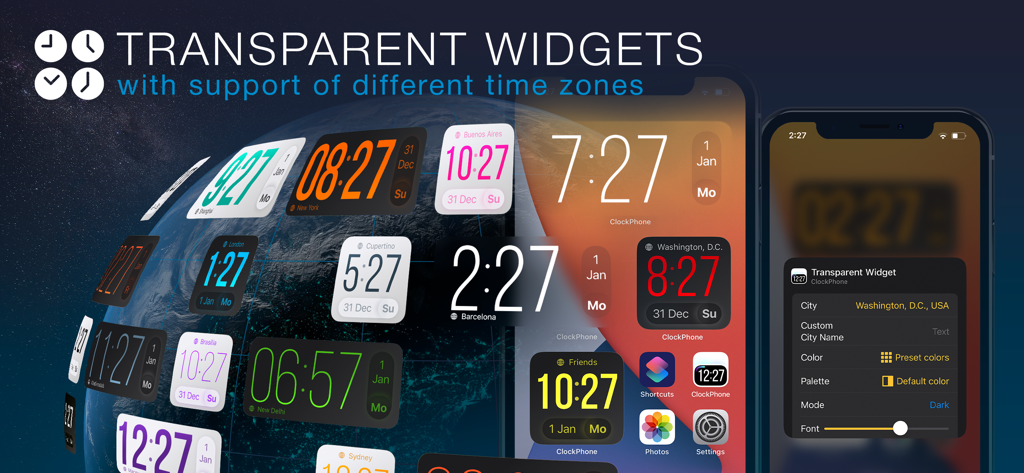
ClockPhone big digital clocks - iPhoneのホーム画面に、さまざまな世界時刻を表示する、カスタマイズ可能な透明な時計ウィジェットの数々。
iPhoneのホーム画面に、さまざまな世界時刻を表示する、カスタマイズ可能な透明な時計ウィジェットの数々。

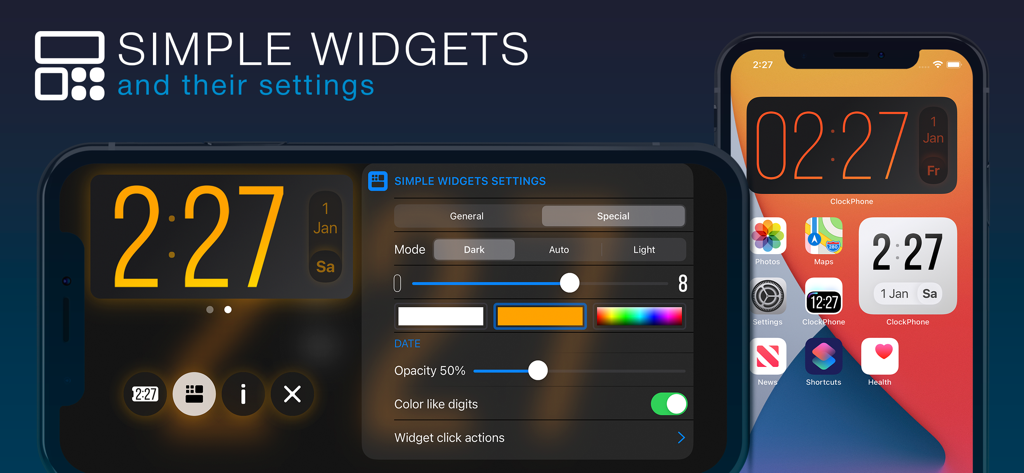
ClockPhone big digital clocks - ClockPhoneのシンプルなウィジェット設定と、iPhoneのホーム画面の時計表示。
ClockPhoneのシンプルなウィジェット設定と、iPhoneのホーム画面の時計表示。

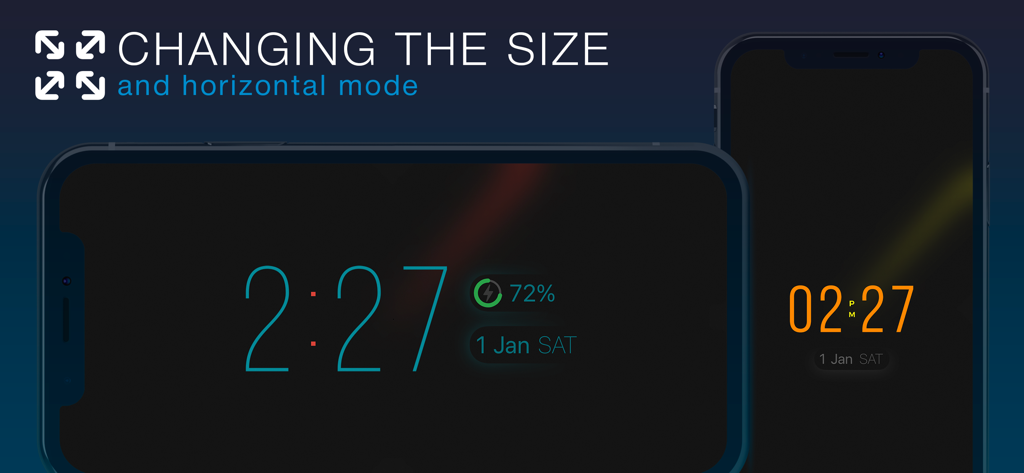
ClockPhone big digital clocks - ClockPhoneアプリ。ランドスケープモードとポートレートモードの両方でデジタル時計表示が表示され、数字のサイズは調整可能です。
ClockPhoneアプリ。ランドスケープモードとポートレートモードの両方でデジタル時計表示が表示され、数字のサイズは調整可能です。

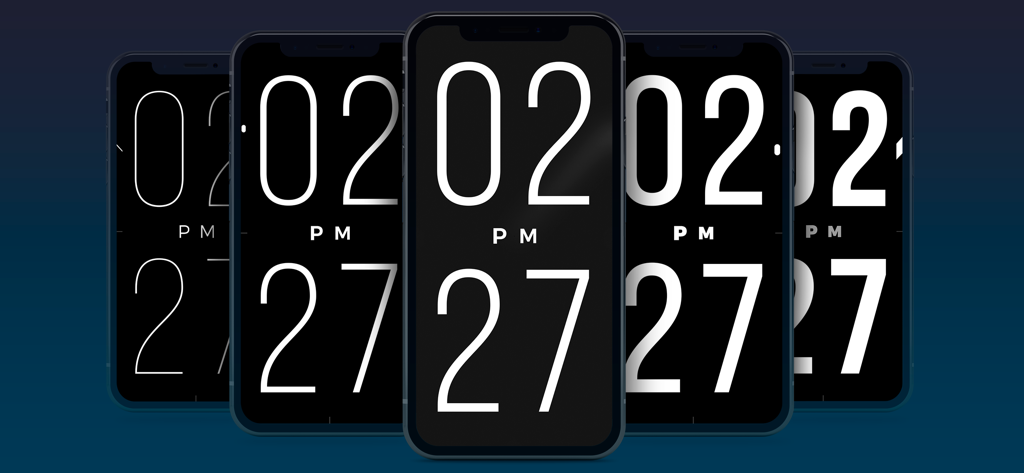
ClockPhone big digital clocks - 一連の5台のiPhone。ClockPhoneアプリが表示され、数字の太さが細いものから太いものまで変化しています。
一連の5台のiPhone。ClockPhoneアプリが表示され、数字の太さが細いものから太いものまで変化しています。

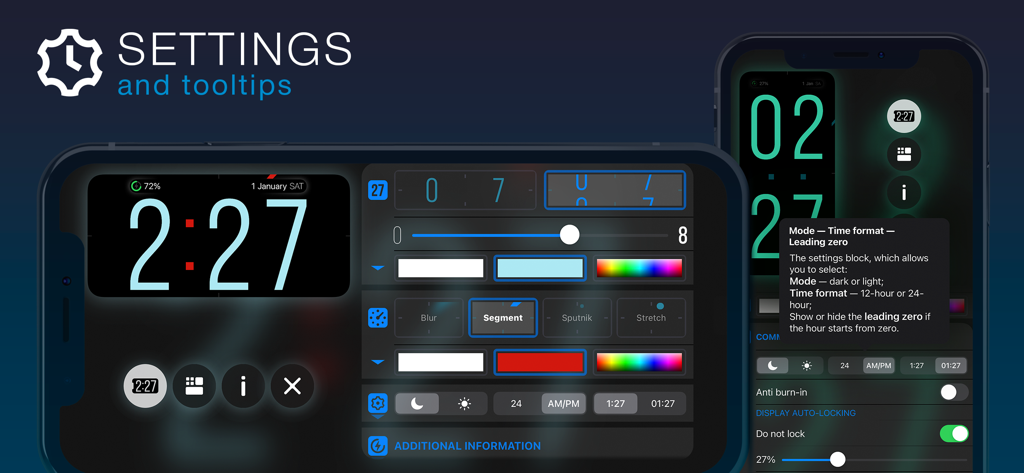
ClockPhone big digital clocks - ClockPhoneアプリの設定インターフェース。時計のカスタマイズオプションと役立つツールチップが表示されています。
ClockPhoneアプリの設定インターフェース。時計のカスタマイズオプションと役立つツールチップが表示されています。

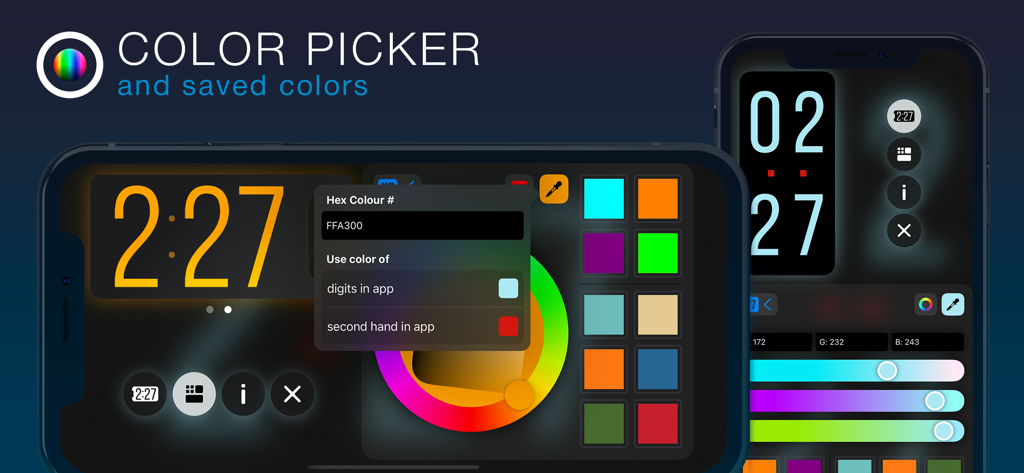
ClockPhone big digital clocks - ClockPhoneアプリのインターフェース。カラーピッカーホイールと、デジタル時計の数字をカスタマイズするための16進数コードオプションが表示されています。
ClockPhoneアプリのインターフェース。カラーピッカーホイールと、デジタル時計の数字をカスタマイズするための16進数コードオプションが表示されています。

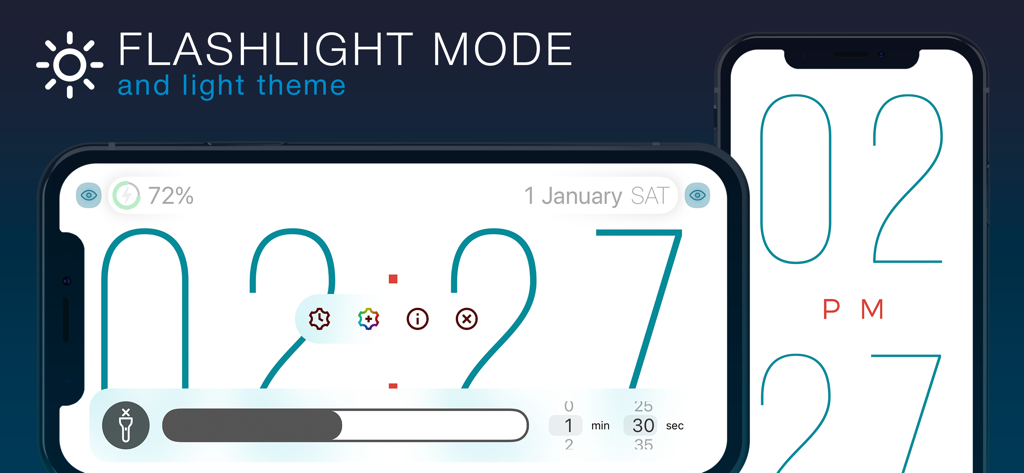
ClockPhone big digital clocks - ClockPhoneアプリのインターフェース。ライトテーマで、懐中電灯モードと大きなデジタル数字が特徴です。
ClockPhoneアプリのインターフェース。ライトテーマで、懐中電灯モードと大きなデジタル数字が特徴です。

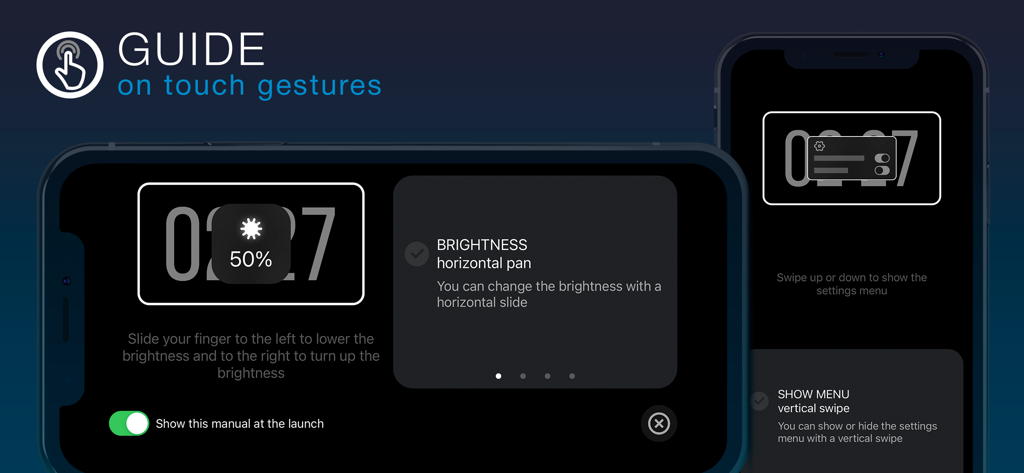
ClockPhone big digital clocks - ClockPhoneアプリのオンボーディング画面。明るさとメニューナビゲーションのためのタッチジェスチャー手順が表示されています。

ClockPhoneアプリのオンボーディング画面。明るさとメニューナビゲーションのためのタッチジェスチャー手順が表示されています。

説明

ClockPhone is a stylish and functional clock app that’s easy to use. It features an advanced alarm with flexible repeat settings: by day of the week, on a specific date, or following a shift schedule. And to make sure you really wake up, there are not just standard options to turn it off, but also advanced methods — like scanning an NFC tag, QR/barcode (for example, on a toothpaste tube in the bathroom), or solving math problems. ClockPhone also includes a versatile timer, perfect for workouts — including various interval types like Tabata, and productivity techniques like Pomodoro, 52/17, and 90/30 — as well as for cooking, meditation, and any task that needs precise time control. The app combines a thoughtfully designed interface with a rich feature set. Thanks to its stylish and attractive time display, ClockPhone fits beautifully into any space. The large digits are easy to read from any distance, and the second hand comes with different display modes for enhanced readability. Time transitions are smoothly animated, and the clock’s appearance is easy to customize via a functional and intuitive interface. Perfect for use on a charging dock or for bringing new life to a favorite device. It looks great in both landscape and portrait orientations. An onboarding guide shows how to control the app with gestures. You can also add ClockPhone widgets to your Home Screen to see the time and date at a glance without opening the app. There are two types of widgets — simple and transparent — each available in two sizes and with plenty of customization options. ● Key app features to tailor it to your needs and use it comfortably in any situation • Screen burn-in protection • Exit lock to prevent unauthorized closure • Simple and transparent widgets • Display of date and battery level • Customization of digit color, animation, thickness, and size • Random color changing of digits • Intuitive gestures: adjust brightness, toggle flashlight, open menu, resize digits • Time signals • Configurations — groups of settings that can be switched manually or on a schedule • Backups • Share settings, configurations, alarms, and timers • Time zone support • Display of analog and digital seconds • Time announcements for visually impaired users ● Alarm features to suit any routine, habit, or personal preference • Repeats by weekday, shift schedule, or specific date • Option to postpone the next trigger • Dismiss methods: standard, NFC tag scan, QR/barcode scan, or solving math problems • Support for custom sounds from the Music library or files saved in iCloud • Gradual volume increase • Flexible snooze options: number of repeats and snooze duration • Actions upon alarm dismissal ● Unique timer features to suit various use cases: interval training, productivity methods for work or study, and more • Multiple intervals with different durations • Repeat settings for entire interval series • Sound at the end of an interval or name announcement at the start • Pause or automatic transition to the next interval • Actions upon timer completion ClockPhone is constantly evolving based on user feedback. Install it on your iPhone, iPad, or iPod touch — and you won’t want to be without it!

Download

ダウンロード: App Store

このページはアプリまたはその開発者の公式ページではなく、情報提供および論評を目的として作成された独立した編集出版物です。明示的に別段の記載がない限り、アプリおよびその開発者は、MWM、Apple、Google Play、アプリのパブリッシャー、またはアプリの開発者と提携、承認、後援、認可、またはその他の公式的な関係はなく、このページのいかなる内容も、アプリがMWMのサービスを使用して開発されたことを意味するものではありません。すべての商標、ロゴ、スクリーンショット、その他のコンテンツはそれぞれの所有者の財産です。