
このページはアプリまたはその開発者の公式ページではなく、情報提供および論評を目的として作成された独立した編集出版物です。明示的に別段の記載がない限り、アプリおよびその開発者は、MWM、Apple、Google Play、アプリのパブリッシャー、またはアプリの開発者と提携、承認、後援、認可、またはその他の公式的な関係はなく、このページのいかなる内容も、アプリがMWMのサービスを使用して開発されたことを意味するものではありません。すべての商標、ロゴ、スクリーンショット、その他のコンテンツはそれぞれの所有者の財産です。


AnyDesk Remote Desktop
本アプリは、物理的な距離を無意味にする。ユーザーは、AnyDeskを通じて、目の前の画面から地球の裏側にあるマシンを自在に支配する新たな常識を実感するだろう。
ダウンロード
12.5M+ユーザー評価
評価数
256.3K開発元
カテゴリ
Utilities対応言語
28最新バージョン
8.1.0サイズ
47.1 MBリリース日
2017年1月26日AnyDesk Remote Desktop アプリケーション分析
テックアナリストによる主要機能の評価
遠隔アクセスと制御
ユーザーは、世界中のどこからでもデバイスに接続し、完全に制御することが可能です。これにより、ITサポート、在宅勤務、リモート学習が実現されます。
優れたパフォーマンス
本ツールは、高いフレームレートと低い遅延を提供し、ユーザーは遠隔デバイスをまるで目の前にあるかのようにスムーズに操作できます。
高水準のセキュリティ
このアプリは、銀行レベルの暗号化を採用しており、ユーザーの接続とデータが常に安全に保たれることを保証します。
個人利用向け無料提供
個人利用の場合、本アプリは無料で提供され、広告が表示されないため、ユーザーはコストを気にせず快適にリモートアクセスを利用できます。
シームレスで安全な接続
ユーザーは、複雑な設定なしに、安全かつスムーズにリモートデバイスへ接続できます。
柔軟な導入オプション
このツールは、クラウドベースまたはオンプレミスでの導入に対応しており、企業や組織の特定のニーズに合わせて柔軟な運用が可能です。
よくある質問
について知っておくべきこと AnyDesk Remote Desktop
Is AnyDesk Remote Desktop free for personal use?
Yes, AnyDesk is ad-free and free for personal use. It connects remote devices securely for individuals, IT professionals, and students.
What is AnyDesk Remote Desktop software used for?
AnyDesk Remote Desktop is powerful remote assistance software. It enables secure and reliable remote access between devices, connecting users whether they are nearby or globally.
How do I initiate a remote connection using AnyDesk?
To initiate a connection with AnyDesk, install and launch the app on both devices. Enter the AnyDesk-ID from the remote device, then confirm the access request to establish control.
Does AnyDesk Remote Desktop allow file transfer?
Yes, AnyDesk Remote Desktop supports file transfer. Users can access and manage files on remote devices, as evidenced by the file browsing interface during a session.
Is AnyDesk a secure remote access solution?
Yes, AnyDesk provides banking-standard encryption to ensure secure and reliable remote access. This protects data during connections for both IT professionals and private users.
What are the performance benefits of AnyDesk?
AnyDesk offers outstanding performance with high frame rates and low latency. It provides a smooth remote experience, suitable for various users including IT support and students.
Can AnyDesk connect to different types of devices?
Yes, AnyDesk connects to various remote devices. It supports cross-platform access, allowing users to control computers like MacBooks, home fileservers, and office PCs.
What kind of encryption does AnyDesk use?
AnyDesk utilizes banking-standard encryption. This security measure ensures that all remote connections are protected and reliable, safeguarding user data during access sessions.
以下のスクリーンショットと説明は、アプリの公式ストアリスティングから直接取得されたものであり、アプリ開発者の所有物です。
アプリストア
スクリーンショット
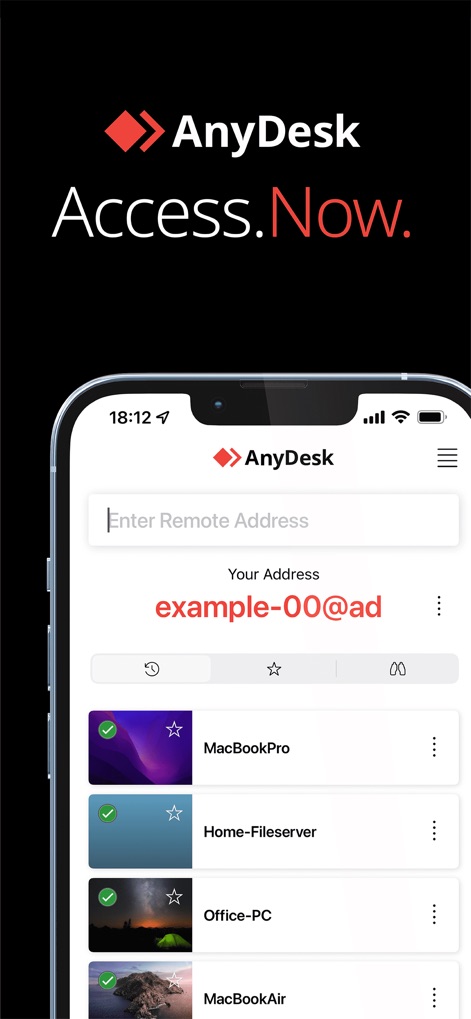
簡単接続、即座に
ユーザーは、固有のAnyDeskアドレスを確認し、「MacBookPro」や「Home-Fileserver」などの最近接続したデバイスリストを素早く参照できます。
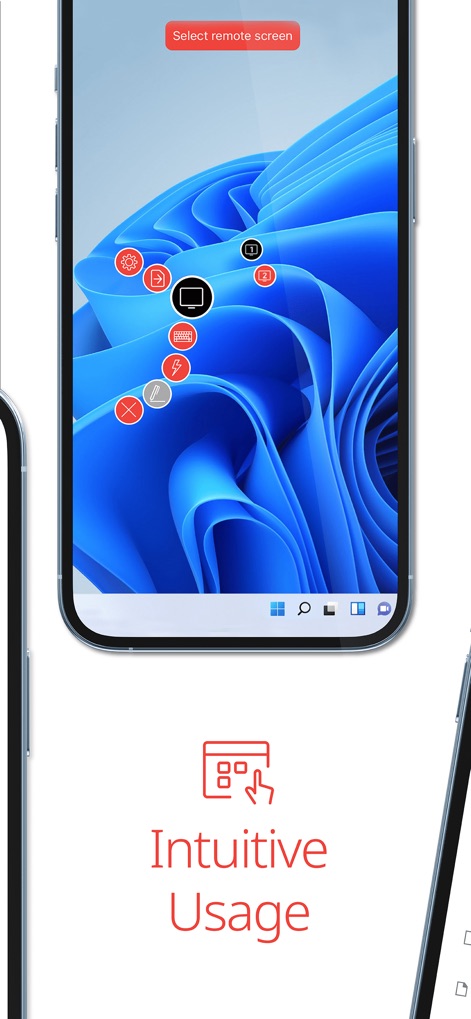
直感的な操作性
リモートのWindowsデスクトップがスマートフォン上に表示され、設定アイコンや切断ボタンなど、直感的なオーバーレイコントロールを通じてシームレスな操作が可能です。

ファイル転送も簡単
ユーザーは、AnyDeskアプリ内のファイルブラウザインターフェースを通じて「/Users/Shared/Photos」などのディレクトリパスにアクセスし、ファイル名、サイズ、日付を含む詳細なファイル情報でファイルを管理できます。

いつでも、どこでも
ユーザーは、スマートフォン上でmacOSデスクトップにアクセスし、Finderウィンドウ内のアプリケーションフォルダやDockアイコンなど、PC環境をどこからでも操作できることを示しています。
説明
Download
類似アプリ
似た機能とユーザー体験を持つアプリ

向日葵远程控制-Sunlogin remotecontrol
Shanghai best oray information s&t co.,ltd

UU远程-远程办公/游戏串流
Guangzhou NetEase Computer System Co.Ltd

AweSun Remote Desktop
AWERAY PTE. LTD.

TeamViewer Remote Control
TeamViewer Germany GmbH

ToDesk远程控制
Hainan Youqu Technology Co., Ltd.

DeskIn Remote Desktop
ZULER TECHNOLOGY PTE. LTD.

Termius - Modern SSH Client
Termius Corporation

RealVNC Viewer: Remote Desktop
RealVNC Limited

LogMeIn Pro & Central
GoTo Group, Inc.
このページはアプリまたはその開発者の公式ページではなく、情報提供および論評を目的として作成された独立した編集出版物です。明示的に別段の記載がない限り、アプリおよびその開発者は、MWM、Apple、Google Play、アプリのパブリッシャー、またはアプリの開発者と提携、承認、後援、認可、またはその他の公式的な関係はなく、このページのいかなる内容も、アプリがMWMのサービスを使用して開発されたことを意味するものではありません。すべての商標、ロゴ、スクリーンショット、その他のコンテンツはそれぞれの所有者の財産です。