
このページはアプリまたはその開発者の公式ページではなく、情報提供および論評を目的として作成された独立した編集出版物です。明示的に別段の記載がない限り、アプリおよびその開発者は、MWM、Apple、Google Play、アプリのパブリッシャー、またはアプリの開発者と提携、承認、後援、認可、またはその他の公式的な関係はなく、このページのいかなる内容も、アプリがMWMのサービスを使用して開発されたことを意味するものではありません。すべての商標、ロゴ、スクリーンショット、その他のコンテンツはそれぞれの所有者の財産です。


Auto Clicker - AutoTap App
指の苦痛は過去のもの。このアプリは、機械的な精度でタップを支配する能力をユーザーに与える。
ダウンロード
250k+ユーザー評価
評価数
634開発元
カテゴリ
Utilities対応言語
8最新バージョン
1.0.6サイズ
212.4 MBリリース日
2025年7月22日この分析は、モバイルゲーム、生産性向上、アプリテスト、およびアクセシビリティのニーズに対応する本アプリの主要機能と、iOSユーザーへの影響を評価します。
「Auto Clicker - AutoTap App」機能分析:反復タスク自動化の効率性
反復タッピングの自動化
指の痛みや疲労をなくし、手動操作の負担を軽減することで、ユーザーは継続的にアプリやゲームと対話できます。
バックグラウンド実行
ユーザーが他のアプリを使用している間や画面がロックされている間も自動タッピングを継続できるため、中断のない自動化が可能です。アイドルゲームの進行や長時間のタスク自動化に特に有効です。
カスタムタッピングシーケンス
複数の場所、異なる遅延、繰り返し回数を含む多段階のタッピングパターンを記録できます。これにより、複雑なゲームの操作や、アプリ内の複雑なナビゲーションフローに対応可能です。
高精度な操作再現
ピクセルレベルの座標とミリ秒単位の厳密なタイミングでユーザー操作を記録し、機械的な精度で再現します。これにより、信頼性の高い、一貫した自動化が保証されます。
精密なタイミング制御
タップ間の正確な遅延を100ミリ秒から60秒まで設定できます。これにより、ゲームのクールダウン期間への対応や、アプリの読み込み時間に応じたインタラクションの調整が可能になります。
ループと実行時間の設定
特定の時間期間、タップ回数、または手動で停止するまで継続的にパターンを実行するための柔軟な設定を提供します。誤操作による無限ループを防ぐ安全タイムアウトも含まれます。
複数パターンの保存
無制限のタッピングシーケンスをカスタム名と説明付きで保存し、異なるゲームやタスク間で簡単に切り替えることができます。これにより、ユーザーは複数の自動化シナリオを効率的に管理できます。
iOSアクセシビリティ機能との連携
iOSのアクセシビリティ機能を利用することで、アプリはジェイルブレイクなしで安全かつ広範囲なiPhoneデバイス上で動作します。これにより、多くのユーザーにとって利用可能性が向上します。
よくある質問
について知っておくべきこと Auto Clicker - AutoTap App
What is the Auto Clicker - AutoTap App?
The Auto Clicker - AutoTap App automates repetitive mobile tasks and minimizes manual input. It boosts gaming performance, streamlines workflows, and eliminates tedious tapping for enhanced productivity.
How does the Auto Clicker - AutoTap App work?
The Auto Clicker - AutoTap App works by automating screen taps. Users can customize settings like the number of pointers, clicks per second, and interval time to perform repetitive actions automatically.
Is the Auto Clicker - AutoTap App suitable for gaming?
Yes, the Auto Clicker - AutoTap App is suitable for gaming. It boosts gaming performance by automating repetitive tasks and minimizing manual input, allowing users to focus on other aspects of gameplay.
What is the cost of the Auto Clicker - AutoTap App subscription?
The Auto Clicker - AutoTap App offers a Weekly Plan subscription for full access at $4.99 per week. This subscription unlocks all unlimited automation features.
How can I enable auto-tap functionality in the Auto Clicker - AutoTap App?
The Auto Clicker - AutoTap App provides step-by-step instructions on how to enable auto-tap functionality. This guidance is accessible directly within the app's interface for user convenience.
Does the Auto Clicker - AutoTap App have custom click settings?
Yes, the Auto Clicker - AutoTap App offers custom click settings. Users can adjust parameters such as the number of pointers, the speed of clicks per second, and the interval time between actions.
Is the Auto Clicker - AutoTap App trusted by users?
Yes, the Auto Clicker - AutoTap App is trusted by a significant user base. The app is explicitly stated as being 'TRUSTED BY 100K+ USERS'.
How do I manage my subscription for the Auto Clicker - AutoTap App?
Users can manage their Auto Clicker - AutoTap App subscription and turn off auto-renewal through their iTunes Account settings. This ensures control over payment and renewal preferences.
以下のスクリーンショットと説明は、アプリの公式ストアリスティングから直接取得されたものであり、アプリ開発者の所有物です。
アプリストア
スクリーンショット

本アプリは、画面上の手のカーソルがタップを正確にシミュレートし、連続する「+1」の表示で高速な操作を視覚化します。
自動タップ開始

本アプリの直感的なインターフェースは、「How To Enable Auto-Tap」のようなクイックガイドを提供し、「TRUSTED BY 100K+ USERS」の評価でその信頼性を示しています。
簡単アクセス
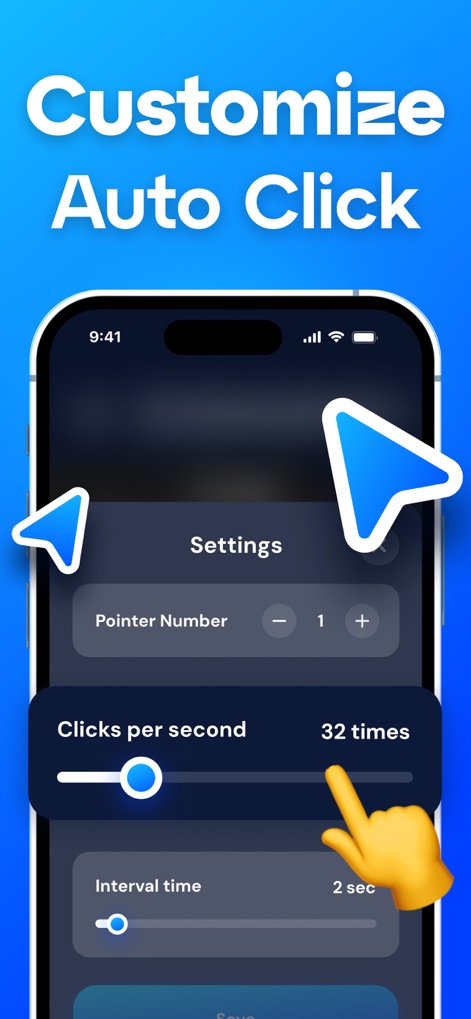
ユーザーは「Clicks per second」のスライダーでクリック速度を細かく調整し、「Interval time」の設定でタップ間の時間間隔をミリ秒単位で制御できます。
高度な設定
説明
Download
類似アプリ
似た機能とユーザー体験を持つアプリ

自动ּ连点器 - 自动点击器
壮壮 彭

连点器-高效自动点击按键辅助工具
和圆 魏

连点器 - 自动点击持续滚动刷新&旋转指针工具
源 韦

自动点击器·连点器
磊 赵

Auto Clicker-Auto Tapper tool
佳豪 张

Auto Clicker: Click Automatic
RH LANDSCAPING LLC

连点器-自动连点神器&点赞抢购助手
倩格 刘

Auto Clicker - Tap Assistant
乐飞 张

Auto Tapper Assistant App
KUPERTINO BIL. YAZ. HALIL IBRAHIM KARAHAN SAFFET ARSLAN MUSTAFA AYTEN MUHAMMET YALCIN OZDEMIR K. S.
このページはアプリまたはその開発者の公式ページではなく、情報提供および論評を目的として作成された独立した編集出版物です。明示的に別段の記載がない限り、アプリおよびその開発者は、MWM、Apple、Google Play、アプリのパブリッシャー、またはアプリの開発者と提携、承認、後援、認可、またはその他の公式的な関係はなく、このページのいかなる内容も、アプリがMWMのサービスを使用して開発されたことを意味するものではありません。すべての商標、ロゴ、スクリーンショット、その他のコンテンツはそれぞれの所有者の財産です。