
このページはアプリまたはその開発者の公式ページではなく、情報提供および論評を目的として作成された独立した編集出版物です。明示的に別段の記載がない限り、アプリおよびその開発者は、MWM、Apple、Google Play、アプリのパブリッシャー、またはアプリの開発者と提携、承認、後援、認可、またはその他の公式的な関係はなく、このページのいかなる内容も、アプリがMWMのサービスを使用して開発されたことを意味するものではありません。すべての商標、ロゴ、スクリーンショット、その他のコンテンツはそれぞれの所有者の財産です。


ダウンロード
1M+ユーザー評価
評価数
949開発元
カテゴリ
Productivity対応言語
22最新バージョン
1.3サイズ
46.7 MBリリース日
2024年9月20日効率と自動化を追求するモバイルユーザー向けの主要機能評価
アプリケーション分析: Auto Clicker・Click Assistant
自動タップの効率的な自動化
本ツールは、モバイルデバイス上での繰り返し発生する画面タップを自動化し、ゲーム、SNS、出会い系アプリなどの多様なデジタル活動における時間と労力を大幅に削減します。
高度なカスタムタップスクリプト作成
ユーザーは、カスタムタイミングと位置を詳細に設定できる自動タップスクリプトを作成可能です。これにより、特定のアプリ内での複雑な操作やゲームでの優位性確保に貢献します。
直感的なシンプルインターフェース
本アプリは、迅速なセットアップと信頼性の高いパフォーマンスを目的としたシンプルで分かりやすいインターフェースを提供します。これにより、初めてのユーザーでも簡単に自動化を開始できます。
精密なタップ位置設定ガイド
画面上に表示されるガイド機能を利用することで、ユーザーはタップ位置を極めて正確に指定できます。これは、特に精密な操作が求められるゲームやアプリでの利用において高い信頼性をもたらします。
柔軟な自動化操作コントロール
ユーザーは、自動化プロセスの開始、一時停止、停止を簡単かつ直感的なコントロールで行うことができます。これにより、デジタル活動中の柔軟な対応と管理が実現されます。
お気に入りアプリ・サイトへの迅速アクセス
頻繁に使用するアプリケーションやウェブサイトをお気に入りとして登録し、ワンタップで素早くアクセスすることが可能です。これにより、自動化を開始するまでの手間が省け、全体的な効率性が向上します。
よくある質問
について知っておくべきこと Auto Clicker・Click Assistant
What is Auto Clicker・Click Assistant?
Auto Clicker・Click Assistant automates repeated screen taps on your device. It saves time by executing tap sequences automatically in games, apps, or during testing.
How does Auto Clicker・Click Assistant help automate tasks?
Auto Clicker・Click Assistant automates tasks by allowing users to create custom tap scripts with specific timings and positions. It uses an on-screen guide for precise tap location settings.
Can Auto Clicker・Click Assistant be used in games?
Yes, Auto Clicker・Click Assistant can be used in games to automate repeated screen taps and tasks. Screenshot #1 demonstrates its application in a shooter game.
Does Auto Clicker・Click Assistant support dating apps or other applications?
Yes, Auto Clicker・Click Assistant supports all applications, including dating apps and websites. Users can add favorite apps and websites for quick access, as shown in Screenshot #2 and #3.
How do I manage my subscription for Auto Clicker・Click Assistant?
You manage your Auto Clicker・Click Assistant subscription and auto-renewal through your iTunes Account Settings after purchase. Auto-renewal must be turned off 24 hours before the current period ends.
What happens if I have a free trial and purchase a subscription for Auto Clicker・Click Assistant?
Any unused portion of a free trial period for Auto Clicker・Click Assistant is forfeited when you purchase a subscription. This applies where a free trial is offered.
Where can I find the Privacy Policy for Auto Clicker・Click Assistant?
The Privacy Policy for Auto Clicker・Click Assistant is available at the following URL: https://1drv.ms/w/s!AtEh75onyRbqbHBCMepyr5VmNk4?e=PoUEjQ.
Can Auto Clicker・Click Assistant set multiple tap points?
Yes, Auto Clicker・Click Assistant allows users to set multiple tap points for automation. Screenshot #4 visually confirms the ability to set auto-clicks multiple times.
以下のスクリーンショットと説明は、アプリの公式ストアリスティングから直接取得されたものであり、アプリ開発者の所有物です。
アプリストア
スクリーンショット

本アプリは、ゲーム画面上に設定された複数のタップポイントと、視覚的に示される自動操作により、ユーザーが繰り返しのアクションを効率的に実行し、ゲームプレイを向上させます。
ゲームを制覇
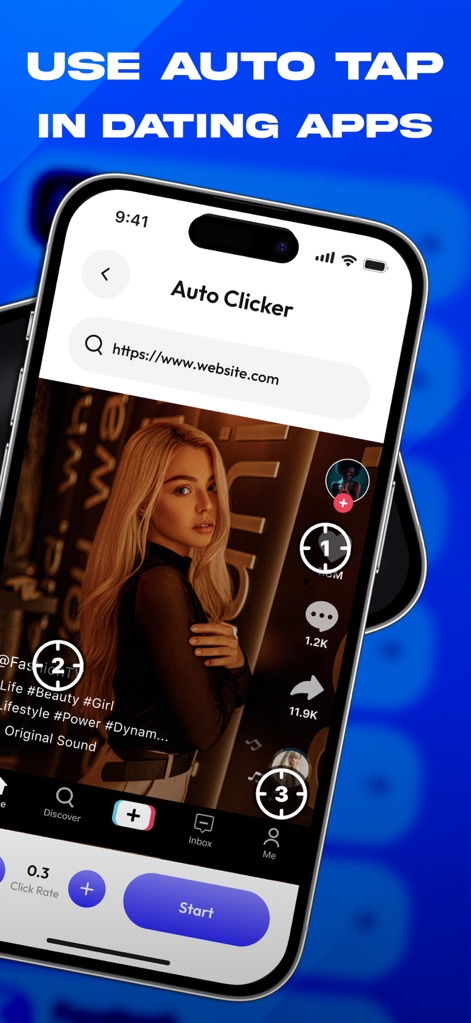
このツールは、ソーシャルメディアフィード上での複数の自動タップポイントの設定と、効率的なコンテンツ閲覧のための操作シーケンスを通じて、ユーザーのデジタルライフを簡素化します。
ソーシャルを自動化

本ツールは、「Add website」という直感的なポップアップと、キーボード入力によるアプリケーション登録機能を提供し、ユーザーが自動化したい特定のウェブサイトやアプリを迅速に追加できるようにします。
アプリを簡単登録

このアプリは、ゲーム画面に表示されるタップ時の視覚効果と、繰り返し作業を効率化するための複数回タップ設定機能により、ユーザーが特定の操作を自動で継続できるようにします。
連続タップ設定
説明
Download
類似アプリ
似た機能とユーザー体験を持つアプリ

自动ּ连点器 - 自动点击器
壮壮 彭

连点器-高效自动点击按键辅助工具
和圆 魏

连点器 - 自动点击持续滚动刷新&旋转指针工具
源 韦

自动点击器·连点器
磊 赵

Auto Clicker-Auto Tapper tool
佳豪 张

Auto Clicker: Click Automatic
RH LANDSCAPING LLC

连点器-自动连点神器&点赞抢购助手
倩格 刘

Auto Clicker - Tap Assistant
乐飞 张

Auto Tapper Assistant App
KUPERTINO BIL. YAZ. HALIL IBRAHIM KARAHAN SAFFET ARSLAN MUSTAFA AYTEN MUHAMMET YALCIN OZDEMIR K. S.
このページはアプリまたはその開発者の公式ページではなく、情報提供および論評を目的として作成された独立した編集出版物です。明示的に別段の記載がない限り、アプリおよびその開発者は、MWM、Apple、Google Play、アプリのパブリッシャー、またはアプリの開発者と提携、承認、後援、認可、またはその他の公式的な関係はなく、このページのいかなる内容も、アプリがMWMのサービスを使用して開発されたことを意味するものではありません。すべての商標、ロゴ、スクリーンショット、その他のコンテンツはそれぞれの所有者の財産です。