CAD迷你看图 - 经典的CAD手机快速看图工具
ダウンロード: App Store

このページはアプリまたはその開発者の公式ページではなく、情報提供および論評を目的として作成された独立した編集出版物です。明示的に別段の記載がない限り、アプリおよびその開発者は、MWM、Apple、Google Play、アプリのパブリッシャー、またはアプリの開発者と提携、承認、後援、認可、またはその他の公式的な関係はなく、このページのいかなる内容も、アプリがMWMのサービスを使用して開発されたことを意味するものではありません。すべての商標、ロゴ、スクリーンショット、その他のコンテンツはそれぞれの所有者の財産です。


ロゴ: CAD迷你看图 - 经典的CAD手机快速看图工具
ダウンロード: App Store

CAD迷你看图 - 经典的CAD手机快速看图工具

図面をポケットに入れて持ち運べます。建築家、エンジニア、請負業者向けに設計された強力なモバイルツールで、現場でDWG図面を即座に開き、計測、編集できます。

主要数値

ダウンロード

1M+

ユーザー評価

3.7/5

評価数

600

開発元

Shanghai Xiaocai Technology Co., Ltd

カテゴリ

Productivity

対応言語

2

最新バージョン

10.6.1

サイズ

116.1 MB

リリース日

2013年11月30日
機能

ポケットに入るプロフェッショナルCADパフォーマンス

現場に重いノートPCを持ち運ぶのはもうやめましょう。業界最速・最軽量のモバイルCADツールで、DWG図面の表示、計測、編集が可能です。

超高速DWG表示

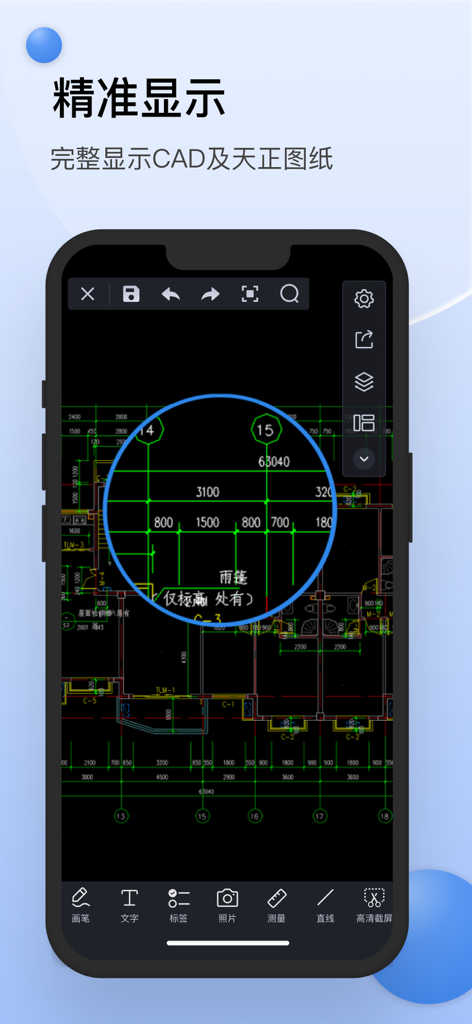
複雑な2Dおよび3D図面を数秒で開けます。AutoCADバージョンR14から2019まで対応しており、図面が常に完璧に表示されることを保証します。

精密計測ツール

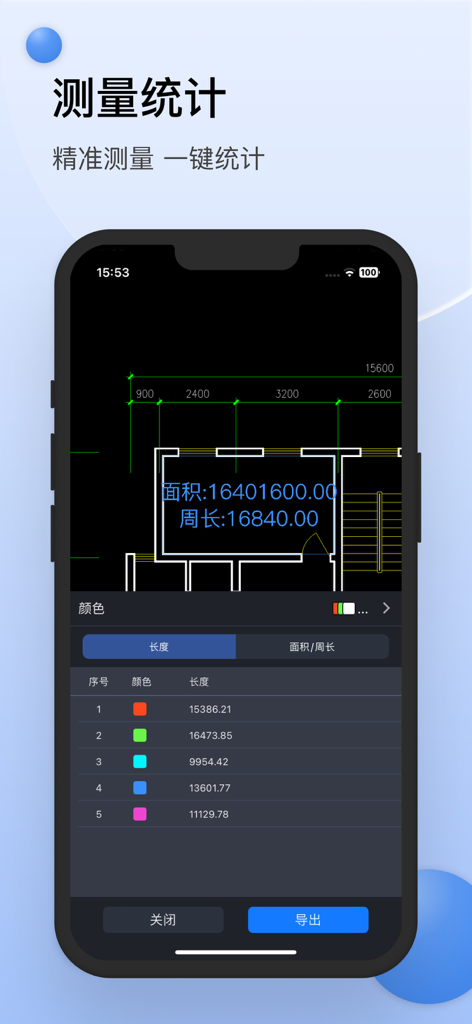
その場で寸法を確認できます。プロフェッショナルグレードのツールを使用して、現場ウォークスルー中にiPadまたはiPhone上で直接長さや面積を計算できます。

以下のスクリーンショットと説明は、アプリの公式ストアリスティングから直接取得されたものであり、アプリ開発者の所有物です。

アプリストア

スクリーンショット
CAD迷你看图 - 经典的CAD手机快速看图工具 - CAD Mini Viewerアプリのスプラッシュスクリーン、ロゴ、中国語のテキストが表示されたスマートフォン。
CAD Mini Viewerアプリのスプラッシュスクリーン、ロゴ、中国語のテキストが表示されたスマートフォン。

CAD迷你看图 - 经典的CAD手机快速看图工具 - CAD Mini Viewerアプリを使用してスマートフォンに表示された、詳細な建築CAD図面。
CAD Mini Viewerアプリを使用してスマートフォンに表示された、詳細な建築CAD図面。

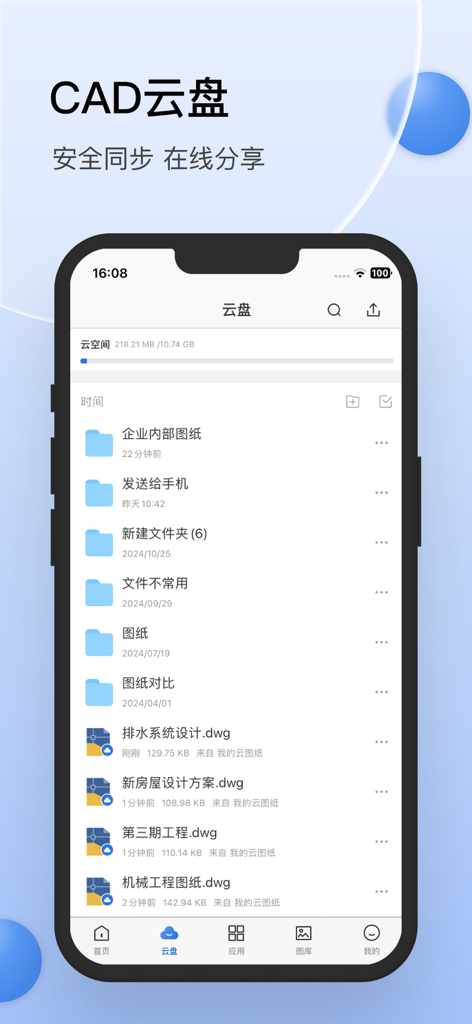
CAD迷你看图 - 经典的CAD手机快速看图工具 - CAD Mini Viewerのクラウドストレージインターフェイス、フォルダ、現場のプロフェッショナル向けのDWG技術図面が表示されたスマートフォン画面。
CAD Mini Viewerのクラウドストレージインターフェイス、フォルダ、現場のプロフェッショナル向けのDWG技術図面が表示されたスマートフォン画面。

CAD迷你看图 - 经典的CAD手机快速看图工具 - CAD Mini Viewerのモバイルインターフェイス、技術図面上での面積および長さの計測統計を表示。
CAD Mini Viewerのモバイルインターフェイス、技術図面上での面積および長さの計測統計を表示。

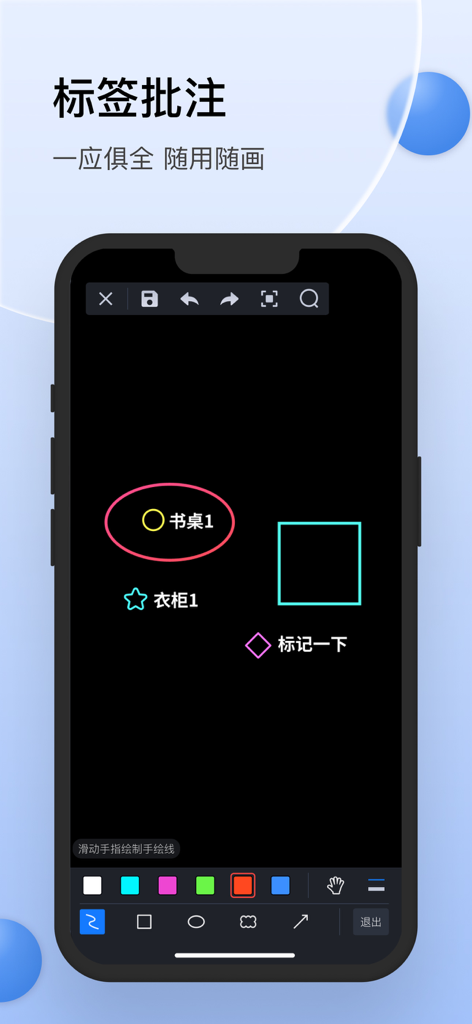
CAD迷你看图 - 经典的CAD手机快速看图工具 - CAD Mini Viewerのモバイルインターフェイス、図面への注釈およびマークアップツールを表示。

CAD Mini Viewerのモバイルインターフェイス、図面への注釈およびマークアップツールを表示。

説明

• The honours of the company of Tianji Media have been installed and used by over 50 million CAD users. • Small software, powerful and fast • Compatible with AutoCAD R14 to 2019 versions of DWG 2D 3D drawings • Professional CAD technical team maintains maintenance updates • Provide 7*24 hour QQ group (339567706) technical service [Main product features] Look at the picture: - Support for opening .dwg .dxf .zip.jpg.png and other file formats, including encrypted drawings; - Support Tianzheng native format conversion, native to T3 format drawings are not lost; - Supports common viewing operations such as pan, zoom, and full image; - Support layout switching, layer operations. edit: - Support simple editing and changing drawings; - Support for editing graphics, including copying, pasting, deleting, and modifying text. measuring: - Support length measurement and area measurement; - Support for fast measurements. Collaboration and conversion: - Support drawing document roaming, network disk storage; - Support file management, you can add folders, copy, move, delete, rename; - Support sharing and forwarding of CAD drawing files; - Support sweeping and extracting drawings and computer transfer; - Support CAD drawing format conversion, including PDF and common image formats. [Automatic renewal of member description] • Subscription period: 6 months and 12 months • Payment: The user confirms the purchase and payment and is credited to the iTunes account. • Cancel renewal: To cancel the renewal, please enter “iTunes Store and App Store” 24 hours before the current subscription period expires, click “Apple ID” and select “View Apple ID”. Go to the "Account Settings" page, click "Subscribe", and select the corresponding subscription to cancel. • Renewal: Purchase an account that automatically renews membership. Apple iTunes will charge the fee within 24 hours before expiration. After the deduction is successful, the subscription period will be postponed for one cycle. • Privacy Policy: http://www.aec188.com/privacy.php • Member Services and Auto Renewal Agreement: http://www.aec188.com/agreement.php Feedback method: E-mail: wuziheng@pcw268.com QQ group: 339567706

Download

ダウンロード: App Store

このページはアプリまたはその開発者の公式ページではなく、情報提供および論評を目的として作成された独立した編集出版物です。明示的に別段の記載がない限り、アプリおよびその開発者は、MWM、Apple、Google Play、アプリのパブリッシャー、またはアプリの開発者と提携、承認、後援、認可、またはその他の公式的な関係はなく、このページのいかなる内容も、アプリがMWMのサービスを使用して開発されたことを意味するものではありません。すべての商標、ロゴ、スクリーンショット、その他のコンテンツはそれぞれの所有者の財産です。







