Choiceworks Calendar
ダウンロード: App Store

このページはアプリまたはその開発者の公式ページではなく、情報提供および論評を目的として作成された独立した編集出版物です。明示的に別段の記載がない限り、アプリおよびその開発者は、MWM、Apple、Google Play、アプリのパブリッシャー、またはアプリの開発者と提携、承認、後援、認可、またはその他の公式的な関係はなく、このページのいかなる内容も、アプリがMWMのサービスを使用して開発されたことを意味するものではありません。すべての商標、ロゴ、スクリーンショット、その他のコンテンツはそれぞれの所有者の財産です。


ロゴ: Choiceworks Calendar
ダウンロード: App Store

Choiceworks Calendar

お子さんが時間の概念をマスターし、移行時の不安を軽減し、自信と安心感をもって日々のルーティンをこなせるように設計された、最高の写真ベースの学習ツールです。

主要数値

ダウンロード

6K+

ユーザー評価

4.0/5

評価数

100

開発元

Bee Visual LLC

カテゴリ

Education

対応言語

1

最新バージョン

6.2

サイズ

48.5 MB

リリース日

2014年1月16日
機能

ビジュアルで予測可能な日常を、お子さんに

神経多様性のある学習者とその保護者のために特別に設計された、強力な写真ベースのカレンダーで、移行時のパニックを減らし、自立心を育みましょう。

パーソナライズされたビジュアルルーティン

ご自身の写真や275以上の画像ライブラリを使って、すぐにスケジュールを作成できます。慣れ親しんだ顔や動画を追加することで、毎日の移行が安全で予測可能になります。

時間の概念をマスターする

抽象的な日付を具体的なビジュアルに変えましょう。「あと〇日」のアニメーションカウンターは、お子さんが休日やお出かけまでの待ち時間を視覚化するのに役立ち、不安を大幅に軽減します。

以下のスクリーンショットと説明は、アプリの公式ストアリスティングから直接取得されたものであり、アプリ開発者の所有物です。

アプリストア

スクリーンショット
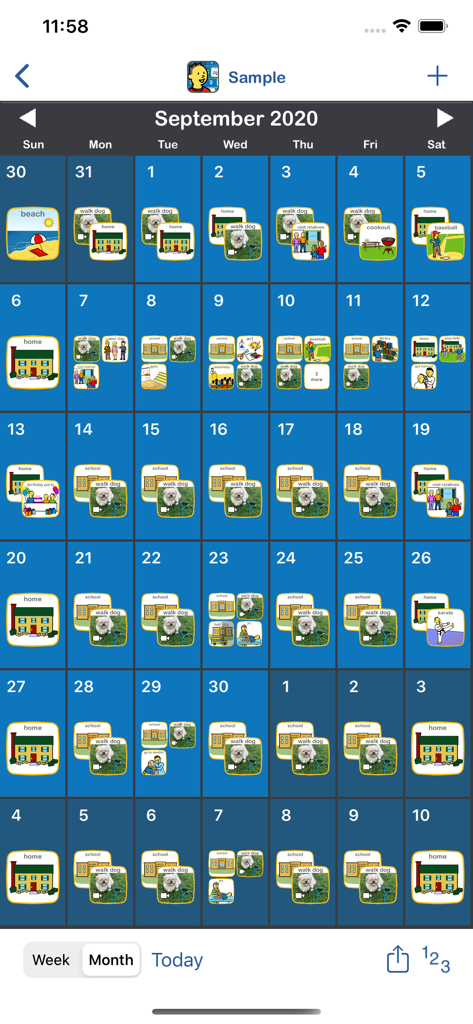
Choiceworks Calendar - 毎日のルーティンを写真アイコンで示す月間ビジュアルスケジュール

毎日のルーティンを写真アイコンで示す月間ビジュアルスケジュール

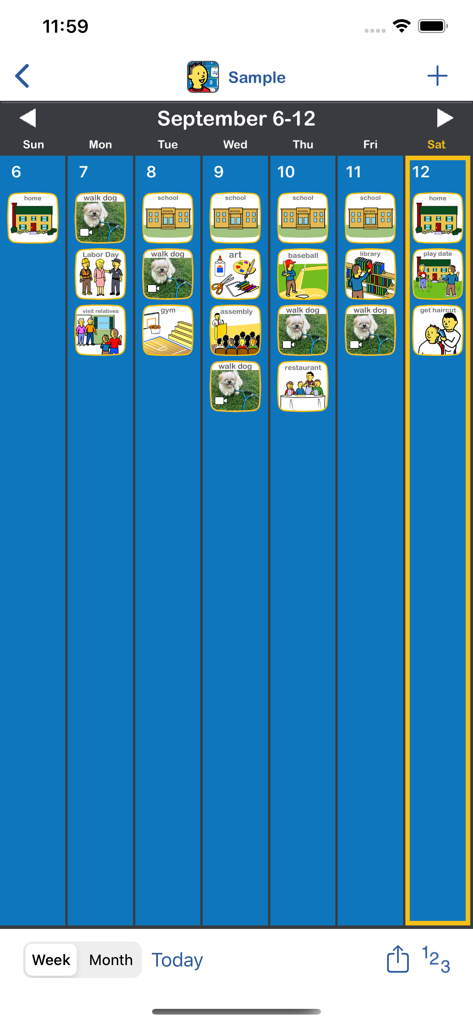
Choiceworks Calendar - 学校や犬の散歩などの毎日のアクティビティのアイコンが表示されたビジュアルスケジュールを示すChoiceworks Calendarアプリの週表示
学校や犬の散歩などの毎日のアクティビティのアイコンが表示されたビジュアルスケジュールを示すChoiceworks Calendarアプリの週表示

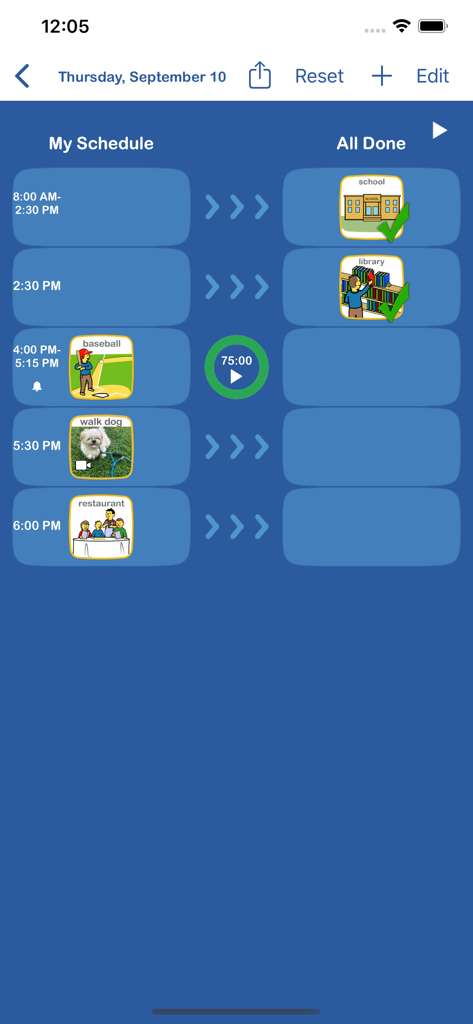
Choiceworks Calendar - アクティビティアイコンとタイマーが表示されたChoiceworks Calendarアプリのデイリービジュアルスケジュール画面
アクティビティアイコンとタイマーが表示されたChoiceworks Calendarアプリのデイリービジュアルスケジュール画面

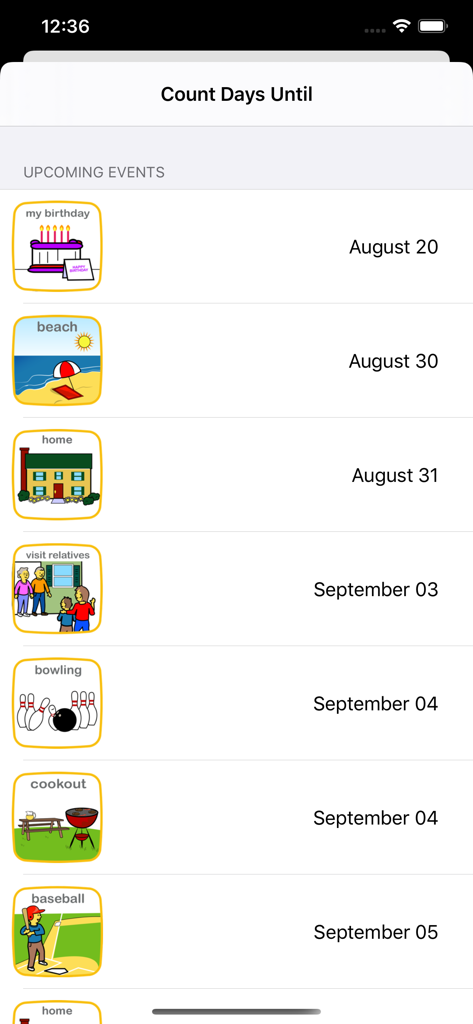
Choiceworks Calendar - 写真アイコンと日付が表示された今後のイベントリストを示すChoiceworks Calendarアプリの画面
写真アイコンと日付が表示された今後のイベントリストを示すChoiceworks Calendarアプリの画面

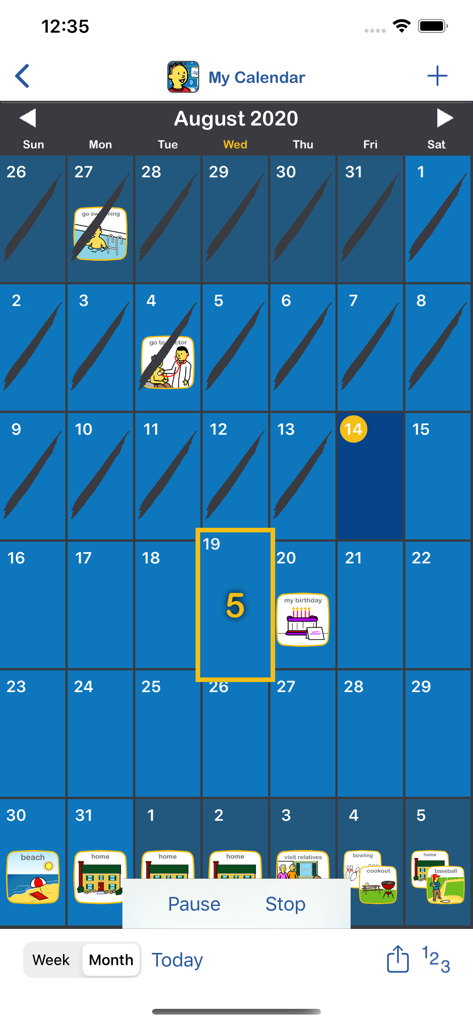
Choiceworks Calendar - 子供向けのカウントダウン機能とビジュアルスケジュールアイコンが表示されたChoiceworks Calendarの月間表示

子供向けのカウントダウン機能とビジュアルスケジュールアイコンが表示されたChoiceworks Calendarの月間表示

説明

The Choiceworks Calendar is a powerful picture-based learning tool that helps children learn what is happening day-to-day, week-to-week, and month-to-month throughout each year. Choiceworks Calendar teaches the abstract concept of time in a structured visual format which helps children organize their lives as well as understand sequence and time. Choiceworks Calendar is the first app of its kind to provide a full-featured calendar designed with both the child and caregiver in mind. Key Features  ■ Easily create a visual calendar of upcoming events in a few minutes (examples: holidays, when visitors are coming, doctor appointments, vacations, sleepovers, parent returning from a trip or military duty) ■ Image Library preloaded with over 275 images and audio ■ Attach video to any image ■ Add your own images using your photo library, camera or use the preloaded image library to record your own audio, video and edit captions for limitless customizability  ■ Create multiple personalized calendars for use with multiple children or in a classroom setting ■ Count Days Until: animated counter for the number of days until an upcoming event (example: How many days until my birthday?) ■ Speaks the daily schedule with child or adult voice ■ Built-in visual timer ■ Automatically adds holidays ■ Easily add reoccurring events ■ Notifications and alarms with visual and audio alerts ■ Search and auto-save features ■ Share boards by Email, AirDrop, Files app or iTunes with other Choiceworks Calendar app users  ■ Ability to print month, week or day for offline viewing or save as PDF Methodology Visual supports are highly effective, proven tools for improving communication between children and caregivers.  Calendars are challenging for children to grasp initially due to the abstract concept of time, months, weeks and days.  They are also time consuming for caregivers to setup and maintain.  Choiceworks Calendar addresses all of these challenges.  For caregivers, it provides a streamlined interface for creating, customizing, sharing and maintaining a calendar of upcoming events.  For the child, it provides visual, audio and video supports that make using the calendar an enjoyable learning experience. Children gain independence and personal responsibility by seeing helpful information such as which days are school days and which days are not.  They also benefit by being informed of upcoming events such as a doctor’s appointment or celebrating a birthday. This clear, simple support provided ahead of time can help a child predict what is going to happen, thereby reducing anxiety.  It helps children understand when there is a change in the routine so they can learn to adapt, become more flexible and better behaved. The information is always visible on the calendar and the child can refer to it as often as needed.  Helpful Tips Simple:  When first implementing Choiceworks Calendar, the calendar should be kept simple and be geared toward the child. By reviewing the calendar each day, the child will learn the days of the week, rote counting, number identification and components of the daily, weekly, and monthly schedule. Visuals:  Put images or videos on the calendar that describe the most important activities of the day. Again, keep it simple. Only include what is important for the child on the calendar.  Start small and gradually increase the amount of information presented as the child begins to understand the passage of time. Advance: As success with Choiceworks Calendar increases, visually plan out big projects and indicate deadlines for science projects, writing assignments, etc.  Chunk larger projects into smaller, manageable steps that the child can complete each day.  This will focus attention to the current task and lessen anxiety and distraction to other portions of project.  Have your own tips or ideas?  Visit our Facebook page and share with the Choiceworks community: https://www.facebook.com/ChoiceworksAndChoiceworksCalendarApps/

Download

ダウンロード: App Store

このページはアプリまたはその開発者の公式ページではなく、情報提供および論評を目的として作成された独立した編集出版物です。明示的に別段の記載がない限り、アプリおよびその開発者は、MWM、Apple、Google Play、アプリのパブリッシャー、またはアプリの開発者と提携、承認、後援、認可、またはその他の公式的な関係はなく、このページのいかなる内容も、アプリがMWMのサービスを使用して開発されたことを意味するものではありません。すべての商標、ロゴ、スクリーンショット、その他のコンテンツはそれぞれの所有者の財産です。