
このページはアプリまたはその開発者の公式ページではなく、情報提供および論評を目的として作成された独立した編集出版物です。明示的に別段の記載がない限り、アプリおよびその開発者は、MWM、Apple、Google Play、アプリのパブリッシャー、またはアプリの開発者と提携、承認、後援、認可、またはその他の公式的な関係はなく、このページのいかなる内容も、アプリがMWMのサービスを使用して開発されたことを意味するものではありません。すべての商標、ロゴ、スクリーンショット、その他のコンテンツはそれぞれの所有者の財産です。


ダウンロード
2.5M+ユーザー評価
評価数
18.5K開発元
カテゴリ
Photo & Video対応言語
9最新バージョン
2026.13サイズ
170.4 MBリリース日
2013年6月24日クリエイティブプロフェッショナル向け主要機能の分析
Cinemagraph Pro: テックアナリストによる機能評価
特許取得済みライブマスキング
この機能により、ユーザーは静止画像上で描画するだけで、動いている部分を魔法のように明らかにできます。複雑な編集スキルがなくても、プロフェッショナルなシネマグラフを簡単に作成することを可能にします。
プロフェッショナルな4Kワークフロー
本ツールは、最大4K解像度でのキャプチャおよび編集をサポートしており、ユーザーは高品質なシネマグラフを制作できます。これにより、細部まで鮮明な印象的なビジュアルコンテンツが提供されます。
多様なエクスポートとSNS連携
ユーザーはH.264、HEVC、Live Photo、GIFなど多様な形式で作品をエクスポートでき、Facebook Ad Managerへのワンタップアップロードやカスタムクロップ設定を通じて、ソーシャルメディアや広告プラットフォームでの共有が容易になります。
高度な編集ツール群
オーバーレイレイヤーによる画像やテキストの追加、クロップ、回転、色、光、トーンカーブのカスタマイズ、速度調整など、包括的なツール群が提供されます。これにより、ユーザーは作品に芸術的な表現と精密な調整を加えることができます。
クラウド連携によるシームレスな編集
iCloud Driveのサポートにより、デバイスを問わずシネマグラフの編集が可能です。ユーザーはiPhone、iPad、Mac間でプロジェクトを簡単に同期し、作業を継続できます。
Flixelコミュニティとの連携
Flixelのプラットフォームを通じて、ユーザーは他のクリエイターの作品からインスピレーションを得たり、自身のシネマグラフをアップロードして共有したりできます。これは、コミュニティとの交流と作品の露出を促進します。
直感的なループカスタマイズ
本ツールは、完璧なループを実現するための簡単なトリミング機能や、ループをバウンスまたはクロスフェードで繰り返す設定を提供します。これにより、ユーザーはスムーズで魅力的なアニメーション効果を素早く作成できます。
包括的な学習リソース
アプリには、初心者向けから上級者向けまで、ステップバイステップのビデオチュートリアルやダウンロード可能な資料が用意されています。これにより、ユーザーはシネマグラフ作成のスキルを着実に向上させることができます。
よくある質問
について知っておくべきこと Cinemagraph Pro
What is Cinemagraph Pro?
Cinemagraph Pro is an Apple Design Award-winning app for iOS that defines visual storytelling. It enables users to create professional cinemagraphs, which are hybrids of natural motion and still imagery, directly on iPhone and iPad.
Can I create professional cinemagraphs easily with Cinemagraph Pro?
Yes, Cinemagraph Pro simplifies professional cinemagraph creation. It allows users to produce high-quality, noticeable hybrid motion imagery in seconds, even without extensive photo or video editing expertise.
How does Cinemagraph Pro create motion effects?
Cinemagraph Pro uses a patented Magical Live Masking method. Users paint over a still image to reveal and isolate motion from a video. This process seamlessly blends still and moving elements into a single compelling cinemagraph.
What video sources are supported by Cinemagraph Pro?
Cinemagraph Pro supports importing any video shot on a tripod, including up to 4K resolution on supported devices. Users can also directly capture videos using the in-app camera for cinemagraph creation.
Does Cinemagraph Pro allow adding text and images?
Yes, Cinemagraph Pro features an advanced editing overlay layer. This functionality enables users to add both text and images on top of their cinemagraphs, enhancing creative expression and visual impact.
What are the export options in Cinemagraph Pro?
Cinemagraph Pro offers diverse export options: H.264, HEVC, Live Photo, and GIF. It also provides custom crop and export settings optimized for seamless sharing on various social media platforms and advertising campaigns.
Where can I find tutorials for Cinemagraph Pro?
Cinemagraph Pro provides comprehensive learning resources within the app. These include video tutorials ranging from beginner to advanced levels, along with downloadable tutorial documents for hands-on practice.
Can I browse other cinemagraphs for inspiration in Cinemagraph Pro?
Yes, Cinemagraph Pro features a 'Discover' section. Users can explore creative work on Flixel, browse curated collections, and upload their own cinemagraphs to potentially be featured for community inspiration.
How does Cinemagraph Pro manage subscriptions?
Cinemagraph Pro subscriptions, known as Flixel Plans, are charged to your iTunes Account. They automatically renew monthly or yearly unless auto-renewal is manually disabled at least 24 hours before the current period ends.
Is Cinemagraph Pro compatible with iCloud Drive for file management?
Yes, Cinemagraph Pro supports iCloud Drive. This feature allows users to access and edit their cinemagraph documents seamlessly across different Apple devices, including iPhone, iPad, and Mac, maintaining workflow continuity.
以下のスクリーンショットと説明は、アプリの公式ストアリスティングから直接取得されたものであり、アプリ開発者の所有物です。
アプリストア
スクリーンショット
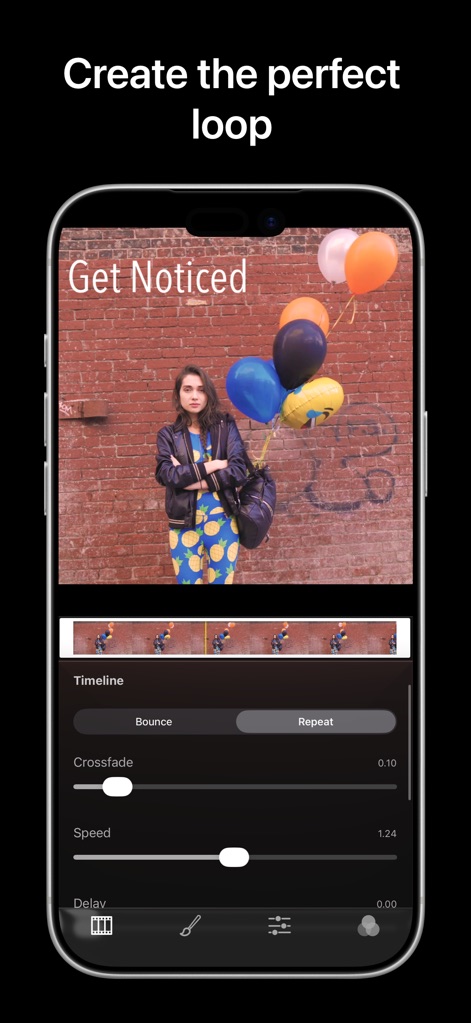
このアプリは、ループの「バウンス」と「リピート」を切り替えるオプションと、精密な「スピード」と「ディレイ」調整スライダーを提供し、ユーザーがシネマグラフの再生を細かく制御できるようにします。
完璧なループを作成
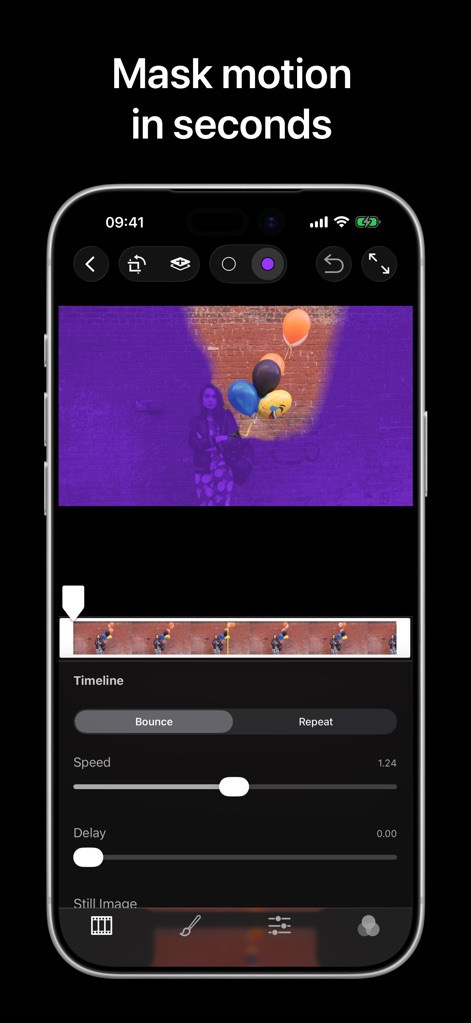
特許取得済みのライブマスキング機能により、ユーザーは「描画ブラシ」を使用して、わずか数秒で画像内の「動きの領域」を正確に識別し、ハイブリッドモーションイメージを簡単に作成できます。
動きを瞬時にマスク

このツールは、「色温度」や「彩度」など、プロフェッショナルグレードのカラー調整オプションを提供し、ユーザーがシネマグラフの視覚的な「光」と「トーン」を完全に制御できるようにします。
色彩を自在に調整

シネマグラフに「カスタムテキスト」を追加し、さまざまな「フォントスタイル」や「色」から選択することで、ユーザーはメッセージを効果的に伝え、ブランドの存在感を際立たせることができます。
テキストで表現力を強化

アプリは「プリセットフィルター」の幅広いコレクションを提供し、ユーザーは単一のタップで作品に適用される様々な「視覚効果」を簡単にプレビューして選択できます。
豊富なフィルター効果

ユーザーは、Instagram向け「1:1」やYouTube向け「16:9」など、複数の「アスペクト比プリセット」から選択して、シネマグラフの「構図」を最適化できます。
理想的な構図にトリミング

このツールには、画像を「回転」させたり「直線化」したりするための高度なオプションが用意されており、ユーザーはシネマグラフの最終的な「アラインメント」を完璧に調整できます。
正確な回転と補正

ユーザーは、TikTokやInstagramなどの主要な「ソーシャルメディアプラットフォーム向けプリセット」を利用し、「フォーマット」や「解像度」をカスタマイズして、作品を簡単にエクスポートできます。
ソーシャルメディアへ簡単エクスポート

作品をFlixelプラットフォームに「アップロード」することで、ユーザーは「公開」または「非公開」のプライバシー設定を選択し、そのシネマグラフがコミュニティによって発見され、「注目」される機会を得ることができます。
Flixelに共有し注目を集める
説明
Download
類似アプリ
同じカテゴリのトップランクアプリ

CapCut: Photo & Video Editor
BYTEDANCE PTE. LTD.

Instagram, Inc.

YouTube
Google LLC

Canva: AI Photo & Video Editor
Canva Pty Ltd

Snapchat
Snap, Inc.

快手
Beijing Kwai Technology Co., Ltd.

Edits: Video Editor
Instagram, Inc.

Meitu- AI Photo & Video Editor
Xiamen Meitu Technology Co., Ltd.

Google Photos: Backup & Edit
Google LLC
このページはアプリまたはその開発者の公式ページではなく、情報提供および論評を目的として作成された独立した編集出版物です。明示的に別段の記載がない限り、アプリおよびその開発者は、MWM、Apple、Google Play、アプリのパブリッシャー、またはアプリの開発者と提携、承認、後援、認可、またはその他の公式的な関係はなく、このページのいかなる内容も、アプリがMWMのサービスを使用して開発されたことを意味するものではありません。すべての商標、ロゴ、スクリーンショット、その他のコンテンツはそれぞれの所有者の財産です。