FileBrowser Professional

FileBrowser Professional

ダウンロード: App Store
ロゴ: FileBrowser Professional

FileBrowser Professional:プロユーザー向けデスクトップクラスのファイル管理

IT管理者やクリエイティブプロフェッショナル向けの究極のツール。双方向同期、インプレース編集、データ追跡ゼロでNAS、サーバー、20以上のクラウドプロバイダーに安全に接続。

ダウンロード: App Store

開発元

Stratospherix

カテゴリ

Business

ダウンロード

312K+

ユーザー評価

4.7/5

評価数

3K+

対応言語

9

効率を可視化

このインターフェースを利用する 312K+ 人のユーザー.

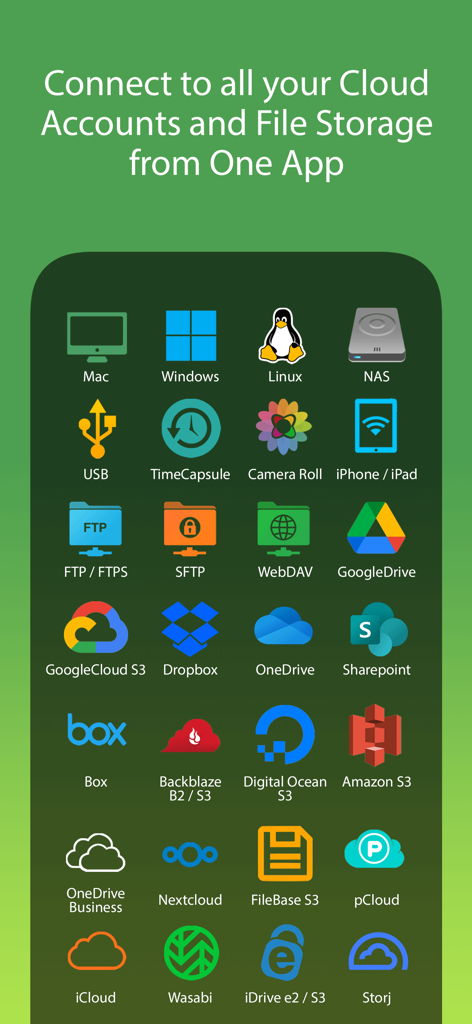
FileBrowser Professionalに対応するGoogle Drive、Dropbox、Amazon S3、NASドライブなど、20以上のクラウドおよびネットワークストレージプラットフォームを表すアイコンのグリッド。
FileBrowser Professionalに対応するGoogle Drive、Dropbox、Amazon S3、NASドライブなど、20以上のクラウドおよびネットワークストレージプラットフォームを表すアイコンのグリッド。

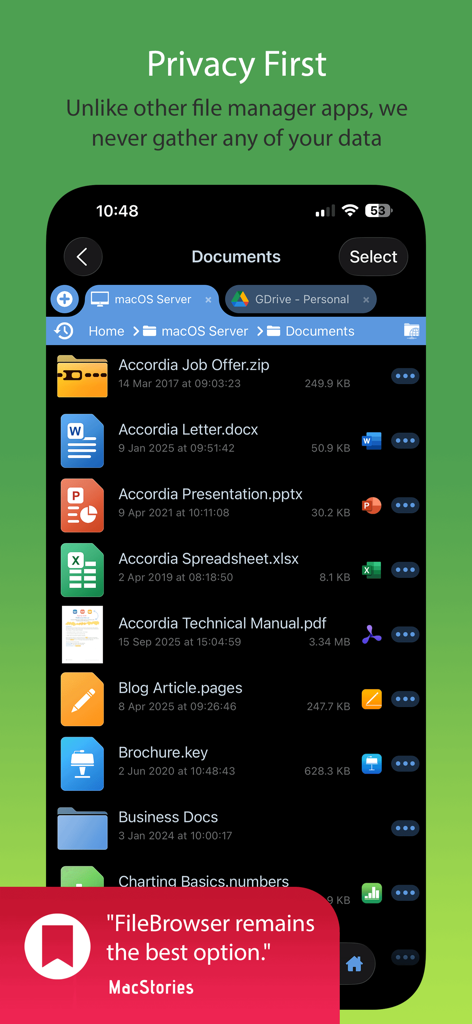
プライバシーとドキュメント管理を強調するFileBrowser Professionalアプリのインターフェース。
プライバシーとドキュメント管理を強調するFileBrowser Professionalアプリのインターフェース。

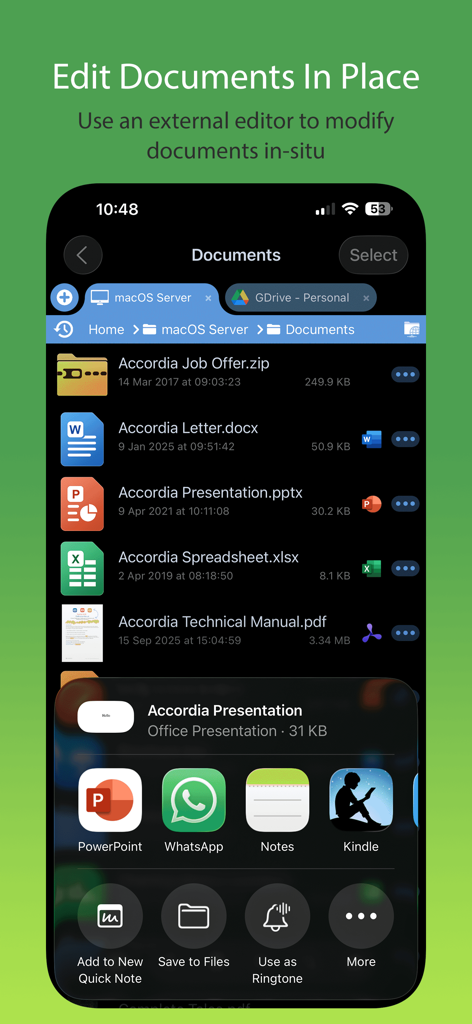
ドキュメント管理とインプレース編集機能を示すFileBrowser Professionalモバイルアプリのインターフェース。
ドキュメント管理とインプレース編集機能を示すFileBrowser Professionalモバイルアプリのインターフェース。

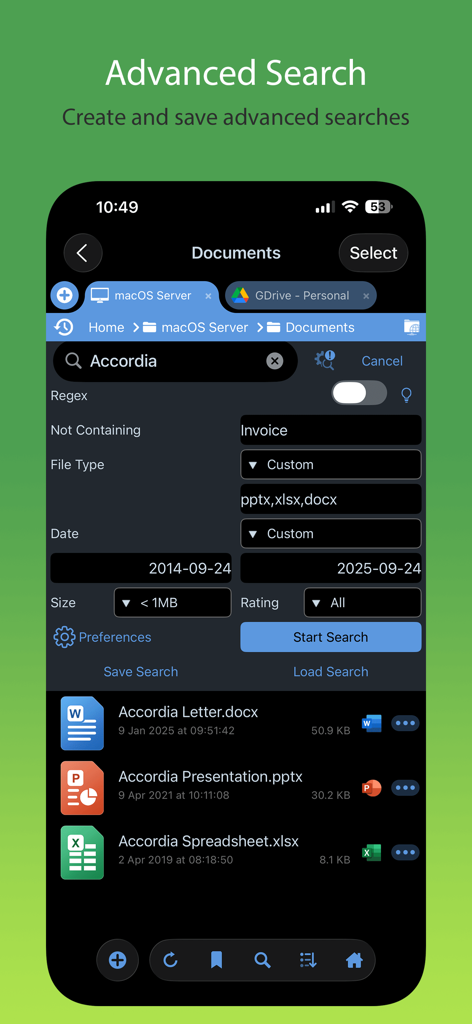
ファイルタイプと日付でフィルタリングできる、FileBrowser Professionalアプリの高度な検索インターフェース。
ファイルタイプと日付でフィルタリングできる、FileBrowser Professionalアプリの高度な検索インターフェース。

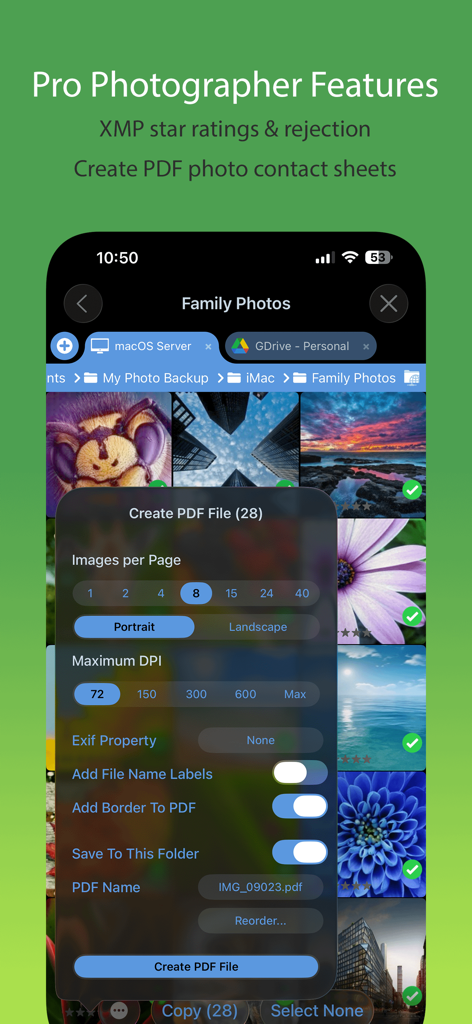
写真コンタクトシートの作成とXMPレーティング機能を示すFileBrowser Professionalアプリのインターフェース。
写真コンタクトシートの作成とXMPレーティング機能を示すFileBrowser Professionalアプリのインターフェース。

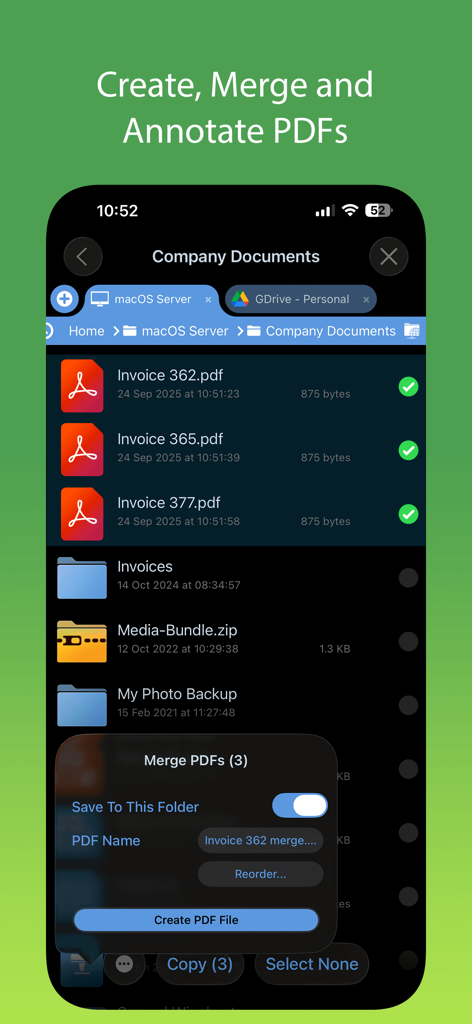
FileBrowser ProfessionalでのPDFファイルの結合および管理用のインターフェース。
FileBrowser ProfessionalでのPDFファイルの結合および管理用のインターフェース。

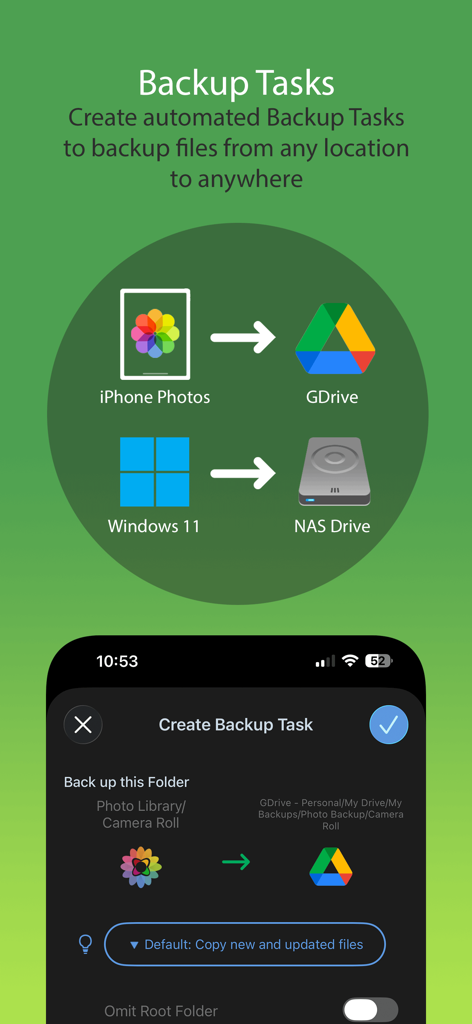
モバイルからクラウドおよびNASストレージへの自動バックアップタスクを示すFileBrowser Professionalインターフェース。
モバイルからクラウドおよびNASストレージへの自動バックアップタスクを示すFileBrowser Professionalインターフェース。

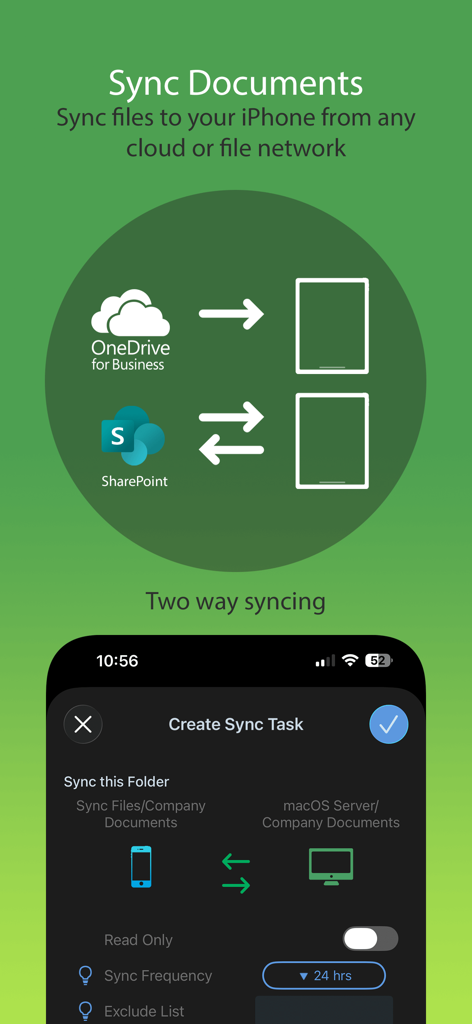
FileBrowser Professionalアプリ内でのクラウドストレージからiPhoneへの双方向ドキュメント同期を説明するグラフィック。
FileBrowser Professionalアプリ内でのクラウドストレージからiPhoneへの双方向ドキュメント同期を説明するグラフィック。

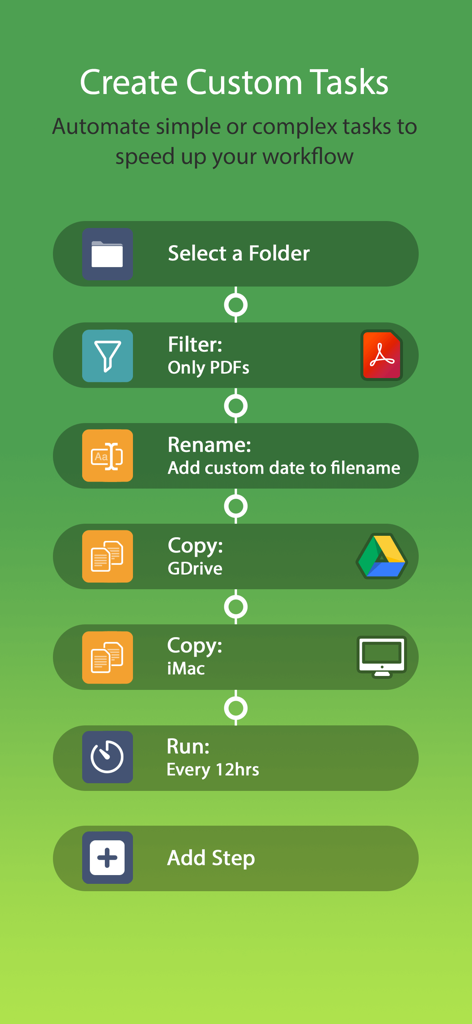
PDFのフィルタリング、名前の変更、クラウドおよびローカルストレージへのコピーなど、FileBrowser Professionalでカスタム自動化タスクを作成する方法を示すフローチャート。
PDFのフィルタリング、名前の変更、クラウドおよびローカルストレージへのコピーなど、FileBrowser Professionalでカスタム自動化タスクを作成する方法を示すフローチャート。

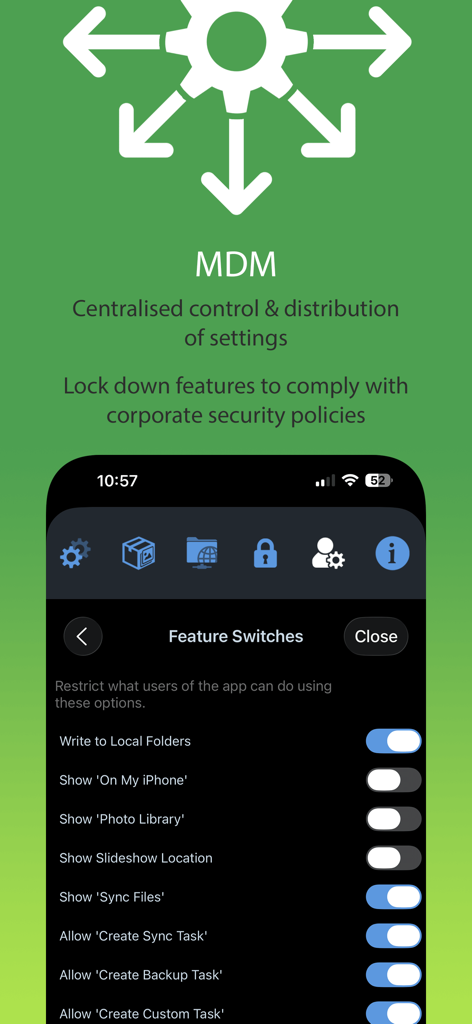
集中管理された機能スイッチと企業のセキュリティ設定を示すFileBrowser Professional MDM統合画面。

集中管理された機能スイッチと企業のセキュリティ設定を示すFileBrowser Professional MDM統合画面。

モバイルワークフローのためのデスクトップクラスのパワー

このアプリを際立たせるツール、 312K+ 人のユーザーが選択.

🌐

ユニバーサル接続

Mac、PC、NASドライブ、およびOneDrive、SharePoint、Amazon S3を含む20以上のクラウドサービスに、単一の統合インターフェースから直接アクセスできます。

シームレスなインプレース編集

ドキュメントの重複を排除します。アプリを起動してサーバー上のファイルを直接編集し、変更を元のソースに自動的に保存します。

🔒

プライバシーファーストのセキュリティ

あなたのデータはあなたのものです。アカウントは不要で、データは追跡しません。ハードウェア暗号化と完全なMDM統合を提供し、企業のコンプライアンスに対応します。

アプリについて

について知っておくべきこと FileBrowser Professional.

説明

Professional document management for iOS, with bulk rename, backup and sync tasks. Edit your documents in-place, stream your media files and connect to over 20 different network and cloud storage locations. “Maximize the potential of what you can do with files on iOS” - Cult of Mac “FileBrowser remains the best option” - MacStories Direct and secure file access to your computers, servers and other storage devices on home or company networks. Core Features - Access file servers and cloud storage - View documents and optionally store them for offline viewing - Present a video, PowerPoint or Keynote direct from the server - Copy and move between any type of storage, from single files to whole directories - Bi-directional automatic sync of network folders to your iPad/iPhone - Backup local files to a network file server or cloud storage - Integrates with other apps allowing you to edit, save and share files while on the go - Integrates with your existing infrastructure, including Active Directory - Integrates with iOS data protection, utilising hardware-based encryption to secure content - Pro photographer XMP sidecar file support for rating images - VPN on-demand support for third-party VPN clients - Supports Microsoft Distributed File System (DFS) - Requires no additional software on company servers Office App Integration - No more duplication of documents between apps - Launch an Office app to edit a network document in-place - Changes are automatically saved to the original document - Scan documents or images direct to multi page PDF - Automatic colour and perspective correction of scanned documents MDM Integration - Centralised distribution of FileBrowser configuration settings - Enforced security lockdown - Conform to corporate Mobile Security Policies - Prevent users from changing local settings - Selectively override any local configuration setting - Distribute file server connection details - Control whether offline viewing/storage is permitted - Control whether content can be shared FileBrowser Professional uses the SMB1, SMB2, and SMB3 network access protocols (also known as CIFS or Windows File Sharing) to connect to: - Macs - PCs - NAS drives - Windows File Servers (including Windows Server Clusters) Access local storage - USB Drives - SD Cards - Folders of other apps - iCloud Drive folders of other apps - iOS Photo Library You can also connect to the following cloud storage - Microsoft OneDrive - Microsoft OneDrive for Business - Microsoft SharePoint 2013 or later - Box.com - Google Drive (including Shared Team Drives) - Dropbox (including Dropbox for Business) - Backblaze B2 - Amazon S3 - Nextcloud - pCloud - Digital Ocean S3 - FileBase S3 - Google Cloud S3 - iDrive Cloud S3 - Storj S3 - Wasabi S3 - WebDAV servers - FTP/FTPS servers - SFTP servers Unlike other file manager apps, we never gather any of your data. We also don't require you to create an account or register an email address with us. For fast friendly support please email support@stratospherix.com. We are happy to receive support emails in any language, but are only able to reply in English.

最新バージョン

25.12

サイズ

78.2 MB

リリース日

2014年4月18日

今すぐモバイルワークフローをマスターしましょう

312,000人以上のプロフェッショナルが、デスクトップグレードのファイル管理、安全なサーバーアクセス、iOSでの完全なプライバシーのためにFileBrowser Proを信頼しています。

ダウンロード: App Store

App information, icons, screenshots, and descriptions displayed on this page are sourced from the Apple App Store and are the property of their respective developers. Download estimates and rankings are based on MWM's proprietary models and may not reflect actual figures. This page is provided for informational and analytical purposes only.

Believe this page infringes your intellectual property? File a dispute