
このページはアプリまたはその開発者の公式ページではなく、情報提供および論評を目的として作成された独立した編集出版物です。明示的に別段の記載がない限り、アプリおよびその開発者は、MWM、Apple、Google Play、アプリのパブリッシャー、またはアプリの開発者と提携、承認、後援、認可、またはその他の公式的な関係はなく、このページのいかなる内容も、アプリがMWMのサービスを使用して開発されたことを意味するものではありません。すべての商標、ロゴ、スクリーンショット、その他のコンテンツはそれぞれの所有者の財産です。


ダウンロード
1M+ユーザー評価
評価数
1.6K開発元
カテゴリ
Reference対応言語
16最新バージョン
1.5.2サイズ
14.9 MBリリース日
2020年12月23日生産性向上に焦点を当てたAppleユーザー向け主要機能評価
アプリケーション分析:Floating Clock-Timer&Stopwatch
フローティング表示
どのアプリケーション上でも、時計を最前面に表示し続けることで、ユーザーは作業を中断することなく時間を確認できます。
マルチデバイス対応
本アプリはiPhone、iPad、Macで利用可能であり、Appleエコシステム全体でシームレスな時間管理体験を提供します。
タイマー機能
ユーザーは特定の期間を設定してカウントダウンを開始でき、作業や休憩の管理、料理、運動などの多様な用途で役立ちます。
ストップウォッチ機能
イベントやアクティビティの経過時間を正確に計測でき、スポーツ、タスクの時間測定、実験などに最適です。
カスタム表示スタイル
ユーザーは時計の表示スタイルを好みに合わせて調整でき、パーソナライズされた視覚体験を実現します。
ミリ秒表示
より高い精度で時間を追跡したいユーザーのために、ミリ秒単位での表示切り替え機能を提供します。
よくある質問
について知っておくべきこと Floating Clock-Timer&Stopwatch
What is the Floating Clock app?
Floating Clock is a time application that displays a floating clock, timer, or stopwatch on top of all other applications. It is available on iPhone, iPad, and Mac devices.
Can I display the Floating Clock over other apps?
Yes, the Floating Clock app can display time, a timer, or a stopwatch as a floating overlay on any app interface. This allows you to monitor time while using other applications.
What features does Floating Clock-Timer&Stopwatch include?
Floating Clock-Timer&Stopwatch features a floating clock, stopwatch, timer, millisecond switch, custom display styles, and a flip clock widget. It supports full customization of colors, fonts, and animation.
Is Floating Clock available on Mac?
Yes, Floating Clock is available on Mac, in addition to iPhone and iPad. It offers a consistent time management experience across Apple devices.
Can I customize the display style of Floating Clock?
Yes, Floating Clock offers custom display styles. Users can fully customize text fonts, text colors, background colors, and animation. More color options are also available.
Does Floating Clock have Apple Watch control?
Yes, Floating Clock supports remote control with Apple Watch. You can tap to start/pause and press to restart the timer or stopwatch directly from your Apple Watch.
Does Floating Clock offer a widget?
Yes, Floating Clock includes a flip clock widget. This allows users to display the clock directly on their home screen for quick access and visual appeal.
How does the Unlimited Access Subscription work for Floating Clock?
The Unlimited Access Subscription for Floating Clock is billed monthly or annually. It provides access to all features and content. A one-time payment option is also available.
How do I cancel my Floating Clock subscription?
You can manage your Floating Clock subscription and turn off auto-renewal by going to your Account Settings after purchase. Cancellation must occur 24 hours prior to the current period's end.
What happens if I subscribe during a free trial for Floating Clock?
If you subscribe to Floating Clock before your free trial ends, the remainder of your free trial period will be forfeited upon purchase confirmation. Subscriptions start immediately after the trial ends.
Where can I find the privacy policy for Floating Clock?
The privacy policy for Floating Clock is available at the URL: https://iandrew.space/apps/policy_floating.html. This document outlines how your data is handled.
以下のスクリーンショットと説明は、アプリの公式ストアリスティングから直接取得されたものであり、アプリ開発者の所有物です。
アプリストア
スクリーンショット

アプリケーションの上にタイマーがフローティング表示されており、ユーザーは他の作業中でも、浮動表示されるタイマーとホーム画面上のアプリを同時に確認できます。
どこでもフローティング表示

大きなデジタル時計とストップウォッチが全画面で表示されており、ユーザーは全画面表示のデジタル時計と全画面表示のストップウォッチによって、視覚的な集中を妨げられずに時間を追跡できます。
全画面モードで集中

現在の時刻がはっきりと表示されており、ユーザーはデジタル時計表示と共に、日付表示のトグルを操作することで、時刻と日付を正確に把握できます。
正確な時刻表示

カスタマイズ可能なタイマーが設定されており、ユーザーはカスタムタイマー設定とアラート機能のオン/オフにより、設定時間経過を音で知らせることができます。
タイマーとアラート

ストップウォッチが動作しており、ユーザーは経過時間の表示を見ながら、リセット/一時停止ボタンで時間の計測を細かく制御できます。
精密なストップウォッチ
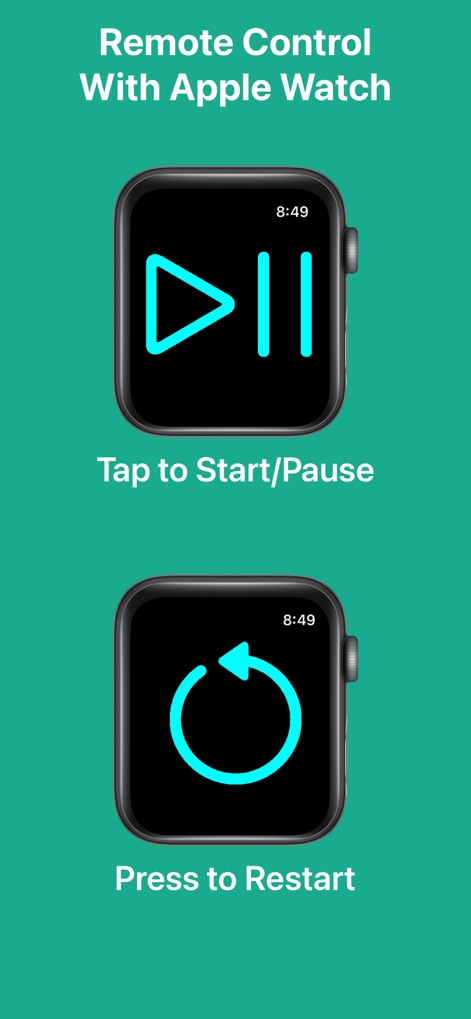
Apple Watchからアプリの操作が可能で、ユーザーは再生/一時停止ボタンと再起動ボタンを使って、手首で時間を制御できます。
Apple Watch連携

テキストの色やフォント、背景色などを細かく調整できる設定画面が表示されており、ユーザーはテキストカラー選択と背景色設定オプションにより、表示を好みに合わせてパーソナライズできます。
自由なカスタマイズ

アプリが縦向きと横向きの両方で表示されており、ユーザーは縦向きの時計表示と横向きの時計表示を切り替えることで、デバイスの向きに合わせて最適な表示形式を選択できます。
縦横対応表示

色選択パレットが表示されており、ユーザーはカラーグリッド選択や透明度スライダーを使って、視覚要素に多様な色を適用できます。
豊富なカラー選択

ロック画面にフリップクロックウィジェットが配置されており、ユーザーはフリップクロックウィジェットにより、アプリを開かずに時刻を素早く確認できます。
便利なウィジェット
説明
Download

このページはアプリまたはその開発者の公式ページではなく、情報提供および論評を目的として作成された独立した編集出版物です。明示的に別段の記載がない限り、アプリおよびその開発者は、MWM、Apple、Google Play、アプリのパブリッシャー、またはアプリの開発者と提携、承認、後援、認可、またはその他の公式的な関係はなく、このページのいかなる内容も、アプリがMWMのサービスを使用して開発されたことを意味するものではありません。すべての商標、ロゴ、スクリーンショット、その他のコンテンツはそれぞれの所有者の財産です。