
このページはアプリまたはその開発者の公式ページではなく、情報提供および論評を目的として作成された独立した編集出版物です。明示的に別段の記載がない限り、アプリおよびその開発者は、MWM、Apple、Google Play、アプリのパブリッシャー、またはアプリの開発者と提携、承認、後援、認可、またはその他の公式的な関係はなく、このページのいかなる内容も、アプリがMWMのサービスを使用して開発されたことを意味するものではありません。すべての商標、ロゴ、スクリーンショット、その他のコンテンツはそれぞれの所有者の財産です。


ダウンロード
10M+ユーザー評価
評価数
122.6K開発元
カテゴリ
Productivity対応言語
37最新バージョン
1.8.2サイズ
92.1 MBリリース日
2021年1月25日iOSデバイスにおけるGoogleフォーム管理の主要機能
'Form for Google Forms' アプリケーション分析
フォームの作成と高度な編集
このアプリは、iOSデバイス上で新しいGoogleフォームを効率的に作成し、既存のフォームをGoogle Driveから直接開いて詳細に編集する機能を提供します。豊富なテンプレート、質問のインポート、共同編集者の追加、質問の並べ替え、セクションの管理、応答検証、画像や動画の追加など、幅広い機能でユーザーのフォーム作成と管理をサポートします。
高度な回答の分析と管理
本ツールは、回答を要約、質問ごと、または個別の詳細モードで表示する機能を提供します。ユーザーは、視覚的に分かりやすいグラフでデータを把握し、CSVやExcel形式でエクスポートできます。さらに、日付、メール、質問、スコアに基づいて回答をフィルタリングする機能も利用可能です。
リアルタイム回答通知
ユーザーは、新しいフォームの回答が提出されるたびに、iOSデバイスに即座に通知を受け取ることができます。これにより、重要な回答を見逃すことなく、タイムリーなアクションや状況把握が可能になります。
スマート質問スキャン機能
このアプリは、カメラ、写真ライブラリの画像、ファイル(ドキュメント、PDF、PPTなど)、またはクリップボードから既存の質問をスキャンして、新しいフォームに迅速にインポートする機能を提供します。これにより、質問の入力作業を大幅に効率化できます。
包括的なクイズ管理
本ツールは、クイズの質問にポイントを設定し、正解を指定し、URLリンク付きのフィードバックを追加する機能を提供します。また、個別の回答に対するフィードバックの設定や、クイズの回答のスコア表示および設定も可能であり、教育目的での利用を強力にサポートします。
共同フォーム開発とテンプレート活用
このアプリは、ユーザーが新しいフォームを迅速かつ効率的に作成できるよう、多様な美しいテンプレートを提供します。また、フォームに共同編集者を追加することで、複数のユーザーが協力してフォームを開発・管理できる環境を構築します。
よくある質問
について知っておくべきこと Form for Google Forms
What is Form for Google Forms?
Form for Google Forms is a free iOS app that allows users to create, edit, and manage all their Google Forms directly on their iPhone, iPod, or iPad. It provides comprehensive tools for form management and response analysis.
Can I create new Google Forms using the Form for Google Forms app?
Yes, Form for Google Forms allows users to create new Google Forms directly on their iOS device. It offers various templates and the ability to import questions from existing forms.
Does Form for Google Forms support editing existing Google Forms?
Yes, Form for Google Forms supports editing existing Google Forms. Users can open any form from their Google Drive on their iOS device to modify questions, re-order them, and add images or videos.
Can Form for Google Forms users receive notifications for new responses?
Yes, Form for Google Forms provides response notifications. Users can get notified via push notifications whenever someone submits a new response to their Google Forms.
What are the options for viewing form responses in Form for Google Forms?
Form for Google Forms allows viewing responses in three modes: Summary, Questions, and Individual. The app displays responses using beautiful graphs in summary mode for comprehensive analysis.
Can I export responses from Form for Google Forms?
Yes, Form for Google Forms allows users to export responses. Responses can be exported in CSV or Excel file format, providing flexibility for further data analysis outside the app.
Is it possible to add collaborators to forms in Form for Google Forms?
Yes, users can add collaborators or editors to their forms directly within the Form for Google Forms app. This feature facilitates teamwork and shared form management.
Can Form for Google Forms scan questions from physical documents or images?
Yes, Form for Google Forms can scan questions. It supports scanning questions using the device's camera, images from the photos library, and files like doc, pdf, or ppt from the Files app.
Does Form for Google Forms allow setting points and feedback for quiz questions?
Yes, Form for Google Forms allows setting points and correct answers for quiz questions. Users can also add feedback with URL links for both correct and incorrect responses.
Is Form for Google Forms an official Google application?
No, Form for Google Forms is a third-party app. It is not associated with Google. All trademarks mentioned are the property of their respective owners.
以下のスクリーンショットと説明は、アプリの公式ストアリスティングから直接取得されたものであり、アプリ開発者の所有物です。
アプリストア
スクリーンショット
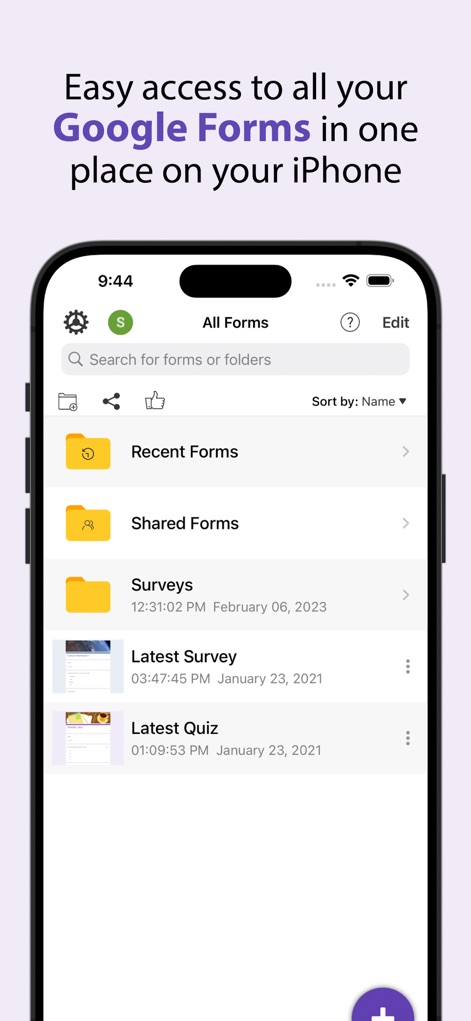
ユーザーは「すべてのフォーム」画面で、検索バーと並べ替え機能を使用して、目的のフォームに素早くアクセスできます。
フォーム一覧管理
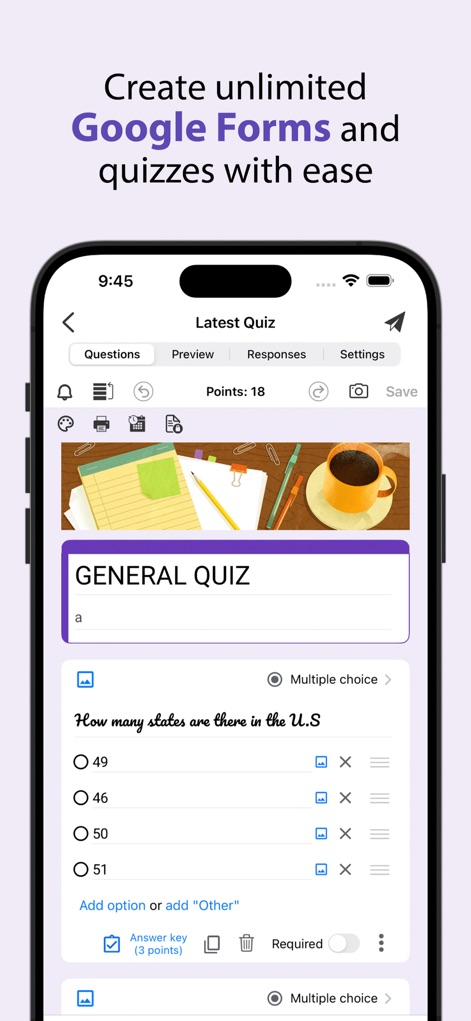
ユーザーは「質問」タブから、複数の選択肢を設定できる質問の作成と、特定の項目を「必須」に設定する機能を利用して、クイズを作成できます。
クイズを簡単作成

ユーザーはクイズの質問に対し、回答の正誤に応じて「ポイント」を割り当て、「フィードバック」を追加することで、学習効果を高められます。
質問に詳細設定

ユーザーは「回答」タブの「概要」モードで、フォームの回答状況を棒グラフで視覚的に確認し、新しい回答に対するプッシュ通知を受け取ることができます。
回答をグラフ化

ユーザーは円グラフで視覚化された回答データを、クリップボードにコピーしたり、iPhoneのフォトライブラリに保存したりして、簡単に共有できます。
分析結果を共有
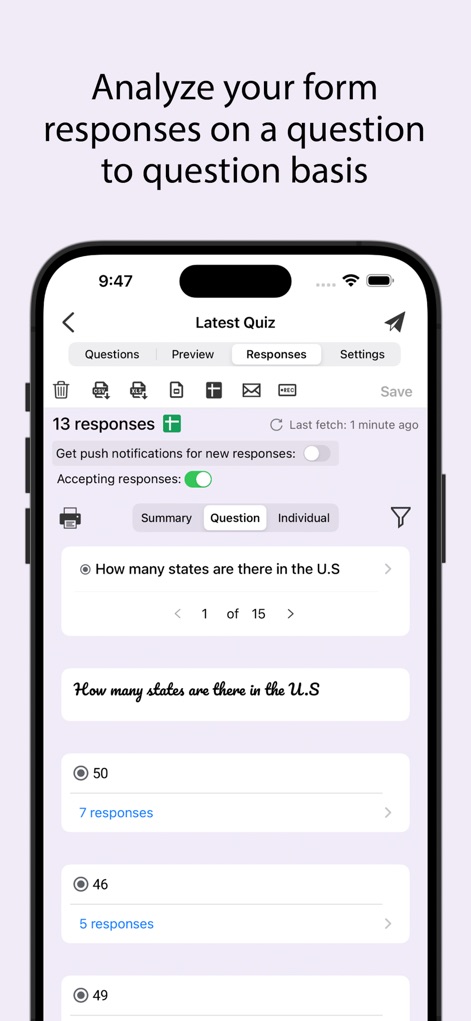
ユーザーは「質問」タブに切り替えることで、各質問に対する回答の内訳を個別に表示し、選択肢ごとの応答数を詳細に分析できます。
質問別に分析

ユーザーは「個別」モードで各回答者の提出内容を確認し、正誤判定と得点を表示する機能を使用して、クイズの採点プロセスを効率化できます。
個別回答を採点
説明
Download
類似アプリ
似た機能とユーザー体験を持つアプリ

Forms for Google Docs
Aurora Innovation Limited

Forms fоr Google Form
Sanpeliano LTD
Forms for Google Drive
BurningFlower Inc

Form For Google Forms & Docs
Seven Mile Apps LLC
Forms ®
SMM service, s.r.o.
Forms for Google Fоrms
LightApps OU
Forms for Google Forms App
AppTraining Limited

Forms for Google Drive ™
Mariia Tereshkova

Forms for Google Forms & Quiz
Niharika Jindal
このページはアプリまたはその開発者の公式ページではなく、情報提供および論評を目的として作成された独立した編集出版物です。明示的に別段の記載がない限り、アプリおよびその開発者は、MWM、Apple、Google Play、アプリのパブリッシャー、またはアプリの開発者と提携、承認、後援、認可、またはその他の公式的な関係はなく、このページのいかなる内容も、アプリがMWMのサービスを使用して開発されたことを意味するものではありません。すべての商標、ロゴ、スクリーンショット、その他のコンテンツはそれぞれの所有者の財産です。