
このページはアプリまたはその開発者の公式ページではなく、情報提供および論評を目的として作成された独立した編集出版物です。明示的に別段の記載がない限り、アプリおよびその開発者は、MWM、Apple、Google Play、アプリのパブリッシャー、またはアプリの開発者と提携、承認、後援、認可、またはその他の公式的な関係はなく、このページのいかなる内容も、アプリがMWMのサービスを使用して開発されたことを意味するものではありません。すべての商標、ロゴ、スクリーンショット、その他のコンテンツはそれぞれの所有者の財産です。


Forms for Google Drive
iPhoneでGoogleフォームを操る力は、机からあなたを解放する。
ダウンロード
750k+ユーザー評価
評価数
790開発元
カテゴリ
Productivity対応言語
25最新バージョン
1.8.5サイズ
96.1 MBリリース日
2023年12月4日テックアナリストによる、モバイルからのGoogleフォーム管理を最適化する主要機能の詳細評価
Forms for Google Drive アプリ分析: 主要機能と影響評価
リアルタイム応答と分析
本アプリは、新しいフォームの送信時にリアルタイムプッシュ通知を提供します。ユーザーは、明確で直感的なチャートやグラフで視覚化された応答をアプリ内で確認でき、日付、メール、またはスコアでフィルタリングして分析することが可能です。
モバイルフォーム作成と編集
ユーザーは、場所や時間を選ばずにiPhoneから直接新しいフォームを作成し、既存のフォームを編集できます。質問の変更、セクションの並べ替え、画像の追加、テーマのカスタマイズなど、広範な編集機能が提供されます。
Google Workspaceとのシームレスな連携
本ツールは、Google Drive、Google Sheets、Google Docsとの即時同期により、ユーザーのGoogle Workspace環境と調和して機能します。既存のフォームをDriveから開いて編集すると、変更が自動的にすべての場所で反映されます。
教育向け機能
教師や教育関係者は、複数選択形式のクイズを作成し、点数を割り当て、正解を設定し、学生の回答をiPhoneからすべて確認できます。これは教育現場での利用に特化して設計されています。
チームコラボレーションと通知
このアプリは、チームやビジネス向けに設計されており、コラボレーターの割り当て、誰が回答したかの追跡、および新しい提出があった際の通知機能を提供します。これにより、チーム全体のデータ収集と管理が容易になります。
データエクスポートオプション
ユーザーは、より詳細なデータ分析のために、フォームの回答をGoogle Sheetsに直接エクスポートしたり、CSVまたはExcel形式でダウンロードして他のスプレッドシートツールで使用したりできます。
多様なフォーム共有方法
ユーザーは、QRコードやリンクを通じてフォームを即座に共有できます。また、メール、WhatsApp、Slack、Facebook、LinkedIn、iMessageなど、さまざまなプラットフォームを通じて簡単にフォームを配布することが可能です。
テンプレートの利用
本アプリは、アンケート、クイズ、投票、注文書、イベント登録、フィードバックフォームなど、幅広いテンプレートから選択する機能を提供し、迅速なフォーム作成を支援します。
よくある質問
について知っておくべきこと Forms for Google Drive
What is Forms for Google Drive?
Forms for Google Drive is a third-party mobile app for managing Google Forms on your phone. It allows users to create, edit, delete, and modify forms, and syncs content instantly with Google Forms.
Can I create new Google Forms using the Forms for Google Drive app?
Yes, the Forms for Google Drive app enables creation of new Google Forms directly. It provides over 80 form templates, including blank forms, quizzes, and various event registrations, to facilitate this process.
Does Forms for Google Drive offer real-time notifications?
Yes, Forms for Google Drive provides real-time iOS notifications for form submissions on your mobile. Users can enable or disable these notifications for individual forms as required, ensuring timely updates.
How do I share forms from Forms for Google Drive?
You can share forms created with Forms for Google Drive directly from your mobile. Options include generating QR codes and links, or sharing to social platforms like WhatsApp, Facebook, LinkedIn, Twitter, and via email.
What are the subscription costs for Forms for Google Drive Pro features?
Forms for Google Drive Pro features are available for $5.99/week, $49.99/year, or a one-time payment of $69.99 for lifetime access. All payments are processed through your iTunes account.
Can Forms for Google Drive export collected data?
Yes, Forms for Google Drive allows users to collect and manage data. It supports exporting this collected data in both CSV and Excel formats directly from the app for further analysis.
Is Forms for Google Drive an official Google application?
No, Forms for Google Drive is a third-party application. It is explicitly stated not to be affiliated with Google. All trademarks belong to their respective owners.
How do I cancel an auto-renewing Forms for Google Drive Pro subscription?
To cancel automatic renewal for your Forms Pro subscription, go to iOS device "Settings" > "iTunes Store and App Store" > "Apple ID" > "Subscription" and cancel at least 24 hours before the current cycle ends.
Does Forms for Google Drive allow team collaboration?
Yes, Forms for Google Drive supports team collaboration. Users can assign forms to specific team members for editing or collaborative input, and take actions based on their collective responses.
What question formats does Forms for Google Drive support?
Forms for Google Drive supports various question formats for Google Forms. These include single-choice questions, multiple-choice questions, and text box inputs, offering comprehensive form creation capabilities.
以下のスクリーンショットと説明は、アプリの公式ストアリスティングから直接取得されたものであり、アプリ開発者の所有物です。
アプリストア
スクリーンショット
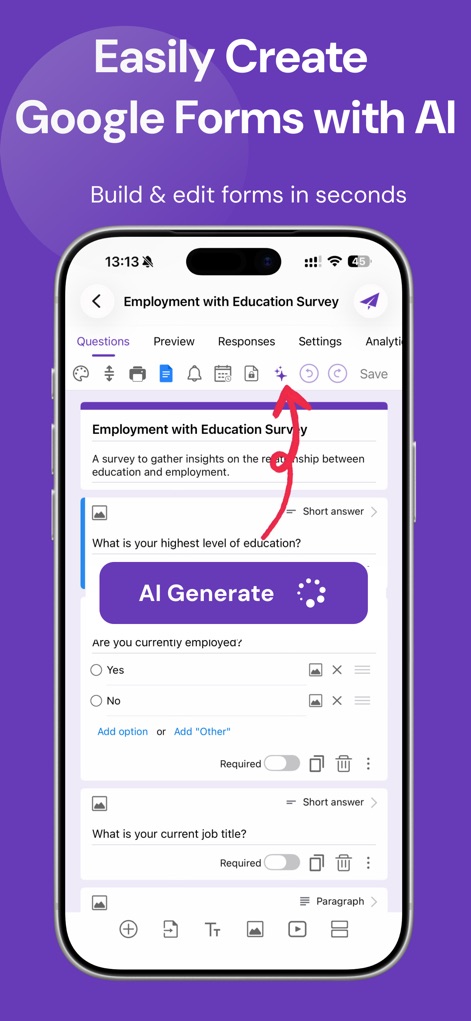
本アプリは、AIがフォームの質問内容を自動で生成する機能と、入力項目として「Short answer」を設定するオプションを提供します。
AIでスマート作成
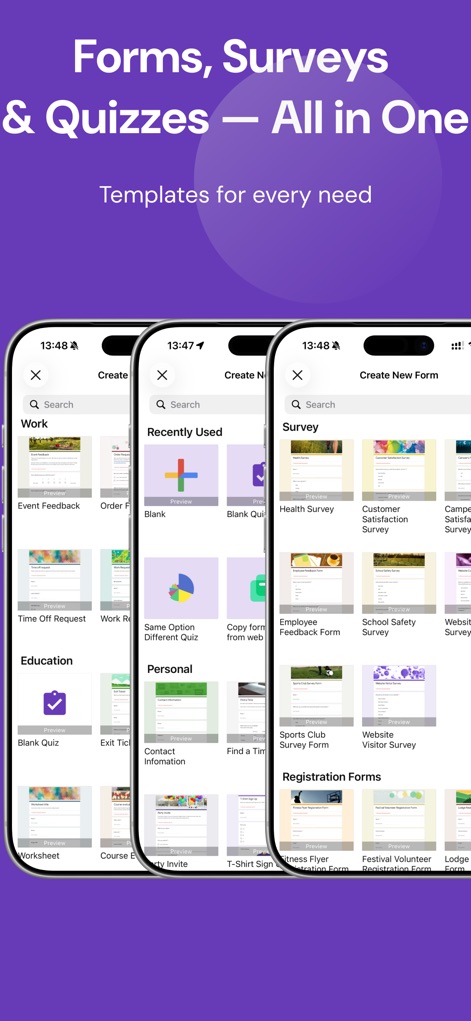
本アプリは、仕事、教育、個人といった幅広いカテゴリに対応する多彩なテンプレートを提供し、様々なアンケートやクイズの作成を支援します。
豊富なテンプレート
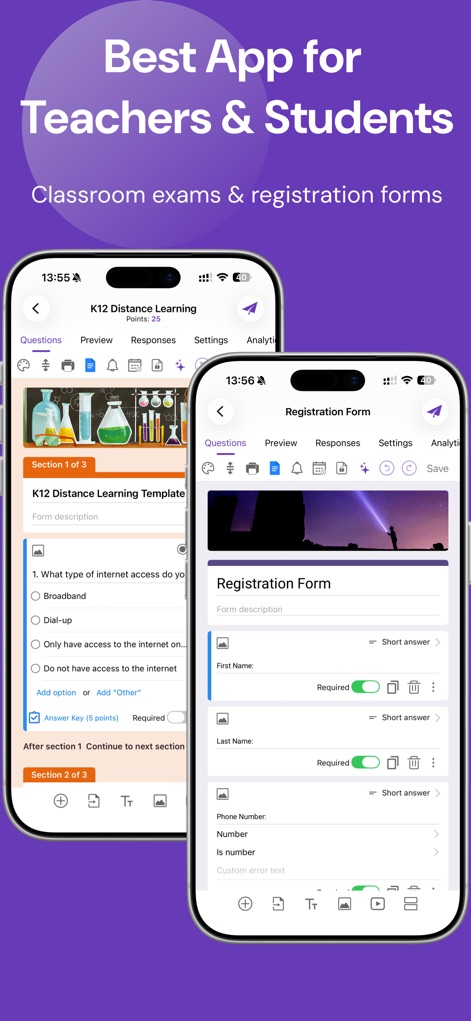
教師は、各設問に点数を割り当てられる「クイズ形式」のフォームを作成したり、氏名や連絡先を収集する「登録フォーム」を効率的に構築できます。
教育現場に最適
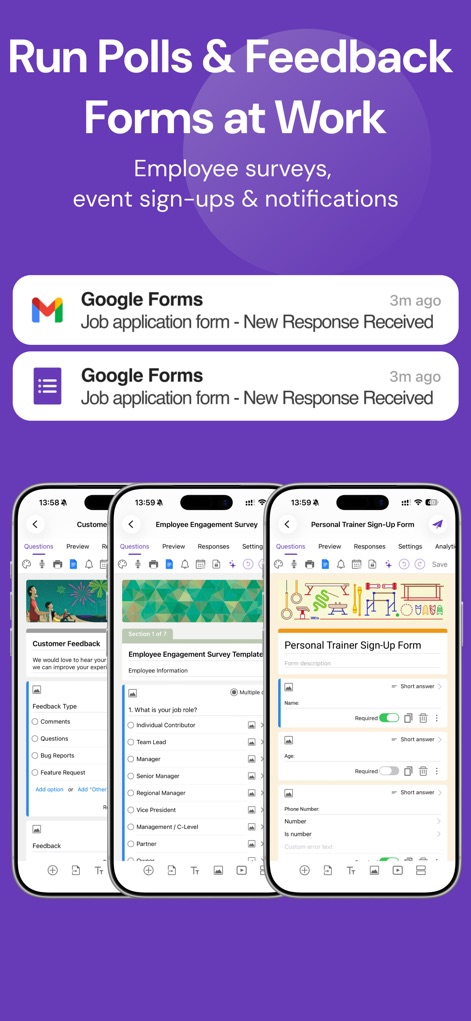
ユーザーは、Googleフォームへの新規回答をリアルタイム通知で把握し、顧客フィードバックや従業員エンゲージメント調査といった業務フォームを迅速に管理できます。
リアルタイム応答管理
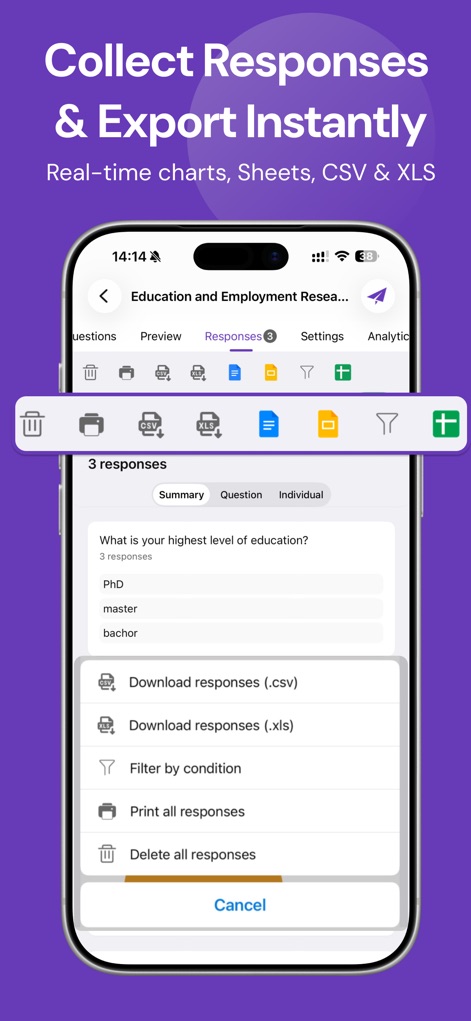
本アプリは、集計された回答のサマリーを分かりやすく表示し、ユーザーはCSVまたはXLS形式でデータをエクスポートして詳細な分析が可能です。
回答データを詳細分析
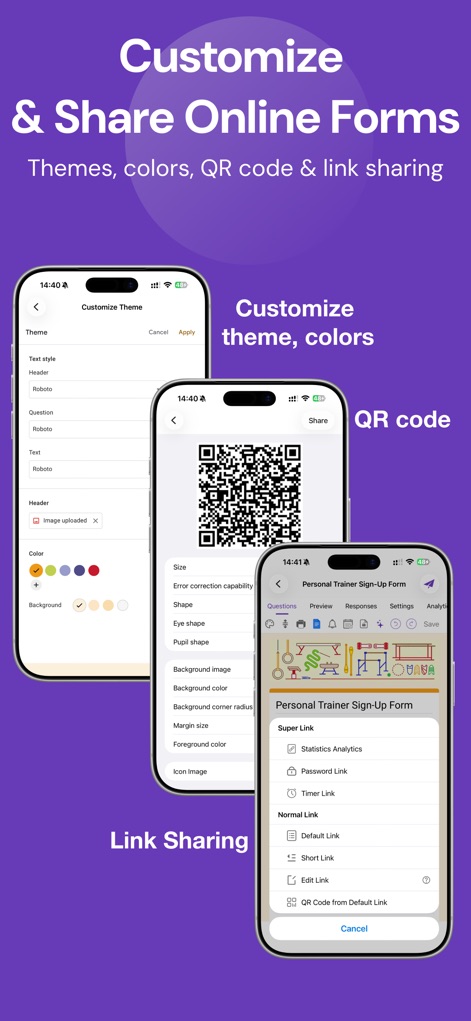
ユーザーは、テーマや背景色を自由にカスタマイズしてフォームの見た目を調整し、生成されたQRコードや多様なリンクオプションを通じて簡単にフォームを共有できます。
デザインと共有を柔軟に
説明
Download
類似アプリ
似た機能とユーザー体験を持つアプリ

Form for Google Forms
Amad Marwat

Forms for Google Docs
Aurora Innovation Limited

Forms fоr Google Form
Sanpeliano LTD

Form For Google Forms & Docs
Seven Mile Apps LLC
Forms ®
SMM service, s.r.o.
Forms for Google Fоrms
LightApps OU

Forms for Google Forms App
AppTraining Limited

Forms for Google Drive ™
Mariia Tereshkova

Forms for Google Forms & Quiz
Niharika Jindal
このページはアプリまたはその開発者の公式ページではなく、情報提供および論評を目的として作成された独立した編集出版物です。明示的に別段の記載がない限り、アプリおよびその開発者は、MWM、Apple、Google Play、アプリのパブリッシャー、またはアプリの開発者と提携、承認、後援、認可、またはその他の公式的な関係はなく、このページのいかなる内容も、アプリがMWMのサービスを使用して開発されたことを意味するものではありません。すべての商標、ロゴ、スクリーンショット、その他のコンテンツはそれぞれの所有者の財産です。