
このページはアプリまたはその開発者の公式ページではなく、情報提供および論評を目的として作成された独立した編集出版物です。明示的に別段の記載がない限り、アプリおよびその開発者は、MWM、Apple、Google Play、アプリのパブリッシャー、またはアプリの開発者と提携、承認、後援、認可、またはその他の公式的な関係はなく、このページのいかなる内容も、アプリがMWMのサービスを使用して開発されたことを意味するものではありません。すべての商標、ロゴ、スクリーンショット、その他のコンテンツはそれぞれの所有者の財産です。


ダウンロード
2.5M+ユーザー評価
評価数
8.1K開発元
カテゴリ
Productivity対応言語
19最新バージョン
1.1.7サイズ
82.3 MBリリース日
2023年10月11日モバイルゲーマーと生産性向上を志向するユーザーのための自動化ツール
GC Auto Clickerの主要機能分析
シングルターゲット自動クリック
本アプリは、単一のターゲットポイントでの反復的なタップ動作を高速かつ効率的に自動化します。手動操作よりも迅速かつ便利に、ゲームプレイやタスクの繰り返し作業をサポートします。
マルチターゲット自動クリック
このツールは、複数のターゲットポイントを連続してタップするモードを提供し、複雑なタスクや一連の操作を自動で実行することを可能にします。これにより、ユーザーはより高度な自動化を実現できます。
CPSテストとパフォーマンス追跡
本ツールは、正確なCPS(1秒あたりのクリック数)テストを提供し、ユーザーのクリック速度を測定し表示します。さらに、過去のクリック速度履歴を詳細に記録し、グラフで視覚化することで、パフォーマンスの変化を追跡できます。
多機能デジタルカウンター
このアプリは、オンラインカウンター機能を通じて、様々な数値を容易に追跡することを可能にします。複数のカウンターをサポートし、それぞれにカスタム名、値、およびステップを設定できます。
フローティングウィンドウのサイズ調整
ユーザーは、クリック要件に応じてフローティングウィンドウのサイズを調整できます。これにより、携帯電話の画面を遮ることなく、スムーズな操作と視認性を維持することが可能です。
カウンター履歴とレポート出力
本ツールは、カウンターの履歴を閲覧できる機能を提供し、カウンターの数値や過去のレポートを出力することを可能にします。これにより、ユーザーは長期的なデータの分析と管理が行えます。
豊富なユーザーインターフェースカスタマイズ
このアプリは、様々なカラーテーマ、タップ音、および振動フィードバックなど、豊富なカスタマイズオプションをユーザーに提供します。これにより、個人の好みに合わせてアプリの体験をパーソナライズできます。
左利きモードのサポート
本ツールは、左利きユーザー向けに特別に設計された「左利きモード」を提供します。これにより、左利きの方も快適かつ効率的にアプリを利用できます。
よくある質問
について知っておくべきこと GC Auto Clicker
What is GC Auto Clicker?
GC Auto Clicker is a click assistant that helps automate repeated clicks for tasks like playing games, auto-liking, and accepting tasks, making phone usage faster and more effective.
Does GC Auto Clicker support multiple clicking points?
Yes, GC Auto Clicker supports multi-target click mode, allowing users to tap multiple target points successively for complex tasks, in addition to single-target clicking.
Can GC Auto Clicker measure click-through rate?
Yes, GC Auto Clicker includes a CPS Test feature that precisely calculates your click-through rate, displays your click speed, and records historical results with graphs.
How do I manage my subscription for GC Auto Clicker?
Subscriptions for GC Auto Clicker are managed through your App Store Account Settings after purchase. Auto-renewal can be turned off at least 24 hours before the current period ends.
Does GC Auto Clicker offer an online counter feature?
Yes, GC Auto Clicker provides an online counter to track various numbers easily. It supports multiple counters, custom names, values, steps, and comprehensive history tracking.
Can I customize the UI size in GC Auto Clicker?
Yes, GC Auto Clicker allows UI customization. Users can adjust the size of the action point and the control bar through the app's settings to suit their specific requirements.
Where can I find guides on using GC Auto Clicker?
GC Auto Clicker provides usage guides on its official website, gcautoclicker.com, and on its dedicated YouTube Channel, 'GC Auto Clicker,' covering various application scenarios.
Does GC Auto Clicker save scripts?
Yes, GC Auto Clicker allows users to save scripts, particularly for multi-point modes. This feature is visible in the 'Save Scripts' section and through the 'added save/load script' option.
以下のスクリーンショットと説明は、アプリの公式ストアリスティングから直接取得されたものであり、アプリ開発者の所有物です。
アプリストア
スクリーンショット
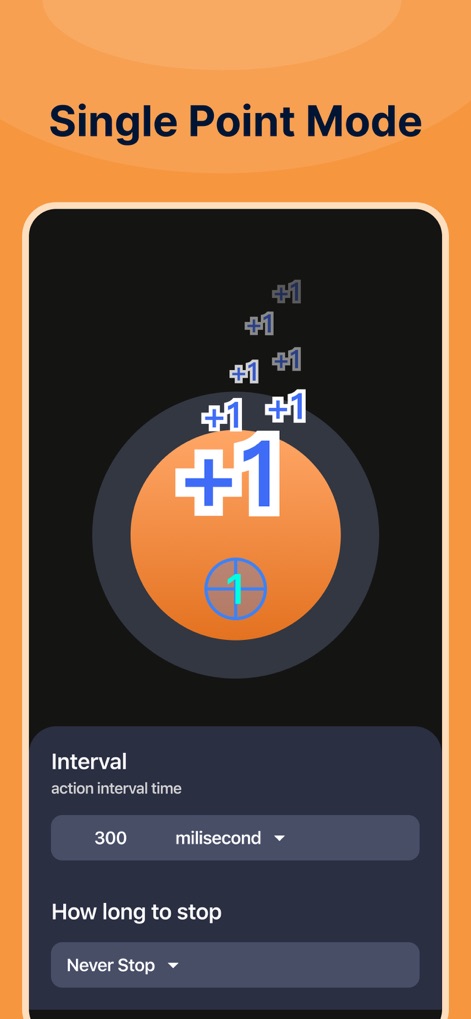
本ツールは、画面上の単一ターゲットにクリックを集中させ、指定された間隔と停止条件で自動クリックを繰り返すことで、ユーザーはタスクを効率的に自動化できます。
シングルポイント設定

ユーザーは作成したスクリプトを保存・管理できます。この画面には複数の保存済みスクリプトとそれらがマルチポイントモードである旨が表示されており、タスク自動化の柔軟性を提供します。
スクリプト管理

アプリの直感的な操作インターフェースでは、大きな「Start」ボタンと、クリックアクションの追加・削除、スクリプトの保存・読み込みといった主要なコントロールバー機能が視覚的にわかりやすく配置されています。
簡単操作インターフェース

本ツールは、アクションポイントとコントロールバーのサイズをスライダーで調整できるUIカスタマイズ機能を提供し、ユーザーは個々の好みに合わせてインターフェースを最適化できます。
UI調整機能

ユーザーは複数のターゲットポイントを設定し、それらを順番にタップするようプログラムできます。このモードでは、複雑なタスクに対応する複数のアクションポイントと、それらを制御するフローティングコントロールバーが視覚的に示されています。
マルチポイント設定

この画面は、大量のクリック数「605」とクリック倍率「x101」を表示するクリッカーゲームのインターフェースを示しており、ユーザーはゲーム内でのクリックパフォーマンスを視覚的に追跡できます。
クリッカーゲーム

本アプリには「Cube War」というミニゲームが搭載されており、グリッド状のパネルと現在のスコア(1/10)が表示されています。
ミニゲーム: キューブウォー

ユーザーは色変化に反応する速度をテストできます。この画面には大きなカラーサークルと、平均速度や最速速度といった詳細なパフォーマンス結果が表示されています。
反応速度テスト

本機能は、木魚を模したアイコンと、「Money +1」といった増加アニメーションを通して、ユーザーが仮想的なカウントを実行し、その数を「22」として視覚的に追跡できるインタラクティブな体験を提供します。
デジタル木魚
説明
Download
類似アプリ
似た機能とユーザー体験を持つアプリ

自动ּ连点器 - 自动点击器
壮壮 彭

连点器-高效自动点击按键辅助工具
和圆 魏

连点器 - 自动点击持续滚动刷新&旋转指针工具
源 韦

自动点击器·连点器
磊 赵

Auto Clicker-Auto Tapper tool
佳豪 张

Auto Clicker: Click Automatic
RH LANDSCAPING LLC

连点器-自动连点神器&点赞抢购助手
倩格 刘

Auto Clicker - Tap Assistant
乐飞 张

Auto Tapper Assistant App
KUPERTINO BIL. YAZ. HALIL IBRAHIM KARAHAN SAFFET ARSLAN MUSTAFA AYTEN MUHAMMET YALCIN OZDEMIR K. S.
このページはアプリまたはその開発者の公式ページではなく、情報提供および論評を目的として作成された独立した編集出版物です。明示的に別段の記載がない限り、アプリおよびその開発者は、MWM、Apple、Google Play、アプリのパブリッシャー、またはアプリの開発者と提携、承認、後援、認可、またはその他の公式的な関係はなく、このページのいかなる内容も、アプリがMWMのサービスを使用して開発されたことを意味するものではありません。すべての商標、ロゴ、スクリーンショット、その他のコンテンツはそれぞれの所有者の財産です。