
このページはアプリまたはその開発者の公式ページではなく、情報提供および論評を目的として作成された独立した編集出版物です。明示的に別段の記載がない限り、アプリおよびその開発者は、MWM、Apple、Google Play、アプリのパブリッシャー、またはアプリの開発者と提携、承認、後援、認可、またはその他の公式的な関係はなく、このページのいかなる内容も、アプリがMWMのサービスを使用して開発されたことを意味するものではありません。すべての商標、ロゴ、スクリーンショット、その他のコンテンツはそれぞれの所有者の財産です。

Google Tasks: Get Things Done
このアプリは、あなたの頭の中の雑多なアイデアを、Googleのツール群と同期する実行可能なタスクへと瞬時に結晶化させる。これにより、思考の漏れや「やり忘れ」は過去の遺物となる。
ダウンロード
12.5M+ユーザー評価
評価数
309.4K開発元
カテゴリ
Productivity対応言語
55最新バージョン
26.13.0サイズ
138.2 MBリリース日
2018年4月27日Google Tasks: 主要機能分析
生産性を高めるためのシンプルで統合されたタスク管理
GmailおよびGoogleカレンダーとのシームレスな連携
本アプリは、GmailやGoogleカレンダーと深く統合されており、ユーザーはメールから直接タスクを作成したり、カレンダーでタスクの期限を確認したりすることで、効率的なワークフローを確立できます。
複数デバイス間でのタスク同期
ユーザーは、スマートフォン、タブレット、PCなど、あらゆるデバイスからタスクにアクセスし、管理することが可能です。タスクはリアルタイムで同期され、どこからでも最新の状態を保てます。
期限設定と通知リマインダー
各タスクに期限を設定することで、ユーザーは目標達成に向けて計画的に取り組むことができます。期限が近づくと通知リマインダーが届き、タスクの漏れを防ぎます。
メールからのタスク作成と関連付け
Gmailの受信トレイから直接タスクを作成し、そのタスクを元のメールにリンクさせることが可能です。これにより、重要なメールに基づいたアクションを迅速にタスク化し、追跡できます。
サブタスクの作成と詳細情報の追加
複雑なタスクをより小さなサブタスクに分解したり、各タスクに必要な詳細情報を追加したりできます。これにより、作業の焦点を明確にし、進捗管理を容易にします。
タスクリストの作成と迅速な追加
ユーザーは、自身の最も重要なTo-Doをまとめたタスクリストを作成し、どこからでも迅速にタスクを捕捉し、追加することが可能です。
タスクの整理と優先順位付け
日付によるタスクの整理や、ドラッグ&ドロップによる優先順位付けが可能です。これにより、ユーザーは現在の状況に応じてタスクの管理を最適化できます。
Google Workspaceエコシステムへの統合
本アプリはGoogle Workspaceの一部として機能し、他のGoogleサービス(Gmail、カレンダーなど)との一貫したユーザー体験を提供します。
よくある質問
について知っておくべきこと Google Tasks: Get Things Done
What is Google Tasks: Get Things Done?
Google Tasks: Get Things Done is a task management app for managing, capturing, and editing tasks. It syncs across all devices and integrates with Gmail and Google Calendar for efficient task completion.
How can I capture tasks quickly using Google Tasks?
Google Tasks allows quick task capture by enabling users to create task lists. Users can view, edit, and manage these tasks on the go from any device, ensuring flexibility and accessibility.
Does Google Tasks support subtasks for detailed organization?
Yes, Google Tasks supports subtasks. Users can break down main tasks into smaller subtasks and add specific details. Task details are editable as work progresses, providing flexible organization.
How does Google Tasks integrate with Gmail?
Google Tasks integrates with Gmail, allowing users to create tasks directly from emails. Users can view tasks in the Gmail side panel and trace each task back to its original source email.
Can Google Tasks set due dates and send notifications?
Yes, Google Tasks enables users to set due dates for tasks and receive notification reminders. Users can also organize tasks by date or prioritize them using a drag-and-drop interface.
Is Google Tasks part of the Google Workspace suite?
Yes, Google Tasks is part of Google Workspace. It brings powerful, intelligent apps together, leveraging Google's AI. This suite seamlessly connects users with Gmail, Calendar, and more.
Does Google Tasks sync across all my devices?
Yes, Google Tasks ensures tasks sync across all user devices. This feature allows users to manage, capture, and edit their tasks efficiently from anywhere and at any time.
How does Google Tasks work with Google Calendar?
Google Tasks integrates with Google Calendar. Users can manage tasks originally created in Calendar directly from their mobile device. This integration helps streamline task completion for users.
以下のスクリーンショットと説明は、アプリの公式ストアリスティングから直接取得されたものであり、アプリ開発者の所有物です。
アプリストア
スクリーンショット

タスクを素早く追加
ユーザーは直感的なキーボード入力でタスクを瞬時に追加でき、複数のタスクリストをタブで効率的に管理できます。

詳細とサブタスク
ユーザーはタスクに詳細な説明を追加し、複雑なプロジェクトを小さなサブタスクに分解して進捗を明確に把握できます。
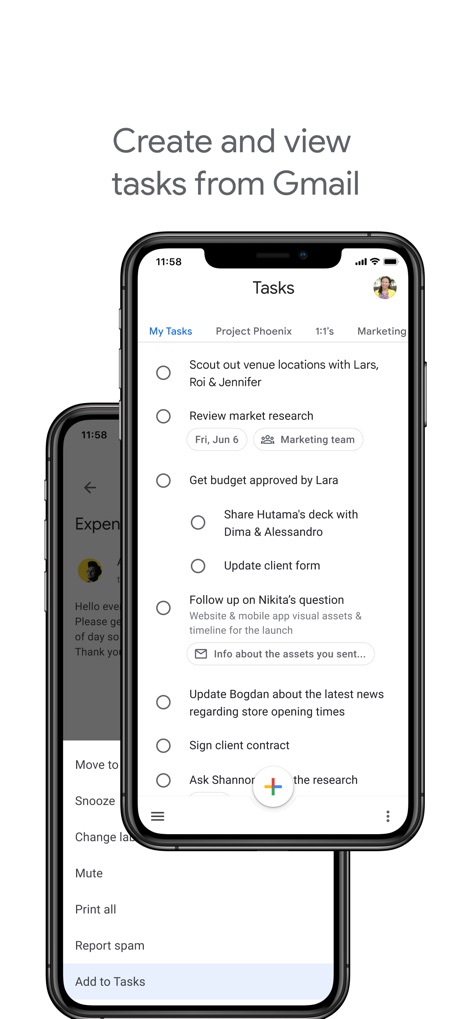
Gmailからタスク生成
本アプリはGmailと連携し、受信したメールから直接タスクを作成する機能を提供し、既存のタスクリストをシームレスに表示します。

カレンダーと統合
Googleカレンダーにタスクが統合され、ユーザーは日付に基づいて整理されたタスクをカレンダービューで直接確認し、計画的に取り組めます。

マルチデバイス対応
タスクはスマートフォンとタブレット間でシームレスに同期され、Google Workspaceエコシステムの一部として、ユーザーはどこからでもタスクにアクセスできます。
説明
Download
類似アプリ
似た機能とユーザー体験を持つアプリ

Notion: Notes, Tasks, AI
Notion Labs, Incorporated

Freenotes®: AI Notes Taking
Hangzhou Free Notes Technology Co., Ltd

Structured - Daily Planner
unorderly GmbH

TickTick:To-Do List & Calendar
Appest Limited

Noteful: Notes & PDF Markup
Noteful Technologies Ltd

Todoist: To Do List & Calendar
Doist Inc.

To do list MinimaList & Widget
Inner Grow Limited

monday.com - Work Platform
monday.com Ltd.

Prodrafts - Infinite Notes
EMMO Corp.
このページはアプリまたはその開発者の公式ページではなく、情報提供および論評を目的として作成された独立した編集出版物です。明示的に別段の記載がない限り、アプリおよびその開発者は、MWM、Apple、Google Play、アプリのパブリッシャー、またはアプリの開発者と提携、承認、後援、認可、またはその他の公式的な関係はなく、このページのいかなる内容も、アプリがMWMのサービスを使用して開発されたことを意味するものではありません。すべての商標、ロゴ、スクリーンショット、その他のコンテンツはそれぞれの所有者の財産です。