
このページはアプリまたはその開発者の公式ページではなく、情報提供および論評を目的として作成された独立した編集出版物です。明示的に別段の記載がない限り、アプリおよびその開発者は、MWM、Apple、Google Play、アプリのパブリッシャー、またはアプリの開発者と提携、承認、後援、認可、またはその他の公式的な関係はなく、このページのいかなる内容も、アプリがMWMのサービスを使用して開発されたことを意味するものではありません。すべての商標、ロゴ、スクリーンショット、その他のコンテンツはそれぞれの所有者の財産です。


GoPro Quik
生きた記録を、手間なく共有可能な傑作へと錬金する。
ダウンロード
25M+ユーザー評価
評価数
2.6M開発元
カテゴリ
Photo & Video対応言語
12最新バージョン
13.31サイズ
276.7 MBリリース日
2012年10月8日GoPro Quik アプリの主要機能分析
テックアナリストによる、アクティブユーザー向けビデオ編集アプリの評価
自動ハイライトビデオ作成
本アプリは、ユーザーのベストショットを自動的に選定し、音楽同期やトランジションを追加して、共有可能なビデオを自動で生成します。
無制限クラウドストレージ (100%品質)
ユーザーは、GoProで撮影したすべての映像に加え、他のカメラからの映像も最大500GBまで、100%の品質で無制限にクラウド保存できます。
自動クラウドアップロードとデバイス同期
写真、ビデオ、編集データはQuikアプリにインポートされると自動的にクラウドにアップロードされ、複数のデバイス間でシームレスな編集とコンテンツ管理が可能になります。
高度な編集ツール
このアプリは、色や光の調整、ビデオのトリミング、ステッカーの追加など、ユーザーの映像を次のレベルに引き上げるためのプレミアムな編集ツールを提供します。
音楽ビート同期
本ツールは、クリップ、トランジション、エフェクトを音楽のビートに合わせて同期させ、ダイナミックなビデオを作成します。
Reframe (360°映像からの通常動画作成)
ユーザーはReframe機能を使用して、360°映像から多様な視点を試すことができ、キーフレーム操作で魅力的なショットとシネマティックなトランジションを即座に作成し、共有可能な通常動画や写真として出力できます。
フレームグラブ
ユーザーは、任意のビデオフレームから高解像度の写真をキャプチャすることが可能です。
GoPro自動検出と高速転送
本アプリは、接続されたGoProカメラを自動的に検出し、有線USB接続を通じて映像を高速かつ簡単に転送します。
環境最適化フィルター
ユーザーは、雪や水辺といった特定の環境に最適化された独自のフィルターを適用できます。
統合コンテンツ管理
本ツールは、ローカルおよびクラウドメディアを一元的に管理し、カメラメディアを別のビューで整理します。ユーザーは検索フィルターやアイコンオーバーレイを活用し、広くて見やすいグリッド形式でメディアを簡単に表示および検索できます。
よくある質問
について知っておくべきこと GoPro Quik
How does GoPro Quik create automatic highlight videos?
The GoPro Quik app automatically identifies your best shots, syncs them to music, adds transitions, and generates a shareable highlight video. This feature requires a Premium or Premium+ Subscription.
What cloud storage options does GoPro Quik offer?
GoPro Quik offers unlimited cloud storage for all GoPro footage with a Premium or Premium+ subscription. Premium includes up to 100GB for other cameras, while Premium+ provides up to 500GB.
Does GoPro Quik synchronize content across devices?
Yes, GoPro Quik synchronizes content across devices. Photos, videos, and edits automatically upload to the cloud after import, ensuring backup and seamless cross-platform editing and management. This requires a subscription.
What editing capabilities does the GoPro Quik app provide?
The GoPro Quik app provides premium editing tools to adjust color, light, and video length, add stickers, utilize Beat Sync, apply cinematic themes, filters, text overlays, and adjust frames. Many features require a Premium/Premium+ subscription.
Can I save still images from videos using GoPro Quik?
Yes, GoPro Quik allows you to save high-resolution still images from any video. The Frame Grab feature lets you capture a specific frame as a photo.
How does GoPro Quik handle 360-degree video?
GoPro Quik transforms 360-degree footage into traditional video or photos using its Reframe feature. Users can choose views, create cinematic transitions with keyframes, and then export for editing and sharing.
Can I control my GoPro camera with the Quik app?
Yes, the GoPro Quik app allows you to control your GoPro camera directly from your phone. It also automatically detects connected GoPro cameras for fast footage transfer.
Is GoPro Fusion content supported by Quik cloud storage?
No, GoPro Quik cloud storage does not support content captured with GoPro Fusion. Cloud storage is available for other GoPro cameras and limited file types from non-GoPro devices.
以下のスクリーンショットと説明は、アプリの公式ストアリスティングから直接取得されたものであり、アプリ開発者の所有物です。
アプリストア
スクリーンショット
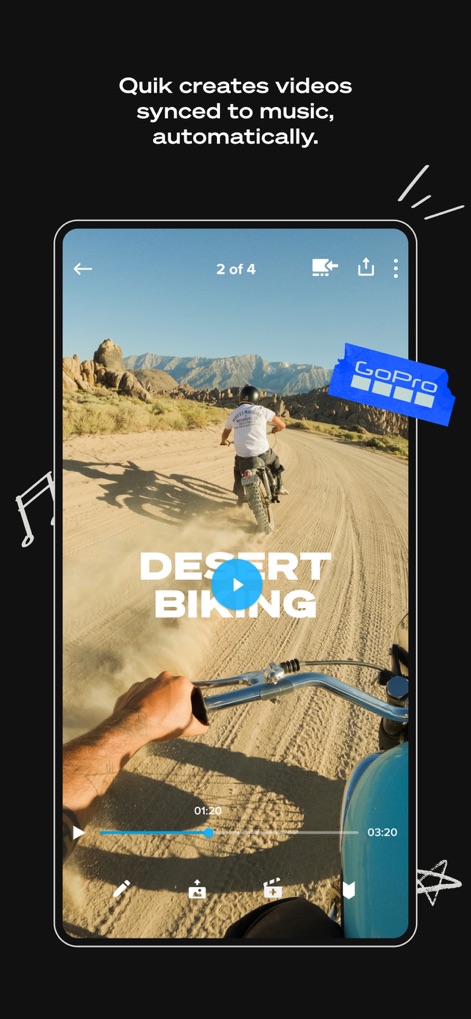
自動編集で際立つ
ユーザーは再生インターフェースで自動生成されたハイライトビデオを視聴でき、音楽に完璧に同期された編集が手軽に楽しめます。

完成通知、即座に
このアプリは、ハイライトビデオが完成した際に通知を送信し、サーフィン動画のような冒険の瞬間を素早く共有できる状態にします。

アルバムで整理
ユーザーはアルバムインターフェースを通じて写真やビデオを効率的に管理し、複数のメディアタイプが一覧で表示されます。

自由な速度編集
ユーザーは直感的なスピード調整ツールを使用して動画の再生速度を変更でき、タイムライン上で編集箇所を正確に指定できます。

音楽で物語を
ユーザーは多様な音楽カテゴリーから最適なサウンドトラックを選択し、音楽の選択が動画にどのように反映されるかをリアルタイムでプレビューできます。

専用フィルター適用
このアプリは「Water」のような環境に特化したフィルターを提供し、水中映像のプレビューでその効果を確認しながら適用できます。

動画から静止画
ユーザーはフレームグラブ機能を使用して動画の特定フレームから高解像度写真を抽出し、直感的なタイムラインで目的の瞬間を選択できます。

GoProを遠隔操作
このアプリは、スマートフォンのインターフェースからGoProカメラの録画開始・停止などを遠隔操作でき、カメラのライブビューをリアルタイムで確認できます。

360度を再構成
ユーザーは360度動画のリフレーム編集機能を利用して視点を自由に調整し、主要な被写体を自動追跡するオブジェクトトラッキングを活用できます。
説明
Download
類似アプリ
似た機能とユーザー体験を持つアプリ






このページはアプリまたはその開発者の公式ページではなく、情報提供および論評を目的として作成された独立した編集出版物です。明示的に別段の記載がない限り、アプリおよびその開発者は、MWM、Apple、Google Play、アプリのパブリッシャー、またはアプリの開発者と提携、承認、後援、認可、またはその他の公式的な関係はなく、このページのいかなる内容も、アプリがMWMのサービスを使用して開発されたことを意味するものではありません。すべての商標、ロゴ、スクリーンショット、その他のコンテンツはそれぞれの所有者の財産です。