
このページはアプリまたはその開発者の公式ページではなく、情報提供および論評を目的として作成された独立した編集出版物です。明示的に別段の記載がない限り、アプリおよびその開発者は、MWM、Apple、Google Play、アプリのパブリッシャー、またはアプリの開発者と提携、承認、後援、認可、またはその他の公式的な関係はなく、このページのいかなる内容も、アプリがMWMのサービスを使用して開発されたことを意味するものではありません。すべての商標、ロゴ、スクリーンショット、その他のコンテンツはそれぞれの所有者の財産です。


LightCut - AI Video Editor
退屈な動画編集にさよならを告げ、AIがあなたのコンテンツを瞬時に高める。LightCutは、素人がプロ顔負けの映像を量産する魔法だ。
ダウンロード
2.5M+ユーザー評価
評価数
30.9K開発元
カテゴリ
Photo & Video対応言語
14最新バージョン
4.100.0サイズ
354.1 MBリリース日
2021年8月12日モバイルクリエイター向けAI動画編集ソリューションの主要機能評価
LightCut - AI Video Editor アプリ分析
DJIデバイス連携
Mavic 3シリーズやOsmoシリーズなど、DJI製ドローンやアクションカメラで撮影した映像を直接アプリ内で編集でき、ファイル転送の手間とデバイスストレージの消費を削減します。これにより、モバイルファーストのコンテンツクリエイターは、より迅速かつ効率的に編集作業を進めることが可能です。
AIワンタップ編集
ユーザーが選択した動画クリップや写真からAIがハイライトシーンを分析・抽出し、適切なテンプレートと組み合わせることで、数秒で共有可能なスタイリッシュな動画(4K UHD対応)を自動生成します。専門的な編集スキルがなくても高品質な動画を手軽に作成できます。
AI自動効果音付与(Aerial AudioMatch)
ドローン映像のテーマ(森、海、都市など)に基づいてAIが自動で高品質な効果音を追加し、手動での検索や編集なしに映像の臨場感を高めます。特にドローンユーザーにとって、コンテンツの質を向上させる強力なツールです。
豊富な動画テンプレート
旅行、ライフスタイル、スポーツ、空撮など、多様なテーマに対応した豊富なテンプレートを提供し、ユーザーは好みのスタイルを選ぶだけで、ソーシャルメディア映えするプロ品質の動画を簡単に作成できます。
Inspire Cam撮影モードとチュートリアル
撮影方法や編集方法に迷うユーザー向けに、多様なシナリオでプロレベルのショットを撮るためのステップバイステップガイドと、撮影後の自動動画作成機能を提供します。これにより、初心者でも自信を持って動画制作に取り組めます。
包括的な編集ツール
ビデオトリマー、カッター、スロー/ファストモーション、テキスト、音楽、ステッカー、エフェクト、トランジションなど、基本的ながら強力な編集機能群を提供し、AIで生成された動画にさらなる創造性を加えることが可能です。
よくある質問
について知っておくべきこと LightCut - AI Video Editor
What is LightCut?
LightCut is an AI-powered video editing app designed for easy creation of stylish videos and vlogs. It provides awesome templates, effects, and an AI editor for both beginners and professionals.
Does LightCut support 4K video export?
Yes, LightCut supports 4K UHD video export. Its AI-powered One-Tap Edit feature can automatically transform selected clips and photos into share-worthy 4K UHD videos.
Can LightCut directly edit footage from DJI drones and handheld devices?
Yes, LightCut directly edits footage from DJI drones like Mavic 3 Series and Mini 4 Pro, and handheld devices such as Osmo Mobile and Osmo Action Series, without requiring export.
How does LightCut's AI video editor function?
LightCut's AI video editor analyzes selected video clips and photos. It identifies highlight moments and matches them with suitable templates to automatically create outstanding, share-worthy videos.
What types of creative templates does LightCut offer?
LightCut offers diverse creative templates across various styles. These include themes for travel, road trips, nature, building & city, fashion, lifestyle vlogs, sports, and aerial videos.
Can LightCut automatically add sound effects to drone videos?
Yes, LightCut features Aerial AudioMatch, an AI that automatically adds sound effects to drone footage. It uses themes like Forest or Urban Street and draws from a library of thousands of professional sounds.
Does LightCut offer guidance for shooting professional-looking videos?
Yes, LightCut provides guidance through its Inspire Cam feature. It offers convenient tutorials with step-by-step instructions on how to achieve great shots in a wide range of scenarios.
Is it possible to adjust video speed in LightCut?
Yes, LightCut allows users to adjust video speed with slow/fast motion tools. It also offers advanced speed curve controls with presets like Montage, Hero Moment, and Bullet Time for dynamic effects.
What unique visual effects are available in LightCut?
LightCut provides various visual effects, including filters, transitions, and Tilt-Shift effects. Tilt-Shift gives videos a miniaturized, unique look, particularly effective for urban scenes.
Does LightCut allow users to add text and stickers to videos?
Yes, LightCut enables users to add multiple stickers and diverse font styles. It offers various sticker categories like 3D, Vlog, and Cute for creative text and graphic overlays.
以下のスクリーンショットと説明は、アプリの公式ストアリスティングから直接取得されたものであり、アプリ開発者の所有物です。
アプリストア
スクリーンショット

このアプリは、AIを搭載したワンタップ編集機能により、瞬時にプロ品質の動画を作成し、ユーザーは豊富なテンプレートや編集オプションから選択できます。
AIでスマート編集

ユーザーは、「Travel」や「Retro」などの多様なカテゴリから最新トレンドのテンプレートを選択し、「Mini-Vlog」や「Summer Vibes」といった視覚的に魅力的なデザインを動画に適用できます。
流行のテンプレート満載

このアプリは、動画の分割や速度調整といったタイムラインベースの編集機能を提供し、ユーザーはテキスト、音楽、フィルターなどの豊富なツールを駆使してクリエイティブな作品を生み出せます。
包括的な動画編集ツール

本アプリは、プロレベルの撮影をサポートするInspire Cam機能を提供し、ユーザーは美化フィルターやアスペクト比調整などの多様な設定オプションで理想的な映像を撮影できます。
プロ級の撮影ガイド

このアプリは、DJI Mavic 3 ProやAction 3といった主要なDJIデバイスとの迅速な接続を可能にし、ユーザーは撮影した映像をスマートフォンに簡単に転送できます。
DJIデバイスと連携

本ツールは、ドローン空撮に特化した「Flying Higher」のようなテンプレートを提供し、ユーザーは選択したデバイスに最適なテンプレートを自動適用して印象的な動画を作成できます。
ドローン用テンプレート

ユーザーは、速度曲線をカスタマイズして動画のリズムを自在に調整でき、「Bullet Time」や「Hero Moment」などの多様なスローモーション効果を適用してドラマチックな演出が可能です。
速度調整でドラマチックに

このアプリは、「Movie」や「Portrait」といった多様なカテゴリのフィルターを提供し、ユーザーは適用前後の効果を比較しながら最適なビジュアル調整を行えます。
豊富なフィルター効果
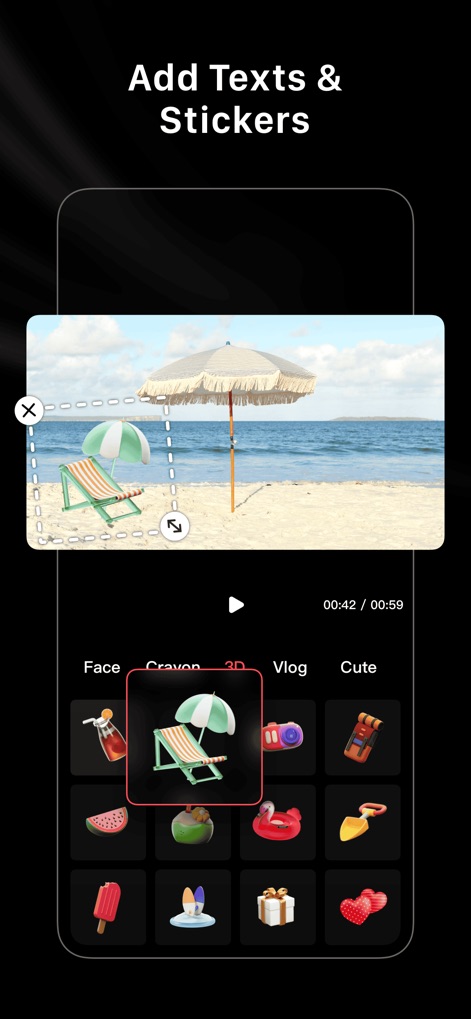
ユーザーは、動画にテキストや「3D」および「Vlog」カテゴリを含む多彩なステッカーを簡単に追加し、より個性的で魅力的なコンテンツを作成できます。
テキストとスタンプ追加

完成した動画は、Instagram、Facebook、TikTokなどの主要なソーシャルメディアプラットフォームへ直接共有でき、ユーザーは作成した作品を即座に世界と共有できます。
作品をソーシャルで共有
説明
Download






このページはアプリまたはその開発者の公式ページではなく、情報提供および論評を目的として作成された独立した編集出版物です。明示的に別段の記載がない限り、アプリおよびその開発者は、MWM、Apple、Google Play、アプリのパブリッシャー、またはアプリの開発者と提携、承認、後援、認可、またはその他の公式的な関係はなく、このページのいかなる内容も、アプリがMWMのサービスを使用して開発されたことを意味するものではありません。すべての商標、ロゴ、スクリーンショット、その他のコンテンツはそれぞれの所有者の財産です。