GrafanaUI
GrafanaUI
ダウンロード: App Store

このページはアプリまたはその開発者の公式ページではなく、情報提供および論評を目的として作成された独立した編集出版物です。明示的に別段の記載がない限り、アプリおよびその開発者は、MWM、Apple、Google Play、アプリのパブリッシャー、またはアプリの開発者と提携、承認、後援、認可、またはその他の公式的な関係はなく、このページのいかなる内容も、アプリがMWMのサービスを使用して開発されたことを意味するものではありません。すべての商標、ロゴ、スクリーンショット、その他のコンテンツはそれぞれの所有者の財産です。

ロゴ: GrafanaUI
ダウンロード: App Store

GrafanaUI

安全でネイティブなiOSエクスペリエンスで、どこへでもダッシュボードを持ち運びましょう。FaceID保護とゼロタッチで、重要なメトリクスを監視し、複数の環境を管理し、インシデントに迅速に対応します。

主要数値

ダウンロード

1K+

ユーザー評価

1.0/5

評価数

0

開発元

Roman Senchuk

カテゴリ

Utilities

対応言語

9

最新バージョン

1.3.0

サイズ

3.5 MB

リリース日

2025年11月7日
機能

外出先でインフラをマスターする

GrafanaUIは、デスクに縛られずに信頼性の高いリアルタイムオブザーバビリティを必要とするDevOpsプロフェッショナルのために、高性能なネイティブiOSエクスペリエンスを提供します。

エンタープライズグレードのセキュリティ

業界標準のiOSキーチェーン暗号化で機密性の高いアクセストークンを保護し、FaceIDまたはTouchIDでダッシュボードを安全に保護します。

統合されたマルチサーバーアクセス

1つのアプリで、本番、ステージング、開発環境全体にわたるクラウドホスト型およびセルフホスト型インスタンス間を簡単に切り替えます。

以下のスクリーンショットと説明は、アプリの公式ストアリスティングから直接取得されたものであり、アプリ開発者の所有物です。

アプリストア

スクリーンショット
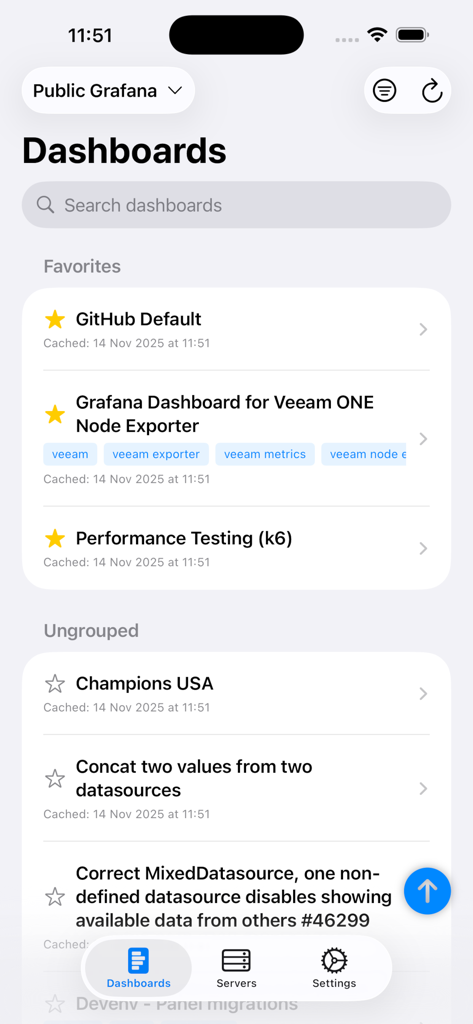
GrafanaUI - GrafanaUIモバイルアプリインターフェース。iPhoneに、お気に入りのグループ化されていない監視ダッシュボードのリストが表示されます。
GrafanaUIモバイルアプリインターフェース。iPhoneに、お気に入りのグループ化されていない監視ダッシュボードのリストが表示されます。

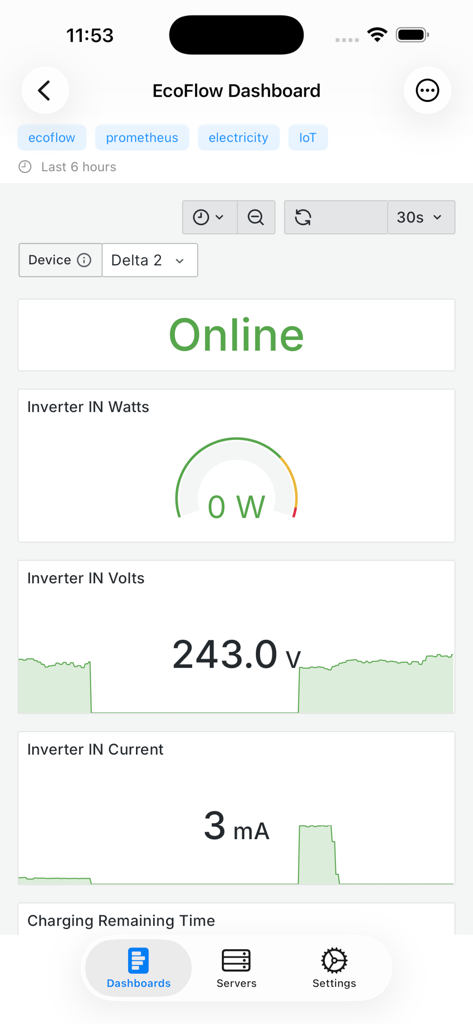
GrafanaUI - GrafanaUIモバイルアプリ。リアルタイム監視ダッシュボードに電気およびIoTメトリクスが表示されます。
GrafanaUIモバイルアプリ。リアルタイム監視ダッシュボードに電気およびIoTメトリクスが表示されます。

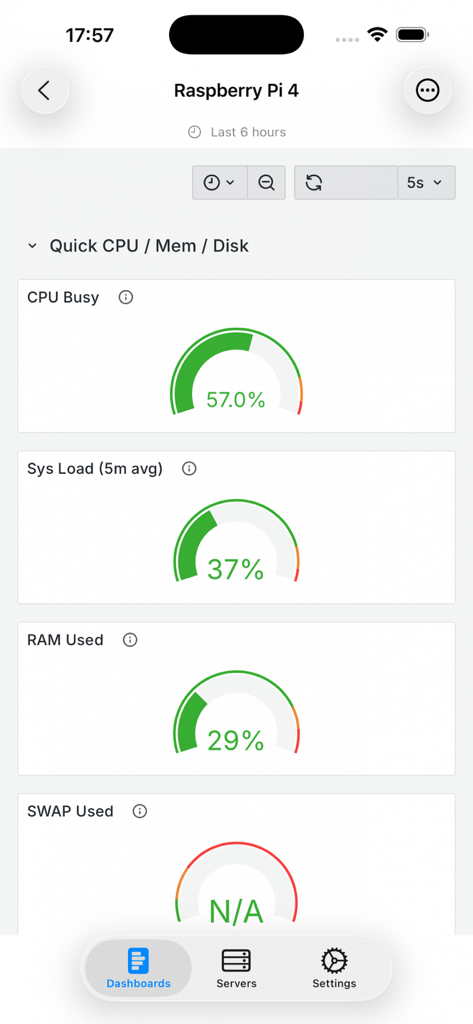
GrafanaUI - GrafanaUIモバイルアプリ。Raspberry Pi 4のシステムパフォーマンスメトリクス(CPUおよびRAM使用量を含む)が表示されます。
GrafanaUIモバイルアプリ。Raspberry Pi 4のシステムパフォーマンスメトリクス(CPUおよびRAM使用量を含む)が表示されます。

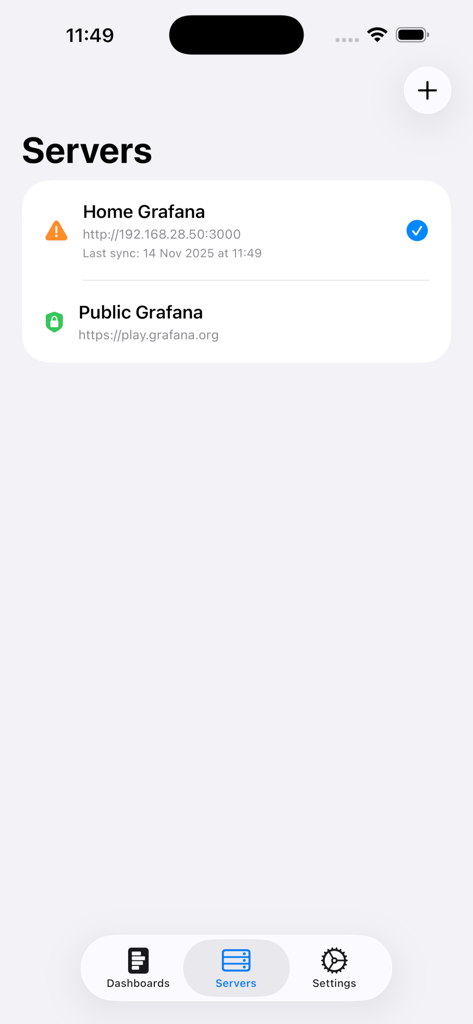
GrafanaUI - GrafanaUIモバイルアプリ画面。接続されているGrafanaサーバーのリストが表示されます。
GrafanaUIモバイルアプリ画面。接続されているGrafanaサーバーのリストが表示されます。

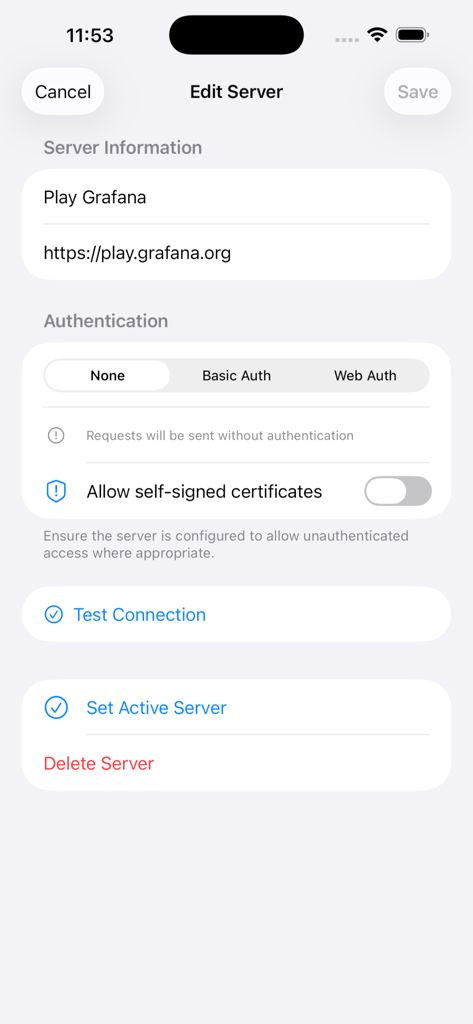
GrafanaUI - GrafanaUIモバイルアプリで、URLや認証方法などのGrafanaサーバーの詳細を編集するためのインターフェース。

GrafanaUIモバイルアプリで、URLや認証方法などのGrafanaサーバーの詳細を編集するためのインターフェース。

説明

Access Your Grafana Dashboards Anywhere, Anytime GrafanaUI brings Grafana monitoring to your iPhone and iPad. Stay connected to your critical metrics whether you're on-call, commuting, or away from your desk. KEY FEATURES Multiple Server Management • Connect to unlimited Grafana servers • Switch between different environments seamlessly • Support for cloud-hosted and self-hosted instances • Automatic connection and credential verification Flexible Authentication • Web Authentication with support for OAuth, SAML, and third-party services • Basic Auth (username/password) support • Automatic subpath detection for Grafana installations • Secure credential storage in iOS Keychain • Different auth methods per server • Optional self-signed certificate trust Dashboard Browsing & Viewing • Browse all dashboards in one place • Pull-to-refresh to update dashboard list • Search by name or tags, organize by folders • Collapse/expand all folders with dedicated buttons • Favorite dashboards in dedicated section • Full-featured viewing with WebView integration • Support for all panel types with real-time updates • Efficient pagination for large dashboard lists Security & Privacy • PIN code and biometric authentication (Face ID/Touch ID) • All credentials encrypted in iOS Keychain • No plain text storage, no third-party tracking Smart Caching & Design • Offline dashboard viewing with automatic cache management • Native iOS interface with dark/light mode support • Optimized for iPhone and iPad • Available in 9 languages PERFECT FOR DevOps Engineers, SREs, System Administrators, Data Analysts, IT Teams, and anyone using Grafana for monitoring and observability. USE CASES On-Call Monitoring: Get instant alerts and check metrics when away from your computer. Perfect for incident response. Remote Work: Access company dashboards from anywhere with secure direct connections—no VPN needed. Quick Status Checks: Monitor metrics during meetings, commutes, or breaks without being tied to your desk. Multi-Environment Management: Switch between production, staging, and development instances in one app. SECURITY FIRST Your security is our top priority. All credentials are encrypted in iOS Keychain. Biometric authentication adds extra protection. The app never stores passwords in plain text or sends data to third-party services. OPTIMIZED EXPERIENCE Built with SwiftUI for iOS, the app feels natural and responsive. The interface adapts perfectly to iPhone and iPad screen sizes. Split-screen multitasking on iPad lets you monitor dashboards while working in other apps. CONTINUOUS UPDATES We constantly improve based on user feedback. Regular updates bring new features, performance improvements, and bug fixes. The latest version includes critical stability fixes for authentication flows and enhanced error handling. REQUIREMENTS • iPhone and iPad compatible • iOS 15.0 or later • Access to Grafana server (cloud or self-hosted) • Web Authentication, Basic Auth (username/password), or unauthenticated access IMPORTANT NOTE This is an unofficial Grafana client. While it provides full API compatibility, it is not affiliated with, endorsed by, or sponsored by Grafana Labs. For the official Grafana experience, visit grafana.com. SUPPORT Having issues or suggestions? Follow us on Instagram @freshlab.app for updates and support. GETTING STARTED 1. Download the app 2. Add your Grafana server URL 3. Choose authentication method: • Web Auth: Login via web interface (supports OAuth, SAML, LDAP, etc.) • Basic Auth: Enter username and password • None: For public/unauthorized servers 4. Browse and view dashboards 5. Set up PIN or biometric authentication for app security Start monitoring your Grafana dashboards on the go today!

Download

ダウンロード: App Store

このページはアプリまたはその開発者の公式ページではなく、情報提供および論評を目的として作成された独立した編集出版物です。明示的に別段の記載がない限り、アプリおよびその開発者は、MWM、Apple、Google Play、アプリのパブリッシャー、またはアプリの開発者と提携、承認、後援、認可、またはその他の公式的な関係はなく、このページのいかなる内容も、アプリがMWMのサービスを使用して開発されたことを意味するものではありません。すべての商標、ロゴ、スクリーンショット、その他のコンテンツはそれぞれの所有者の財産です。








