
このページはアプリまたはその開発者の公式ページではなく、情報提供および論評を目的として作成された独立した編集出版物です。明示的に別段の記載がない限り、アプリおよびその開発者は、MWM、Apple、Google Play、アプリのパブリッシャー、またはアプリの開発者と提携、承認、後援、認可、またはその他の公式的な関係はなく、このページのいかなる内容も、アプリがMWMのサービスを使用して開発されたことを意味するものではありません。すべての商標、ロゴ、スクリーンショット、その他のコンテンツはそれぞれの所有者の財産です。


ダウンロード
5M+ユーザー評価
評価数
101.2K開発元
カテゴリ
Productivity対応言語
1最新バージョン
1.5.15サイズ
30.7 MBリリース日
2018年12月13日主要機能とデジタルセキュリティへの影響
アプリケーション分析: ID.me Authenticator
強力な多要素認証(MFA)
オンラインアカウントに堅牢なセキュリティ層を追加し、ハッカーからの不正アクセスを効果的に防止します。
ID.meアカウントの保護強化
ユーザーのID.meアカウント専用に設計されたセキュリティ対策により、政府機関、教育機関、医療提供者とのオンラインやり取りにおけるID保護を強化します。
多様な認証方法のサポート
時間ベースのワンタイムパスワード(TOTP)、プッシュ通知、モバイルセキュリティキーなど、複数の認証オプションを提供し、ユーザーの利便性と柔軟な選択を可能にします。
プッシュ通知による迅速な承認
アプリから直接受け取ったプッシュ通知をタップするだけで、ログインリクエストを迅速かつ簡単に承認でき、ユーザーエクスペリエンスを向上させます。
時間ベースのワンタイムパスワード(TOTP)生成
ネットワーク接続に依存しない一時的な認証コードをデバイス上で生成し、信頼性の高いオフライン認証機能を提供します。
無料かつシンプルなセキュリティソリューション
追加費用なしで利用でき、直感的な操作性により、あらゆるスキルレベルのユーザーが簡単に高度なセキュリティ対策を導入できます。
よくある質問
について知っておくべきこと ID.me Authenticator
What is ID.me Authenticator?
ID.me Authenticator is a free multi-factor authentication (MFA) solution for your ID.me account. It adds an extra layer of security, protecting your account from hackers.
How does ID.me Authenticator provide 2-step verification?
ID.me Authenticator generates secure 2-step verification tokens. This includes time-based one-time passwords (TOTP), push notifications, or mobile security keys to verify user identity.
What methods does ID.me Authenticator use to verify identity?
The ID.me Authenticator verifies identity via push notifications, where users tap 'Yes' to approve, or by entering a generated time-based one-time password (TOTP) code from the app.
Can ID.me Authenticator protect my account from hackers?
Yes, ID.me Authenticator protects your account from hackers. It adds an additional layer of security through multi-factor authentication for your ID.me account.
How do I configure my ID.me Authenticator account?
Users can configure their ID.me Authenticator account by scanning a QR code from the website where they enable Two-Factor Authentication, or by adding an account manually via a secret key.
Does ID.me Authenticator support push notifications for login approval?
Yes, ID.me Authenticator supports push notifications. Users approve a login request by tapping ‘Yes’ on the notification sent to the ID.me Authenticator app.
Can I use ID.me Authenticator to generate time-based one-time passwords (TOTP)?
Yes, ID.me Authenticator generates secure time-based one-time passwords (TOTP). Users enter this verification code from the app to complete the 2-step verification process.
Is the ID.me Authenticator app free to use?
Yes, the ID.me Authenticator app is a free multi-factor authentication (MFA) solution. It provides additional security without cost.
以下のスクリーンショットと説明は、アプリの公式ストアリスティングから直接取得されたものであり、アプリ開発者の所有物です。
アプリストア
スクリーンショット
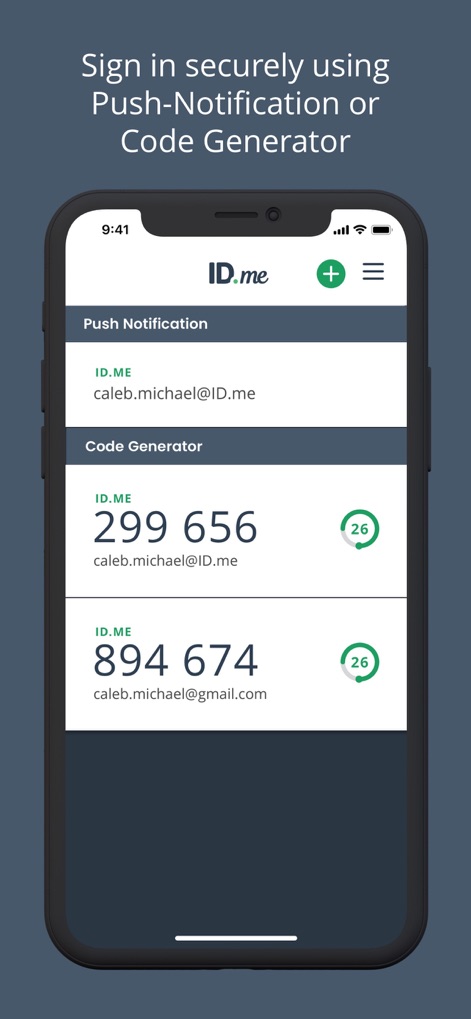
プッシュ通知オプションとワンタイムパスワード生成機能の両方を提供し、多様な認証方法でアカウントを保護します。
安全なログイン認証

QRコードスキャン機能を利用してアカウントを簡単に追加でき、視覚的な設定ガイドとスキャンボタンが操作を導きます。
迅速なアカウント設定

秘密鍵入力フィールドと高度な設定オプションを通じて、アカウントを詳細に手動で設定できます。
柔軟な手動追加

ログインリクエストの詳細情報表示と、直感的な承認/拒否ボタンにより、安全かつ迅速な認証を可能にします。
簡単なログイン承認
説明
Download
類似アプリ
似た機能とユーザー体験を持つアプリ

Google Authenticator
Google LLC

Duo Mobile
Duo Security LLC

Authenticator App - 2FA &. MFA
APPLY DIJITAL HIZMETLER TICARET LIMITED SIRKETI

authenticator . app
Mustafa Uz

SafeNet MobilePASS+
Thales DIS (Singapore) Pte Ltd

Čítačka
Tatra banka, a.s.

Authenticator App - SafeAuth
Brilliant App Limited

Authenticator App - 2FA Auth
UNIVERSE DIJITAL HIZMETLER LIMITED SIRKETI

Authenticator App : Scan & 2FA
XSOFT GLOBAL LIMITED
このページはアプリまたはその開発者の公式ページではなく、情報提供および論評を目的として作成された独立した編集出版物です。明示的に別段の記載がない限り、アプリおよびその開発者は、MWM、Apple、Google Play、アプリのパブリッシャー、またはアプリの開発者と提携、承認、後援、認可、またはその他の公式的な関係はなく、このページのいかなる内容も、アプリがMWMのサービスを使用して開発されたことを意味するものではありません。すべての商標、ロゴ、スクリーンショット、その他のコンテンツはそれぞれの所有者の財産です。