
このページはアプリまたはその開発者の公式ページではなく、情報提供および論評を目的として作成された独立した編集出版物です。明示的に別段の記載がない限り、アプリおよびその開発者は、MWM、Apple、Google Play、アプリのパブリッシャー、またはアプリの開発者と提携、承認、後援、認可、またはその他の公式的な関係はなく、このページのいかなる内容も、アプリがMWMのサービスを使用して開発されたことを意味するものではありません。すべての商標、ロゴ、スクリーンショット、その他のコンテンツはそれぞれの所有者の財産です。


ImgPlay: GIF Maker & Meme
退屈な動画から、SNSを支配するアニメーションへ。ImgPlayは、あなたのアイデアを即座にバイラルコンテンツに変える。
ダウンロード
7.5M+ユーザー評価
評価数
193.0K開発元
カテゴリ
Photo & Video対応言語
15最新バージョン
6.5.3サイズ
244.6 MBリリース日
2015年6月23日ソーシャルメディアクリエイター向けの高機能GIF作成ツールを徹底評価。
ImgPlay: GIF Maker & Meme – テックアナリストによる主要機能分析
高度なミーム&ステッカー作成
20以上の内蔵アニメーションテキストエフェクト、カスタムフォントのインポート、複数のテキストエリアを持つミームキャンバス、カスタム画像やGIFをステッカーとして使用する機能により、コンテンツをパーソナライズできます。
高画質エクスポートとSNS最適化
ディザリング技術によるクリーンでシャープなGIF出力、ファイルサイズ最適化、GIF、MP4、APNG、WebPなど多様な形式でのエクスポート、主要SNSへのワンタップ共有を提供し、最高の品質と効率でコンテンツを共有できます。
多機能メディア変換
動画、Live Photos、連続撮影、静止画、さらには画面録画まで、多様なメディアソースから高品質なGIFを簡単に作成できます。
AI背景除去と高度な編集
AIによるインスタントな背景除去機能や、InstagramやTikTokに最適化されたキャンバス比率、再生速度や方向の詳細設定など、プロフェッショナルな編集ツールを提供します。
フレームレベルの詳細編集
すべてのフレームを一度に表示・編集し、ドラッグ&ドロップで並べ替えたり、不要なフレームを瞬時に削除したりすることで、コンテンツを細部まで完璧にコントロールできます。
豊富なビジュアル強化
45種類のフィルターや、明るさ、露出、コントラスト、彩度、シャープネスなどの詳細なビジュアル調整機能、さらに機密性の高い領域を隠すモザイクやぼかしツールを利用できます。
クリエイティブなオーバーレイ
個人のブランディングのために独自のロゴを追加したり、色付きまたはパターン化された背景、様々なボーダー、ペン描画機能などを使用して、GIFをさらに個性的にスタイリングできます。
4種類のカメラモード
ハンズフリー、ノーマル、ストップモーション、ブーメランの4種類のカメラモードを搭載しており、アプリ内で新しいコンテンツを直接撮影できます。
よくある質問
について知っておくべきこと ImgPlay: GIF Maker & Meme
What is ImgPlay?
ImgPlay is a GIF Maker app that converts videos, Live Photos, burst shots, still images, and screen recordings into high-quality GIFs. It provides tools for creating animations and memes.
Can ImgPlay convert videos to GIFs?
Yes, ImgPlay can convert videos to GIFs with precise trimming. It also transforms Live Photos, burst shots, and screen recordings into seamless animations.
Does ImgPlay offer AI features for editing GIFs?
Yes, ImgPlay includes cutting-edge AI technology for GIF editing. It features AI background removal to instantly remove backgrounds from your creations.
Can I create memes using the ImgPlay app?
Yes, ImgPlay includes an Advanced Meme Maker with multiple text areas and an auto-text canvas. You can also use custom stickers and import fonts.
What export formats does ImgPlay support for GIFs?
ImgPlay supports exporting creations as GIF, MP4, APNG, or WebP formats. It also offers customized resolutions and file size optimization.
Is ImgPlay free to use or does it have a subscription?
ImgPlay offers ImgPlay Premium to unlock all GIF editing features and remove watermarks. Subscription options include weekly, monthly, or yearly plans.
Can I share my GIFs directly to social media from ImgPlay?
Yes, ImgPlay provides one-tap sharing to major platforms like Instagram, TikTok, Reels, X, and Facebook. It also allows quick sharing via iMessage.
Does ImgPlay allow frame-level editing for animations?
Yes, ImgPlay provides frame-level editing. Users can view, edit, reorder, and remove individual frames, or combine different media types within a single project.
What camera modes does ImgPlay offer for content creation?
ImgPlay offers four camera modes for capturing new content. These modes are hands-free, normal, stop-motion, and boomerang, providing versatile creation options.
Can I customize backgrounds in ImgPlay?
Yes, ImgPlay provides tools for background customization. You can add colored or patterned backgrounds and apply various borders to frame your GIF perfectly.
以下のスクリーンショットと説明は、アプリの公式ストアリスティングから直接取得されたものであり、アプリ開発者の所有物です。
アプリストア
スクリーンショット
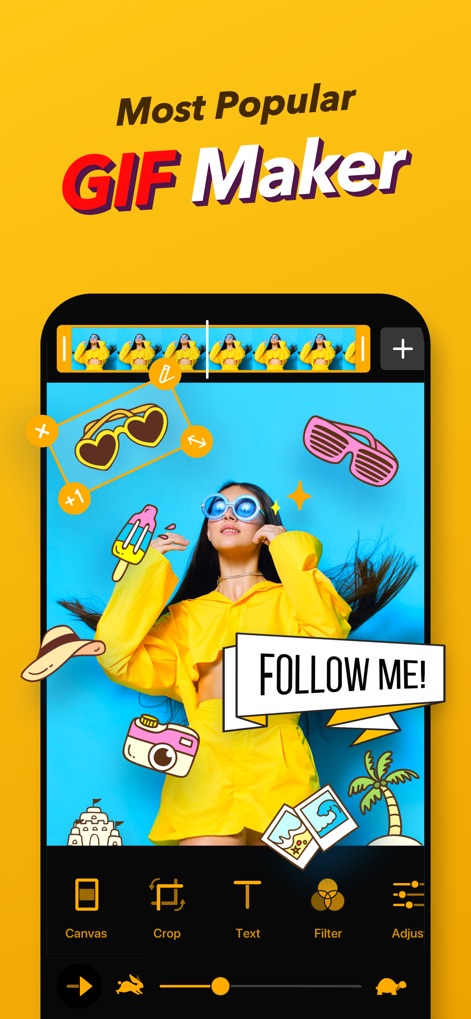
このアプリは、上部のタイムラインで複数のフレームを視覚的に管理し、画面下部の直感的な編集ツール(例えばテキストやフィルタ機能)を使って、高度なGIFを簡単に作成できます。
多機能GIF作成
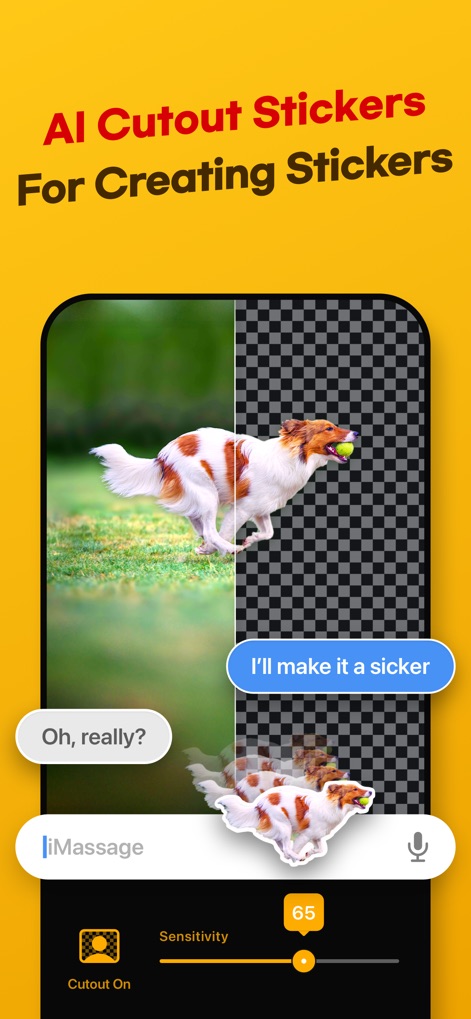
本ツールは、AI背景除去機能により画像から被写体を瞬時に切り抜き、それをカスタムステッカーとしてメッセージアプリでの利用や、他のプロジェクトでの活用が可能です。
AI背景除去ステッカー

ユーザーは、カスタマイズ可能なミームキャンバスと、複数のテキストエリアを活用することで、流行の画像や動画から独自のユーモラスなミームを簡単に作成できます。
オリジナルミーム作成

このアプリは、直感的なインターフェースで複数の静止画を組み合わせ、細かく動きを調整できるストップモーションアニメーションを制作し、創造性を最大限に引き出します。
魅力的なコマ撮り

本ツールは、InstagramやWhatsAppなどの主要SNSプラットフォームに合わせた最適化オプションを提供し、ファイルサイズ調整機能により、高品質なGIFを迅速かつスムーズに共有できます。
SNS最適化と共有

ユーザーは、検索バーから特定のキーワードでGIFを検索したり、「Happy」や「Love」のようなカテゴリフィルターを利用して、世界中のトレンドGIFを素早く見つけて共有できます。
トレンドGIFを探索

このアプリは、画像上に表現豊かなテキスト(例: "MEME FACE")を配置する機能と、キャンバスやクロップなどの多様な編集ツールを組み合わせることで、ユニークなビジュアルコンテンツを生み出します。
クリエイティブな編集
説明
Download
類似アプリ
似た機能とユーザー体験を持つアプリ

quickLive-Video2Live Wallpaper
Changshu Chuang Shi Media Technology Co., Ltd.

Live - LivePhoto maker
Beyond Trading

Patternator Video Wallpapers
Bazaart Ltd.
GIF Maker & Editor Pro
Chengdu Siwen Culture Media Co., Ltd.
Gif Maker-meme & video to gifs
姿凤 陈

Mematic - The Meme Maker
Trilliarden Entertainment GmbH

Video to Live ◦
Anish Modan

Boomerang - Video Maker
Video Bakery Ltd.

Easy Video Speed Editor
Osawa Shunsuke
このページはアプリまたはその開発者の公式ページではなく、情報提供および論評を目的として作成された独立した編集出版物です。明示的に別段の記載がない限り、アプリおよびその開発者は、MWM、Apple、Google Play、アプリのパブリッシャー、またはアプリの開発者と提携、承認、後援、認可、またはその他の公式的な関係はなく、このページのいかなる内容も、アプリがMWMのサービスを使用して開発されたことを意味するものではありません。すべての商標、ロゴ、スクリーンショット、その他のコンテンツはそれぞれの所有者の財産です。