
このページはアプリまたはその開発者の公式ページではなく、情報提供および論評を目的として作成された独立した編集出版物です。明示的に別段の記載がない限り、アプリおよびその開発者は、MWM、Apple、Google Play、アプリのパブリッシャー、またはアプリの開発者と提携、承認、後援、認可、またはその他の公式的な関係はなく、このページのいかなる内容も、アプリがMWMのサービスを使用して開発されたことを意味するものではありません。すべての商標、ロゴ、スクリーンショット、その他のコンテンツはそれぞれの所有者の財産です。


Libero Mail
退屈な受信トレイを、個人的な情報戦の司令センターに変える。Libero Mailが提供するのは、単なるメールチェック機能ではない。そこにあるのは、デジタルな日常を支配するためのツールだ。
ダウンロード
1M+ユーザー評価
評価数
100.1K開発元
カテゴリ
Productivity対応言語
2最新バージョン
50.10.5サイズ
79.8 MBリリース日
2015年5月20日Libero Mailアプリの主要機能とそのターゲットユーザーへの影響度を分析。
Libero Mail アプリケーション:包括的な機能分析
マルチアカウント管理
複数のプロバイダーのメールアカウント(Libero、Virgilio、Gmail、Yahooなど)を一元的に管理し、単一のアプリケーション内で全てのメールにアクセスできるため、効率的な運用が可能です。
統合ニュースセクション
ニュース、時事問題、経済、自動車、地域の天気やイベント、個人の星占いなど、幅広い最新情報が統合されたセクションで提供され、毎日の情報収集をサポートします。
PINコード保護
独自のPINコードを設定することで、アプリケーションへの不正アクセスを防止し、メールのプライバシーとセキュリティを強化します。特定の時間設定での自動ロックも可能です。
クイックアクション
スワイプ操作により、メールの削除、既読/未読設定、フォルダへの移動、スパム報告など、頻繁に行うアクションを迅速に実行できます。これらのアクションはユーザーの好みに合わせてカスタマイズ可能です。
迅速な連絡先アクセス
スマートフォンの連絡先(アドレス帳)と連携し、メール作成時に宛先候補を素早く提案します。また、簡単な操作で連絡先リストにアクセスできるボタンも提供されます。
マルチデバイス対応
タブレット向けに特別に設計されたインターフェースを備えており、スマートフォンだけでなく、より大きな画面のデバイスでも最適化されたユーザーエクスペリエンスを提供します。
優先度設定と開封確認
メール送信時に高い優先度を設定して受信者に緊急性を示すことや、メールが開封されたことを確認するための開封確認を要求することが可能です。
会話管理機能
関連するメールを一つの会話としてグループ化するかどうかを選択できます。これにより、スレッド形式のメールの整理と追跡が容易になります。
表示名(Display Name)設定
メールの送信者名を自由に設定できるため、ビジネスやプライベートの状況に応じて、異なる表示名でメールを送信し、パーソナライズされたコミュニケーションを実現できます。
アカウントごとのカラー設定
アカウントごとに異なる色を割り当てることができ、複数のメールアカウントを視覚的に区別しやすくすることで、一目で目的のアカウントを識別し、管理の効率を高めます。
よくある質問
について知っておくべきこと Libero Mail
Is the Libero Mail app compatible with tablets?
Yes, the Libero Mail app offers multi-device compatibility with an interface specifically designed and optimized for tablet use.
Can I add external email providers like Gmail to Libero Mail?
Yes, the Libero Mail app supports multi-account functionality. Users add accounts from any provider, including Gmail, Yahoo, and Hotmail, even without a Libero account.
How can I personalize account colors in the Libero Mail app?
Libero Mail allows users to customize each added account with a distinct color from a palette. This feature helps visually differentiate accounts at a glance.
How do I set a custom sender name in Libero Mail?
The Libero Mail app includes a "Display name" feature. This allows users to decide which name appears as the sender for their emails instead of the raw email address.
Does Libero Mail offer app security with a PIN?
Yes, the Libero Mail app provides PIN protection. Users can set an exclusive code to block access, either every time the app closes or after a chosen time interval.
Are swipe actions customizable in the Libero Mail app?
Yes, the Libero Mail app features customizable quick actions through swiping. Users can personalize actions like deleting, marking as read/unread, moving emails, or labeling them as spam.
How does Libero Mail assist with adding email recipients?
Libero Mail offers quick contacts functionality. It suggests recipients by accessing the phone's address book and includes a "+" button for rapid access to contacts during email composition.
Can I request a read receipt for emails in Libero Mail?
Yes, the Libero Mail app enables users to request a read receipt for their sent emails. It also provides the option to set messages with high priority.
Does the Libero Mail app show message previews in the inbox?
Yes, Libero Mail allows users to choose message snippet display. They can view an email preview or opt for a cleaner inbox layout without previews.
Can I group email conversations in Libero Mail?
Yes, the Libero Mail app supports conversation management. Users can decide whether to group multiple related emails into a single conversation thread for better organization.
How do I log out of an account in the Libero Mail app?
Users can log out of their accounts in the Libero Mail app by selecting the "Esci" (Log Out) option. This is accessible from the Menu or the "Gestione account" page.
Does the Libero Mail app feature a news section?
Yes, the Libero Mail app includes a dedicated News section. It provides daily news across various topics, local weather updates, events, and personalized horoscopes.
以下のスクリーンショットと説明は、アプリの公式ストアリスティングから直接取得されたものであり、アプリ開発者の所有物です。
アプリストア
スクリーンショット
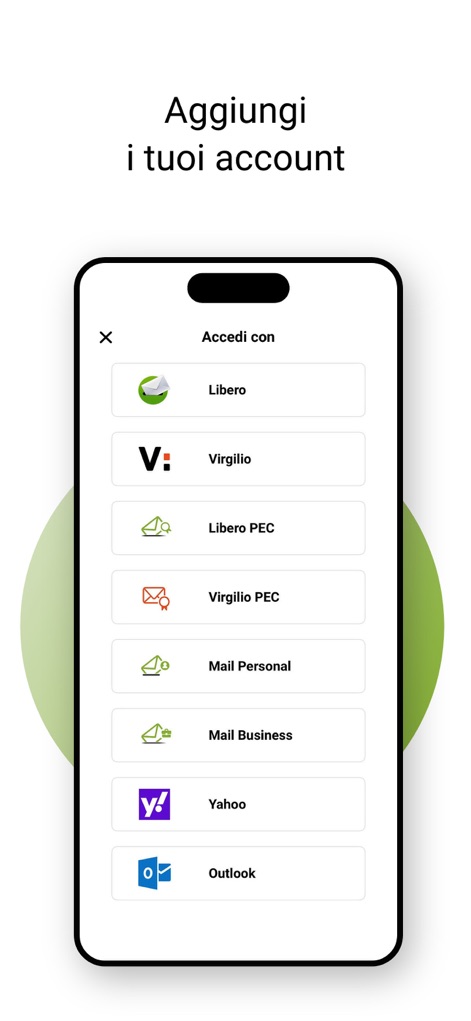
このアプリでは、Libero、Virgilio、Yahoo、Outlookなどのさまざまなプロバイダーのメールアカウントを簡単に追加し、統合されたアクセスで管理できます。
複数アカウント追加

ユーザーは、アカウント名や署名などの基本情報を編集できるだけでなく、表示カラー設定を通じて自分好みにアカウントをカスタマイズできます。
アカウント設定

本ツールは、複数のメールアカウントを一覧で表示し、それぞれに割り当てられたユーザーアイコンやメールアドレスを通じて、アカウントの統合管理を効率的に行えます。
アカウント一覧

ユーザーは、スワイプアクションでメールを削除などの迅速な操作を行えるほか、画面下部のナビゲーションバーからメール、ニュースなどのセクションへ簡単にアクセスできます。
受信トレイ効率化

このアプリは、メールに「高優先度」を設定して緊急性を示す機能や、「読了確認」を要求するオプションを通じて、送受信者間のコミュニケーションを強化します。
メール作成支援

ユーザーは、統合された連絡先リストから目的の人物を簡単に検索でき、連絡先アイコンとメールアドレスの表示により、迅速な宛先選択が可能です。
連絡先検索

本ツールでは、「差出人」「件名」「添付ファイル」などの複数のフィルターオプションと、日付範囲指定機能により、ユーザーが探しているメールを効率的に見つけることができます。
詳細メール検索

アプリは、専用のPINコード入力画面を通じて不正アクセスから保護されており、ユーザーは独自のPINを設定することでメールのセキュリティを強化できます。
PINで保護
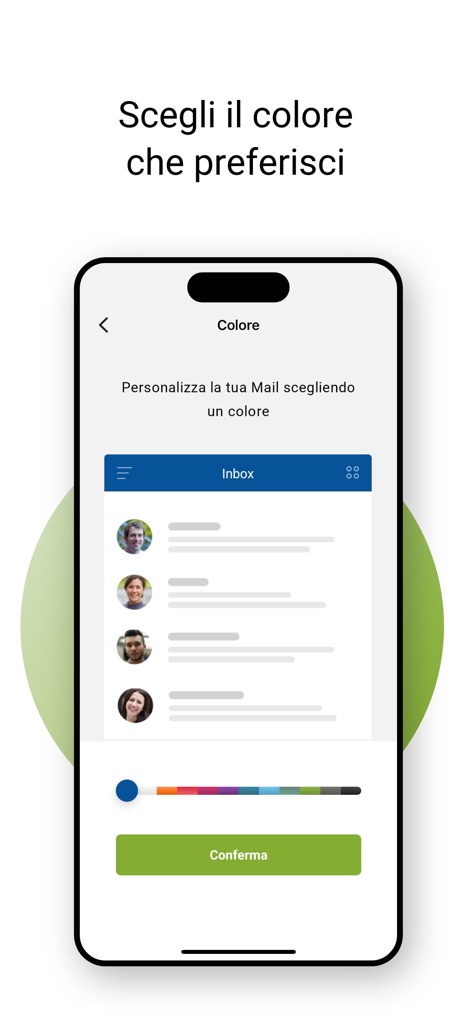
ユーザーは、広範なカラーパレットから好みの色を選択してアプリのテーマをカスタマイズでき、インボックスのプレビューでその変更をリアルタイムで確認できます。
テーマカラー選択
説明
Download
類似アプリ
似た機能とユーザー体験を持つアプリ

Microsoft Outlook
Microsoft Corporation

Mail: Email, Cloud, Calendar
V Kontakte OOO

Yandex Mail: Email & Cloud
DIRECT CURSUS COMPUTER SYSTEMS TRADING LLC

Gmail - Email by Google
Google LLC

Yahoo Mail
Yahoo Inc.

Proton Mail - Encrypted Email
Proton AG

Email - Edison Mail
Edison Software Inc.

Zoho Mail - Email and Calendar
Zoho Corporation

GMX - Mail & Cloud
1&1 Mail & Media GmbH
このページはアプリまたはその開発者の公式ページではなく、情報提供および論評を目的として作成された独立した編集出版物です。明示的に別段の記載がない限り、アプリおよびその開発者は、MWM、Apple、Google Play、アプリのパブリッシャー、またはアプリの開発者と提携、承認、後援、認可、またはその他の公式的な関係はなく、このページのいかなる内容も、アプリがMWMのサービスを使用して開発されたことを意味するものではありません。すべての商標、ロゴ、スクリーンショット、その他のコンテンツはそれぞれの所有者の財産です。