
このページはアプリまたはその開発者の公式ページではなく、情報提供および論評を目的として作成された独立した編集出版物です。明示的に別段の記載がない限り、アプリおよびその開発者は、MWM、Apple、Google Play、アプリのパブリッシャー、またはアプリの開発者と提携、承認、後援、認可、またはその他の公式的な関係はなく、このページのいかなる内容も、アプリがMWMのサービスを使用して開発されたことを意味するものではありません。すべての商標、ロゴ、スクリーンショット、その他のコンテンツはそれぞれの所有者の財産です。

ダウンロード
25M+ユーザー評価
評価数
37.5K開発元
カテゴリ
Productivity対応言語
33最新バージョン
1.26031.21サイズ
98.9 MBリリース日
2023年2月28日Link to Windows (iPhone版) 機能分析
iPhoneとWindows PC間のシームレスな統合を実現する主要機能の評価
PCとiPhone間のファイル共有
ユーザーはPCとiPhone間でファイルを簡単に共有し、作業効率を向上させることができます。
PCからの電話の発着信
ユーザーはPCから直接電話の発着信を行い、デバイスを切り替える手間を省くことができます。
テキストメッセージの閲覧と返信
ユーザーはPC上でテキストメッセージを読み、返信することができ、中断なくコミュニケーションを維持できます。
iPhone通知のPC上での管理
ユーザーはPCでiPhoneの通知を一元的に管理し、重要な情報を見逃すことなく対応できます。
よくある質問
について知っておくべきこと Link to Windows
Can I make calls from my PC using "Link to Windows"?
Yes, the "Link to Windows" app enables you to make and receive calls directly from your Windows PC when your iPhone is connected via the Phone Link feature.
Does "Link to Windows" show iPhone notifications on my PC?
Yes, "Link to Windows" allows you to manage and view your iPhone's notifications directly on your connected Windows PC through the Phone Link feature.
Can I send text messages from my PC with "Link to Windows"?
Yes, the "Link to Windows" app enables users to read and reply to text messages from their iPhone directly through their connected Windows PC.
Does "Link to Windows" display my iPhone contacts on the PC?
Yes, the "Link to Windows" app provides the ability to view your iPhone contacts directly on your connected Windows PC.
How do I share files between my iPhone and PC using "Link to Windows"?
"Link to Windows" facilitates file sharing between your iPhone and PC. The app displays received files and offers a file share option to another paired device.
What iOS version is required for "Link to Windows"?
"Link to Windows" requires an iPhone running iOS 16 or higher to support the Phone Link feature connection with a Windows PC.
What are the PC requirements for the Phone Link feature with "Link to Windows"?
The Phone Link feature requires a PC with Bluetooth Low Energy (BLE) support running Windows 10 (May 2019 Update or later) or Windows 11.
Is "Link to Windows" available for iPad or Mac?
No, "Link to Windows" is not available for iPad (iPadOS) or MacOS. It exclusively supports iPhone and Windows PC integration.
How do I connect my iPhone to my PC using the "Link to Windows" app?
To connect, open the Phone Link app on your PC and follow the instructions. You can scan a QR code from your PC or proceed without one to link your device.
How does the "Link to Windows" app maintain connection with my PC?
The "Link to Windows" app automatically connects your iPhone to a paired PC when it is within range. Ensure your PC is nearby and Bluetooth is activated.
Where can I find the Microsoft Terms of Use for the "Link to Windows" app?
The Microsoft Terms of Use for the "Link to Windows" app are located at the provided link: https://go.microsoft.com/fwlink/?LinkID=246338.
Does the "Link to Windows" app have a privacy statement?
Yes, the "Link to Windows" app adheres to a Privacy Statement, which users can access via the link: https://go.microsoft.com/fwlink/?LinkID=248686.
What is "Link to Windows"?
"Link to Windows" is an app that connects your iPhone to the Phone Link feature on your Windows PC. It provides instant access to phone content directly from your computer.
以下のスクリーンショットと説明は、アプリの公式ストアリスティングから直接取得されたものであり、アプリ開発者の所有物です。
アプリストア
スクリーンショット

PCで通話管理
このアプリは、PC上で進行中の通話インターフェースを表示し、PC画面上に着信通知や通話履歴を一覧で提供することで、ユーザーがデバイス間で中断なく通話に応答・管理できるシームレスな体験を実現します。
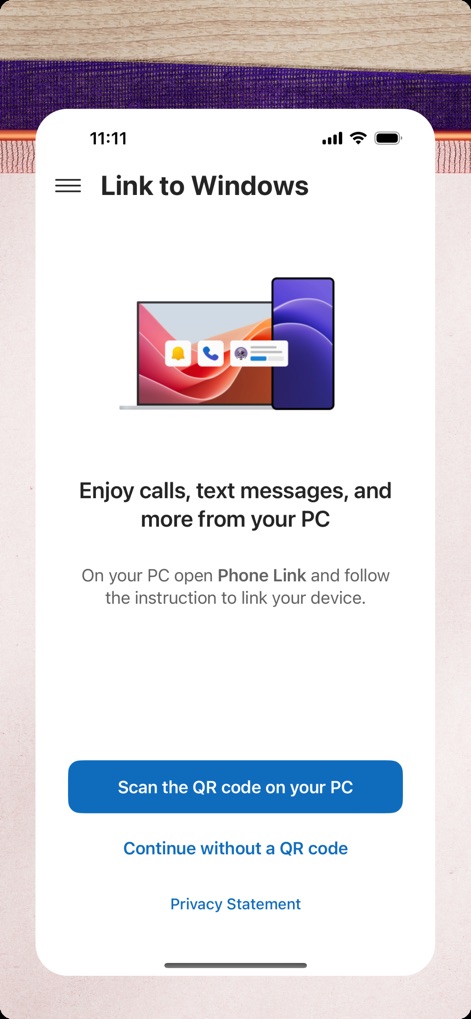
簡単接続設定
この画面では、PCとの連携を素早く開始するためのQRコードスキャンボタンが明確に表示されており、PCとスマートフォンの連携によって通話やメッセージなどの機能が利用可能になることを示すイラストが配置されています。
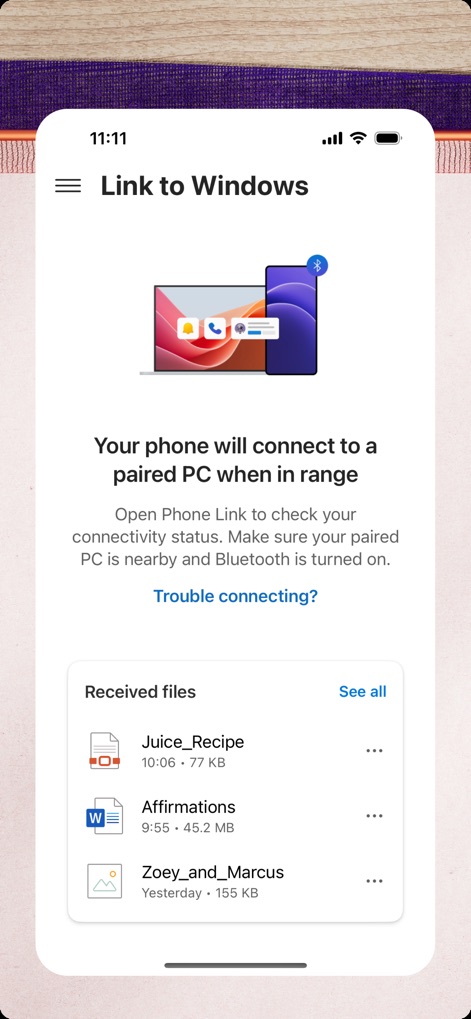
ファイル転送表示
本アプリは、デバイス間の安定した接続状態を示すBluetooth接続アイコンを上部に表示し、PCから受信したファイルを日付やサイズと共に一覧で確認できる「Received files」セクションを提供することで、重要なドキュメントやメディアの管理を簡素化します。
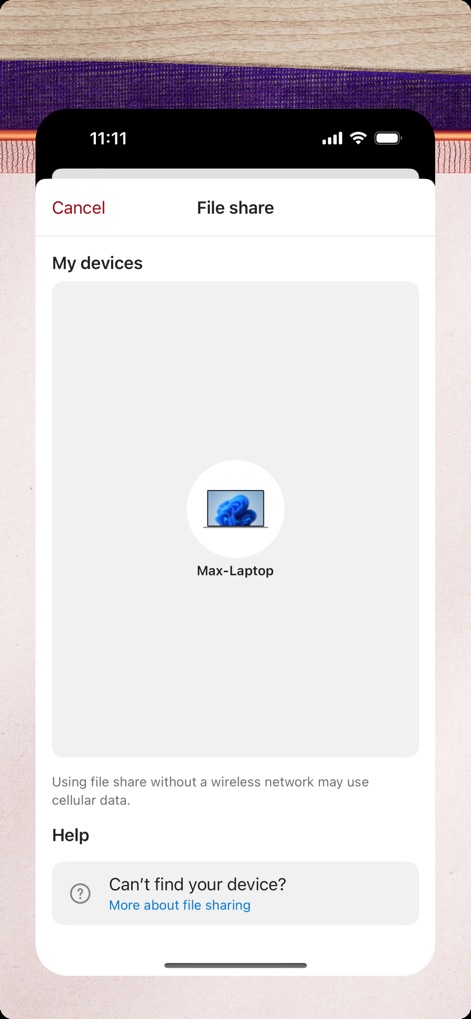
PCへ簡単共有
この画面では、ファイル共有専用のインターフェースが提供され、接続可能なデバイスとして検出されたPCデバイス(例: Max-Laptop)が明確にリスト表示されるため、ユーザーは目的のPCへ簡単にファイルを転送できます。
説明
Download





このページはアプリまたはその開発者の公式ページではなく、情報提供および論評を目的として作成された独立した編集出版物です。明示的に別段の記載がない限り、アプリおよびその開発者は、MWM、Apple、Google Play、アプリのパブリッシャー、またはアプリの開発者と提携、承認、後援、認可、またはその他の公式的な関係はなく、このページのいかなる内容も、アプリがMWMのサービスを使用して開発されたことを意味するものではありません。すべての商標、ロゴ、スクリーンショット、その他のコンテンツはそれぞれの所有者の財産です。