
このページはアプリまたはその開発者の公式ページではなく、情報提供および論評を目的として作成された独立した編集出版物です。明示的に別段の記載がない限り、アプリおよびその開発者は、MWM、Apple、Google Play、アプリのパブリッシャー、またはアプリの開発者と提携、承認、後援、認可、またはその他の公式的な関係はなく、このページのいかなる内容も、アプリがMWMのサービスを使用して開発されたことを意味するものではありません。すべての商標、ロゴ、スクリーンショット、その他のコンテンツはそれぞれの所有者の財産です。


LumaShare Share/Print Station
シームレスなワイヤレス印刷、ライブスライドショー、インターネット接続なしでの即時ソーシャル共有で、行列をスピードアップし、クライアントを感動させましょう。
ダウンロード
23K+ユーザー評価
評価数
400開発元
カテゴリ
Photo & Video対応言語
1最新バージョン
4.0.2サイズ
31.2 MBリリース日
2014年5月20日プロフェッショナルな共有を簡単に
イベントROIを最大化し、高速共有、オフラインでの信頼性、そして現代のイベント起業家向けに設計されたプロフェッショナルなデジタルディスプレイでブースのボトルネックを解消します。
インスタントマルチチャネル共有
専用iPadステーションから、SMS、WhatsApp、Email、またはQRコード経由でゲストが写真、GIF、Boomerangを共有できるようにすることで、行列をスムーズに進めましょう。
揺るぎないオフラインモード
会場のWi-Fiが不安定でも、あなたの評判を台無しにさせないでください。LumaShareはSMSとEmailをローカルにキューイングし、オンラインに戻ると自動的に送信します。
よくある質問
について知っておくべきこと LumaShare Share/Print Station
LumaShareは何に使用されますか?
LumaShareを使用すると、dslrBoothまたはLumaBoothのフォトブースの写真、ビデオ、GIFを表示および共有できます。電子メール、SMS、WhatsApp、AirDrop、QRコード、直接印刷による共有が可能です。
LumaShareで利用できる共有オプションは何ですか?
LumaShareでは、電子メール、SMS、WhatsApp、AirDrop、QRコード経由で写真、ビデオ、GIFの共有オプションを提供しています。これらの機能はシームレスに統合されています。
LumaShareはインターネット接続なしでアイテムを共有できますか?
はい、LumaShareはインターネット接続なしでも電子メールとSMS共有をサポートしています。その他の共有方法ではネットワークアクセスが必要になる場合があります。
LumaShareは写真の印刷をサポートしていますか?
はい、LumaShareではAirPrint対応プリンターまたはdslrBoothやLumaBoothに接続されたプリンターへの直接印刷が可能です。
スライドショー用にLumaShareを外部ディスプレイに接続するにはどうすればよいですか?
LumaShareはRoku、AppleTV、または互換性のあるスマートTVなどのAirPlay 2デバイスに接続できます。HDMIケーブルを使用して外部ディスプレイに接続することも可能です。
LumaShareで無制限に共有するにはサブスクリプションが必要ですか?
はい、SMS、電子メール、QRコード、WhatsApp経由での無制限共有には、LumaShareクラウドストレージ&共有サブスクリプションが必要です。
LumaShareサブスクリプションの月額料金はいくらですか?
LumaShareクラウドストレージ&共有サブスクリプションは月額$8.99です。支払いはiTunesアカウントを通じて処理されます。
LumaShareサブスクリプションの管理またはキャンセルはできますか?
はい、iTunesアカウント設定でLumaShareサブスクリプションを管理し、自動更新をオフにすることができます。アクティブ期間中のキャンセルはできません。
LumaShareは共有または印刷の前に免責事項を表示できますか?
はい、LumaShareでは、ゲストに表示される免責事項を追加できます。これは、コンテンツの共有または印刷が許可される前に表示されます。
以下のスクリーンショットと説明は、アプリの公式ストアリスティングから直接取得されたものであり、アプリ開発者の所有物です。
アプリストア
スクリーンショット
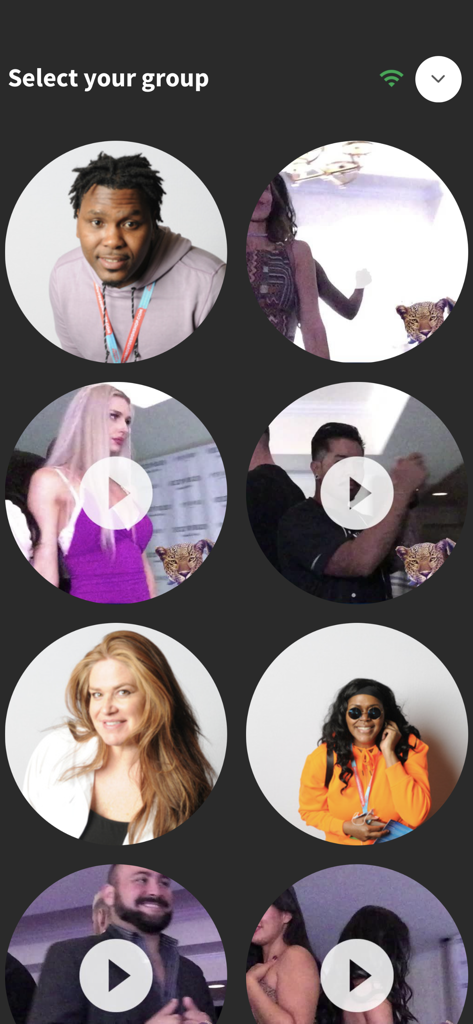
LumaShareアプリ画面には、選択のためにイベント写真やビデオの円形のサムネイルが表示されています。
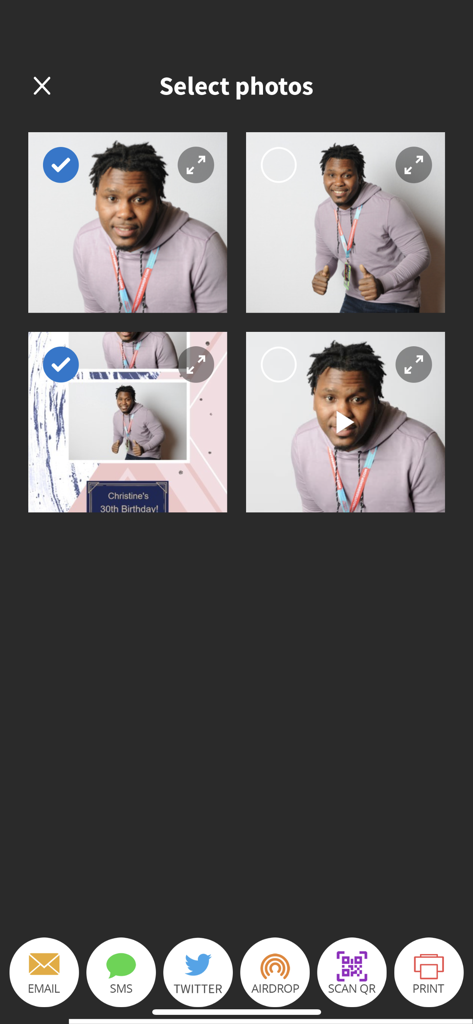
LumaShareアプリインターフェースで、写真ブースの画像を選択し、Eメール、SMS、またはQRコードで共有します。
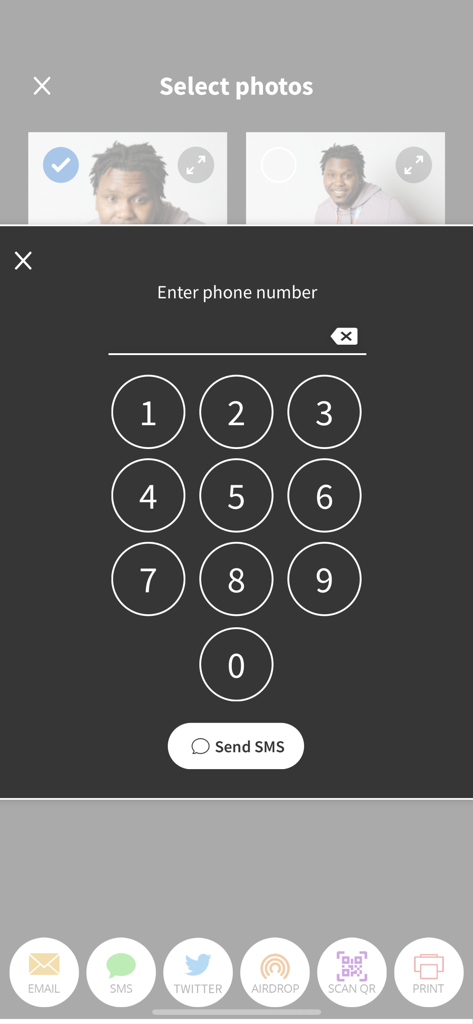
LumaShareアプリ画面には、写真の選択とSMS共有用の電話番号を入力するためのテンキーが表示されています。
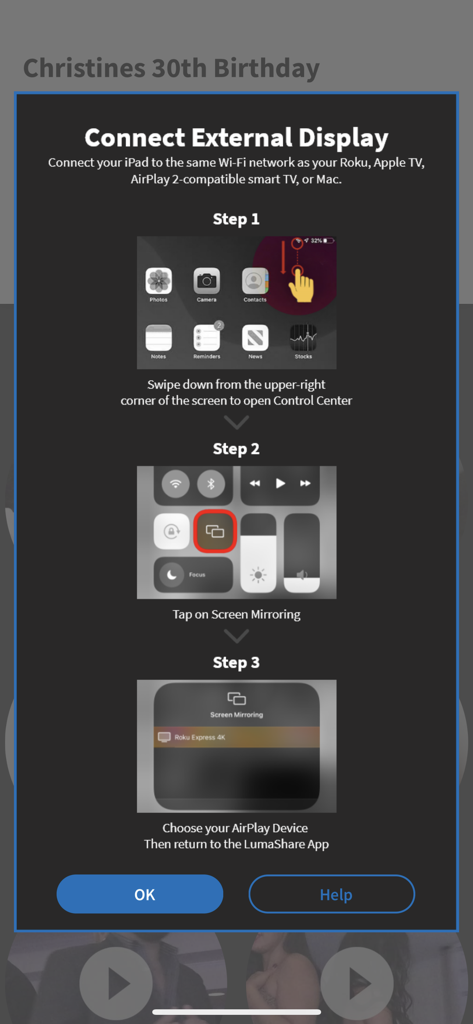
AirPlay画面ミラーリングを使用してLumaShareアプリを外部ディスプレイに接続するためのステップバイステップの手順
説明
Download
類似アプリ
似た機能とユーザー体験を持つアプリ

ChackTok - 360video&photobooth
LINKSIGN UK CO., LTD

Touchpix · Photo & Video Booth
Propfun

RevoSpin 360
MRKJ INC

LumaBooth Event Photo Booth
Lumasoft LLC

Mini Photobooth
Minivan Labs

Simple Booth HALO
SMPL Inc.

Simple Booth Classic
SMPL Inc.

BoothLab: Photo & Video Booth
Jorge Cozain

Wifibooth the PRO photo booth
Solodigitalis Inc.
このページはアプリまたはその開発者の公式ページではなく、情報提供および論評を目的として作成された独立した編集出版物です。明示的に別段の記載がない限り、アプリおよびその開発者は、MWM、Apple、Google Play、アプリのパブリッシャー、またはアプリの開発者と提携、承認、後援、認可、またはその他の公式的な関係はなく、このページのいかなる内容も、アプリがMWMのサービスを使用して開発されたことを意味するものではありません。すべての商標、ロゴ、スクリーンショット、その他のコンテンツはそれぞれの所有者の財産です。