MoneyBay: Expense Manager
Download on App Store

This page is not an official page of the app or its developer, but an independent editorial publication created for informational and commentary purposes. Unless expressly stated otherwise, neither the app nor its developer is affiliated with, endorsed by, sponsored by, authorized by, or otherwise officially connected with MWM, Apple, Google Play, the app publisher, or the app's developer, and nothing on this page implies that the app was developed using MWM's services. Any trademarks, logos, screenshots, and other content remain the property of their respective owners.


Logo of MoneyBay: Expense Manager
Download on App Store

MoneyBay: Expense Manager

Take control of your finances instantly with voice notes, image imports, and total privacy. No account required—just simple, secure tracking on all your Apple devices.

Key Figures

Downloads

0

User Rating

4.6/5

Total Ratings

0

Publisher

Le Canh Phong

Category

Finance

Locales

6

Latest Version

26.7

Size

79.8 MB

First Released

Dec 4, 2024
Features

Master Your Finances Without the Friction

The ultimate privacy-first toolkit for busy professionals and freelancers. Track spending, scan receipts, and manage debts—no account required.

100% Private & Instant

Skip the sign-up. Start tracking in seconds with no account registration. Your data stays yours, synced securely via iCloud with zero third-party tracking.

Smart AI Data Entry

Stop manual typing. Simply scan physical receipts, import transaction screenshots, or log your expenses hands-free using voice-to-text AI.

The following screenshots and description are sourced directly from the app's official store listing and are the property of the app developer.

App Store

Screenshots
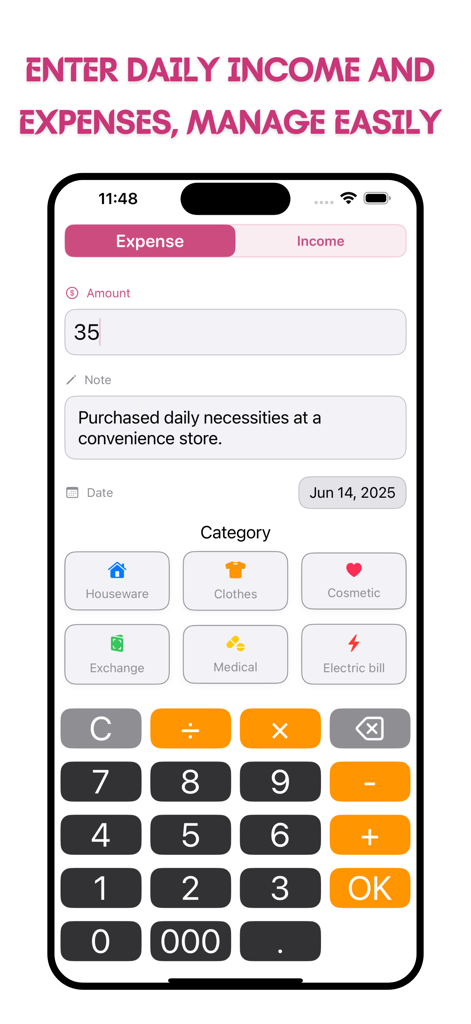
MoneyBay: Expense Manager - MoneyBay app interface for entering daily expenses with category icons and a numeric keypad
MoneyBay app interface for entering daily expenses with category icons and a numeric keypad

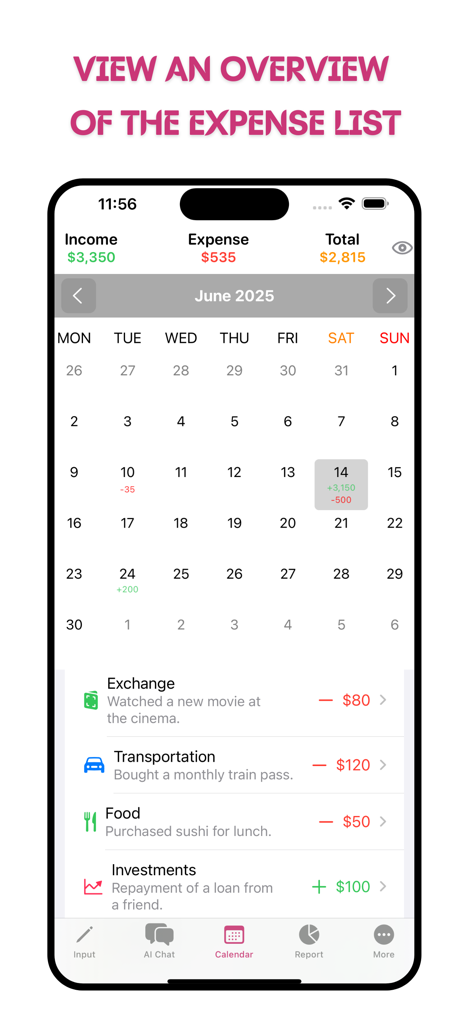
MoneyBay: Expense Manager - MoneyBay app interface showing a monthly calendar view with categorized daily income and expenses

MoneyBay app interface showing a monthly calendar view with categorized daily income and expenses
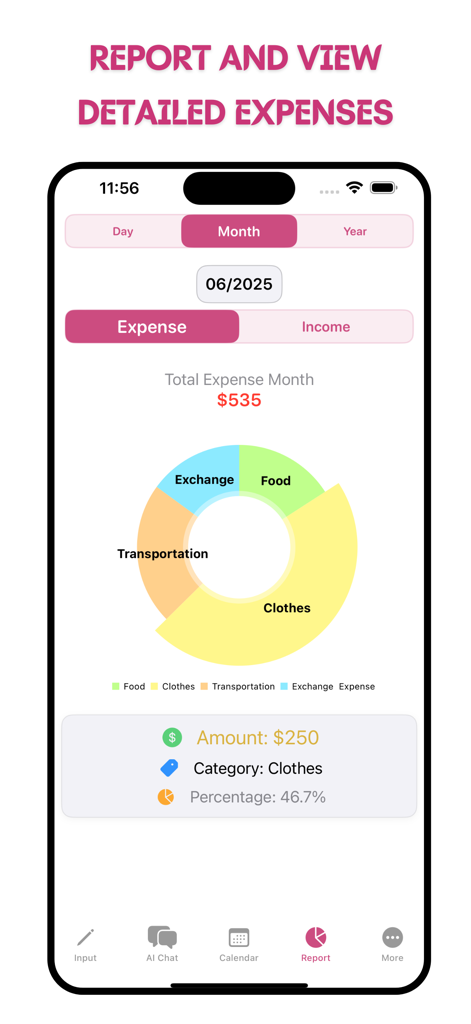
MoneyBay: Expense Manager - Monthly expense report screen in the MoneyBay app showing a colorful pie chart with spending categories like clothes and food
Monthly expense report screen in the MoneyBay app showing a colorful pie chart with spending categories like clothes and food

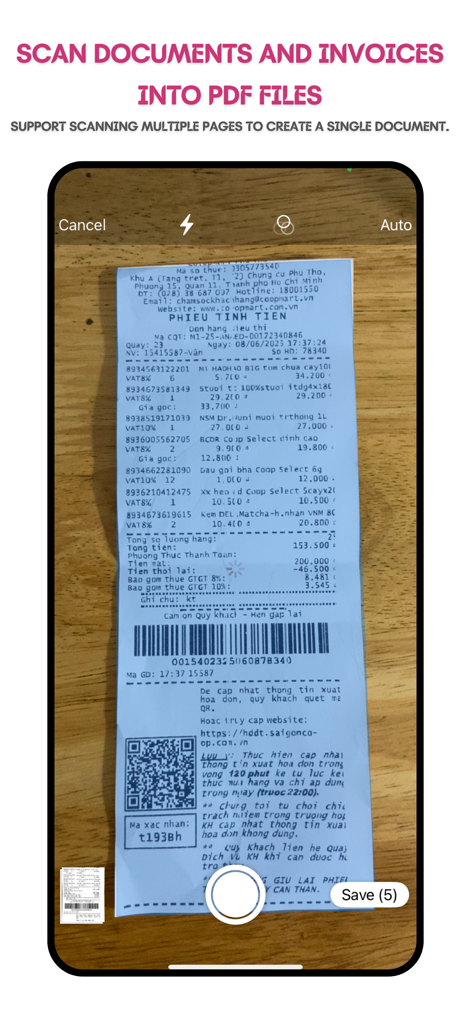
MoneyBay: Expense Manager - MoneyBay app interface scanning a paper receipt to create a PDF document.
MoneyBay app interface scanning a paper receipt to create a PDF document.

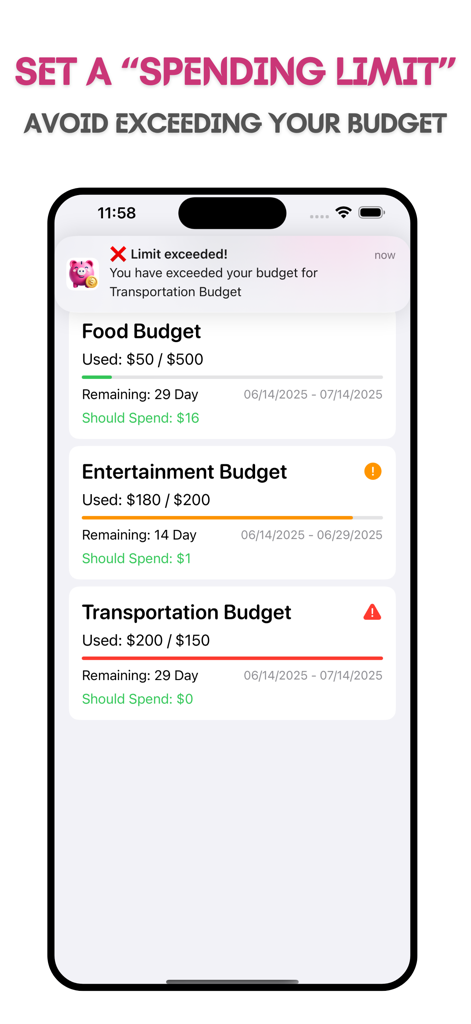
MoneyBay: Expense Manager - MoneyBay app interface showing spending limits and budget alerts for food entertainment and transportation categories
MoneyBay app interface showing spending limits and budget alerts for food entertainment and transportation categories

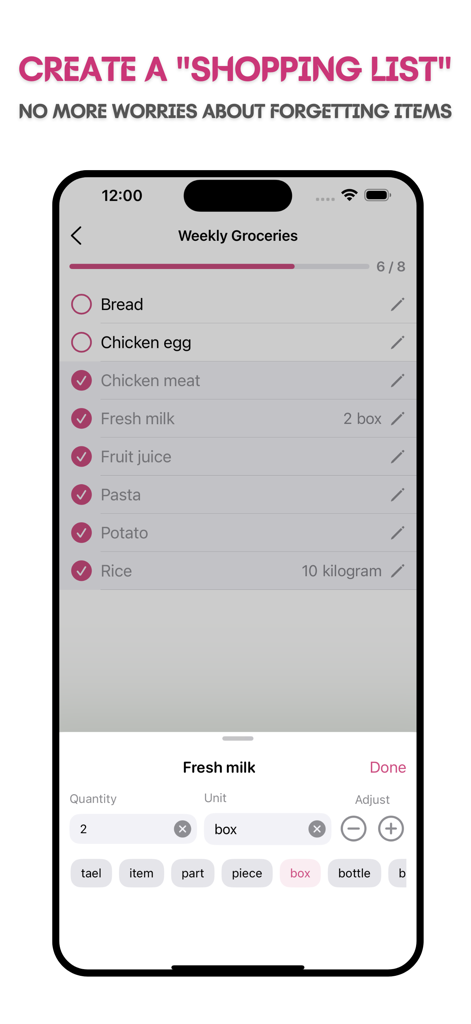
MoneyBay: Expense Manager - MoneyBay app interface displaying a weekly groceries shopping list with items checked off and quantity adjustment options
MoneyBay app interface displaying a weekly groceries shopping list with items checked off and quantity adjustment options

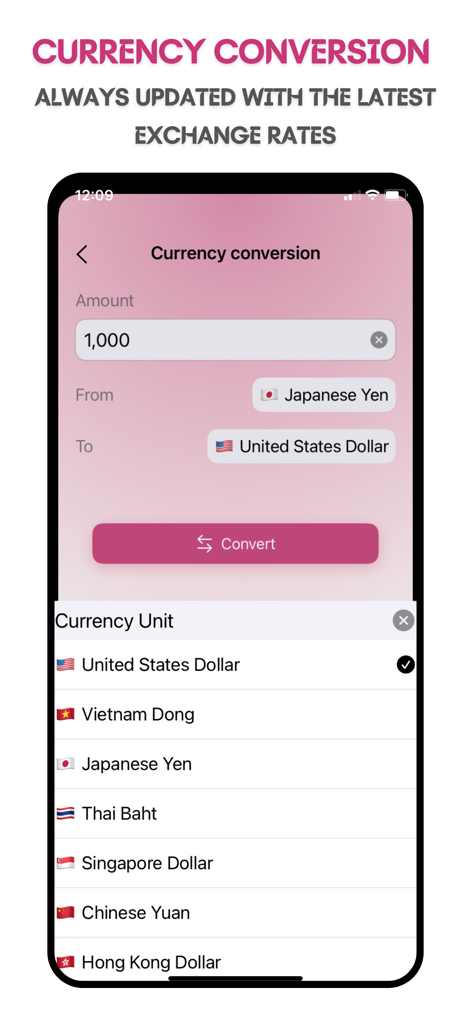
MoneyBay: Expense Manager - MoneyBay app currency conversion screen showing Japanese Yen to US Dollar exchange rates
MoneyBay app currency conversion screen showing Japanese Yen to US Dollar exchange rates

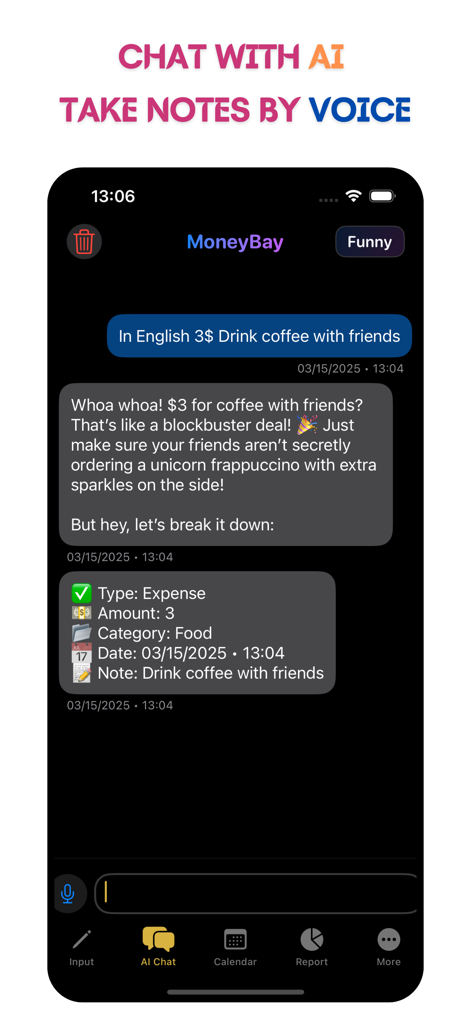
MoneyBay: Expense Manager - A screenshot of MoneyBay app showing the AI chat interface where a user logs a coffee expense using natural language and voice commands.
A screenshot of MoneyBay app showing the AI chat interface where a user logs a coffee expense using natural language and voice commands.

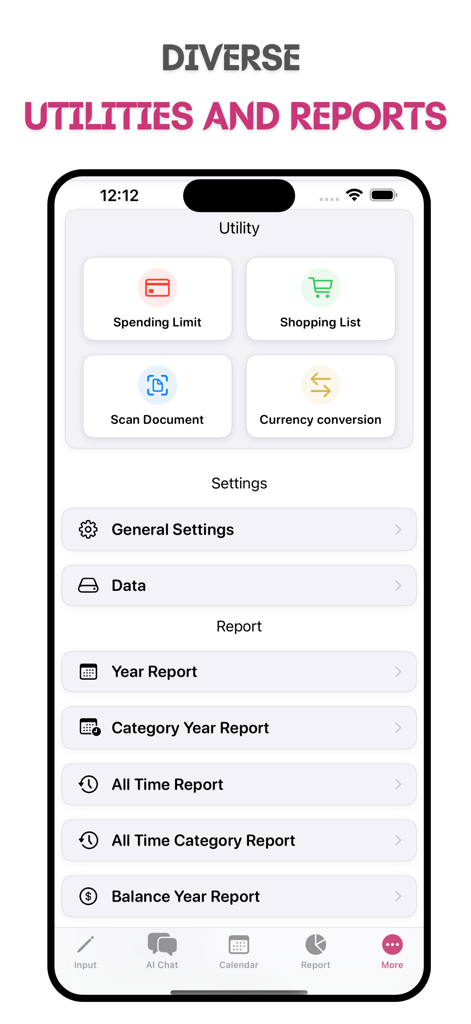
MoneyBay: Expense Manager - A screenshot of the MoneyBay app utility and reports screen showing spending limits shopping lists and financial reporting options
A screenshot of the MoneyBay app utility and reports screen showing spending limits shopping lists and financial reporting options

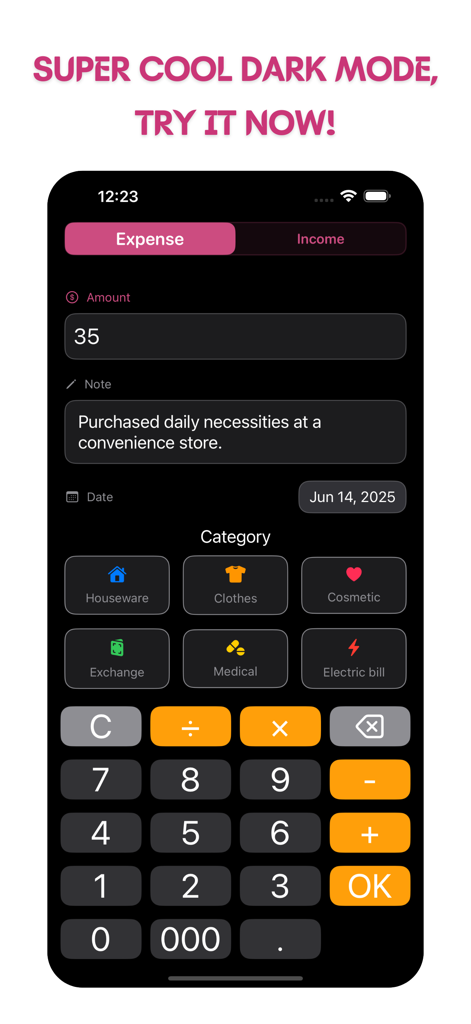
MoneyBay: Expense Manager - MoneyBay app interface showing a dark mode expense entry screen with amount note categories and a calculator keypad

MoneyBay app interface showing a dark mode expense entry screen with amount note categories and a calculator keypad

Description

MoneyBay – Easily Manage Your Personal Finances! The MoneyBay app helps you track your income and expenses in a simple, fast, and effective way. With a user-friendly and intuitive interface, you can get an overview of your finances in just a few steps. MoneyBay automatically generates income and expense reports, helping you control your budget and optimize your personal finances. Key Features: 1. Easy to Use, Intuitive Interface: Simple design, easy to navigate right from the first use. 2. No Account Registration Required: Start using the app immediately without the need to create an account. 3. Easy Data Entry: Record income or expenses in just seconds. 4. Financial Reports: View monthly, yearly, and cumulative expense reports. 5. App Theme Colors: Choose from a variety of theme colors for the app. 6. Backup and Export CSV Data: Easily export data to a CSV file for storage or sharing. 7. iCloud Sync: Sync your data across all iOS devices via iCloud to ensure you always have the latest data, anywhere, anytime. 8. Chat with AI, take notes by voice. 9. "MoneyBay Scanner" feature: Scan documents, invoices, contracts, business cards, papers..., export to PDF, no watermark. 10. "Shopping List" feature: to assist users in planning and efficiently managing the items they need to purchase, ensuring no item is overlooked during shopping. 11. "Import Transactions from Image" feature: Import screenshots of purchase invoices, online payment results, or bank transaction history. 12. "Debt Book" feature: Helps you record, manage, and track daily loans and borrowings, useful for individuals and small business owners. Detailed Features: - Easy Data Entry: When you start using MoneyBay, you'll find the data entry screen incredibly simple. Choose “Income” or “Expense” and enter the amount. The numeric keypad helps you input quickly and accurately. You can also calculate and enter multiple records in a single action. - Track Income and Expenses via List: The app displays your income and expense records in a List format, making it easy to monitor your daily financial status. You can also edit or delete records in case of any mistakes. - Visual Financial Reports: MoneyBay automatically generates spending reports in the form of pie charts, allowing you to easily see the ratio of income and expenses. These reports help you quickly identify overspending and adjust your budget accordingly. - Backup and Export Data: All your data can be exported to a CSV file for backup or transfer to another device. You can store the data in your personal email or on your computer to ensure no important information is lost. - iCloud Sync: The iCloud sync feature helps you easily sync your income and expense data across all your iOS devices. Any changes made on one device will automatically update on others, ensuring you always have the latest data no matter where you are. - Customizable Interface: MoneyBay allows you to change the app's theme color according to your personal preference. You can choose from light to dark colors to truly personalize the app. MoneyBay is the perfect app for those who want to manage their personal finances easily and effectively without worrying about complexity. Download MoneyBay now to start tracking your income, expenses, saving, and optimizing your finances! • Email: vutaso.com@gmail.com • Facebook: https://www.fb.com/moneybayapp Powered by VUTASO.com

Download

Download on App Store

This page is not an official page of the app or its developer, but an independent editorial publication created for informational and commentary purposes. Unless expressly stated otherwise, neither the app nor its developer is affiliated with, endorsed by, sponsored by, authorized by, or otherwise officially connected with MWM, Apple, Google Play, the app publisher, or the app's developer, and nothing on this page implies that the app was developed using MWM's services. Any trademarks, logos, screenshots, and other content remain the property of their respective owners.