
このページはアプリまたはその開発者の公式ページではなく、情報提供および論評を目的として作成された独立した編集出版物です。明示的に別段の記載がない限り、アプリおよびその開発者は、MWM、Apple、Google Play、アプリのパブリッシャー、またはアプリの開発者と提携、承認、後援、認可、またはその他の公式的な関係はなく、このページのいかなる内容も、アプリがMWMのサービスを使用して開発されたことを意味するものではありません。すべての商標、ロゴ、スクリーンショット、その他のコンテンツはそれぞれの所有者の財産です。


ダウンロード
5M+ユーザー評価
評価数
18.3K開発元
カテゴリ
Productivity対応言語
31最新バージョン
2.3.6サイズ
27.0 MBリリース日
2011年7月6日シンプルさ、プライバシー、データ制御を重視するiPhoneユーザー向けの機能分析
My Contacts Backup アプリケーション分析: 主要機能評価
アカウント・登録不要
本アプリは、サインイン、アカウント作成、アクティベーションが一切不要なため、ユーザーは手間なくプライベートな連絡先データを管理できます。
完全オフラインバックアップ
このツールは、サーバーへの同期が不要な完全オフラインバックアップを提供し、ユーザーの連絡先データのプライバシーを最大限に保護します。
ワンタッチメールバックアップ
ユーザーは、シンプルな操作で連絡先をバックアップし、.vcf添付ファイルとして自分自身にメールで送信できます。
簡単なVCF復元
このアプリは、メールクライアント内の.vcfファイルをタップするだけで、いつでも連絡先を簡単に復元できる機能を提供します。
iOSデバイス間転送
ユーザーは、メールクライアントのみを使用して、iOSデバイス間で連絡先を簡単に転送することが可能です。
複数エクスポート形式
連絡先はVCF形式でバックアップできるほか、より柔軟なデータ管理のためにCSV形式でエクスポートすることも可能です。
定期バックアップリマインダー
ユーザーは、連絡先の定期的なバックアップを促すリマインダー(週次または月次)を設定し、データ損失のリスクを低減できます。
アプリ内VCard復元
本アプリは、万が一の状況に備え、アプリ内でVCardファイルを直接復元する機能も提供します。
よくある質問
について知っておくべきこと My Contacts Backup
How to backup contacts with My Contacts Backup?
My Contacts Backup allows you to back up all your contacts with a single touch. The app sends them to your email as a .vcf attachment. You then receive the backup file in your mailbox.
How to restore contacts using My Contacts Backup?
To restore contacts, open the .vcf file in your mailbox using the iOS Mail app. Tap the attachment to import all contacts directly from the file. No other app is required for restoration.
Does My Contacts Backup require an account or internet connection for backup?
No, My Contacts Backup does not require signing in, creating accounts, or internet synchronization with any server for backup. It performs offline backups directly from your phone.
What file formats does My Contacts Backup support for export?
My Contacts Backup supports exporting contacts as a VCF (vCard) file for backup. It also allows users to export contacts as a CSV (Excel) file.
Is there a limit to the number of contacts I can back up using My Contacts Backup?
Yes, the VCF backup in the free version of My Contacts Backup is limited to a maximum of 500 contacts. The PRO version offers unlimited contact backup.
Can My Contacts Backup remind me to backup my contacts regularly?
Yes, My Contacts Backup includes a feature to set reminders. Users can configure the app to prompt them for regular backups on a weekly or monthly basis.
Can I delete all contacts in my Address Book using My Contacts Backup?
Yes, My Contacts Backup provides a specific feature to delete all contacts in your Address Book. This function is available within the application.
以下のスクリーンショットと説明は、アプリの公式ストアリスティングから直接取得されたものであり、アプリ開発者の所有物です。
アプリストア
スクリーンショット
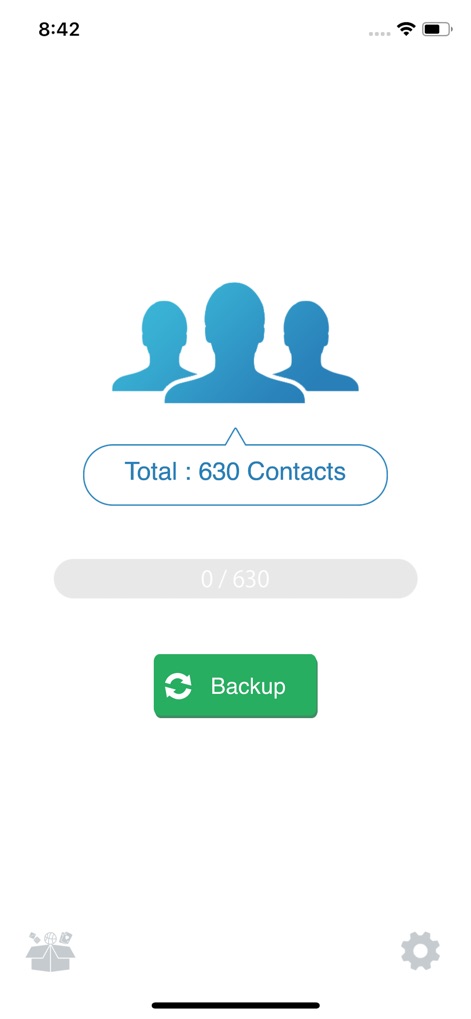
このアプリは、画面中央に「Total : 630 Contacts」と表示される総連絡先数をユーザーに提示し、シンプルなデザインの緑色の「Backup」ボタンを通じて、ワンタップでバックアッププロセスを開始することを可能にします。
連絡先を簡単バックアップ

受信したメール画面では、「MyContact...4733-382.vcf」という名称の添付ファイルが表示され、そのファイルをタップすることで「Add All 382 Contacts」という明確なオプションにより、ユーザーは簡単に連絡先をデバイスに復元できます。
ワンタップで復元
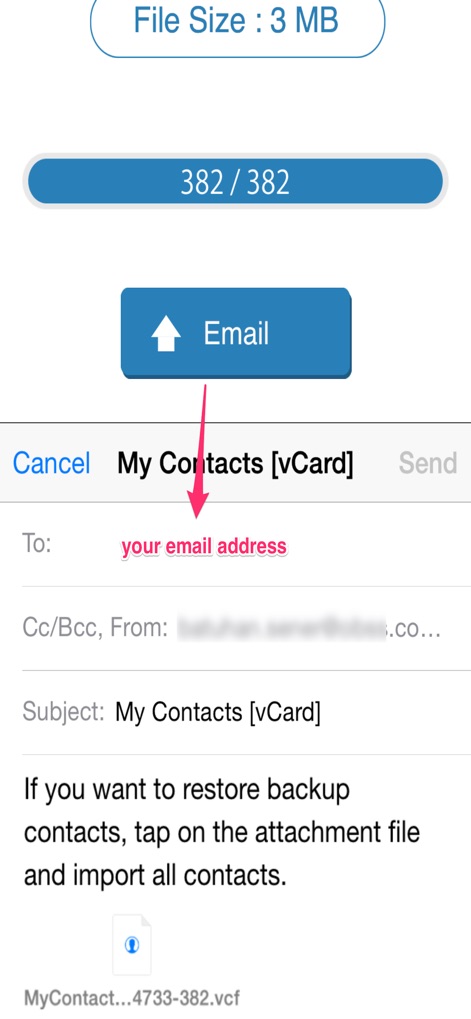
バックアッププロセス完了後、このアプリはユーザーの連絡先が「File Size : 3 MB」であることを示し、さらにメール作成画面を自動的に開いて「your email address」にバックアップファイルを添付して直接送信できるよう支援します。
メールで安全に送信
説明
Download
類似アプリ
似た機能とユーザー体験を持つアプリ
Delete Contacts+
Shanghai Jia Feng Software Co. Ltd.
Contacts Sync: Google & More
Playa Apps

Contact.s Back Up
Symon Johnson

Sync Contact for Google & more
Reena Williams
Contacts Backup + Transfer
One Wave AB

Contacts Backup Pro & Restore
AppRover

Export Contacts to Excel, CSV
LE NGUYEN QUANG PHUOC

Simple Backup Contacts
Giacomo Guglielmi
Contacts Backup and Transfer⁺
serkat ret
このページはアプリまたはその開発者の公式ページではなく、情報提供および論評を目的として作成された独立した編集出版物です。明示的に別段の記載がない限り、アプリおよびその開発者は、MWM、Apple、Google Play、アプリのパブリッシャー、またはアプリの開発者と提携、承認、後援、認可、またはその他の公式的な関係はなく、このページのいかなる内容も、アプリがMWMのサービスを使用して開発されたことを意味するものではありません。すべての商標、ロゴ、スクリーンショット、その他のコンテンツはそれぞれの所有者の財産です。