
このページはアプリまたはその開発者の公式ページではなく、情報提供および論評を目的として作成された独立した編集出版物です。明示的に別段の記載がない限り、アプリおよびその開発者は、MWM、Apple、Google Play、アプリのパブリッシャー、またはアプリの開発者と提携、承認、後援、認可、またはその他の公式的な関係はなく、このページのいかなる内容も、アプリがMWMのサービスを使用して開発されたことを意味するものではありません。すべての商標、ロゴ、スクリーンショット、その他のコンテンツはそれぞれの所有者の財産です。


NCalc Scientific Calculator +
NCalc Scientific Calculator + は、複雑な数式をまるで紙に書くように扱い、その計算能力を個人の指先に移植する。これは単なる電卓ではない。それは、数学的な思考を解き放つためのツールだ。
ダウンロード
5M+ユーザー評価
評価数
168.7K開発元
カテゴリ
Education対応言語
51最新バージョン
3.5.6サイズ
151.4 MBリリース日
2019年4月3日高度な数学計算とグラフ作成をモバイルデバイスで実現
NCalc Scientific Calculator + の主要機能分析
高機能グラフモジュール
本アプリは、関数、陰関数、極座標、パラメトリックプロットを含む包括的なグラフ機能を提供します。ユーザーは、グラフ上で根、交点、極値、導関数、積分の評価を実行し、視覚的に数学的問題を分析することが可能です。
自然表示入力
本ツールは、教科書に記載されている通りに数式(分数、ルート、指数など)を入力できる自然表示インターフェースを備えています。ユーザーは、紙に書かれたのと同じ形式で結果を確認でき、直感的な操作が可能です。
高度な代数・微積分ツール
本アプリは、式の展開、因数分解、簡略化などの代数計算に加え、導関数、積分、極限の計算といった微積分機能を提供します。これにより、ユーザーは複雑な数学的問題を効率的に解決できます。
方程式・不等式ソルバー
このツールは、一般的な方程式の解法に加え、二次、三次、四次方程式専用のソルバーを備えています。また、二次、三次、四次の不等式を区間ベースの解で解決する機能も提供し、多様な問題に対応します。
行列とベクトルの演算
本アプリは、行列とベクトルの加算、減算、乗算といった基本的な演算に加え、行列式、逆行列、転置、ランク、固有値、固有ベクトルといった高度なツールを提供します。これにより、ユーザーは線形代数の問題を深く探求できます。
統計と分布の計算
本ツールは、記述統計や回帰計算(回帰プロッターを含む)などの統計計算機能を提供します。また、正規分布、二項分布、ポアソン分布、t分布、カイ二乗分布、F分布といった多様な分布計算に対応し、ユーザーはデータ分析を広範囲に実行できます。
単位・通貨換算
本アプリは、1000種類以上の単位換算と通貨換算の機能を提供します。これにより、ユーザーは学術的または実用的な目的で、異なる単位や通貨間での迅速かつ正確な変換を実行できます。
複素数計算
このツールは、複素数の四則演算、極形式・直交形式変換、指数関数、対数関数、累乗、根、三角関数といった広範な計算をサポートします。ユーザーは、電気工学や物理学などの分野で要求される複雑な計算を実行できます。
よくある質問
について知っておくべきこと NCalc Scientific Calculator +
What is NCalc Scientific Calculator +?
NCalc Scientific Calculator + is a comprehensive app combining a natural-display scientific calculator, advanced math tools, graphing, a large formula library, and a unit/currency converter for students and engineers.
Does NCalc Scientific Calculator + offer a graphing function?
Yes, NCalc Scientific Calculator + includes a full graphing module similar to 83/84 calculators. It supports Cartesian, implicit, polar, and parametric functions, with features like tracing and finding roots.
Can NCalc Scientific Calculator + solve equations?
Yes, NCalc Scientific Calculator + features an Equation Solver. It solves general equations, including quadratic, cubic, and quartic forms, as well as systems of equations with up to four variables.
How does the natural display feature work in NCalc Scientific Calculator +?
The NCalc Scientific Calculator + natural display feature allows users to enter expressions exactly as they appear in textbooks, including fractions, roots, and exponents, presenting results clearly.
Does NCalc Scientific Calculator + include a unit converter?
Yes, NCalc Scientific Calculator + provides a comprehensive unit converter with over 1000 unit conversions and a currency converter, useful for various mathematical and engineering tasks.
What types of algebra calculations can NCalc Scientific Calculator + perform?
NCalc Scientific Calculator + performs algebra calculations such as expansion, factorization, and simplification. It also handles derivatives, integrals, and limits for calculus, and complex number calculations.
Is NCalc Scientific Calculator + a free application?
No, NCalc Scientific Calculator + offers access through an auto-renewing subscription. Users purchase this subscription via an In-App Purchase.
Can I manage my NCalc Scientific Calculator + subscription?
Yes, users manage their NCalc Scientific Calculator + subscription and turn off auto-renewal through their AppStore Account Settings after purchase. Auto-renewal must be off 24 hours prior to the current period's end.
Does NCalc Scientific Calculator + support complex number calculations?
Yes, NCalc Scientific Calculator + supports complex number calculations. It handles arithmetic, polar/rectangular conversion, exponential, logarithm, powers, roots, and full trigonometric functions for complex numbers.
Where can I find the privacy policy for NCalc Scientific Calculator +?
The privacy policy and terms of use for NCalc Scientific Calculator + are available at https://ncalc-app.web.app/terms-of-services.html.
以下のスクリーンショットと説明は、アプリの公式ストアリスティングから直接取得されたものであり、アプリ開発者の所有物です。
アプリストア
スクリーンショット
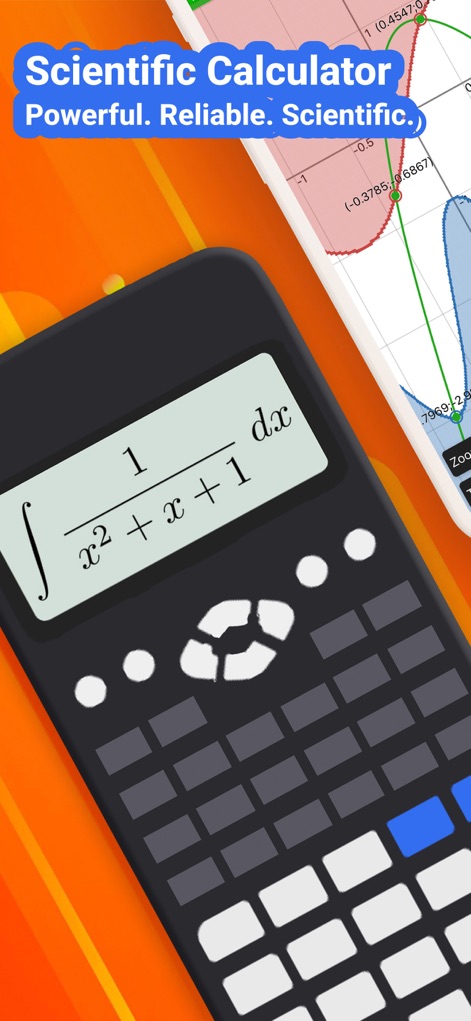
このアプリは、積分式が教科書通りに表示される自然表示と、関数の動きを直感的に捉えるグラフ表示の両方を提供します。
高機能科学計算
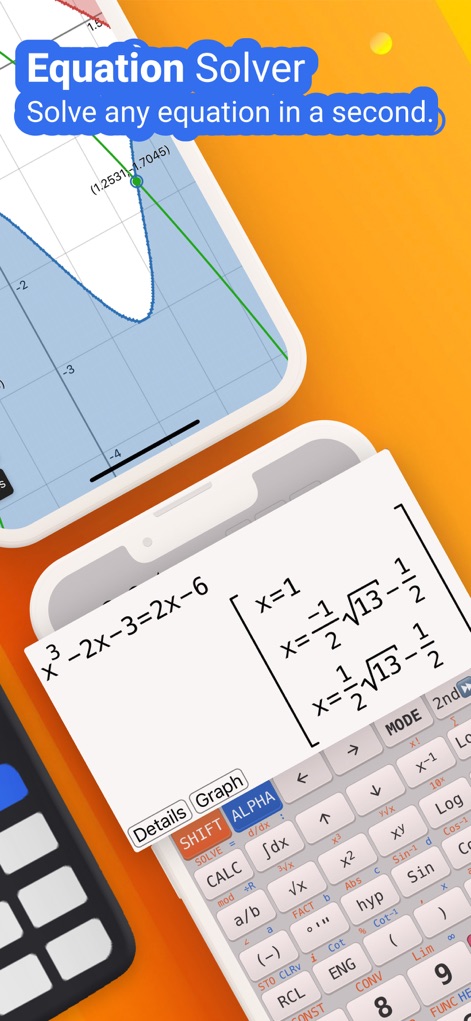
ユーザーは、複雑な方程式の複数の解を瞬時に確認でき、その数式入力と結果が一体化して表示されます。
方程式ソルバー

本ツールは、微分、積分、複素数などの多様な代数演算に対応し、計算結果が視覚的に整理されて表示されます。
高度な代数計算
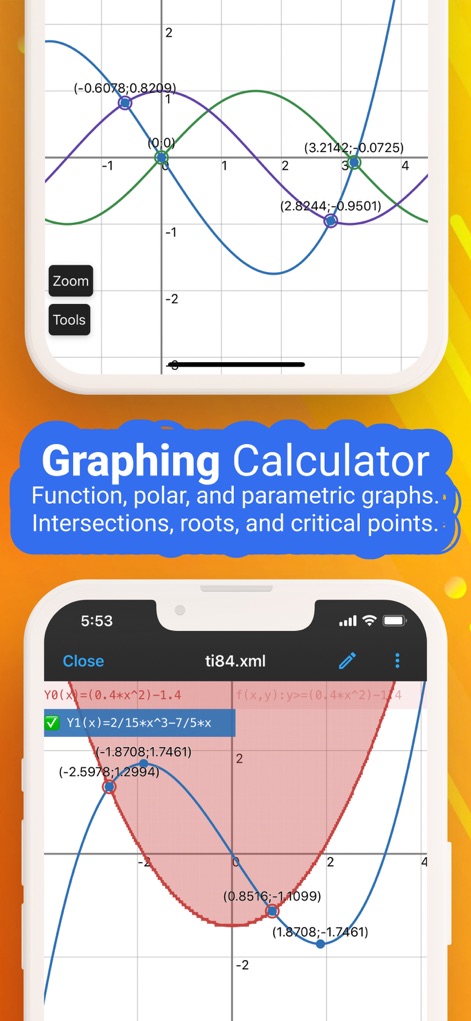
複数の関数グラフを同時にプロットし、交点、根、極値といった重要なポイントを容易に特定できます。
高機能グラフ計算
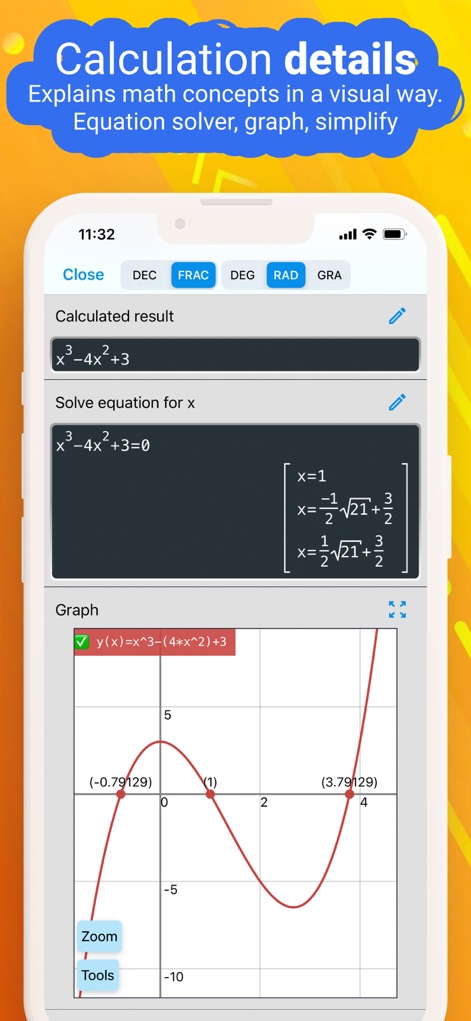
解かれた方程式の全解と、その方程式に対応する関数グラフが同時に表示され、数学的概念を深く理解できます。
詳細な計算結果
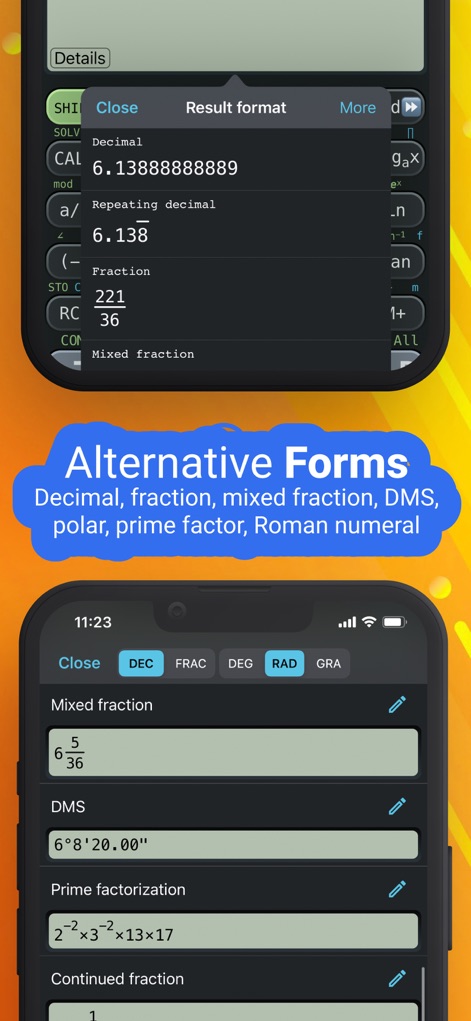
計算結果は、分数、混分数、繰り返し小数、素因数分解など、複数の形式で柔軟に確認可能です。
多様な結果表示

このアプリは、複素数を含む方程式の解を提示し、詳細な科学計算キーボードを通じて複雑な入力も容易に行えます。
方程式解決の力
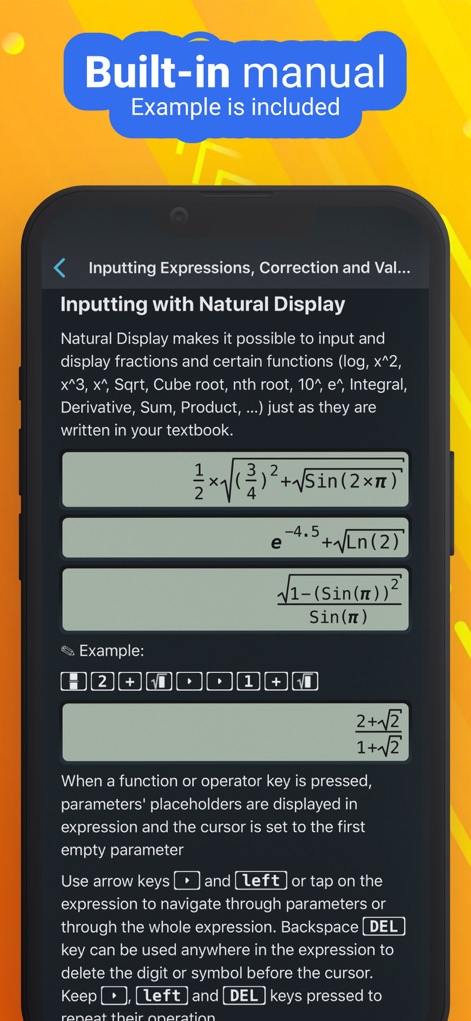
ユーザーは教科書と同じように自然表示で数式を入力でき、入力プロセスの具体的なステップバイステップの例も確認できます。
直感的な数式入力
説明
Download
類似アプリ
似た機能とユーザー体験を持つアプリ

Calculate84
Century Light LLC

Calculator ∞
An Truong

数字ּּ统量
振龙 张

Scientific Calculator fx-991
Dinh Phuc

Desmos Graphing Calculator
Desmos, Inc.

HiPER Scientific Calculator
Jindrich Houska
Panecal Scientific Calculator
Noriyasu Kutsuzawa

Calculator #
An Truong

PCalc
TLA Systems Ltd.
このページはアプリまたはその開発者の公式ページではなく、情報提供および論評を目的として作成された独立した編集出版物です。明示的に別段の記載がない限り、アプリおよびその開発者は、MWM、Apple、Google Play、アプリのパブリッシャー、またはアプリの開発者と提携、承認、後援、認可、またはその他の公式的な関係はなく、このページのいかなる内容も、アプリがMWMのサービスを使用して開発されたことを意味するものではありません。すべての商標、ロゴ、スクリーンショット、その他のコンテンツはそれぞれの所有者の財産です。