PDF pages Extractor & Splitter

PDF pages Extractor & Splitter

ダウンロード: App Store
ロゴ: PDF pages Extractor & Splitter

PDFページ抽出&分割:モバイルワークフローのための精密なドキュメント管理

かさばるファイルの共有をやめて、本当に必要なものだけを共有しましょう。特定のページ範囲を抽出し、パスワードを解除し、iOSファイルアプリとシームレスに統合された、外科手術のような精度でPDFを整理できます。

ダウンロード: App Store

開発元

Ruchira Ramesh

カテゴリ

Productivity

ダウンロード

3K+

ユーザー評価

1.0/5

評価数

0

対応言語

1

指先一つで高精度

このインターフェースを利用する 3K+ 人のユーザー.

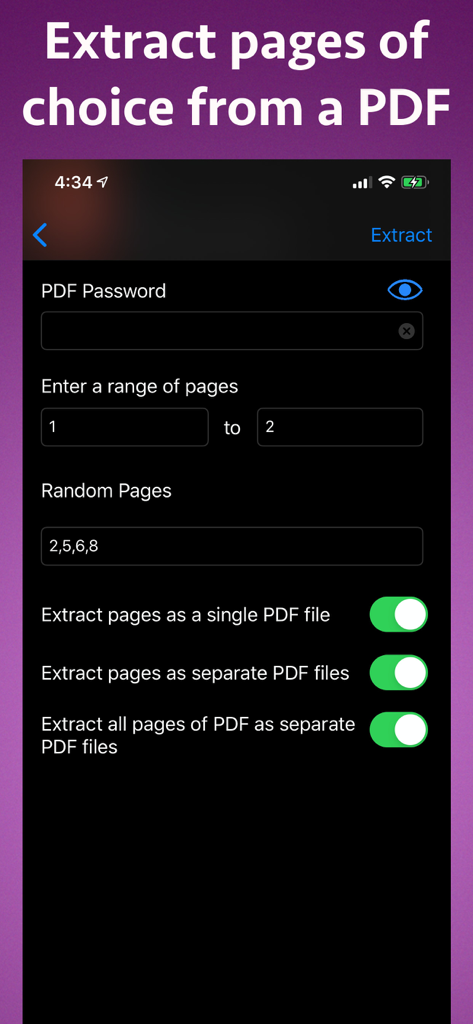
iPhoneでPDFファイルから特定のページを抽出するためのインターフェース
iPhoneでPDFファイルから特定のページを抽出するためのインターフェース

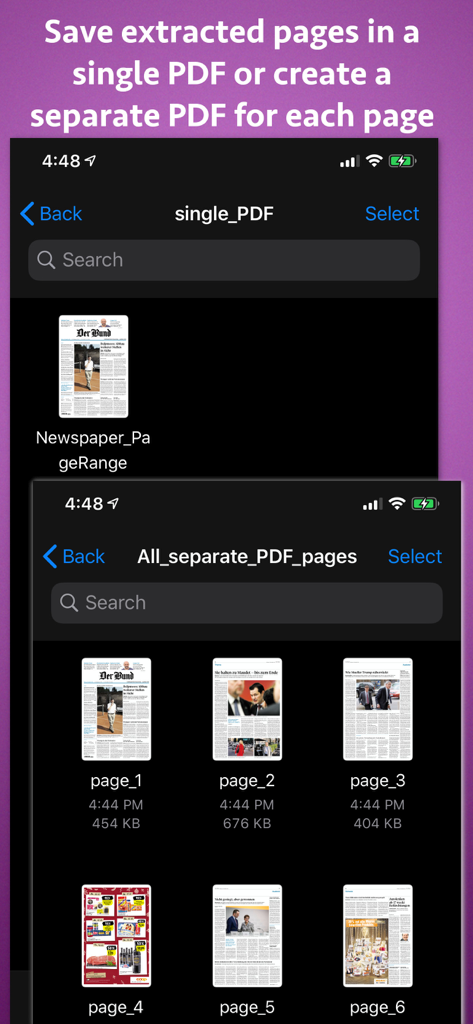
抽出したPDFページを1つのドキュメントとして保存するか、各ページを個別のファイルとして保存するオプションを示すインターフェース
抽出したPDFページを1つのドキュメントとして保存するか、各ページを個別のファイルとして保存するオプションを示すインターフェース

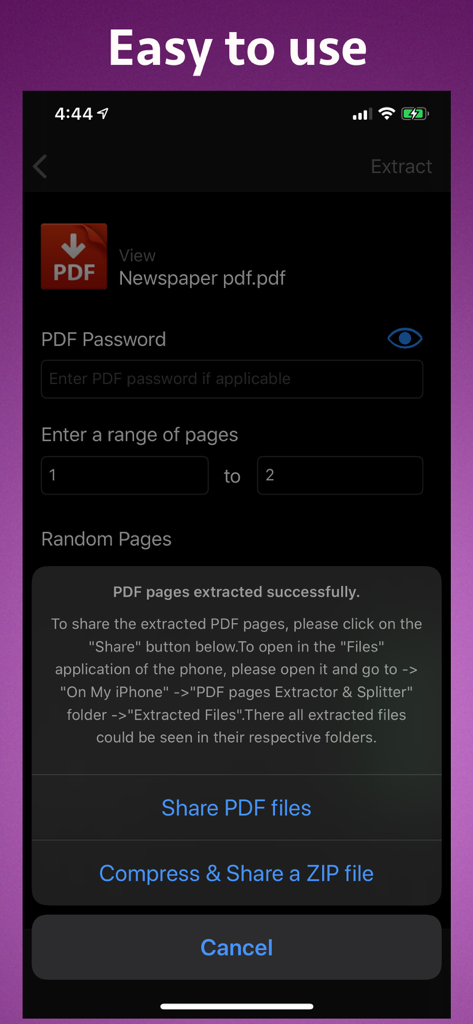
ファイル共有またはZIPファイルへの圧縮オプションを伴うPDFページ抽出の成功を示すインターフェース
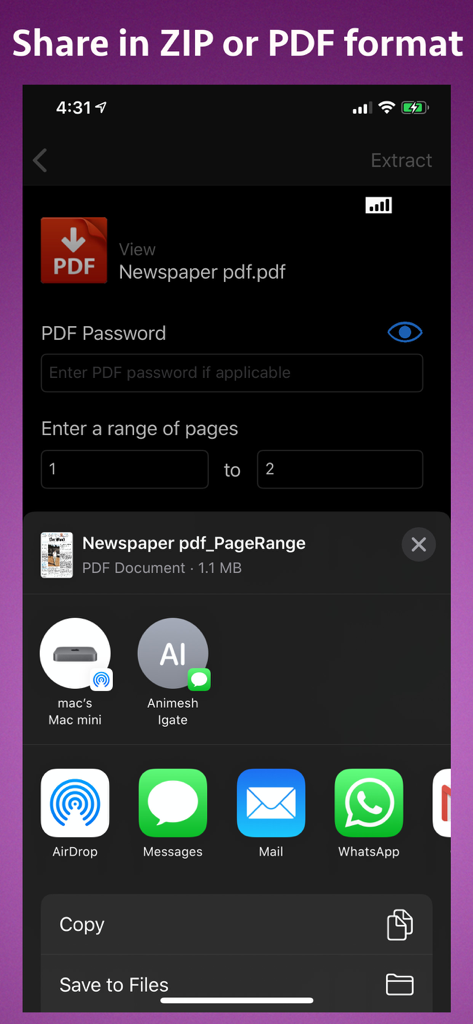
ファイル共有またはZIPファイルへの圧縮オプションを伴うPDFページ抽出の成功を示すインターフェース

iPhoneでのPDFページ抽出設定と共有オプションを示すインターフェース

iPhoneでのPDFページ抽出設定と共有オプションを示すインターフェース

精密なPDFツールでよりスマートに作業

このアプリを際立たせるツール、 3K+ 人のユーザーが選択.

✂️

外科手術のようなページ抽出

2、8、25のような特定のページ範囲または個別の番号を選択します。余分な部分なしで署名ページや重要な学習チャプターを抽出するのに最適です。

🔓

安全なパスワード処理

保護されたドキュメントを簡単に処理し、パスワードを解除して迅速に共有できます。外出先で機密性の高い法律ファイルや財務ファイルを管理するのに最適です。

📉

ファイルを縮小し、速度を向上

ドキュメントの肥大化をなくし、必要なページのみを保持することでファイルサイズを削減します。iOSファイルアプリと完全に統合されており、ネイティブなワークフローを実現します。

アプリについて

について知っておくべきこと PDF pages Extractor & Splitter.

説明

Extract pages of choice from a PDF and save as separate PDF file.Pages could be selected by page range or explicit page numbers.The application also supports password protected PDF. Using the application, you could specify a range of the pages to be extracted and saved.For example, if you want to extract from page 10 to page 20 of a PDF file, you could specify this range of 10 to 20 in the application.The application will extract these pages and save them either as a single PDF file or each page as a separate PDF file as per your choice. Sometimes, we want to extract random pages from PDF. For example, if you want to extract only pages numbered 2,6,8,25, and 50 from PDF, this could be done as well.Inside the application just specify all page numbers separated by comma.The application will extract these random pages and save them either as a single PDF file or as a separate pdf file as per your choice. If you want to extract all pages of PDF and save each of these pages as separate PDF, you could do this as well. If the PDF pages are annotated, the application will process & retain the annotations into the extracted pages as well. The application also supports Password Protected PDF files. This means that the application could easily extract pages even from PDF files that are protected by a password.Also, the application removes the password from the extracted pages. (Note: You will have to enter the password in application.) The application is integrated with "Files" app of the phone.All extracted pages & PDF files could be easily accessed & managed using the Files application. The extracted pages could be saved in following three ways : a) All pages of choice could be extracted and saved as a single PDF file. b) Each extracted page could be saved as a separate PDF file. c) All pages of the PDF could be saved as a separate PDF file. Benefits : -- Reduce the file size by only taking the pages that are needed. -- Share only the PDF containing the required pages. -- Save PDF files without password -- Remove unwanted pages from a PDF -- Maintain documentation easily by extracting and keeping only important pages from a PDF. -- Integration with the phone's "Files" application for easy access to the extracted pages & PDF. -- Extracted pages could be easily used inside a document or a presentation.This makes documentation and presentation easy to prepare. -- Save a particular chapter or only selected pages from a PDF file, the application will be quite useful to you.It helps in saving & sharing a particular chapter from a book or novel.If there is a page containing an important study topic ,it could be extracted & saved using the application as well.

最新バージョン

15

サイズ

6.8 MB

リリース日

2018年1月31日

肥大化したファイルの共有をやめ、抽出を始めましょう。

何千人ものプロフェッショナルや学生が、iPhoneやiPadから直接、当社の高精度PDFツールを使用して、必要な部分だけを分割、抽出、共有しています。あなたもその仲間入りをしましょう。

ダウンロード: App Store

App information, icons, screenshots, and descriptions displayed on this page are sourced from the Apple App Store and are the property of their respective developers. Download estimates and rankings are based on MWM's proprietary models and may not reflect actual figures. This page is provided for informational and analytical purposes only.

Believe this page infringes your intellectual property? File a dispute