Penjo: Pencil Journal, Planner

Penjo: Pencil Journal, Planner

ダウンロード: App Store
ロゴ: Penjo: Pencil Journal, Planner

Penjo:オールインワン・ペンシルジャーナル&デジタルプランナー

マインドフル・プランニングのための究極のデジタルサンクチュアリ。カレンダーを簡単に同期し、手書き文字を検索し、Apple Pencilのパワーで美しいデイリースプレッドを作成しましょう。

開発元

Zafer ARICAN

カテゴリ

Productivity

ダウンロード

58K+

ユーザー評価

4.6/5

評価数

500

対応言語

12

あなたの人生のキャンバス

このインターフェースを利用する 58K+ 人のユーザー.

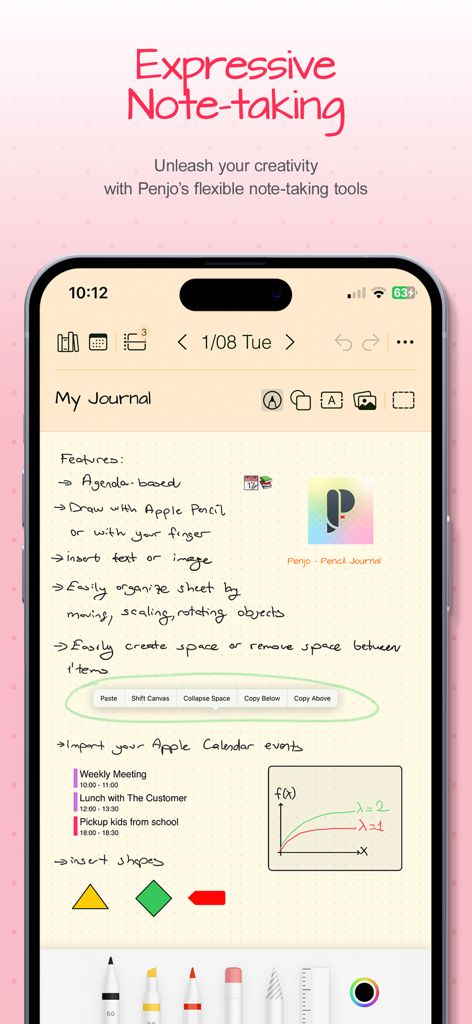
スマートフォン画面に、クリエイティブなノート作成ツールと統合されたカレンダーイベントを備えた手書きのデジタルジャーナルエントリが表示されています。
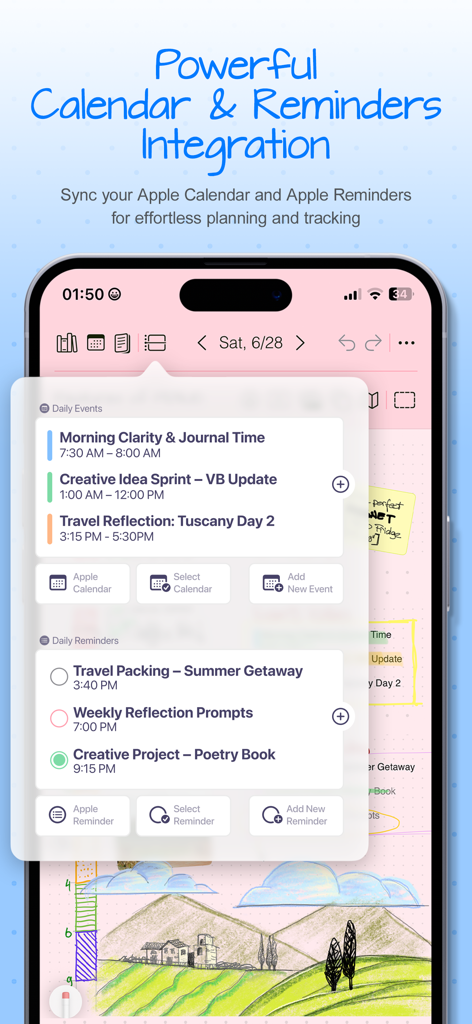
スマートフォン画面に、クリエイティブなノート作成ツールと統合されたカレンダーイベントを備えた手書きのデジタルジャーナルエントリが表示されています。

Penjoアプリのスクリーンショット。デジタルジャーナルインターフェイス内にAppleカレンダーイベントとAppleリマインダーの統合が表示されています。
Penjoアプリのスクリーンショット。デジタルジャーナルインターフェイス内にAppleカレンダーイベントとAppleリマインダーの統合が表示されています。

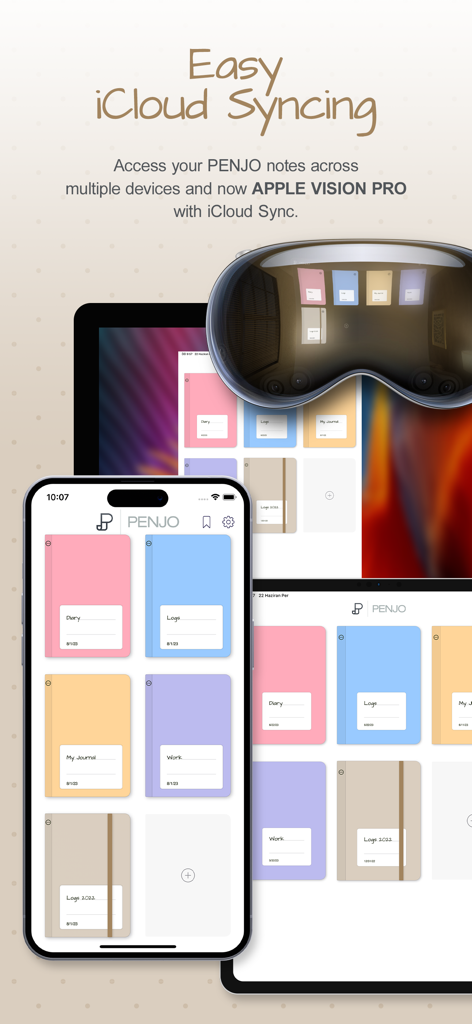
iPhone、iPad、Apple Vision Pro全体でシームレスなiCloud同期と美しいデジタルジャーナルカバーを表示するPenjoアプリインターフェイス。
iPhone、iPad、Apple Vision Pro全体でシームレスなiCloud同期と美しいデジタルジャーナルカバーを表示するPenjoアプリインターフェイス。

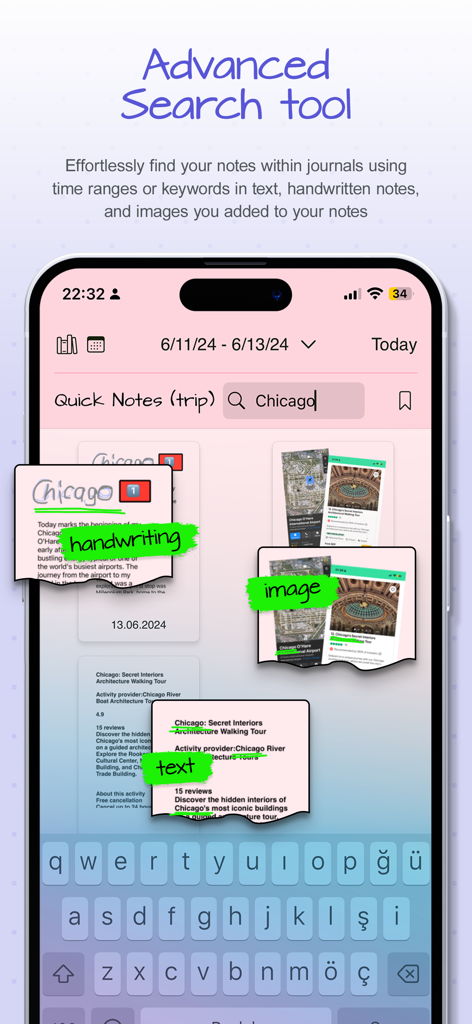
Penjoアプリのインターフェイスに、キーワード「Chicago」の手書きメモ、画像、テキスト全体にわたる高度な検索結果が表示されています。
Penjoアプリのインターフェイスに、キーワード「Chicago」の手書きメモ、画像、テキスト全体にわたる高度な検索結果が表示されています。

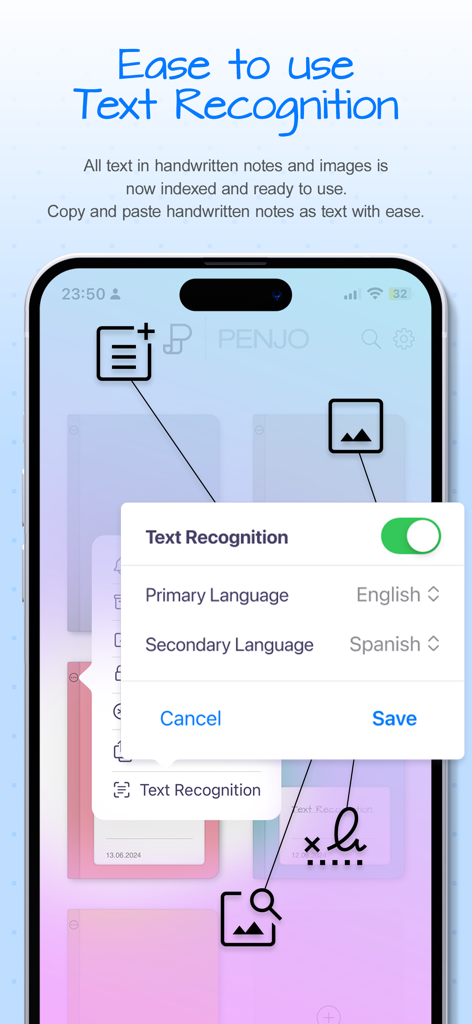
Penjoアプリのインターフェイスに、言語選択付きの手書きおよび画像テキスト認識設定が表示されています。
Penjoアプリのインターフェイスに、言語選択付きの手書きおよび画像テキスト認識設定が表示されています。

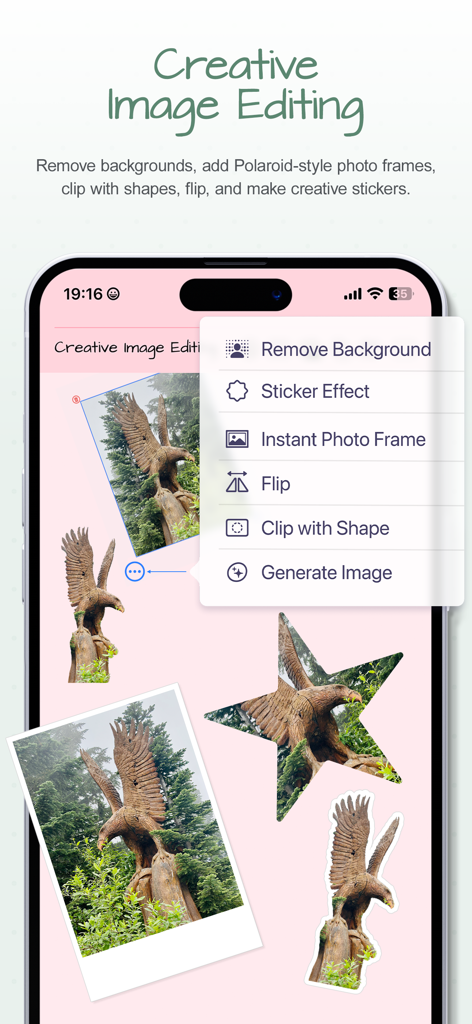
Penjoアプリのクリエイティブ画像編集メニュー。デジタルジャーナルページで背景削除とステッカー効果が表示されています。
Penjoアプリのクリエイティブ画像編集メニュー。デジタルジャーナルページで背景削除とステッカー効果が表示されています。

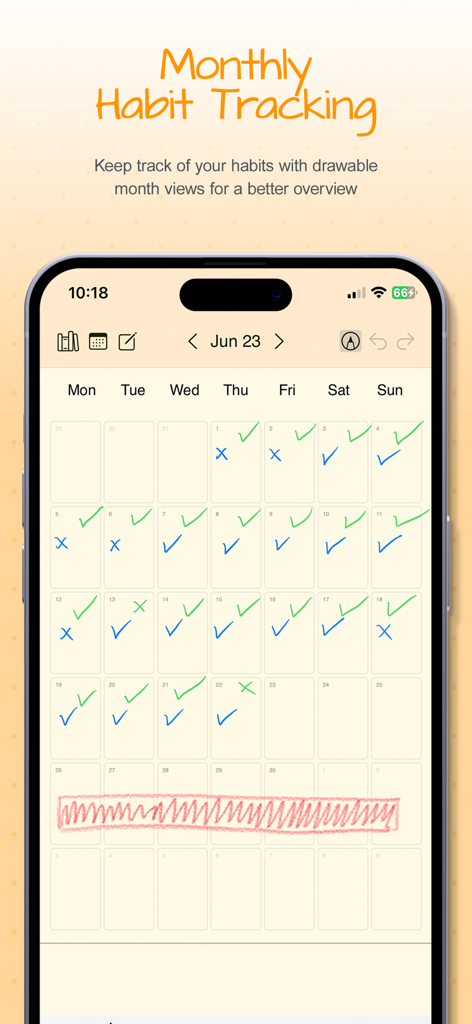
Penjoアプリの月間カレンダービュー。青と緑のチェックマーク付きの手書き習慣トラッキングが表示されています。
Penjoアプリの月間カレンダービュー。青と緑のチェックマーク付きの手書き習慣トラッキングが表示されています。

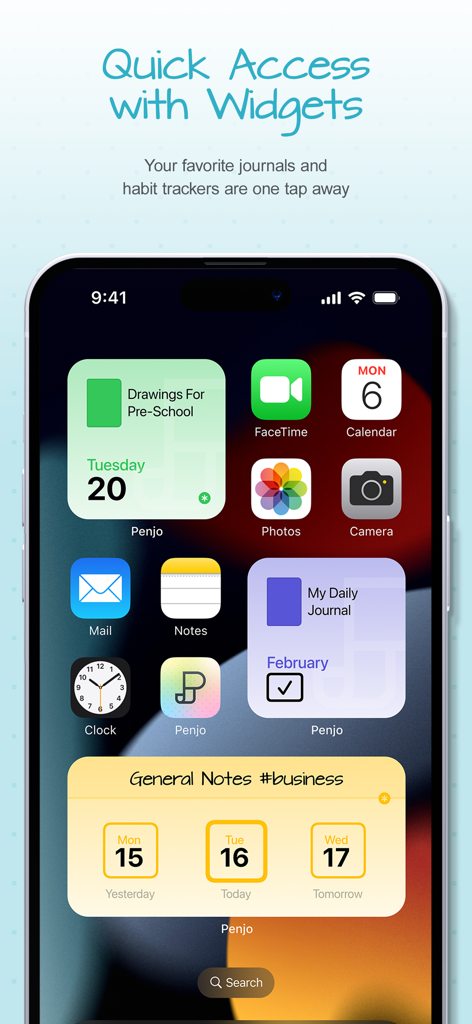
iPhoneホーム画面に、デイリージャーナルと習慣トラッキング用のさまざまなPenjoウィジェットが表示されています。
iPhoneホーム画面に、デイリージャーナルと習慣トラッキング用のさまざまなPenjoウィジェットが表示されています。

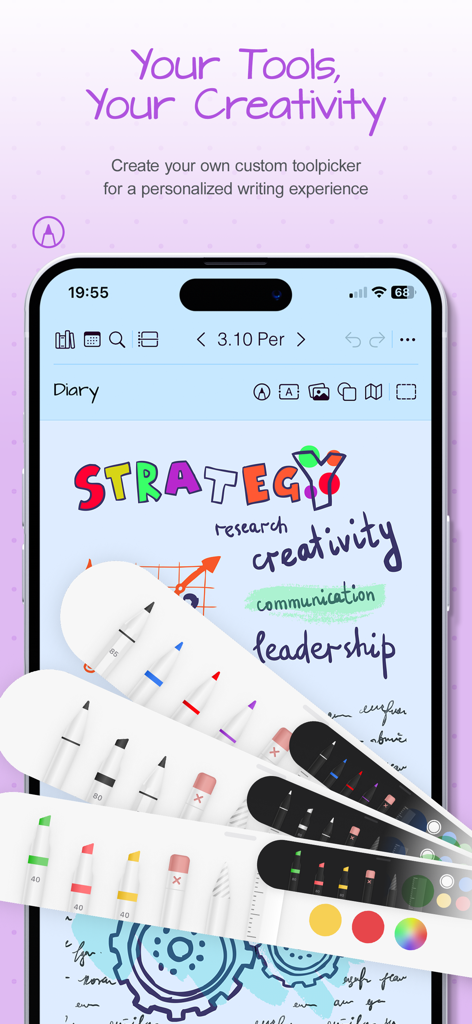
Penjoジャーナルアプリのカスタマイズ可能なデジタルペンとハイライター。
Penjoジャーナルアプリのカスタマイズ可能なデジタルペンとハイライター。

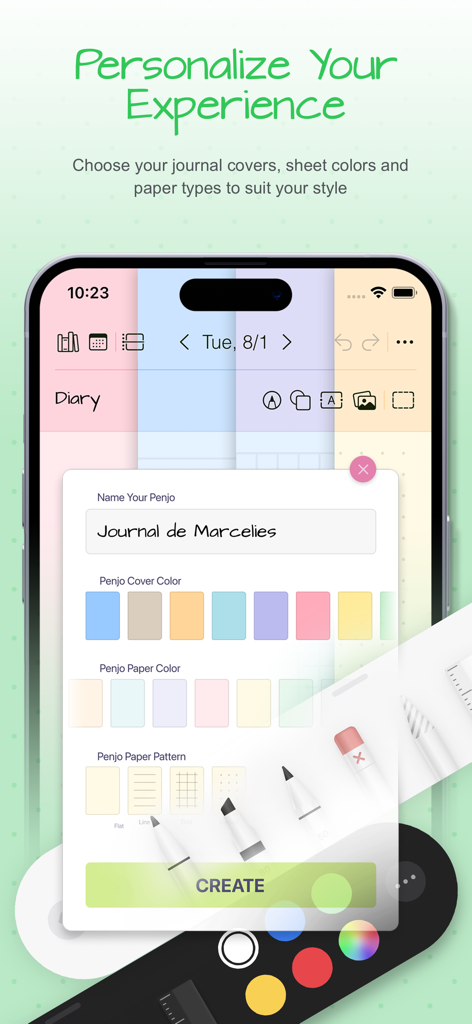
Penjoアプリの画面に、ジャーナル名、カバーの色、紙の色、紙のパターンをカスタマイズするオプションが表示されています。

Penjoアプリの画面に、ジャーナル名、カバーの色、紙の色、紙のパターンをカスタマイズするオプションが表示されています。

あなたの1日を、あなたらしくデザインする

このアプリを際立たせるツール、 58K+ 人のユーザーが選択.

創造的な自由

カスタムカバー、ステッカー、AI搭載の画像ツール(背景削除など)で、デジタルスクラップブックを簡単に作成し、あなたのスペースをパーソナライズしましょう。

🔍

スマートな手書き検索

もう思考を失うことはありません。オンデバイス認識により、数ヶ月前のメモも数秒で見つけられます。手書き文字が、タイプされたテキストと同じくらい検索可能になります。

📅

シームレスなライフ統合

Appleカレンダーやリマインダーと同期し、プロフェッショナルなスケジュールと個人的なマインドフルな振り返りの間のギャップを埋めます。

アプリについて

について知っておくべきこと Penjo: Pencil Journal, Planner.

説明

Plan forward. Reflect backward. Create freely. A fresh start for the new year: Penjo helps you set goals, plan ahead, and keep a clear, organized journal you’ll enjoy returning to every day. Penjo is a Pencil-first journal and daily planner with Apple Calendar & Reminders, iCloud sync, and secure Face/Touch ID. Each day opens as a clean sheet for your notes, with powerful on-device handwriting search and creative image tools like background removal, stickers, and instant frames. Why Penjo PLAN & ORGANIZE • All in one: Journal, planner, daily notes, and habit logs together. • Calendar & Reminders: Check today at a glance, add tasks, and stay on schedule. (Also supports Google Calendar and Exchange.) • Views that fit your routine: Day, Week, and Month for planning; List & Reader for fast, distraction free browsing of past entries. • Day vs. List modes: In Day Mode, the next item is the next date and journals open on today’s sheet. In List Mode, the next item is the next nonempty day and journals open to the List/Reader view. • Sync: iCloud keeps iPad, iPhone, Mac, and visionOS up to date. • Privacy: Lock private journals with Face ID or Touch ID. CREATE • Pencil first: Write, sketch, annotate. Add text, images, shapes, and map cards. • Personalized tool picker: Create your own set of pens and pencils, reorder tools, and switch fast. • Scribble text entry: Write with Apple Pencil to enter typed text quickly in text fields. • Auto-straighten lines: Draw a line and make a tiny cross-mark. Penjo instantly straightens it for cleaner diagrams, arrows, and layouts. • Create as you go: Background removal, clip with shapes, flip, stickers, instant frames (Image Playground supported where available). FIND & REUSE • Find and reuse: On device text recognition lets you search handwriting and text in images, and Copy as Text converts selected handwriting to typed text on your clipboard. • Flexible pages: Add or remove pages automatically, insert or collapse space; choose dot, grid, or lined paper. • Copy or move sheet: Duplicate or move any sheet to another day or journal, perfect for reusing templates. PERSONALIZE & ACCESS • Personalize: Custom names, covers, and colors; drag & drop to reorder journals. • Color Bookmarks: Mark day notes with colored bookmarks and filter your journal by color to quickly find related notes, themes, or topics. • Widgets: Jump to today’s notes and trackers from your Home Screen. • Export and share: Export pages or full journals as PDF to archive, print, or share. Penjo Unlimited Unlock unlimited journals & pages, full iCloud sync, enhanced Calendar & Reminders, and protected journals. Family Sharing available on monthly plans. Roadmap highlights Apple Journaling Suggestions • Collections • Custom Covers and more Support penjoapp.com • support@penjoapp.com Privacy Policy: https://penjoapp.com/penjoappprivacy Terms of Use: https://www.apple.com/legal/internet-services/itunes/dev/stdeula/

最新バージョン

3.6.12

サイズ

17.6 MB

リリース日

2023年3月27日

最も整理された章を書き始める準備はできましたか?

デジタルの整理力と、手書きの触覚的な喜びを体験してください。Penjoで毎日計画し、創造し、振り返る58,000人以上のマインドフルな達成者に加わりましょう。

ダウンロード: App Store

App information, icons, screenshots, and descriptions displayed on this page are sourced from the Apple App Store and are the property of their respective developers. Download estimates and rankings are based on MWM's proprietary models and may not reflect actual figures. This page is provided for informational and analytical purposes only.

Believe this page infringes your intellectual property? File a dispute