
このページはアプリまたはその開発者の公式ページではなく、情報提供および論評を目的として作成された独立した編集出版物です。明示的に別段の記載がない限り、アプリおよびその開発者は、MWM、Apple、Google Play、アプリのパブリッシャー、またはアプリの開発者と提携、承認、後援、認可、またはその他の公式的な関係はなく、このページのいかなる内容も、アプリがMWMのサービスを使用して開発されたことを意味するものではありません。すべての商標、ロゴ、スクリーンショット、その他のコンテンツはそれぞれの所有者の財産です。


Planner for iPad
iPadを自分だけの思考キャンバスに変え、デジタルとアナログの境界線を消し去る。思考の流れを指先で操り、カレンダーを単なる予定表から表現の場へと昇華させる。
ダウンロード
1M+ユーザー評価
評価数
9.9K開発元
カテゴリ
Productivity対応言語
8最新バージョン
1.6.67サイズ
61.6 MBリリース日
2020年1月28日整理されたクリエイティブなiPadユーザーのためのデジタルプランニングツール評価
Planner for iPad 分析レポート
Apple Pencilによる手書き入力
Apple Pencilを使用することで、カレンダーに直接手書きで書き込むことができ、紙のプランナーのような直感的でパーソナルな書き心地をデジタル環境で実現します。
多彩なカレンダー表示とカスタマイズ
月、週(縦・横)、日ごとの多様なカレンダービューを提供し、週の開始曜日や一日の時間設定を自由に調整できるほか、Googleカレンダーなどの外部カレンダー連携により、ユーザーはスケジュールを一元的に管理することが可能です。
豊富なデコレーション素材
スタンプ、リフィル、マスキングテープ、To-Doリストなどの素材を利用して、カレンダーを容易にパーソナライズし、視認性を向上させることが可能です。これにより、クリエイティブな表現と整理を両立できます。
カスタマイズ可能なスタイルシート
事前にインストールされている白黒のスタイルシートに加え、オンライン文具店で新しいシートを購入することで、ユーザーは自身の好みに合わせてアプリの見た目をさらにカスタマイズし、視覚的な満足度を高めることができます。
よくある質問
について知っておくべきこと Planner for iPad
What is Planner for iPad?
Planner for iPad is a flexible digital planning application designed to function like a paper planner, optimized for iPad use. It offers various calendar views and extensive personalization options.
Does Planner for iPad support Apple Pencil handwriting?
Yes, Planner for iPad allows users to write directly on the calendar interface using an Apple Pencil. This feature enhances the tactile experience of digital planning.
Can Planner for iPad sync with Google Calendar?
Yes, Planner for iPad can display schedules from other calendars, including Google Calendar. This feature allows users to integrate external events into their Planner app views.
What calendar views does Planner for iPad offer?
Planner for iPad provides monthly, weekly (vertical and horizontal), and daily calendar views. Users can also customize the starting day of the week and the beginning/ending time of the day.
How can users personalize their Planner for iPad calendar?
Users can personalize their Planner for iPad calendar with materials such as stamps, refills, masking tapes, and to-do lists. New style sheets are also available from an online stationery store.
Does Planner for iPad include cloud storage?
Yes, Planner for iPad includes cloud storage services. A basic plan offers 5GB, and a plus plan provides 10GB for automatically storing data, photos, and other items.
How is the cloud storage subscription for Planner for iPad billed?
The cloud storage service for Planner for iPad is automatically renewed monthly. User fees for this subscription are billed directly to your iTunes account.
How do I cancel the automatic renewal for Planner app's cloud storage?
To cancel automatic renewal for Planner app's cloud storage, go to the subscription management page on iTunes or turn off auto-renewal. This must be done at least 24 hours before the auto-renewal period.
Can I change my storage plan within the Planner for iPad app?
Yes, you can change your storage plan for Planner app. This can be done either directly within the Planner app settings or through the subscription management page on iTunes.
Are there different styles available for Planner for iPad?
Yes, Planner for iPad comes with pre-installed white and black style sheets. Users can also purchase new style sheets from the online stationery store to customize their planning experience.
Can I use Planner for iPad for both business and personal planning?
Yes, Planner for iPad supports multiple planner types including ToDo lists, a Diary, and a Notebook. This makes it suitable for various planning needs, for both business and personal use.
以下のスクリーンショットと説明は、アプリの公式ストアリスティングから直接取得されたものであり、アプリ開発者の所有物です。
アプリストア
スクリーンショット
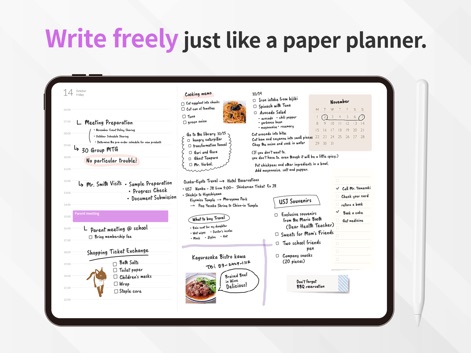
Apple Pencilによる手書き入力で、まるで紙の手帳のように自然な書き心地を実現し、料理のレシピや詳細なタスクリストを自由に記録できます。
手書きで自由自在

Google Calendarとの連携により、外部の予定をシームレスに同期。デジタル入力とApple Pencilによる手書き入力を組み合わせ、ワークスケジュールを効率的に管理できます。
外部カレンダー連携
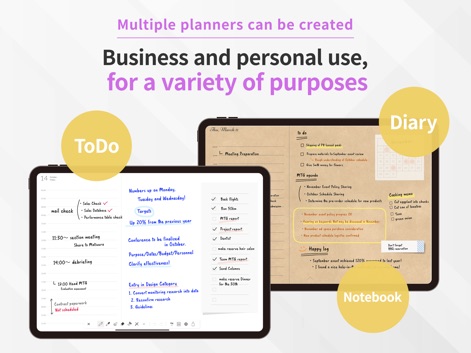
ToDoリストやノート機能で日々のタスク管理とアイデア整理ができ、日記や詳細な計画のための複数のレイアウトオプションで、ビジネスからプライベートまで多様な用途に対応します。
多様な用途に対応

シールやスタンプを使ってカレンダーを自由に装飾し、マスキングテープのような素材で視覚的に情報を整理することで、個性的で魅力的なプランナーを作成できます。
楽しくデコレーション

月、週、日、年といった豊富な表示オプションが用意されており、ユーザーはスケジュール全体から詳細までを瞬時に切り替え、ニーズに合わせた最適なレイアウトを選択できます。
多様な表示形式
説明
Download
類似アプリ
似た機能とユーザー体験を持つアプリ
Planner, Journal, To Do List
jinal alagiya

2026 Planner & Agenda - Floret
Akash Jain
todo mate: tasks & routines
todo mate
Cute Calendar : Agenda Planner
VU HO NGOC

Cahoカレンダー 人気の可愛い手帳かれんだー
LAN CHEN

Write memos for fun
James Smith
CalenDraw: Calendar Notes
DataBeNice LLC

DAYOL : Journal, Calendar
SEUNGAH JO
Penjo: Pencil Journal, Planner
Zafer ARICAN
このページはアプリまたはその開発者の公式ページではなく、情報提供および論評を目的として作成された独立した編集出版物です。明示的に別段の記載がない限り、アプリおよびその開発者は、MWM、Apple、Google Play、アプリのパブリッシャー、またはアプリの開発者と提携、承認、後援、認可、またはその他の公式的な関係はなく、このページのいかなる内容も、アプリがMWMのサービスを使用して開発されたことを意味するものではありません。すべての商標、ロゴ、スクリーンショット、その他のコンテンツはそれぞれの所有者の財産です。