PrinterShare Premium
ダウンロード: App Store

このページはアプリまたはその開発者の公式ページではなく、情報提供および論評を目的として作成された独立した編集出版物です。明示的に別段の記載がない限り、アプリおよびその開発者は、MWM、Apple、Google Play、アプリのパブリッシャー、またはアプリの開発者と提携、承認、後援、認可、またはその他の公式的な関係はなく、このページのいかなる内容も、アプリがMWMのサービスを使用して開発されたことを意味するものではありません。すべての商標、ロゴ、スクリーンショット、その他のコンテンツはそれぞれの所有者の財産です。

ロゴ: PrinterShare Premium
ダウンロード: App Store

PrinterShare Premium

プロフェッショナルがiPhoneまたはiPadから近くのWi-Fiプリンターまたはリモートで共有されたデスクトッププリンターにPDF、ドキュメント、ウェブページを直接印刷するための信頼できるソリューションです。

主要数値

ダウンロード

353K+

ユーザー評価

3.0/5

評価数

700

開発元

Dynamix Software

カテゴリ

Productivity

対応言語

26

最新バージョン

4.1

サイズ

47.2 MB

リリース日

2010年5月27日
機能

ハードウェアをアップグレードせずにプロフェッショナルな印刷

あらゆるソースから、あらゆるプリンターで信頼性の高いハードコピーを必要とするプロフェッショナル向けに設計された堅牢な印刷ソリューションで、モバイルワークフローを強化します。

ユニバーサルプリンター接続

AirPrintの制限から解放されます。Wi-Fiまたはデスクトップコンソール経由で古い「ワークホース」プリンターに直接印刷できるため、高価なハードウェアアップグレードが不要になります。

グローバルリモートプリント

コーヒーショップから、あるいは国内のどこからでも、オフィスプリンターに契約書やドキュメントを送信できます。到着時には、ハードコピーがあなたやチームを待っています。

以下のスクリーンショットと説明は、アプリの公式ストアリスティングから直接取得されたものであり、アプリ開発者の所有物です。

アプリストア

スクリーンショット
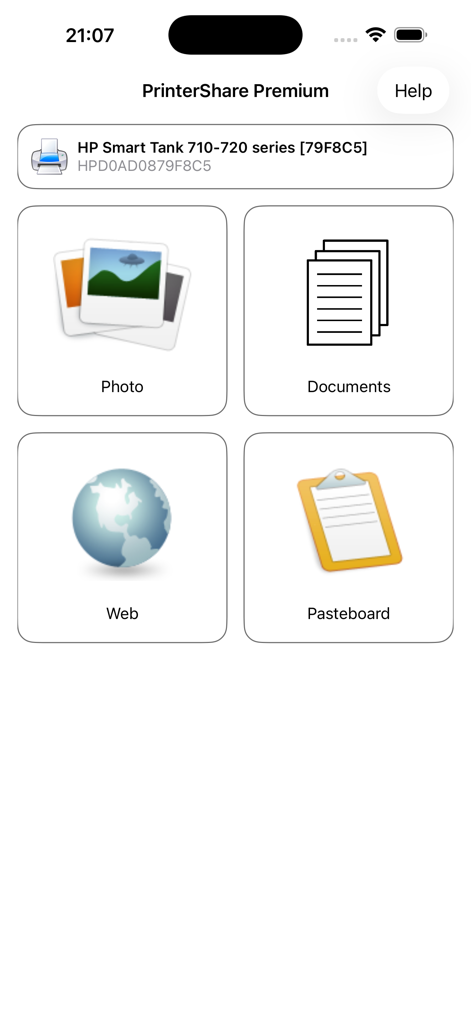
PrinterShare Premium - PrinterShare Premiumアプリのインターフェース。写真、ドキュメント、ウェブページ、クリップボードコンテンツを印刷するオプションが表示されます。
PrinterShare Premiumアプリのインターフェース。写真、ドキュメント、ウェブページ、クリップボードコンテンツを印刷するオプションが表示されます。

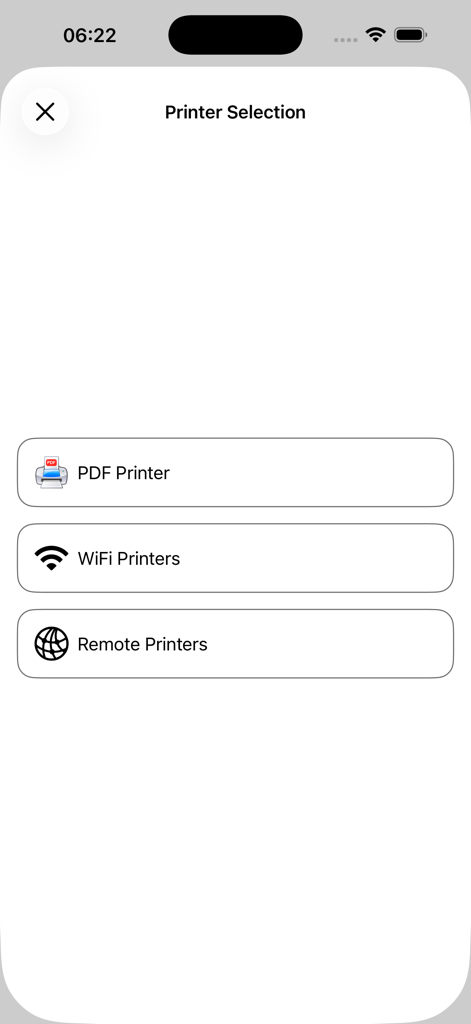
PrinterShare Premium - PrinterShare Premiumアプリのプリンター選択画面。PDF、Wi-Fi、リモートプリンターのオプションが含まれます。
PrinterShare Premiumアプリのプリンター選択画面。PDF、Wi-Fi、リモートプリンターのオプションが含まれます。

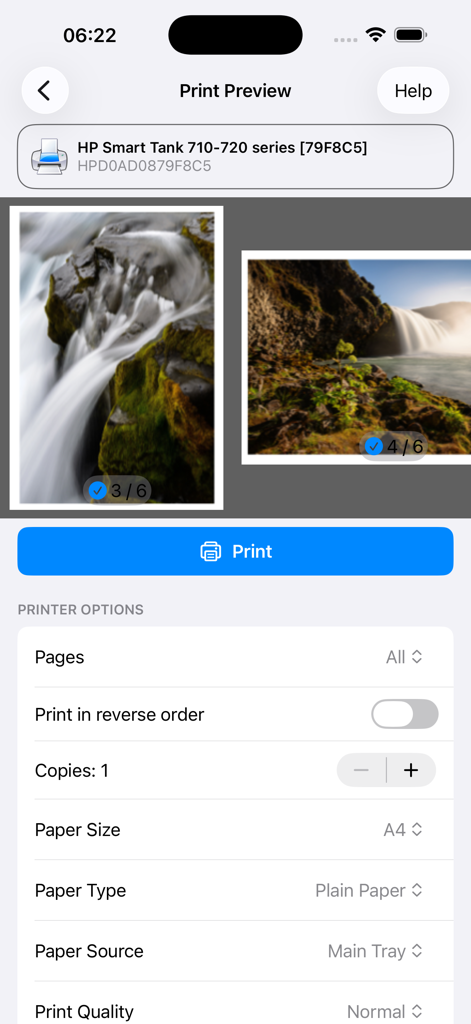
PrinterShare Premium - PrinterShare Premiumの印刷プレビュー。写真の選択とプリンター構成オプションが表示されます。

PrinterShare Premiumの印刷プレビュー。写真の選択とプリンター構成オプションが表示されます。

説明

With PrinterShareTM you can print photos, contacts, and web pages. Many other apps, including Mail, Safari and Notes, allow you to copy something and then paste it into PrinterShare for printing. FEATURES Using paid PrinterShare app you can print the following content: - Photos and images; - Web pages; - PDF documents; - Content copied to clipboard (using Paste to Print); - Content shared from other apps using the Action button. You can print via: - Wi-Fi (using a Wi-Fi Direct printer or using a Wi-Fi router as a middleman); - PC or Mac (if your printer is shared using PrinterShare Console desktop client); USING PRINTERS Printing on Nearby wireless printers Most of the Wi-Fi printers are detected automatically. PrinterShare can print on such printers directly in case they are supported by the app. Here is the list of printers supported by PrinterShare app: https://printershare.net/help-mobile-supported.sdf If your printer is not among supported, you can print as well using the PrinterShare Console desktop app. As long as your printer available from a Windows or Mac computer, you can print via the Console. To use it, download the PrinterShare Console software on that computer from www.printershare.com . PrinterShare app installed on your mobile device will find printers shared via the Console automatically. However, please note that your printer should be connected to the same Wi-Fi network to which your mobile device is connected. Remote printing via the Internet Also, you can print on printers located anywhere in the world via the Internet. This will require the same Console software installed on the computer at the receiving end, and a PrinterShare Console account registered. Complimentary 100 pages for Remote Printing under the same account. MORE INFO Please visit printershare.net for more information on printing with PrinterShare app

Download

ダウンロード: App Store

このページはアプリまたはその開発者の公式ページではなく、情報提供および論評を目的として作成された独立した編集出版物です。明示的に別段の記載がない限り、アプリおよびその開発者は、MWM、Apple、Google Play、アプリのパブリッシャー、またはアプリの開発者と提携、承認、後援、認可、またはその他の公式的な関係はなく、このページのいかなる内容も、アプリがMWMのサービスを使用して開発されたことを意味するものではありません。すべての商標、ロゴ、スクリーンショット、その他のコンテンツはそれぞれの所有者の財産です。








