PrinterShare

PrinterShare

ダウンロード: App Store
ロゴ: PrinterShare

プロフェッショナル向けユニバーサルモバイル印刷ソリューション:PrinterShare

ドキュメント、写真、ウェブページを、レガシーモデルを含むほとんどのプリンターに印刷。Wi-Fi、PC、またはインターネット経由で接続し、新しいAirPrintデバイスの購入費用を節約できます。

開発元

Dynamix Software

カテゴリ

Productivity

ダウンロード

694K+

ユーザー評価

2.9/5

評価数

900

対応言語

26

あなたのワークフローを再定義

このインターフェースを利用する 694K+ 人のユーザー.

PrinterShareアプリのモバイル印刷プレビュー画面。写真選択とプリンター設定が表示されています。
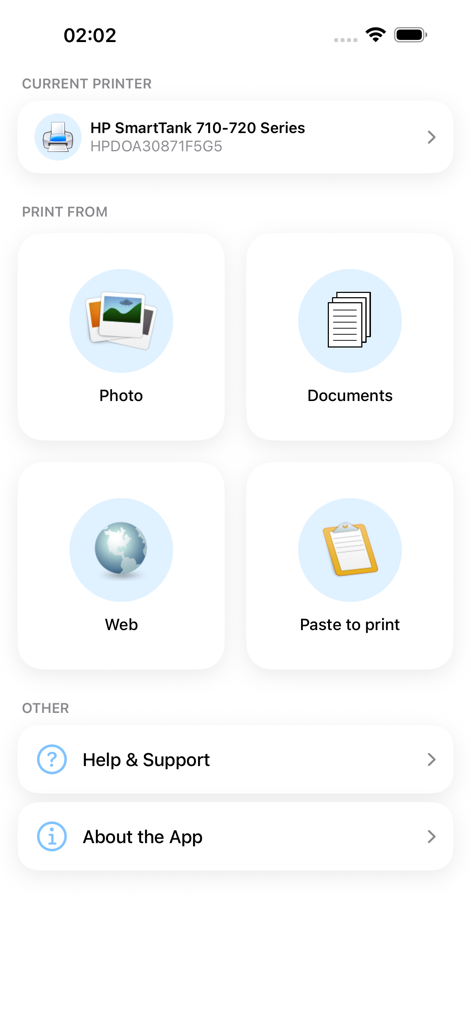
PrinterShareアプリのモバイル印刷プレビュー画面。写真選択とプリンター設定が表示されています。

PrinterShareアプリのメインインターフェース。HPプリンターが選択されており、写真、ドキュメント、ウェブページの印刷オプションが表示されています。
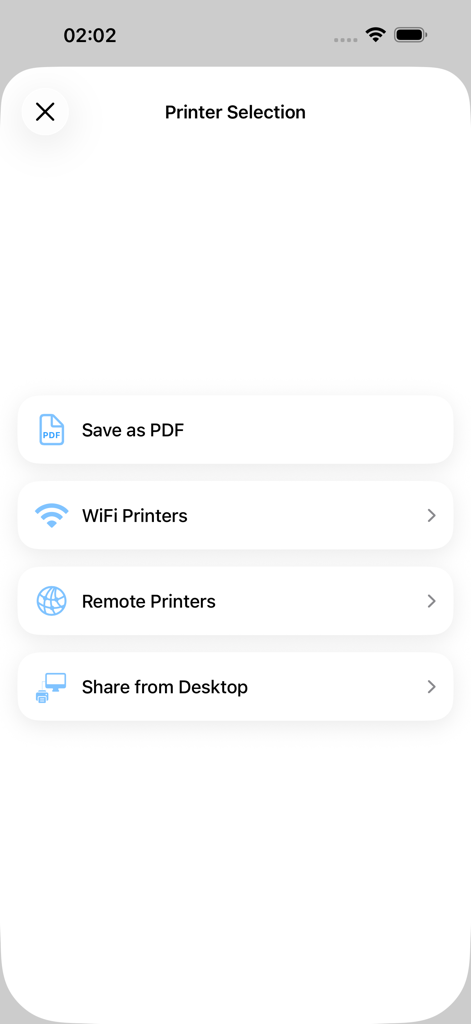
PrinterShareアプリのメインインターフェース。HPプリンターが選択されており、写真、ドキュメント、ウェブページの印刷オプションが表示されています。

PrinterShareアプリのプリンター選択メニュー。WiFi、リモート、デスクトップ印刷のオプションが表示されています。

PrinterShareアプリのプリンター選択メニュー。WiFi、リモート、デスクトップ印刷のオプションが表示されています。

アップグレードなしのプロフェッショナル印刷

このアプリを際立たせるツール、 694K+ 人のユーザーが選択.

🖨️

レガシープリンターを活用

AirPrint非対応の古いWi-FiおよびUSBプリンターに直接印刷。信頼性の高い家庭用またはオフィス用ハードウェアを最新のiOSデバイスで活用し、コストを節約しましょう。

🌍

現場からのリモート印刷

世界中どこからでも、オフィスのプリンターに契約書や領収書を送信。本社で書類を待つ必要がある不動産業者や営業チームに最適です。

📋

インスタントクリップボード印刷

どのアプリからでもテキストをコピーし、「ペーストして印刷」ツールですぐに印刷。必要なもののハードコピーを得るために、エクスポートやファイル変換をする必要はもうありません。

アプリについて

について知っておくべきこと PrinterShare.

説明

With PrinterShareTM Premium you can print photos, contacts, and web pages. Many other apps, including Mail, Safari and Notes, allow you to copy something and then paste it into PrinterShare for printing. IMPORTANT The PrinterShare app is not completely free. It is free to install and to print a test page, but actual printing requires payment. To unlock the full functionality, you need to buy the Premium Key available as an in-app purchase inside this app or by purchasing the PrinterShare Premium app from the App Store. FEATURES Using the paid PrinterShare app you can print the following content: - Photos and images; - Web pages; - Content copied to clipboard (using Paste to Print); - Content shared from other apps using the Action button. You can print via: - Wi-Fi (using a Wi-Fi Direct printer or using a Wi-Fi router as a middleman); - PC or Mac (if your printer is shared using PrinterShare Console desktop client); - AirPrint USING PRINTERS Printing on Nearby wireless printers Most of the Wi-Fi printers are detected automatically. PrinterShare can print on such printers directly in case they are supported by the app. Here is the list of printers supported by PrinterShare app: https://printershare.net/help-mobile-supported.sdf If your printer is not among supported, you can print as well using the PrinterShare Console desktop app. As long as your printer available from a Windows or Mac computer, you can print via the Console. To use it, download the PrinterShare Console software on that computer from printershare.net . PrinterShare app installed on your mobile device will find printers shared via the Console automatically. However, please note that your printer should be connected to the same Wi-Fi network to which your mobile device is connected. Remote printing via the Internet Also, you can print on printers located anywhere in the world via the Internet. This will require the same Console software installed on the computer at the receiving end, and a PrinterShare Console account registered. Complimentary 100 pages for Remote Printing under the same account. MORE INFO Please visit printershare.net for more information on printing with PrinterShare app.

最新バージョン

4.2

サイズ

47.5 MB

リリース日

2010年6月4日

面倒な印刷から解放されませんか?

新しいハードウェアへの投資を節約し、iPhoneやiPadからWi-Fiプリンターまたはリモートプリンターに直接印刷。694,000人以上のプロフェッショナルに加わり、本日ダウンロードして最初のテストページを無料で印刷しましょう。

ダウンロード: App Store

App information, icons, screenshots, and descriptions displayed on this page are sourced from the Apple App Store and are the property of their respective developers. Download estimates and rankings are based on MWM's proprietary models and may not reflect actual figures. This page is provided for informational and analytical purposes only.

Believe this page infringes your intellectual property? File a dispute